
1. Baigėsiview
The Siindoo JH-923 Wireless Headphones are designed to provide a high-quality audio experience with extended playtime and versatile connectivity. Featuring advanced Bluetooth 5.3 technology, multiple EQ sound modes, and a comfortable, foldable design, these headphones are suitable for various uses, including travel, office work, and daily listening.

Figure 1: Siindoo JH-923 Wireless Headphones (Rose Gold)
2. Kas yra dėžutėje
Išpakuodami patikrinkite pakuotės turinį, kad įsitikintumėte, jog yra visi reikalingi daiktai:
- Siindoo JH-923 Wireless Headphones
- Vartotojo vadovas
- 0.5 m C tipo įkrovimo laidas
- 1.2 m ilgio AUX kabelis

2 pav. Pakuotės turinys
3. Produkto ypatybės
The Siindoo JH-923 headphones offer a range of features designed for enhanced audio and user comfort:
- Prailgintas grojimo laikas: Up to 65 hours of continuous music playback on a single charge. A quick 5-minute charge provides 3 hours of playtime.
- "Bluetooth 5.3": Ensures stable and fast wireless connectivity. Supports simultaneous connection to two devices.
- 3 ekvalaizerio garso režimai: Customize your listening experience with Balance, Bass, and Treble modes.
- Didelės raiškos garsas ir gilūs bosai: Equipped with dual 40mm dynamic drivers for rich, clear sound and powerful bass.
- Integruotas mikrofonas: For clear, hands-free calls.
- Pasyvioji triukšmo izoliacija: Full-surround earcups with memory foam isolate up to 95% of low and mid-frequency ambient noise.
- Patogus ir sulankstomas dizainas: Soft protein leather headband and memory foam earcups provide long-term comfort. The foldable design allows for easy portability.
- Laidinis režimas: Includes a 3.5mm AUX cable for wired listening when the battery is depleted or for non-Bluetooth devices.
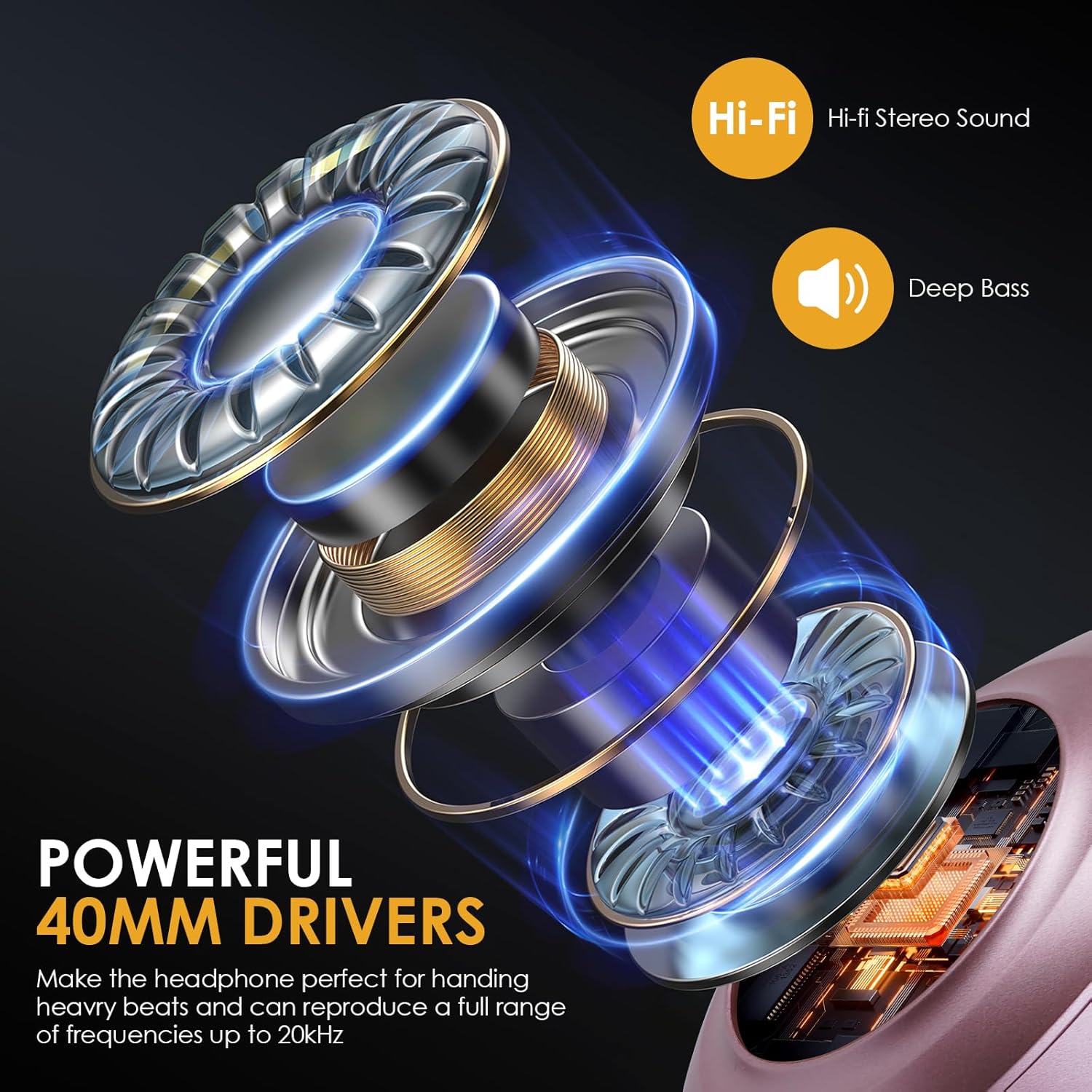
Figure 3: Powerful 40mm Drivers for Hi-Fi Audio
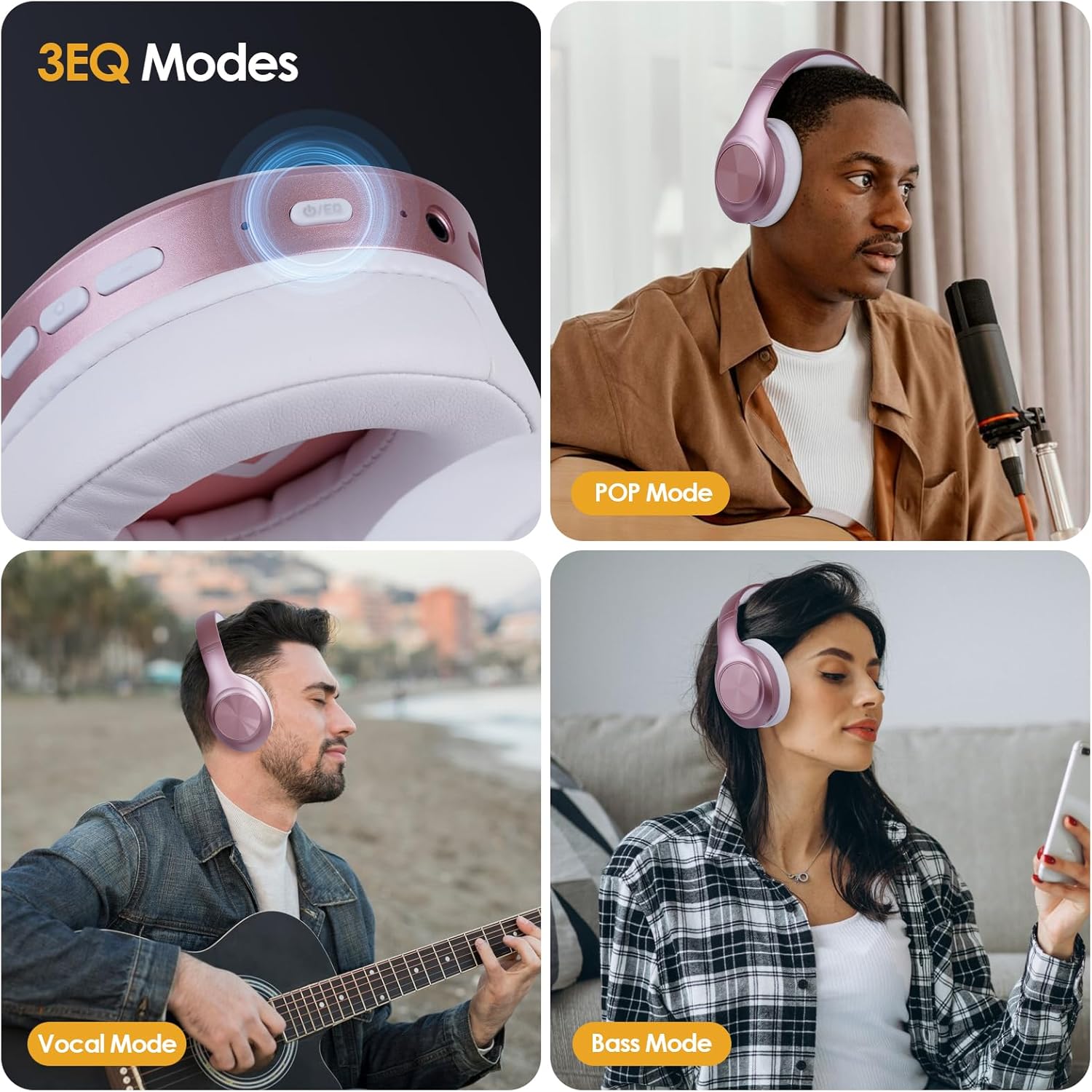
Figure 4: Customizable 3 EQ Modes

Figure 5: Exceptional Comfort and Foldable Design
4. Sąranka
4.1 Ausinių įkrovimas
Prieš pirmą kartą naudodami, visiškai įkraukite ausines. Pilnas įkrovimas trunka maždaug 2.5 valandos.
- Prijunkite pridedamą C tipo įkrovimo laidą prie ausinių įkrovimo prievado.
- Kitą laido galą prijunkite prie USB maitinimo adapterio (nepridedamas) arba kompiuterio USB prievado.
- LED indikatorius rodys įkrovimo būseną (pvz., raudona spalva kraunant, mėlyna, kai visiškai įkrauta).
Note: For quick charging, a 5-minute charge can provide up to 3 hours of playtime.
4.2 Maitinimo įjungimas/išjungimas
- Maitinimas: Paspauskite ir palaikykite maitinimo mygtuką maždaug 3 sekundes, kol LED indikatorius mirksės mėlynai.
- Išjungti: Paspauskite ir palaikykite maitinimo mygtuką maždaug 3 sekundes, kol užges LED indikatorius.
4.3 Bluetooth poravimas
Norėdami prijungti ausines prie „Bluetooth“ įrenginio:
- Įsitikinkite, kad ausinės yra išjungtos.
- Paspauskite ir palaikykite maitinimo mygtuką 5–7 sekundes, kol LED indikatorius pakaitomis mirksės raudonai ir mėlynai, rodydamas susiejimo režimą.
- Savo įrenginyje (išmaniajame telefone, planšetiniame kompiuteryje, asmeniniame kompiuteryje) įjunkite „Bluetooth“ ir ieškokite galimų įrenginių.
- Select "Siindoo JH-923" from the list of devices.
- Prijungus, LED indikatorius lėtai mirksės mėlyna spalva.
Note: The headphones can connect to two devices simultaneously. After connecting to the first device, disable Bluetooth on the first device, pair with the second, then re-enable Bluetooth on the first device. The headphones should automatically connect to both.
4.4 Laidinis ryšys (AUX režimas)
Norėdami naudoti ausines laidiniu režimu:
- Insert one end of the provided 1.2m AUX cable into the 3.5mm audio jack on the headphones.
- Insert the other end of the AUX cable into the 3.5mm audio output of your device.
- The headphones will automatically switch to wired mode. No battery power is required for wired listening.
5. Naudojimo instrukcijos
5.1 Mygtukų funkcijos
Familiarize yourself with the control buttons located on the earcup:
- Maitinimo mygtukas (daugiafunkcis mygtukas):
- Press and hold 3s: Power On/Off
- Press and hold 5-7s (from off): Enter Bluetooth Pairing Mode
- Short press (music): Play/Pause
- Short press (incoming call): Answer/End Call
- Long press (incoming call): Reject Call
- Double press: Redial last number
- Garsumo didinimo (+) mygtukas:
- Trumpas paspaudimas: padidinti garsumą
- Ilgas paspaudimas: Kitas takelis
- Garsumo mažinimo (-) mygtukas:
- Trumpas paspaudimas: Sumažinti garsumą
- Ilgai paspauskite: Ankstesnis takelis
- EQ mygtukas:
- Short press: Cycle through EQ modes (Balance, Bass, Treble)

Figure 6: EQ Button for Sound Customization
6. Priežiūra ir priežiūra
Proper care will extend the lifespan of your headphones:
- Valymas: Ausinėms valyti naudokite minkštą, sausą šluostę. Nenaudokite abrazyvinių valiklių ar tirpiklių.
- Saugykla: Kai nenaudojate, laikykite ausines vėsioje, sausoje vietoje. Sulankstomas dizainas leidžia jas kompaktiškai laikyti.
- Akumuliatoriaus priežiūra: Norėdami išsaugoti baterijos veikimo laiką, venkite dažnai visiškai iškrauti ausines. Reguliariai jas įkraukite, net jei ilgą laiką nenaudojate.
- Venkite drėgmės: Saugokite ausines nuo vandens ar per didelės drėgmės.
- Temperatūra: Avoid extreme temperatures, both hot and cold, as they can affect battery performance and headphone components.
7. Problemų sprendimas
If you encounter issues with your headphones, refer to the following table for common problems and solutions:
| Problema | Galima priežastis | Sprendimas |
|---|---|---|
| Ausinės neįsijungia. | Senka baterija. | Pilnai įkraukite ausines. |
| Nepavyksta susieti per „Bluetooth“. | Ausinės neįjungtos susiejimo režimu; įrenginio „Bluetooth“ išjungtas; per toli nuo įrenginio. | Įsitikinkite, kad ausinės yra susiejimo režime (mirksi raudonai / mėlynai). Įjunkite įrenginio „Bluetooth“. Perkelkite ausines arčiau įrenginio (ne toliau kaip 10 metrų). |
| Nėra garso Bluetooth režimu. | Per mažas garsumas; neprijungta; įrenginyje pasirinkta neteisinga garso išvestis. | Padidinkite ausinių ir įrenginio garsumą. Iš naujo susiekite ausines. Patikrinkite įrenginio garso išvesties nustatymus. |
| Nėra garso laidiniu (AUX) režimu. | AUX cable not fully inserted; faulty cable; device volume too low. | Ensure AUX cable is fully inserted into both headphone and device jacks. Try a different AUX cable. Increase device volume. |
| Prasta skambučių kokybė. | Weak Bluetooth signal; microphone obstructed. | Move closer to your device. Ensure microphone is clear. |
8. Specifikacijos
| Funkcija | Detalė |
|---|---|
| Modelio pavadinimas | Siindoo JH-923 |
| Ryšio technologija | Belaidis („Bluetooth 5.3“), laidinis (3.5 mm AUX) |
| Bluetooth diapazonas | Iki 10 metrų (33 pėdų) |
| Baterijos veikimo laikas | Žaidimo laikas iki 65 valandų |
| Įkrovimo laikas | apytiksliai 2.5 valandas |
| Garso tvarkyklės tipas | Dvigubi 40 mm dinaminiai garsiakalbiai |
| Dažnių diapazonas | 20Hz ~ 20KHz |
| Varža | 32 omų |
| Jautrumas | 115 dB |
| Triukšmo valdymas | Garso izoliacija (pasyvus triukšmo slopinimas) |
| Svoris | 10.2 uncijos (apie 289 gramų) |
| Matmenys (sulankstyti) | 3.94 x 4.72 x 3.15 colio (apytiksliai) |
9. Garantija ir palaikymas
Siindoo products are manufactured to the highest quality standards. This product is covered by a standard manufacturer's warranty against defects in materials and workmanship from the date of purchase. Please retain your proof of purchase for warranty claims.
For technical support, warranty inquiries, or further assistance, please contact Siindoo customer service through the retailer where the product was purchased or visit the official Siindoo websvetainė kontaktinei informacijai.
Note: The warranty does not cover damage caused by misuse, accident, unauthorized modification, or normal wear and tear.