
1. Įvadas
Thank you for choosing the CREWORKS 38x38cm Digital Control Heat Press Machine. This manual provides essential information for the safe and efficient operation, maintenance, and troubleshooting of your new heat press. Please read these instructions thoroughly before use and retain them for future reference.
2. Saugos instrukcijos
- Visada junkite mašiną prie įžeminto maitinimo lizdo.
- Keep hands and clothing clear of the heating plate during operation to prevent burns. The machine operates at high temperatures.
- Do not operate the machine in wet conditions or with wet hands.
- Užtikrinkite tinkamą vėdinimą darbo zonoje.
- Unplug the machine from the power source when not in use or before cleaning and maintenance.
- Nebandykite patys modifikuoti ar taisyti prietaiso. Kreipkitės pagalbos į kvalifikuotus techninės priežiūros darbuotojus.
- The machine features an automatic shut-off after 30 minutes of inactivity for enhanced safety.
3. Gaminio komponentai
Susipažinkite su pagrindinėmis savo šiluminio preso dalimis:
- Rankena: For opening and closing the heating plate.
- Slėgio reguliavimo rankenėlė: To set the desired pressure for transfers.
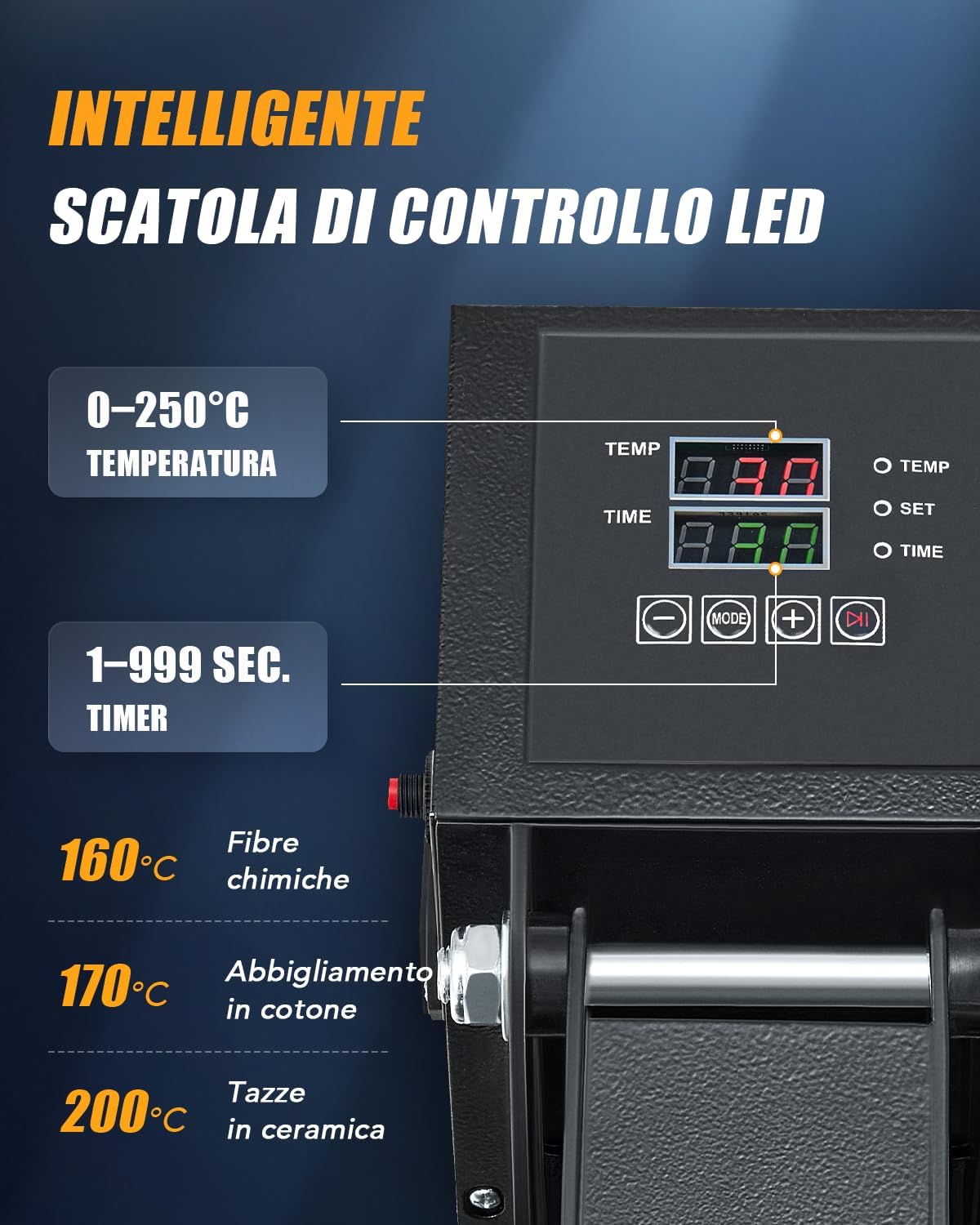
- Digital Control Display: Shows and allows adjustment of temperature and time.
- Šildymo plokštė: The upper plate that heats up and applies pressure.
- Heat-Resistant Mat: Placed on the base plate to protect materials.
- Pull-out Base Plate: The lower plate where items are placed, designed to slide out for easy loading.
- Maitinimo jungiklis: Norėdami įjungti / išjungti įrenginį.

4. Sąranka
- Išpakuoti: Atsargiai išimkite visus komponentus iš pakuotės.
- Vieta: Place the heat press on a stable, heat-resistant surface in a well-ventilated area. Ensure there is enough space around the machine for safe operation.
- Maitinimo jungtis: Prijunkite maitinimo laidą prie įžeminto elektros lizdo.
- Pirminė apžiūra: Before first use, inspect the machine for any visible damage.
5. Naudojimo instrukcijos
5.1. Valdymo skydelis baigtasview
The digital control panel allows precise adjustment of temperature and time:

- Temperatūros nustatymas: Adjustable from 0-250°C (0-480°F). Use the '+' and '-' buttons to set the desired temperature.
- Laiko nustatymas: Adjustable from 1-999 seconds. Use the '+' and '-' buttons to set the desired time.
- Režimo mygtukas: To switch between temperature and time settings.
5.2. Slėgio reguliavimas
The pressure adjustment knob on top of the heating plate allows you to customize the pressing force for different materials and transfer types.

- Pasukite pagal laikrodžio rodyklę, kad padidintumėte slėgį.
- Turn counter-clockwise to decrease pressure.
5.3. Šilumos perdavimo procesas
- Įjunkite mašiną naudodami maitinimo jungiklį.
- Set the desired temperature and time using the digital control panel. Allow the machine to preheat until the set temperature is reached.
- Pull out the base plate using the handle.
- Place your material (e.g., T-shirt) onto the heat-resistant mat on the pull-out base. Ensure it is flat and smooth.
- Uždėkite perkėlimo dizainą (pvz., HTV, sublimacinį popierių) ant medžiagos.
- Slide the base plate back into position.
- Lower the heating plate using the handle until it locks into place, applying pressure.
- The timer will start automatically. Once the time elapses, the machine will beep.
- Lift the heating plate using the handle.
- Carefully pull out the base plate and remove your transferred item. Be cautious as the item will be hot.
5.4. Universalios programos
This heat press is suitable for various items and materials:

5.5. Even Heat Distribution
The machine features dual heating tubes for efficient and uniform heat transfer across the entire 38x38cm plate.

5.6. Oficialus produkto vaizdo įrašas
6. Priežiūra
- Valymas: Ensure the machine is unplugged and completely cooled before cleaning. Wipe the heating plate with a soft, damp audinys. Nenaudokite abrazyvinių valiklių ar tirpiklių.
- Saugykla: Nenaudojamą terminį presą laikykite sausoje, be dulkių aplinkoje.
- Reguliarūs patikrinimai: Periodiškai patikrinkite visus varžtus ir jungtis, kad įsitikintumėte, jog jie tvirtai priveržti.
7. Problemų sprendimas
| Problema | Galima priežastis | Sprendimas |
|---|---|---|
| Mašina neįsijungia | Maitinimo laidas neprijungtas; Maitinimo jungiklis išjungtas; Lizdo problema | Check power cord connection; Turn on power switch; Test outlet with another device |
| Uneven heat transfer | Incorrect pressure; Heating plate not fully closed; Faulty heating element | Adjust pressure knob; Ensure plate is fully closed; Contact support if issue persists |
| Design not adhering | Incorrect temperature/time; Insufficient pressure; Wrong material type | Adjust temperature/time settings; Increase pressure; Verify material compatibility with transfer type |
8. Specifikacijos
| Funkcija | Detalė |
|---|---|
| Modelis | 38x38cm Heat Press |
| Prekės ženklas | ĮRENGINIAI |
| Galia | 1400W |
| Plokštelės dydis | 38x38 cm |
| Temperatūros diapazonas | 0–250 °C (0–480 °F) |
| Laikmačio diapazonas | 1-999 sekundžių |
| Matmenys (I x P x A) | 38.5 x 42 x 46.5 cm |
| Svoris | 17 kg |
| Medžiagos sudėtis | Metal, Aluminum, Silicone |

9. Garantija ir palaikymas
For warranty information and customer support, please refer to the purchase documentation or contact your retailer. Keep your proof of purchase for any warranty claims.