
1. Įvadas
Thank you for choosing the PNI Voyager S2600 WiFi 4K Ultra HD Car DVR Camera. This device is designed to record high-quality video footage of your journeys, providing security and evidence in case of incidents. It features 4K Ultra HD recording, Wi-Fi connectivity for smartphone control, parking monitoring, and a G-sensor for automatic incident detection.

Image 1.1: PNI Voyager S2600 Dash Cam installed in a vehicle, showcasing its key features: 4K Ultra HD recording, Wi-Fi connectivity, and Parking Monitoring.
2. Saugos informacija
Prašome perskaityti ir laikytis šių saugos nurodymų, kad užtikrintumėte tinkamą veikimą ir išvengtumėte žalos ar sužalojimų.
- Nelaikykite prietaiso itin aukštose temperatūrose, tiesioginiuose saulės spinduliuose ilgą laiką arba didelėje drėgmėje.
- Įsitikinkite, kad įrenginys yra tvirtai pritvirtintas ir netrukdo vairuotojui view arba trukdyti automobilio valdymui.
- Naudokite tik pateiktą maitinimo laidą ir priedus. Naudojant nepatvirtintus priedus, galite sugadinti įrenginį ir panaikinti garantiją.
- Nebandykite patys ardyti ar taisyti įrenginio. Pagalbos kreipkitės į įgaliotąjį techninės priežiūros personalą.
- Kad vaizdo įrašymas būtų aiškus, objektyvą laikykite švarų.
- Always format the microSD card regularly to maintain optimal recording performance.
3. Pakuotės turinys
Patikrinkite, ar pakuotėje yra visi reikalingi daiktai:
- PNI Voyager S2600 Car DVR Camera
- Power cord with cigarette lighter plug (12V/24V compatible)
- Priekinio stiklo tvirtinimas
- Vartotojo vadovas

Image 3.1: The PNI Voyager S2600 dash cam, its magnetic mount, and the power cable with a cigarette lighter adapter.
4. Produktas baigtasview
Familiarize yourself with the components of your PNI Voyager S2600 dash cam.
4.1. Įrenginio išdėstymas
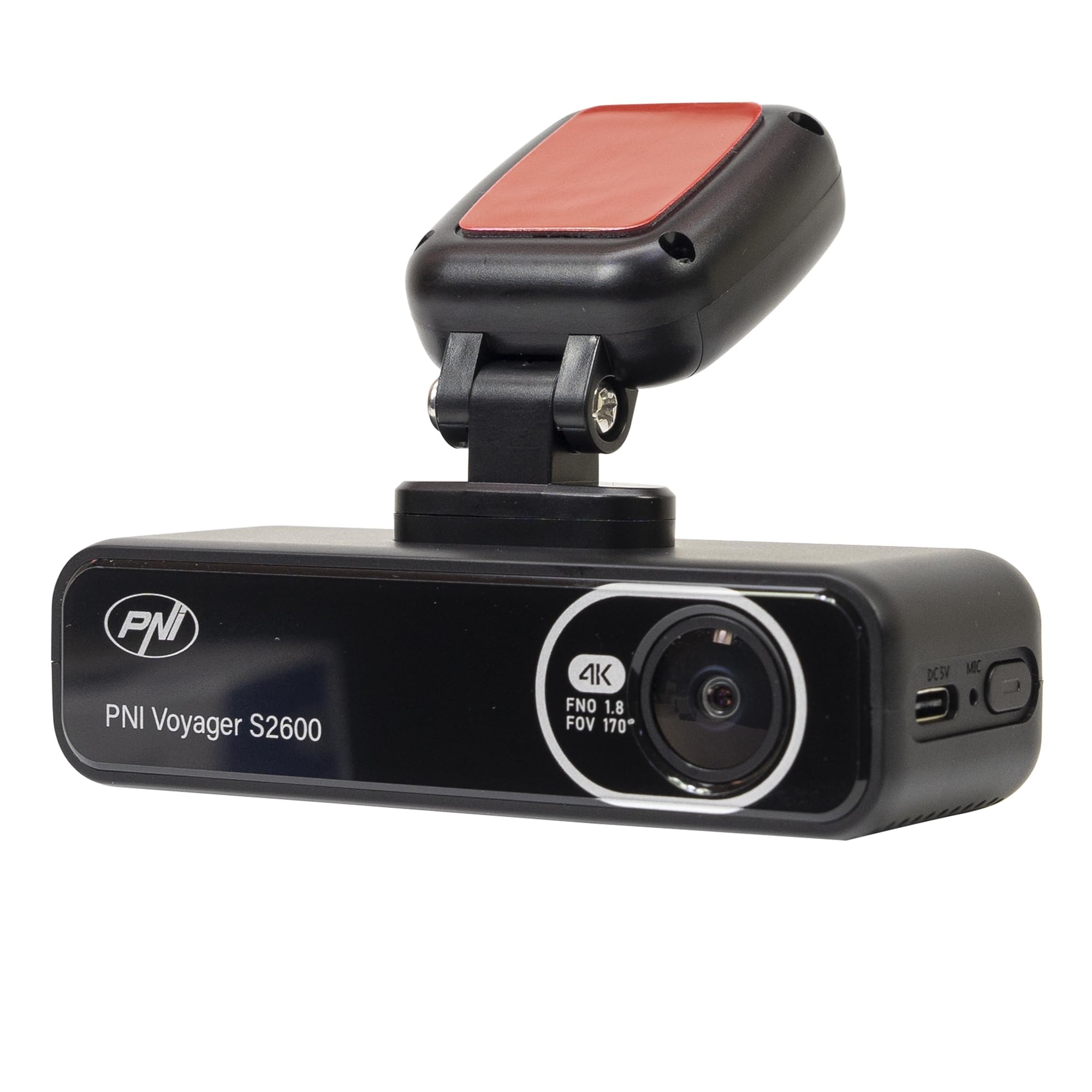
4.1 vaizdas: priekis view of the PNI Voyager S2600, displaying the camera lens with 4K FNO 1.8 FOV 170° markings, the PNI brand logo, and the model name.

4.2 pav.: Išsamus view of the side of the dash cam, highlighting the USB-C power input (DC 5V) and the microphone opening.
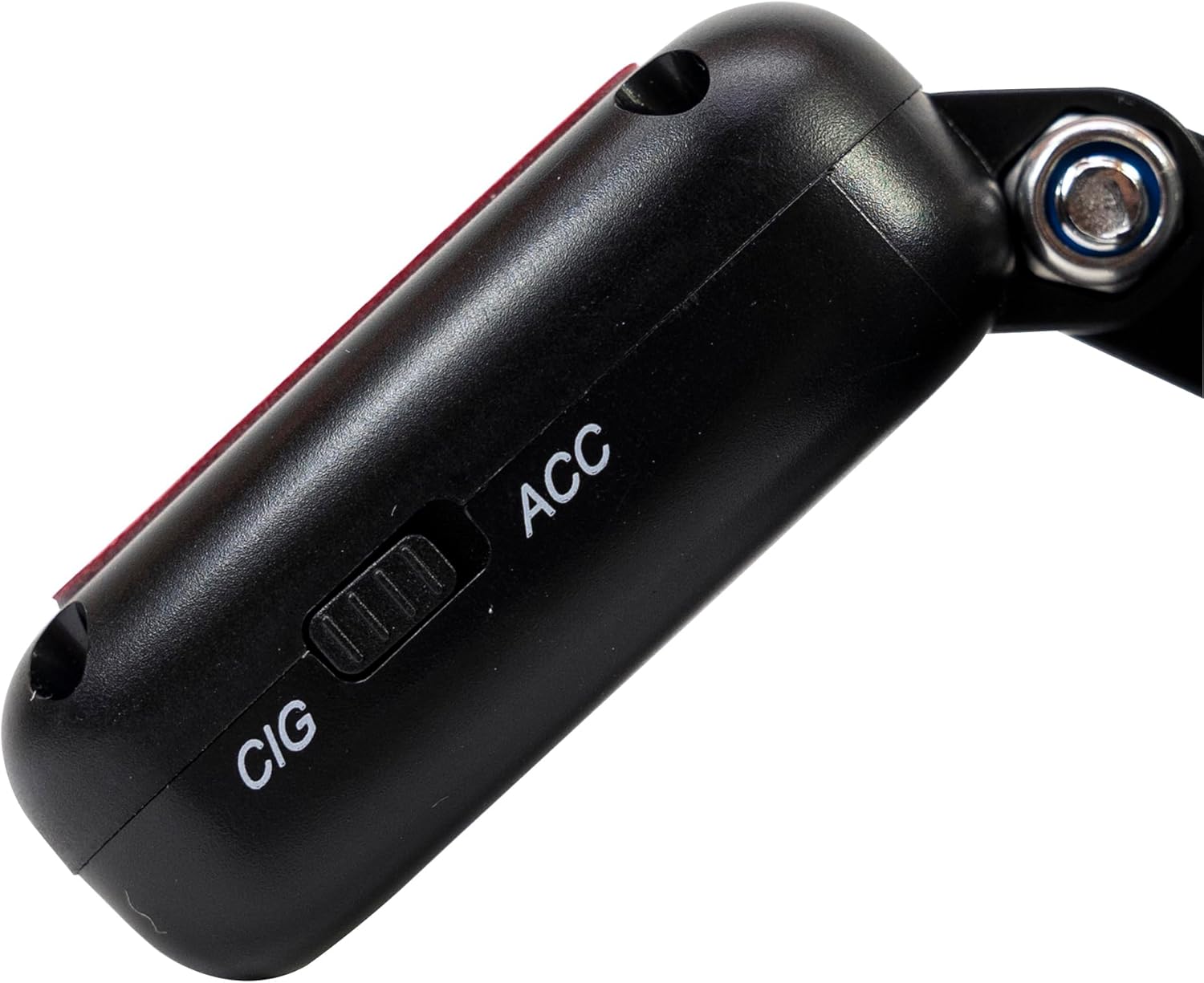
4.3 paveikslėlis: Šonas view of the magnetic mount, featuring a switch to select between 'CIG' (cigarette lighter power) and 'ACC' (accessory power) modes.
4.2. Pagrindinės savybės
- 4K itin aukštos raiškos vaizdo įrašymas: Captures video at 3840x2160 resolution at 30FPS, or 2560x1440 at 30FPS, and 1920x1080 at 60FPS/30FPS.
- „Wi-Fi“ ryšys: Connects to your smartphone via the Viidure-Dashcam Viewer app for live view, video download, and settings adjustment.
- Parkavimo stebėjimas: Activates the camera to record when vibration or movement is detected while the vehicle is parked.
- G jutiklis: Automatically locks the current video file in case of a collision to prevent overwriting.
- Plataus kampo objektyvas: 170 laipsnių viewing angle to capture a broad perspective of the road.
- Ciklo įrašymas: Perrašo seniausią „foo“tagkai atminties kortelė pilna, užtikrinant nepertraukiamą įrašymą.
- Integruotas GPS: Records speed and coordinates, which can be displayed on recorded videos.
5. Sąranka
5.1. „MicroSD“ kortelės įdėjimas
- Įsitikinkite, kad vaizdo registratorius yra išjungtas.
- Įrenginyje suraskite „microSD“ kortelės lizdą.
- Insert a high-speed (Class 10 or higher) microSD card (up to 512GB) into the slot until it clicks into place.
- To remove, gently push the card in until it clicks, then release. The card will eject.
Svarbu: Format the microSD card within the app or on a computer before first use and periodically thereafter to ensure stable recording.
5.2. Installation and Power Connection
- Nuvalykite priekinio stiklo vietą, kurioje ketinate montuoti vaizdo registratorių. Įsitikinkite, kad jis neuždengia vaizdo. view.
- Attach the windshield mount to the dash cam. The mount is magnetic for easy attachment.
- Peel off the protective film from the adhesive pad on the mount and firmly press it onto the chosen spot on your windshield for at least 30 seconds.
- Connect the power cable to the USB-C port on the mount.
- Route the power cable neatly along the windshield and dashboard to the vehicle's cigarette lighter socket.
- Plug the cigarette lighter adapter into the vehicle's 12V/24V power outlet.
- Select the appropriate power mode on the mount's switch: 'CIG' for continuous power from the cigarette lighter, or 'ACC' for power only when the vehicle's ignition is on.

Image 5.1: The PNI Voyager S2600 dash cam detached from its magnetic mount, illustrating the contact points for secure attachment.
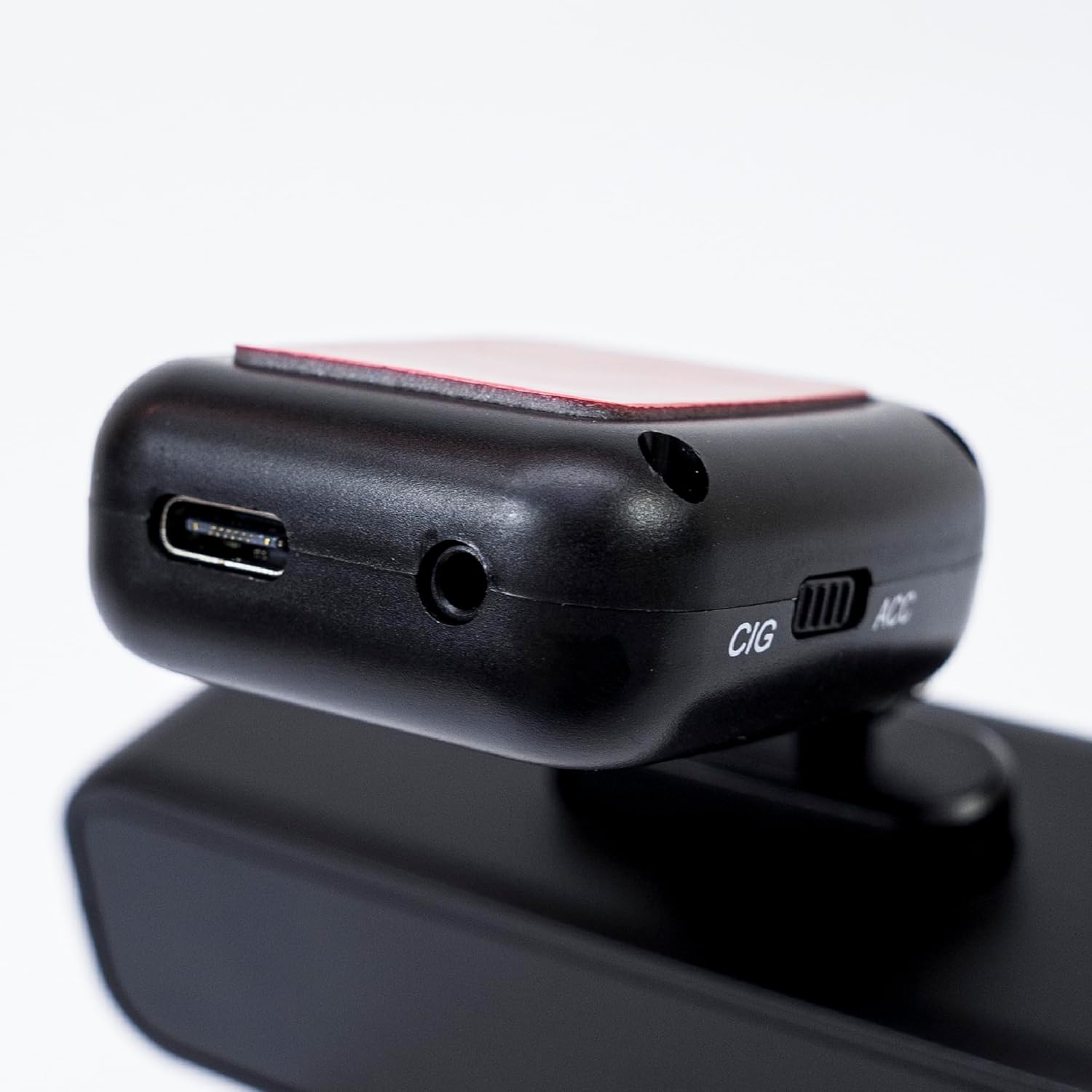
Image 5.2: The top of the dash cam mount, featuring the USB-C port for power input and the CIG/ACC switch for power mode selection.
5.3. Programėlės diegimas ir „Wi-Fi“ ryšys
- Atsisiųskite „Viidure-Dashcam“. Viewer programėlę iš „App Store“ („iOS“) arba „Google Play Store“ („Android“).
- Įjunkite vaizdo registratorių.
- On your smartphone, go to Wi-Fi settings and connect to the dash cam's Wi-Fi network. The network name (SSID) and password can usually be found in the dash cam's settings (if it has a screen) or in the manual.
- Open the Viidure-Dashcam Viewer app. The app should automatically detect and connect to the dash cam.
- Naudodami programą galite view gyvas kvailystage, adjust settings, download recorded videos, and format the microSD card.

Image 5.3: A smartphone showing the Viidure-Dashcam Viewer application, demonstrating the wireless connection and control over the PNI Voyager S2600 dash cam.
6. Naudojimo instrukcijos
6.1. Automatinis įrašymas
Once powered on and with a valid microSD card inserted, the PNI Voyager S2600 will automatically begin loop recording. Video fileišsaugomi segmentais (pvz., 1, 3 arba 5 minutės) „microSD“ kortelėje.
6.2. G jutiklis (avarinis įrašymas)
The built-in G-sensor detects sudden impacts or rapid acceleration/deceleration. When triggered, it automatically locks the current video segment, preventing it from being overwritten by loop recording. These emergency fileyra saugomi atskirame aplanke „microSD“ kortelėje.
6.3. Parkavimo stebėjimas
When the vehicle is parked and the dash cam is powered (either continuously via CIG mode or with a hardwire kit), the parking monitor function activates. If the G-sensor detects a collision or motion detection is enabled and detects movement, the dash cam will automatically power on and record a short video segment. This feature helps protect your vehicle when unattended.

Image 6.1: Visual representation of the Parking Monitor feature, showing the dash cam detecting an impact while the car is parked.
6.4. Wi-Fi and App Usage
The Viidure-Dashcam Viewer app allows you to:
- Tiesiogiai View: See what the camera is recording in real-time on your smartphone.
- Vaizdo įrašo atkūrimas: Review recorded videos directly from the microSD card.
- Download Videos: Transfer important video files from the dash cam to your smartphone.
- Nustatymų reguliavimas: Configure various dash cam settings, such as video resolution, G-sensor sensitivity, loop recording duration, and parking monitor options.
- Formatuoti SD kortelę: Erase all data on the microSD card.
6.5. GPS funkcionalumas
The integrated GPS receiver records your vehicle's speed and location data. This information can be overlaid on the video footage during playback via the app or compatible desktop software, providing additional context for your recordings.
7. Priežiūra
7.1. Prietaiso valymas
Use a soft, dry cloth to clean the dash cam body. For the lens, use a specialized lens cleaning cloth to avoid scratches. Do not use chemical cleaners or abrasive materials.
7.2. „MicroSD“ kortelės formatavimas
It is recommended to format the microSD card every 2-4 weeks to prevent data corruption and ensure optimal recording performance. This can be done through the Viidure-Dashcam Viewer programa.
7.3. Firmware atnaujinimai
Periodically check the PNI website or the Viidure-Dashcam Viewer app for available firmware updates. Firmware updates can improve performance, add new features, or fix bugs. Follow the instructions provided with the update carefully.
8. Problemų sprendimas
If you encounter issues with your PNI Voyager S2600, refer to the following common problems and solutions:
| Problema | Galima priežastis | Sprendimas |
|---|---|---|
| Vaizdo registratorius neįsijungia. | No power supply; faulty cable; incorrect power mode. | Check power cable connection; ensure cigarette lighter socket is active; verify CIG/ACC switch setting. |
| Įrašymas sustoja arba užstringa. | MicroSD card error; card full; low-speed card. | Format microSD card; replace with a high-speed (Class 10 U3) card; ensure sufficient storage. |
| Wi-Fi connection unstable or fails. | Interference; incorrect password; app issue. | Ensure dash cam Wi-Fi is enabled; re-enter password; restart app and dash cam; try connecting in a different location. |
| Prasta vaizdo kokybė. | Dirty lens; incorrect resolution setting. | Clean the camera lens; check video resolution settings in the app. |
| Parkavimo stebėjimo sistema neveikia. | Incorrect power mode; feature disabled. | Ensure dash cam is receiving continuous power (CIG mode or hardwire kit); enable parking monitor in app settings. |
If the problem persists, please contact PNI customer support.
9. Specifikacijos
Detailed technical specifications for the PNI Voyager S2600 Car DVR Camera:
| Funkcija | Aprašymas |
|---|---|
| Modelio numeris | PNI-S2600 |
| Vaizdo raiška | 4K (3840x2160@30FPS), 2K (2560x1440@30FPS), FHD (1920x1080@60FPS/30FPS) |
| Vaizdo jutiklis | SONY335 (5MP, 2592x1944px) |
| Viewing kampas | 170 laipsnių |
| Vaizdo įrašo formatas | MP4, H.264 |
| Nuotraukos formatas | JPEG |
| Maksimali nuotraukų raiška | 8 MP (3264 x 2448) |
| Sandėliavimas | MicroSD card slot, up to 512GB (Class 10 or higher recommended) |
| Ryšys | Wi-Fi, GPS (integrated) |
| Ypatingos savybės | G-Sensor, Parking Monitoring, Motion Detection, Loop Recording |
| Maitinimo šaltinis | 5V/2A (via 12V/24V car adapter) |
| Baterija | Super capacitor 1.5 UF |
| Darbinė temperatūra | -26°C ~ +80°C |
| Matmenys (I x P x A) | 105 mm x 35 mm x 27 mm |
| Svoris | 88 gramų |
| USB tipas | C tipas |
10. Garantija ir palaikymas
10.1. Informacija apie garantiją
The PNI Voyager S2600 Car DVR Camera comes with a 24 mėnesių garantija from the date of purchase. This warranty covers manufacturing defects under normal use. It does not cover damage caused by misuse, accidents, unauthorized modifications, or improper installation. Please retain your proof of purchase for warranty claims.
10.2. Pagalba klientams
For technical assistance, troubleshooting, or warranty inquiries, please contact PNI customer support. You can find more information and support resources on the official PNI websvetainė:
Manufacturer: ONLINESHOP SRL
Address: Olteniei 26A, Piatra Neamt, Neamt, 610206, Romania