
1. Įvadas
This manual provides essential information for the safe and efficient operation of your Sharp GX-BT190 Portable Bluetooth Speaker. Please read it thoroughly before using the device and retain it for future reference.
2. Saugos informacija
- Nelaikykite garsiakalbio ekstremaliose temperatūrose, tiesioginiuose saulės spinduliuose ar didelėje drėgmėje.
- Neardykite, neremontuokite ir nemodifikuokite garsiakalbio. Tai gali panaikinti garantiją ir sukelti pavojų saugumui.
- Ensure the charging port cover is securely closed when using the speaker near water to maintain its IP67 rating.
- Naudokite tik pridedamą įkrovimo laidą arba sertifikuotą lygiavertį laidą.
- Saugokite garsiakalbį nuo vaikų ir naminių gyvūnėlių.
- Venkite klausytis dideliu garsu ilgą laiką, kad nepažeistumėte klausos.
3. Pakuotės turinys
- Sharp GX-BT190 Portable Bluetooth Speaker
- USB įkrovimo laidas
- Virvelė
- Instrukcijų vadovas
4. Produktas baigtasview

Priekyje view of the Sharp GX-BT190 speaker, showing the central speaker grille with the Sharp logo and the LED light ring.

Šoninė view of the Sharp GX-BT190 speaker, highlighting the textured speaker grille and the integrated lanyard.
Galinis view of the Sharp GX-BT190 speaker, showing the control buttons and the sealed charging port cover.
Valdikliai ir indikatoriai:
- Maitinimo mygtukas: Paspauskite ir palaikykite, kad įjungtumėte/išjungtumėte.
- Garsumo didinimo / kito takelio mygtukas (+): Trumpai paspauskite, kad padidintumėte garsumą, ilgai paspauskite kitą takelį.
- Garsumo mažinimo / ankstesnio takelio mygtukas (-): Trumpas paspaudimas – garsumui sumažinti, ilgas – ankstesniam takeliui.
- Play/Pause / Call Button (►||): Trumpas paspaudimas, norint paleisti / pristabdyti, atsiliepti / baigti skambučius. Ilgas paspaudimas, norint atmesti skambučius.
- Mode / Light Button (M): Short press to cycle through LED light modes. Long press to turn off LED lights.
- USB-C įkrovimo prievadas: For charging the speaker. Ensure the rubber cover is sealed when not charging.
- LED indikatorius: Rodo įkrovimo būseną ir „Bluetooth“ susiejimo būseną.
5. Sąranka
5.1 Garsiakalbio įkrovimas
- Open the rubber cover on the back of the speaker to access the USB-C charging port.
- Prijunkite pridėtą USB įkrovimo laidą prie garsiakalbio USB-C prievado.
- Kitą USB kabelio galą prijunkite prie USB maitinimo adapterio (nepridedamas) arba kompiuterio USB prievado.
- Įkrovimo metu LED indikatorius švies ir užges, kai bus visiškai įkrautas.
- Close the rubber cover securely after charging to maintain the speaker's waterproof rating.
5.2 Įjungimas / išjungimas
- Norėdami įjungti: Press and hold the Power button for approximately 3 seconds. You will hear an audible prompt, and the LED indicator will flash.
- Norėdami išjungti: Press and hold the Power button for approximately 3 seconds. You will hear an audible prompt, and the LED indicator will turn off.
5.3 Bluetooth poravimas
- Ensure the speaker is powered on and the LED indicator is flashing, indicating it is in pairing mode.
- Savo mobiliajame įrenginyje įjunkite Bluetooth ir ieškokite galimų įrenginių.
- Select "GX-BT190" from the list of devices.
- Kai įrenginys bus susietas, LED indikatorius nustos mirksėti ir liks šviesti, o jūs išgirsite patvirtinimo signalą.
- Įjungus garsiakalbį, jis automatiškai prisijungs prie paskutinio susieto įrenginio, jei įrenginys yra diapazone ir įjungtas „Bluetooth“ ryšys.
5.4 Tikrojo belaidžio stereo (TWS) susiejimas
TWS allows you to pair two GX-BT190 speakers together for a stereo audio experience.

Two Sharp GX-BT190 speakers, one red and one blue, positioned together, illustrating the True Wireless Stereo (TWS) pairing feature.
- Ensure both GX-BT190 speakers are powered on and not connected to any Bluetooth device.
- Ant vieno iš garsiakalbių (tai bus pagrindinis garsiakalbis) dukart paspauskite maitinimo mygtuką. Garsiakalbis įsijungs į TWS susiejimo režimą.
- The two speakers will automatically search for and connect to each other. You will hear a confirmation tone once TWS pairing is successful.
- Once TWS paired, connect your mobile device to the primary speaker via Bluetooth as described in section 5.3.
- Norėdami atjungti TWS, dukart paspauskite bet kurio garsiakalbio maitinimo mygtuką.
6. Operacinis
6.1 Garso grojimas
- Leisti / pristabdyti: Trumpai paspauskite paleidimo/pauzės mygtuką.
- Pagarsink: Trumpai paspauskite mygtuką „+“.
- Patildyti: Trumpai paspauskite mygtuką „-“.
- Kitas takelis: Ilgai paspauskite mygtuką „+“.
- Ankstesnis takelis: Ilgai paspauskite mygtuką „-“.
6.2 Skambinimas laisvų rankų įranga
- Atsiliepti į skambutį: Trumpai paspauskite mygtuką „Groti / pristabdyti“, kai suskamba įeinantis skambutis.
- Baigti skambutį: Skambučio metu trumpai paspauskite mygtuką „Paleisti / pristabdyti“.
- Atmesti skambutį: Kai suskamba įeinantis skambutis, ilgai paspauskite mygtuką „Groti / pristabdyti“.
6.3 LED Mood Lights
- Short press the 'M' (Mode/Light) button to cycle through the 6 available LED mood light modes.
- Long press the 'M' button to turn off the LED lights.
6.4 Waterproof and Dustproof Usage (IP67)

The Sharp GX-BT190 speaker partially submerged in water, demonstrating its IP67 waterproof and dustproof capabilities.
The GX-BT190 speaker is rated IP67, meaning it is protected from dust ingress and can withstand immersion in water up to 1 meter for 30 minutes. To ensure this protection:
- Always ensure the rubber cover for the charging port is fully and securely sealed before exposing the speaker to water or dust.
- Nenardinkite garsiakalbio tyčia ilgam laikui arba giliau nei nurodytas gylis.
- Jei garsiakalbis pateko į vandenį, prieš įkraudami jį nusausinkite minkštu skudurėliu.
7. Priežiūra
7.1 Valymas
- Nuvalykite garsiakalbį minkšta, damp audinys.
- Nenaudokite abrazyvinių valiklių, alkoholio ar cheminių tirpiklių.
- Ensure the speaker is dry before charging or storing.
7.2 Saugykla
- Garsiakalbį laikykite vėsioje, sausoje vietoje, toliau nuo tiesioginių saulės spindulių ir ekstremalių temperatūrų.
- Jei akumuliatorių ketinate laikyti ilgesnį laiką, periodiškai jį įkraukite (pvz., kas 3 mėnesius), kad palaikytumėte jo būklę.
8. Problemų sprendimas
| Problema | Sprendimas |
|---|---|
| Garsiakalbis neįsijungia. | Įsitikinkite, kad baterija įkrauta. Prijunkite garsiakalbį prie maitinimo šaltinio naudodami USB laidą. |
| Nepavyksta susieti per „Bluetooth“. | Ensure the speaker is in pairing mode (LED flashing). Turn off and on Bluetooth on your device. Move the speaker closer to your device. Clear previous Bluetooth connections on your device. |
| Nėra garso arba garsas per mažas. | Padidinkite garsumą tiek garsiakalbyje, tiek prijungtame įrenginyje. Įsitikinkite, kad garsiakalbis tinkamai suporuotas. |
| Prasta garso kokybė. | Move the speaker closer to your device. Ensure there are no obstructions between the speaker and your device. Try playing a different audio source. |
| TWS susiejimas nepavyko. | Ensure both speakers are GX-BT190 models and are not connected to any other Bluetooth device. Try powering both speakers off and on, then re-attempt TWS pairing. |
9. Specifikacijos

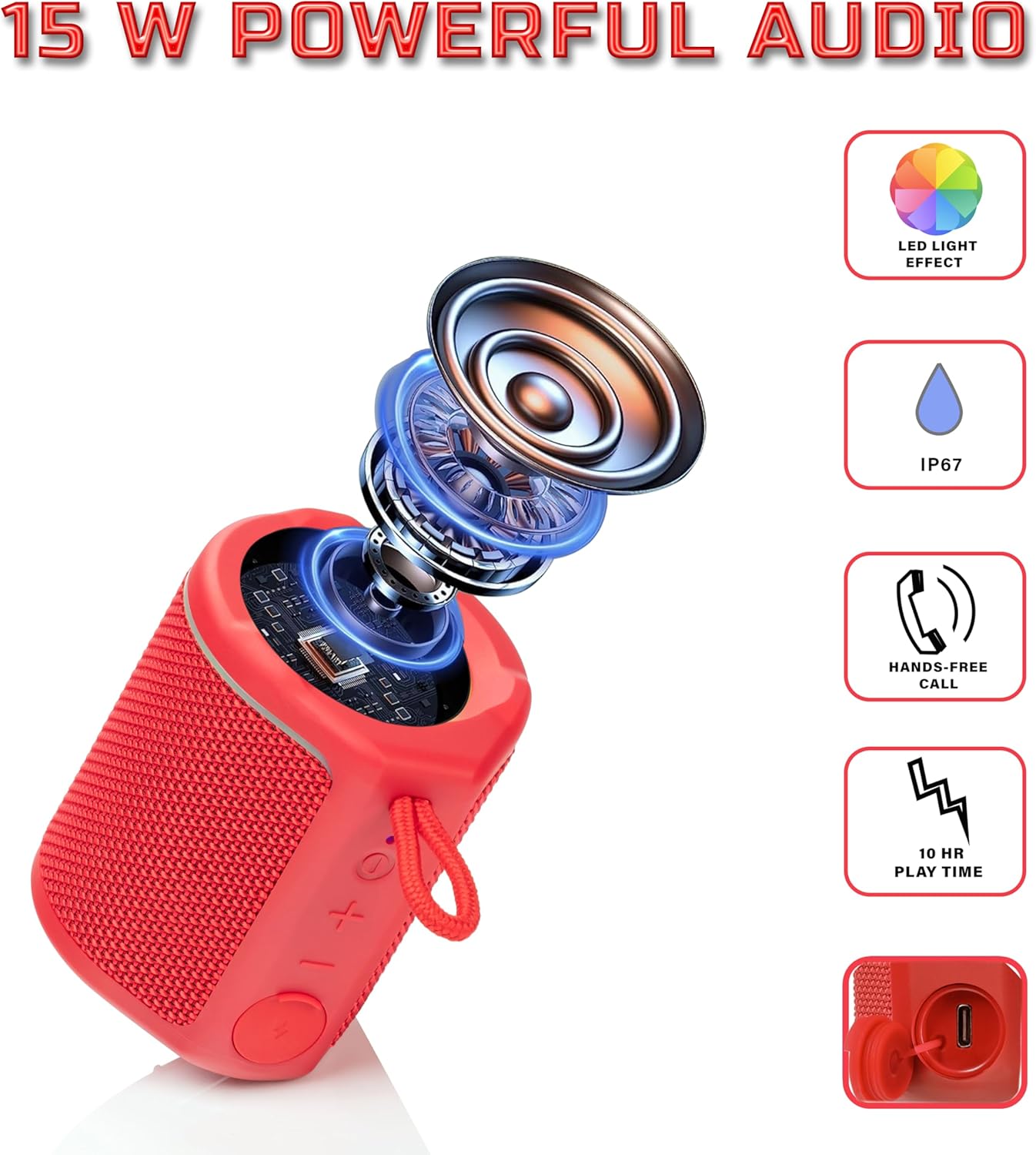
Diagram illustrating the internal components of the Sharp GX-BT190 speaker, including the speaker driver, and highlighting features like LED light effect, IP67 rating, hands-free call function, and battery life.
| Funkcija | Detalė |
|---|---|
| Modelio numeris | GX-BT190 |
| Ryšio technologija | Bluetooth |
| Didžiausia garsiakalbio išėjimo galia | 10 vatų |
| Atsparumo vandeniui įvertinimas | IP67 |
| Baterijos veikimo laikas | Iki 15 valandų |
| Baterijos tipas | 1 ličio jonas (įtraukta) |
| Baterijos talpa | 1200 mAh |
| Gaminio matmenys (D x P x A) | 7.5 x 7.5 x 7.5 cm (apytiksliai) |
| Prekės svoris | 226.8 g (8 uncijos) |
| belaidis diapazonas | Iki 33 pėdų |
| Papildomos funkcijos | LED Light, True Wireless Stereo (TWS), Hands-Free Calling |
10. Garantija
The Sharp GX-BT190 Portable Bluetooth Speaker comes with a 1-Year Limited Warranty from the date of purchase. This warranty covers manufacturing defects under normal use. It does not cover damage caused by misuse, accidents, unauthorized modifications, or normal wear and tear. Please retain your proof of purchase for warranty claims.
11. Parama
For technical assistance, warranty inquiries, or further information regarding your Sharp GX-BT190 speaker, please contact Sharp Inc. customer support:
- Gamintojo kontaktai: Sharp Inc
- Telefonas: 1-800-BE-SHARP