
AUN AUN M98 Y9
AUN 4K Android TV Stick User Manual
Model: AUN M98 Y9
Prekės ženklas: AUN
Įvadas
This user manual provides comprehensive instructions for the AUN 4K Android TV Stick (Model: M98 Y9). It covers product features, setup, operation, maintenance, and troubleshooting to ensure optimal performance and user experience. The AUN TV Stick transforms any compatible display into a smart TV, offering access to a vast array of streaming content and applications.
Kas yra dėžutėje
Išpakuodami patikrinkite, ar yra visi šie daiktai:
- 1 x 4K Android TV Stick (AUN M98 Y9)
- 1x nuotolinio valdymo pultas
- 1x maitinimo adapteris
- 1 x C tipo laidas
- 1 x IR kabelis
- 1 x HDMI Extender Cable
- 1 x Vartotojo vadovas

Image: All components included in the AUN 4K Android TV Stick package, laid out for clear viewing. This includes the TV stick, its remote control, power adapter, Type-C cable, IR cable, HDMI extender cable, and the user manual.
Produktas baigtasview
The AUN M98 Y9 Android TV Stick is a compact device designed to provide smart TV functionalities to any display with an HDMI input. It features a sleek design and intuitive controls.
Įrenginio komponentai
- HDMI jungtis: Plugs directly into your TV's HDMI port.
- USB sąsaja: Skirta išoriniams atminties įrenginiams arba periferiniams įrenginiams prijungti.
- Power Hole (Type-C): Maitinimo adapterio prijungimui.
- Pilotas L.amp: Nurodo įrenginio būseną.

Image: The AUN 4K Android TV Stick and its accompanying remote control. The stick is a compact, black rectangular device, and the remote is an ergonomic black controller with various buttons for navigation and voice control.
Nuotolinio valdymo pultas
The included remote control allows for easy navigation and interaction with the TV Stick. It supports voice search for quick content discovery.
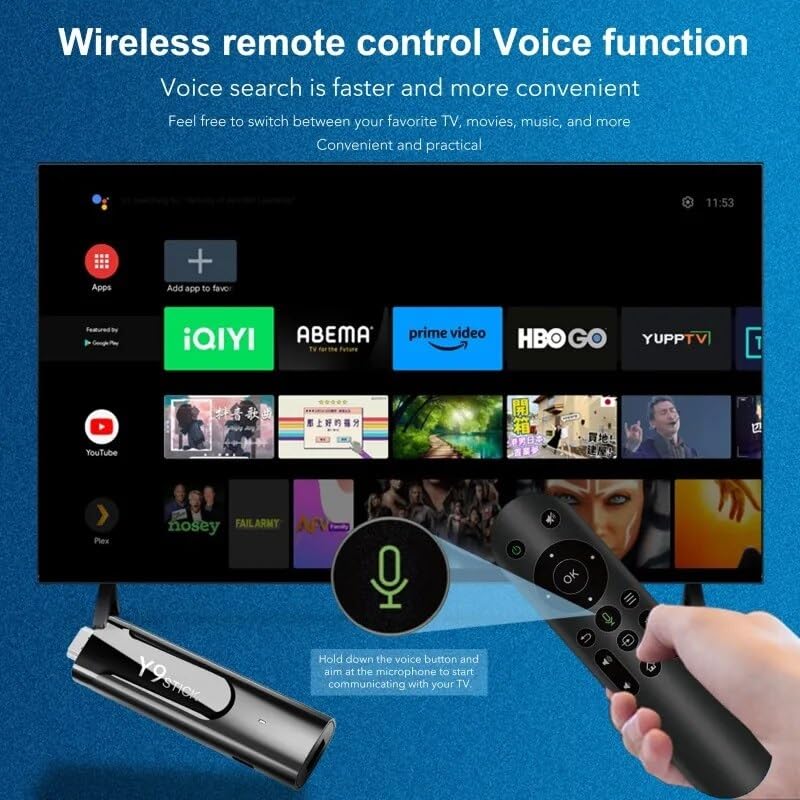
Image: A hand holding the AUN TV Stick remote control, with a visual overlay indicating the voice search button and microphone icon. The image illustrates the ease of using voice commands to interact with the TV stick's interface, which is displayed on a television screen in the background.
Sąrankos vadovas
Follow these steps to set up your AUN 4K Android TV Stick:
- Prijunkite televizoriaus laikiklį: Plug the AUN TV Stick directly into an available HDMI port on your television or projector. If space is limited, use the provided HDMI extender cable.
- Prijunkite maitinimą: Connect the Type-C cable to the "Power Hole" on the TV Stick and the other end to the provided power adapter. Plug the power adapter into a wall outlet.
- Connect IR Cable (Optional): If the TV Stick is hidden behind the TV or in a cabinet, connect the IR cable to the TV Stick and position the IR receiver in a location where it has a clear line of sight to your remote control.
- Pasirinkite HDMI įvestį: Turn on your TV or projector and select the corresponding HDMI input source to which the TV Stick is connected.
- Pradiniai nustatymai: Follow the on-screen instructions to complete the initial setup, including language selection, Wi-Fi network connection, and Google account login.
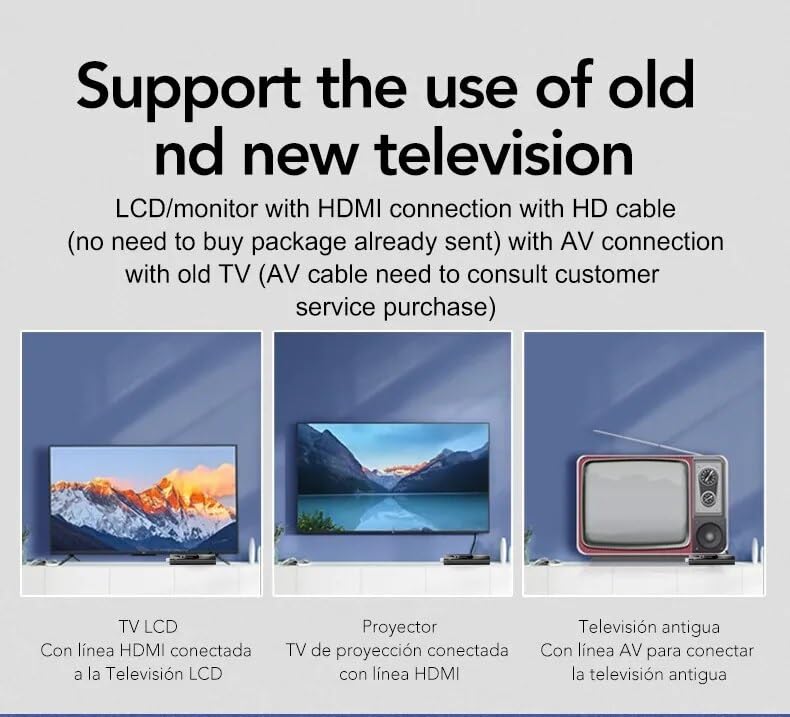
Image: This diagram illustrates the versatility of the AUN TV Stick, showing its compatibility with modern LCD TVs and projectors via HDMI, and older televisions using an AV connection (AV cable sold separately). It highlights the ease of connecting the device to various display types.
Naudojimo instrukcijos
Naršymas sąsajoje
Use the directional pad and "OK" button on the remote control to navigate through the Android TV interface. The "Back" button returns to the previous screen, and the "Home" button takes you to the main home screen.
Prisijungiama prie „Wi-Fi“.
- Pradiniame ekrane eikite į Nustatymai.
- Pasirinkite Tinklas ir internetas.
- Iš sąrašo pasirinkite norimą „Wi-Fi“ tinklą.
- Įveskite „Wi-Fi“ slaptažodį naudodami ekrano klaviatūrą ir pasirinkite Prisijunkite.
The AUN TV Stick supports dual-band Wi-Fi (2.4G/5G) for stable and fast wireless connectivity.

Image: This visual demonstrates the AUN TV Stick's support for both 2.4G and 5G dual-band Wi-Fi, ensuring smooth high-speed graphics and streaming. It also shows the capability to mirror content from a mobile phone to the TV screen, enhancing the viewpatirtį.
Programų diegimas
Access the Google Play Store from the home screen to download and install your favorite streaming apps (e.g., Netflix, Prime Video, Disney+ Hotstar) and games. A Google account is required for Play Store access.
Using Voice Search
Press the dedicated voice button on your remote control and speak into the microphone to search for content, open apps, or get information. Voice search is faster and more convenient.
Pagrindinės savybės
- 4K Ultra HD raiška: Supports stunning 4K resolution for crisp, clear visuals and an immersive viewpatirtį.
- HDR 10+ palaikymas: Enhanced dynamic range for vibrant colors and greater contrast.
- „Widevine“ 1 lygio sertifikatas: Enables streaming of high-definition content from premium services like Netflix and Prime Video.
- „Android 13“ operacinė sistema: Provides a smooth, user-friendly interface with access to a vast ecosystem of apps.
- Amlogic S905Y4 Quad A35 CPU: High-performance processor for seamless streaming and gaming.
- 2 GB RAM ir 16 GB atminties: Sufficient memory for smooth operation and ampvietos programėlėms ir medijai.
- Dviejų dažnių „Wi-Fi“ (2.4 G / 5 G): Ensures stable and fast internet connectivity.
- "Bluetooth 5": For connecting wireless headphones, game controllers, and other Bluetooth accessories.
- Dolby Audio & DTS Digital Support: Delivers rich, immersive sound quality.
- USB & Memory Card Ports: Allows for external storage expansion and media playback.
- „Miracast“ palaikymas: Enables screen mirroring from compatible devices.

Image: This image highlights the superior image quality of the AUN TV Stick, emphasizing its 4K Ultra HD and HDR capabilities. The vibrant colors and sharp details demonstrate the immersive visual experience provided by the device.

Image: This image emphasizes the generous memory configuration of the AUN TV Stick, featuring 2GB of DDR3 RAM and 16GB of eMMC storage. This combination ensures smooth operation and ample space for applications and media content.
Trikčių šalinimas
If you encounter issues with your AUN 4K Android TV Stick, refer to the following common problems and solutions:
- Nėra maitinimo / įrenginys neįsijungia:
- Ensure the power adapter is securely connected to the TV Stick and a working power outlet.
- Išbandykite kitą maitinimo lizdą.
- No Signal on TV Screen:
- Verify the TV Stick is firmly plugged into the HDMI port.
- Patikrinkite, ar jūsų televizorius nustatytas į tinkamą HDMI įvesties šaltinį.
- Išbandykite kitą televizoriaus HDMI prievadą.
- If using the HDMI extender, ensure it is properly connected.
- Nuotolinio valdymo pultas nereaguoja:
- Ensure there are no obstructions between the remote and the TV Stick (or IR receiver).
- Check if the remote control batteries need replacement.
- If using the IR cable, ensure it is properly connected and positioned.
- „Wi-Fi“ ryšio problemos:
- Paleiskite iš naujo „Wi-Fi“ maršrutizatorių.
- Įsitikinkite, kad TV Stick yra jūsų „Wi-Fi“ maršrutizatoriaus diapazone.
- Dar kartą įveskite „Wi-Fi“ slaptažodį, kad įsitikintumėte, jog jis teisingas.
- Try connecting to the 2.4GHz band if you are on 5GHz, or vice-versa.
- App Crashing/Slow Performance:
- Uždarykite fonines programas.
- Clear the cache of the problematic app via Settings > Apps.
- Restart the TV Stick by unplugging and re-plugging the power.
- Įsitikinkite, kad turite pakankamai laisvos vietos saugykloje.
Specifikacijos
| Funkcija | Detalė |
|---|---|
| Prekės ženklas | AUN |
| Modelis | AUN M98 Y9 |
| Operacinė sistema | Android 13 |
| Procesorius | Amlogic S905Y4 Quad A35 |
| RAM | 2 GB |
| Sandėliavimas | 16 GB |
| Rezoliucija | 4K |
| Ypatingos savybės | Widevine L1, HDR 10+, AV1, Dolby Audio, DTS Digital, Miracast |
| Ryšys | 2.4G/5G Dual WiFi, Bluetooth 5 |
| Uostai | USB, Memory Card, HDMI, Type-C Power |
| Suderinami įrenginiai | Television, Projectors |
| Gaminio matmenys | 8 x 3 x 2 cm |
| Prekės svoris | 300 g |

Image: This graphic illustrates the core technical specifications of the AUN TV Stick, highlighting its Amlogic S905Y4 Quad A35 CPU, OpenGL ES 3.2 GPU, H.265 video decoder supporting up to 4K@60fps, and HDMI 2.0 output for 4K@60fps display.
Priežiūra
To ensure the longevity and optimal performance of your AUN 4K Android TV Stick, follow these maintenance guidelines:
- Valymas: Įrenginiui valyti naudokite minkštą, sausą šluostę. Nenaudokite skystų valiklių ar aerozolių.
- Vėdinimas: Įsitikinkite, kad prietaisas yra gerai vėdinamoje vietoje, kad jis neperkaistų. Neuždenkite ventiliacijos angų.
- Saugykla: Kai ilgesnį laiką nenaudojate prietaiso, laikykite jį vėsioje, sausoje vietoje, apsaugotoje nuo tiesioginių saulės spindulių ir ekstremalių temperatūrų.
- Programinės įrangos atnaujinimai: Regularly check for and install system updates to ensure the device has the latest features and security patches.
Garantija ir palaikymas
The AUN 4K Android TV Stick comes with a 6 mėnesių garantija from the date of purchase. This warranty covers manufacturing defects and malfunctions under normal use. Please retain your purchase receipt as proof of purchase.
For technical support, warranty claims, or any other inquiries, please contact Megaa Electronics using the following details:
- El. paštas: support@megaaelectronics.com or megaaelectronics@gmail.com
- WhatsApp: 8328671337
Please provide your product model (AUN M98 Y9) and a detailed description of the issue when contacting support.
Ask a question about this manual
Ask about setup, troubleshooting, compatibility, parts, safety, or missing instructions. Manuals+ will review the question and use this page’s manual context to help answer it.