
T10M Pro+
Vortex T10M Pro+ Tablet User Manual
Model: T10M Pro+
1. Įvadas
Thank you for choosing the Vortex T10M Pro+ Tablet. This manual will guide you through the features and functions of your new device, ensuring a smooth and enjoyable user experience. Please read this manual carefully before using your tablet.
Kas yra dėžutėje
Upon unboxing your Vortex T10M Pro+ Tablet, please verify that all the following items are present:
- Vortex T10M Pro+ Tablet
- Įkroviklis
- Ekrano apsauga
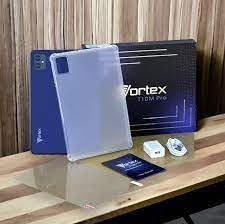
Image: Contents of the Vortex T10M Pro+ Tablet box. This includes the tablet, a clear protective case, the power adapter, and a screen protector, all neatly arranged on a wooden surface.
2. Produktas baigtasview
Familiarize yourself with the physical components and key features of your Vortex T10M Pro+ Tablet.
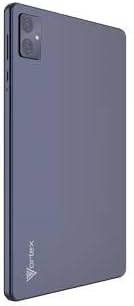
Vaizdas: Galinis view of the Vortex T10M Pro+ Tablet. The tablet has a sleek, dark finish with the 'Vortex' logo subtly placed at the bottom. The camera module is visible in the upper left corner.

Vaizdas: Išsamus view of the back of the Vortex T10M Pro+ Tablet, highlighting its specifications. Printed details include '10.1-inch Brilliant Display', '5MP Front Camera', '8MP Rear Camera', 'MTK6766 Processor', 'Quad-Core, 4GB+64GB', '5000mAh Mega Battery', and 'Android 12'.
3. Sąranka
3.1. Įrenginio įkrovimas
Before first use, fully charge your tablet. Connect the provided charger to the tablet's charging port and plug it into a power outlet. The battery indicator on the screen will show charging progress.
3.2. Inserting SIM/MicroSD Card
The Vortex T10M Pro+ supports 4G LTE connectivity and expandable storage. To insert a SIM card (for mobile data) or a microSD card (for additional storage):
- Planšetinio kompiuterio šone raskite SIM / „microSD“ kortelės dėklą.
- Norėdami atidaryti dėklą, naudokite pateiktą SIM kortelės išstūmimo įrankį.
- Carefully place the SIM card(s) and/or microSD card into the designated slots, ensuring correct orientation.
- Švelniai stumkite dėklą atgal į planšetinį kompiuterį, kol jis spragtelėdamas užsifiksuos.
3.3. Pradinis įjungimas
Press and hold the Power button located on the side of the tablet until the Vortex logo appears. Follow the on-screen prompts to complete the initial setup, including language selection, Wi-Fi connection, and Google account setup.
4. Naudojimo instrukcijos
4.1. Pagrindinė navigacija
Your tablet runs on Android 13.0. Use touch gestures for navigation:
- Bakstelėkite: Pasirinkite elementą arba atidarykite programėlę.
- Perbraukimas: Slinkite per ekranus arba sąrašus.
- Žnybtelėjimas, norint priartinti: Priartinkite arba atitolinkite nuotraukas ir web puslapių.
- Ilgai paspauskite: Pasiekite kontekstinius meniu arba perkelkite piktogramas.
4.2. Prisijungimas prie Wi-Fi
Norėdami prisijungti prie „Wi-Fi“ tinklo:
- Eikite į Nustatymai > Tinklas ir internetas > Internetas.
- Įjunkite „Wi-Fi“.
- Iš sąrašo pasirinkite norimą tinklą ir, jei būsite paraginti, įveskite slaptažodį.
4.3. Using Mobile Data (4G LTE)
If you have inserted a valid SIM card with an active data plan:
- Eikite į Nustatymai > Tinklas ir internetas > SIM kortelės.
- Ensure Mobile data is enabled for your SIM.
4.4. Kameros veikimas
Planšetinis kompiuteris turi 8 MP galinę kamerą ir 5 MP priekinę kamerą.
- Atidarykite fotoaparato programą.
- Norėdami nufotografuoti, palieskite užrakto mygtuką.
- Perjunkite priekinę ir galinę kameras naudodami kameros perjungimo piktogramą.
4.5. Saugyklos valdymas
Your tablet comes with 64GB of internal storage. You can expand this using a microSD card up to 128GB. To view storage usage, go to Nustatymai > Sandėliavimas.
5. Priežiūra
5.1. Valymas
Planšetinio kompiuterio ekraną ir korpusą valykite minkštu, nepūkuotu audiniu. Venkite naudoti stiprias chemines medžiagas ar abrazyvines medžiagas.
5.2. Programinės įrangos atnaujinimai
Periodically check for software updates to ensure your tablet has the latest features and security patches. Go to Nustatymai > Sistema > Sistemos atnaujinimas.
5.3. Akumuliatoriaus priežiūra
Norėdami pailginti baterijos veikimo laiką:
- Venkite ekstremalių temperatūrų.
- Neleiskite akumuliatoriui dažnai visiškai išsikrauti.
- Atjunkite įkroviklį, kai akumuliatorius bus pilnas.
6. Problemų sprendimas
Šiame skyriuje aptariamos dažniausiai pasitaikančios problemos, su kuriomis galite susidurti naudodami planšetinį kompiuterį.
| problema | Galimas sprendimas |
|---|---|
| Planšetinis kompiuteris neįsijungia | Įsitikinkite, kad akumuliatorius įkrautas. Paspauskite ir palaikykite maitinimo mygtuką bent 10–15 sekundžių, kad priverstumėte įrenginį paleisti iš naujo. |
| Wi-Fi ryšio problemos | Iš naujo paleiskite planšetinį kompiuterį ir „Wi-Fi“ maršrutizatorių. Nustatymuose pamirškite tinklą ir prijunkite iš naujo. |
| Programėlės veikia lėtai arba stringa | Close background apps. Clear app cache (Settings > Apps > [App Name] > Storage > Clear cache). Restart the tablet. |
| Storage full message | Ištrinkite nereikalingus files or apps. Move media to a microSD card. |
7. Specifikacijos
Detailed technical specifications for the Vortex T10M Pro+ Tablet.
| Funkcija | Specifikacija |
|---|---|
| Modelio pavadinimas | T10M Pro+ Tablet (Unlocked) Blue 10.1" 64GB 4GB GSM 4G LTE + Wifi 8MP |
| Ekrano dydis | 10.1 colių |
| Maksimali ekrano skiriamoji geba | 1280 x 800 pikselių |
| Atnaujinimo dažnis | 120 Hz |
| Procesorius | „MediaTek“, 2 GHz |
| RAM | 4 GB |
| Vidinė saugykla | 64 GB |
| Išplečiama saugykla | „MicroSD“ (iki 128 GB) |
| Operacinė sistema | Android 13.0 |
| Galinė kamera | 8 MP |
| Priekinė kamera | 5 MP |
| Ryšys | 4G LTE, „Wi-Fi“, „Bluetooth“, GPS |
| Baterijos tipas | Ličio jonų |
| Vidutinis baterijos veikimo laikas | 18 valandų |
| Gaminio matmenys | 10.1 x 5 x 3 colio |
| Spalva | Juoda |
8. Informacija apie garantiją
This product is covered by a manufacturer's warranty. Please refer to the warranty card included with your purchase or visit the manufacturer's official websvetainėje rasite išsamias garantijos sąlygas, galiojimo laiką ir pretenzijų teikimo procesą.
9. Parama
For further assistance, technical support, or service inquiries, please contact the manufacturer's customer support. Contact information can typically be found on the product packaging, the manufacturer's websvetainėje arba garantijos dokumentuose.
Ask a question about this manual
Ask about setup, troubleshooting, compatibility, parts, safety, or missing instructions. Manuals+ will review the question and use this page’s manual context to help answer it.