
1. Įvadas
This manual provides detailed instructions for the installation, operation, and maintenance of your WEILAILIFE 8MP 4K PoE Security Camera System. This system features 8-megapixel (4K) resolution cameras, Power over Ethernet (PoE) for simplified installation, two-way audio communication, 130° ultra-wide-angle lenses, and advanced AI human detection. Please read this manual thoroughly before using the product to ensure proper setup and functionality.
2. Pakuotės turinys
Patikrinkite, ar pakuotėje yra visi toliau išvardyti daiktai:
- 1 x 4K 8MP 8-Channel Network Video Recorder (NVR) with 1TB HDD
- 4 x 4K 8MP Cameras
- 4 x 18.2m LAN Cables for Cameras
- 1 x USB pelė
- 1 x 1 m HDMI laidas
- 1 x NVR Power Adapter (48V2A)
- 1x nuotolinio valdymo pultas
- 1 x 1m LAN Cable
- 1 x Instruction Manual & Warning Label
- 4 x Camera Mounting Screw Packs
3. Sąranka
The WEILAILIFE security camera system is designed for easy plug-and-play installation. Follow these steps to set up your system:
- Prijunkite NVR: Connect the NVR to a power source using the provided power adapter. Connect the NVR to a monitor via the HDMI or VGA port, and connect the USB mouse for navigation.
- Prijungti kameras: Connect each camera to the NVR using the provided LAN cables. The PoE technology will supply power and video signal through a single cable.
- Tinklo ryšys (pasirinktinai nuotolinei prieigai): Nuotoliniam viewing, connect the NVR to your router using the provided 1m LAN cable.
- Maitinimo režimai: The cameras support dual power interfaces. For distances exceeding standard PoE range (up to 200m), an additional power source can be used.

Figure 3.1: Camera Power Modes. The system supports PoE for distances up to 200m, with an option for an additional power adapter for extended range.

Figure 3.2: Plug-and-Play Connection. Cameras connect directly to the NVR via LAN cables, providing power, video, and audio.

Figure 3.3: IP66 Waterproof Connector. Ensure the waterproof connector is properly installed for outdoor camera use.
4. Naudojimo instrukcijos
4.1. Dvipusis garsas
The system supports two-way audio, allowing you to communicate with individuals near the camera using the dedicated mobile application. This feature enables real-time conversations, such as speaking to a delivery person at your door.

Figure 4.1: Two-Way Audio Communication. Interact with visitors or deter intruders directly through the camera.
4.2. Nuotolinis stebėjimas
Pasiekite tiesioginius vaizdo transliacijas ir įrašytą maistątage from anywhere using the free 'Honestview' or 'Eseecloud' app on your smartphone (iOS/Android), tablet, or computer. The system supports multiple users (up to 4) viewing streams simultaneously.

Figure 4.2: Remote Access. Monitor your property from various devices, including smartphones, tablets, and PCs.
4.3. Judesio aptikimas ir įspėjimai
Leveraging advanced recognition algorithms and infrared detection, the system sends real-time notifications to your device when abnormal activity is detected. Dual detection (PIR & AI) minimizes false alarms from leaves, clouds, animals, or insects, significantly improving accuracy over traditional motion detection.

Figure 4.3: PIR & AI Dual Detection. The system accurately identifies human movement while reducing false alarms.
4.4. Įrašymo režimai
The NVR supports various recording modes to suit your needs:
- Suplanuotas įrašymas: Set specific times for continuous recording.
- Rankinis įrašymas: Start and stop recording manually as needed.
- Judesio aptikimo įrašymas: Įrašo tik aptikus judesį, taip taupoma vieta saugykloje.

Figure 4.4: Recording Options. Choose between continuous, scheduled, or motion-activated recording.
5. Savybės
5.1. 4K 8MP Ultra-High Resolution
The 3264 x 2488 high-resolution security cameras provide clear and detailed images, ensuring 24/7 security for your home or business. Even at night, you can see everything within 24 meters.
5.2. 130° Ultra-Wide Angle Lens
Equipped with a 130° wide-angle optical lens, the cameras capture a broad field of view, minimizing blind spots and enhancing surveillance coverage. This allows for clear recording and monitoring of large areas.
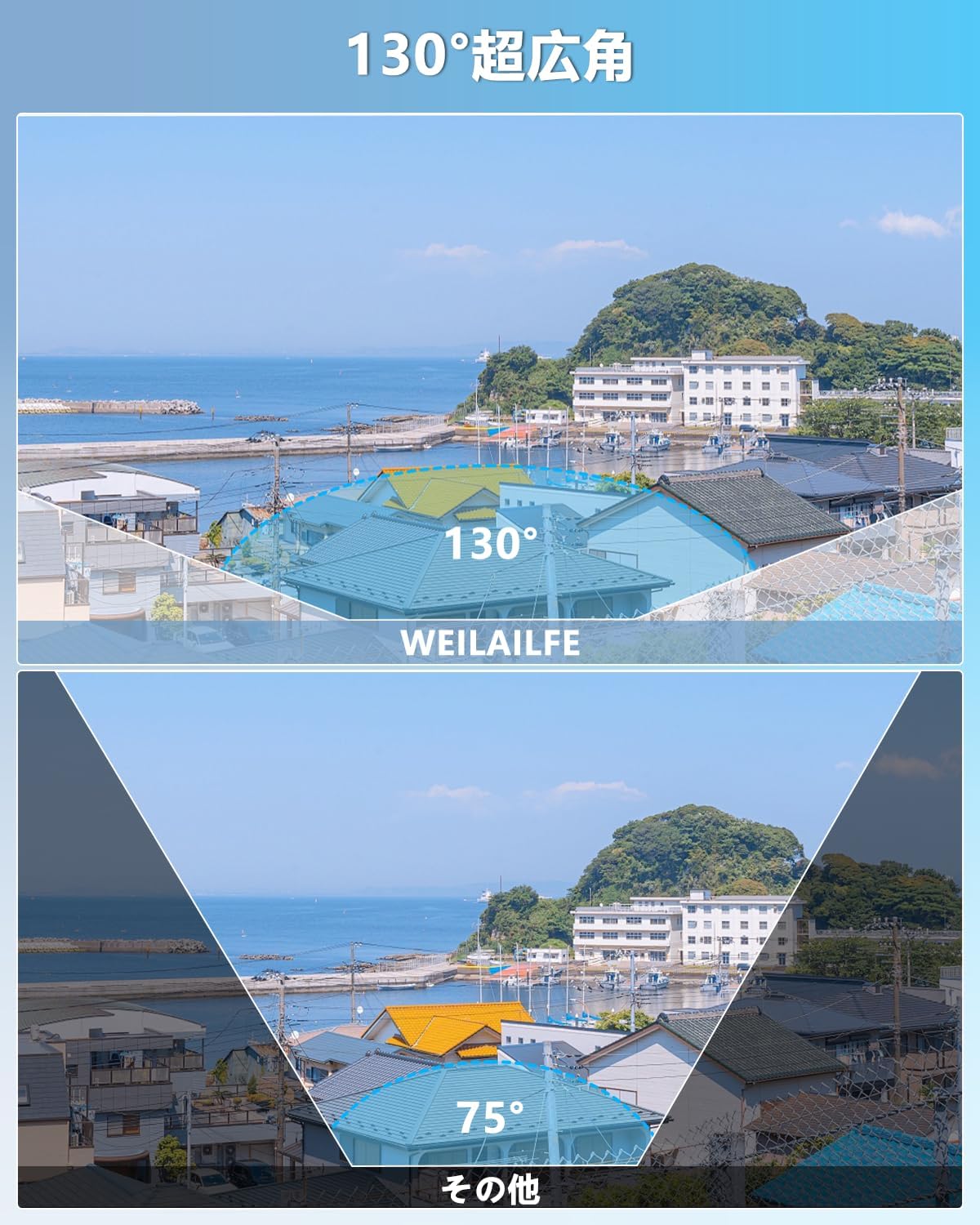
Figure 5.1: 130° Ultra-Wide Angle. Capture more of your surroundings with an expanded field of view.
5.3. H.265 Compression Technology
The system utilizes H.265 compression, which allows for more than double the recording time compared to H.264 while maintaining image quality. This technology also improves processing speed by 50%, enabling smoother viewing even with slower internet connections.

Figure 5.2: H.265+ Compression. Efficiently store more footage without compromising video quality.
5.4. IP66 atsparus oro sąlygoms dizainas
With an IP66 dustproof and waterproof rating, the cameras are built to withstand harsh weather conditions, effectively preventing dust and rain from affecting performance. This makes them suitable for both indoor and outdoor installation.

Figure 5.3: IP66 Weatherproof. Reliable surveillance in various weather conditions, from -25°C to 50°C.
5.5. Naktinis matymas
The IR-LED system automatically activates infrared mode in low-light conditions, providing clear night vision up to 20 meters. This ensures continuous monitoring even in complete darkness.

Figure 5.4: Automatic Day/Night Switching. The camera adapts to lighting conditions for optimal visibility.
5.6. Expandability
The system is expandable, allowing you to add up to 8 cameras in total to meet your surveillance needs. This flexibility makes it suitable for various locations such as offices, gardens, shops, or villas.

Figure 5.5: Expandable System. Add up to 8 cameras to cover all desired areas.
5.7. AI WDR Function
The AI WDR (Wide Dynamic Range) function adjusts the balance between bright and dark areas in surveillance footage, enhancing image clarity and detail. This is particularly useful in scenes with high contrast.

Figure 5.6: AI WDR Function. Improves image clarity in high-contrast lighting conditions.
5.8. Lankstus saugojimas
The system includes a built-in 1TB hard drive and supports H.265+ compression, which reduces required storage capacity by 50% while providing clear images. The internal hard drive automatically overwrites old footage and can be expanded up to 6TB. Cloud storage options are also available.

Figure 5.7: Storage Options. Utilize the built-in HDD or cloud storage for continuous recording.
6. Priežiūra
To ensure optimal performance and longevity of your security camera system, regular maintenance is recommended:
- Švarūs fotoaparato objektyvai: Periodiškai nuvalykite fotoaparato objektyvus minkšta šluosteamp šluoste, kad pašalintumėte dulkes ir dėmes, kurios gali turėti įtakos vaizdo aiškumui.
- Patikrinkite jungtis: Ensure all cable connections (power, LAN, HDMI/VGA) are secure and free from damage.
- Programinės įrangos atnaujinimai: Check for and install any available firmware updates for the NVR and cameras to ensure the latest features and security patches.
- Kietojo disko sveikata: Stebėkite NVR standžiojo disko būklę per sistemos nustatymus, kad išvengtumėte duomenų praradimo.
- Aplinkos veiksniai: Ensure cameras are not obstructed by foliage or other objects that could interfere with their field of view or trigger false alarms.
7. Problemų sprendimas
If you encounter any issues with your WEILAILIFE security camera system, refer to the common problems and solutions below. If the problem persists, please contact customer support.
| Problema | Galima priežastis | Sprendimas |
|---|---|---|
| Nėra vaizdo monitoriuje | Loose cable connection, NVR not powered, incorrect input source on monitor. | Check HDMI/VGA cables, ensure NVR is powered on, select correct input on monitor. |
| Kamera nerodo vaizdo įrašo | LAN cable issue, camera not powered (PoE), camera malfunction. | Check LAN cable connection, ensure NVR PoE ports are active, try connecting camera to a different port or NVR. |
| Nėra nuotolinės prieigos | NVR neprijungtas prie interneto, neteisingi programėlės nustatymai, užkardos problemos. | Ensure NVR is connected to router, verify app network settings, check router firewall. |
| Dažni klaidingi aliarmai | Motion detection sensitivity too high, environmental factors (e.g., moving branches). | Adjust motion detection sensitivity, define specific detection zones to exclude irrelevant areas. |
| Nėra garso | Microphone/speaker disabled, volume too low, audio settings incorrect. | Check camera and NVR audio settings, ensure volume is up on viewprietaisą. |
8. Specifikacijos
| Funkcija | Detalė |
|---|---|
| Prekės ženklas | WEILAILIFE |
| Modelio numeris | WEILAI-POEHL+XKWK |
| Ryšio technologija | Wired IEEE802.11a/n/f |
| Vaizdo įrašymo raiška | 4K 2160P, 8MP (3264×2488) |
| Ypatingos savybės | 4K 8MP, PIR & Dual Detection, Two-Way Audio, Expandable, Remote Monitoring |
| Kanalų skaičius | 8 |
| Maksimali atminties talpa | 1 TB (išplečiama iki 6 TB) |
| Galios tipas | Maitinimo laidas |
| Operacinė sistema | Linux |
| Suderinami įrenginiai | Camera, Smartphone, Tablet, TV, Desktop PC |
| Kameros aprašymas | 130° Ultra Wide Angle & Two-Way Audio, 8MP & AI Human Detection |
| Naktinis matymas | 845nm 3 Infrared Dot Matrix Lamps Super Night Vision |
| Naktinio matymo diapazonas | 20 metrų |
| Kadrų dažnis | 15 kadrų per sekundę |
| Įrašymo režimas | Tvarkaraštis, rankinis |
| USB prievadai | 2 |
| Techninės įrangos sąsaja | HDMI, USB, VGA |
| Objektyvo tipas | Platus kampas |
| Laukas View | 130 laipsnių |
| Signalo formatas | Skaitmeninis |
| Optinių jutiklių technologija | CMOS |
| Rekomenduojamas naudojimas | Lauke, Viduje |
| Produkto svoris | 3.9 kg |
| Kilmė | Kinija |
| Product Body Size | 30 x 26 x 18 cm |
9. Garantija ir palaikymas
WEILAILIFE is committed to providing high-quality products and excellent customer service. Our products undergo strict quality control during manufacturing and inspection.
9.1. Informacija apie garantiją
Šis produktas tiekiamas su a vienerių metų nemokama garantija nuo pirkimo datos. Prašome išsaugoti pirkimo įrodymą garantiniams reikalavimams.

Figure 9.1: 12-Month Warranty. Your product is covered for one year.
9.2. Pagalba klientams
If you have any questions, concerns, or require assistance with your product, please do not hesitate to contact our support team. We offer Japanese language support via email and aim to respond within 24 hours.
- El. paštas: info-jp@weilailifetech.com
- Websvetainė: jp.weilailifetech.com
You can also connect with us via LINE for quick support:

Figure 9.2: WEILAILIFE LINE Service. Scan the QR code to connect for support.
Tiesioginė nuoroda: https://lin.ee/EqPKtnq
Our service center is located at: Chiba-ken, Chiba-shi, Inage-ku, Tendai 5-8-9, Rose Avenue Inage Tendai 1F.