
1. Įvadas
Thank you for choosing the Sharp 50FQ5EG 50-inch QLED 4K Google TV. This manual provides essential information for setting up, operating, maintaining, and troubleshooting your new television. Please read it thoroughly before use and keep it for future reference.
Pagrindinės funkcijos:
- 50-inch QLED 4K Ultra HD Display with 144 Hz Refresh Rate
- Google TV Operating System with Google Assistant and Chromecast built-in
- Harman/Kardon Hybrid Speaker System with Dolby Atmos
- Dolby Vision IQ, HDR10, HLG Support
- Multiple Connectivity Options: 4 x HDMI 2.1, 2 x USB, Bluetooth 5.3, Wi-Fi, Ethernet
- Frameless Aluminum Design
Įtraukti komponentai:
- Sharp 50FQ5EG Television
- Pjedestalo stovas
- Nuotolinio valdymo pultas (reikalingos 2 AAA baterijos, pridedamos)
- Instrukcijų vadovas
- Maitinimo kabelis
2. Saugos informacija
Norėdami užtikrinti saugų darbą ir išvengti žalos, laikykitės šių saugos priemonių:
- Maitinimas: Connect the TV only to an AC 220V, 50Hz power outlet. Do not overload power outlets.
- Vėdinimas: Užtikrinkite tinkamą vėdinimą aplink televizorių. Neužblokuokite ventiliacijos angų.
- Skystis ir drėgmė: Do not expose the TV to rain, moisture, or dripping/splashing liquids. Do not place objects filled with liquids on the TV.
- Šilumos šaltiniai: Laikykite televizorių atokiau nuo šilumos šaltinių, tokių kaip radiatoriai, šildytuvai, viryklės ar kiti šilumą skleidžiantys prietaisai.
- Valymas: Prieš valydami atjunkite televizorių nuo elektros lizdo. Naudokite minkštą, sausą šluostę. Nenaudokite skystų ar aerozolinių valiklių.
- Aptarnavimas: Nemėginkite patys aptarnauti šio gaminio. Visą techninę priežiūrą patikėkite kvalifikuotam aptarnavimo personalui.
- Vaikai: Prižiūrėkite vaikus, kad jie nežaistų su televizoriumi ar nuotolinio valdymo pultu.
3. Sąranka
3.1 Išpakavimas
Atsargiai išimkite televizorių ir visus priedus iš pakuotės. Išsaugokite pakuotės medžiagas būsimam transportavimui ar techninei priežiūrai.
3.2 Attaching the Pedestal Stand
If you are not wall-mounting the TV, attach the included pedestal stand:
- Padėkite televizorių ekranu žemyn ant minkšto, lygaus paviršiaus, kad nepažeistumėte ekrano.
- Sulygiuokite stovo komponentus su tvirtinimo angomis televizoriaus apačioje.
- Pritvirtinkite stovą pridėtais varžtais. Prieš pastatydami televizorių vertikaliai, įsitikinkite, kad stovas tvirtai pritvirtintas.

Vaizdas: Stambus planas view of the TV's pedestal stand and integrated Harman/Kardon speakers.
3.3 Tvirtinimas prie sienos (pasirinktinai)
The Sharp 50FQ5EG supports VESA wall mounts with a standard of 200 x 200 mm. Use M6 screws (not included) with a length appropriate for your wall mount bracket. Consult a professional for wall mounting to ensure safety and proper installation.
3.4 Išorinių įrenginių prijungimas
Connect your external devices to the TV's ports. The TV features 4 HDMI 2.1 ports, 2 USB ports, Ethernet, and an optical audio output.
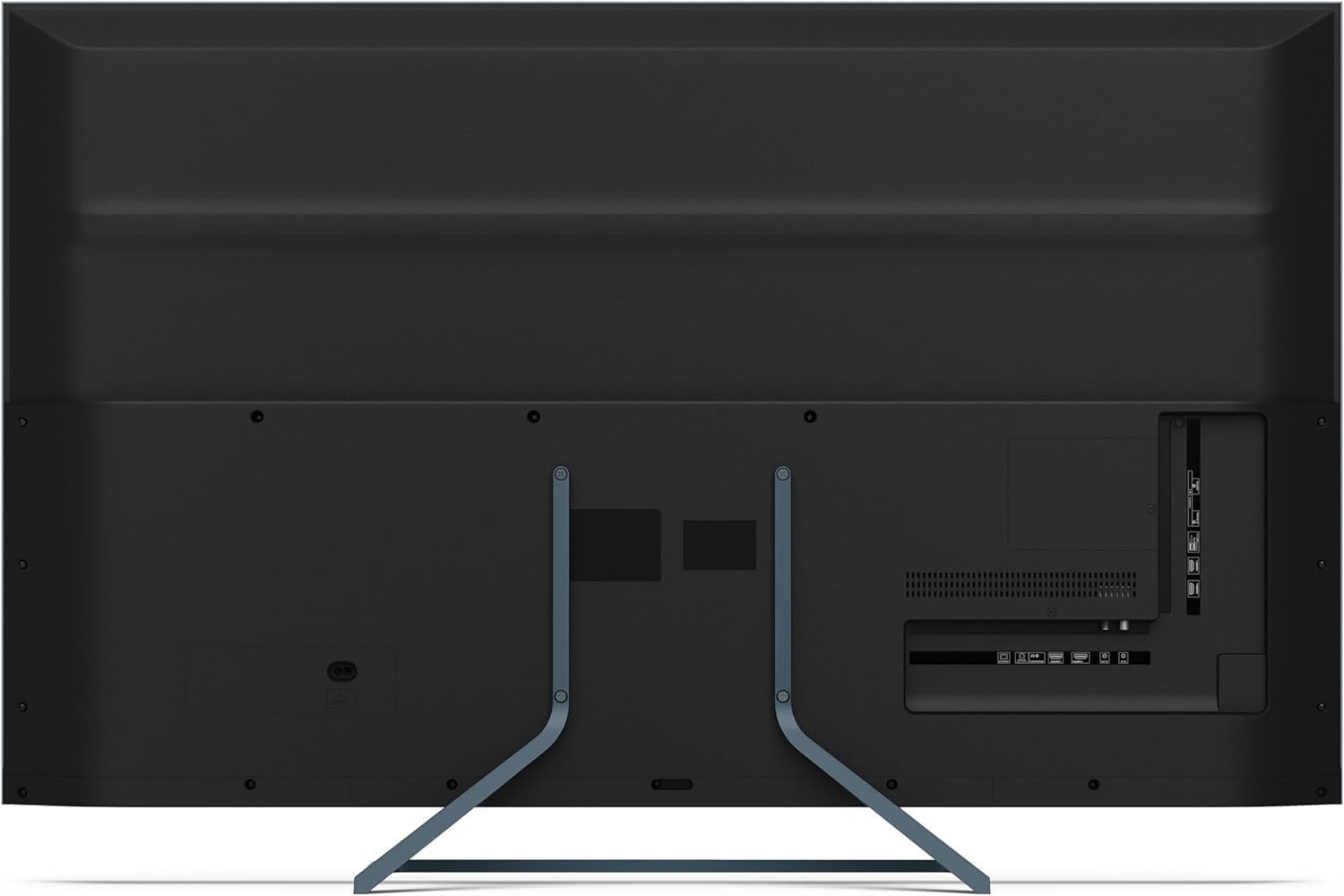
Vaizdas: Galinis view of the television displaying the arrangement of HDMI, USB, and other connectivity ports.
- HDMI: Connect Blu-ray players, game consoles, or set-top boxes. HDMI 2.1 supports eARC and ALLM for enhanced audio and gaming.
- USB: Prijunkite USB atmintines, kad galėtumėte atkurti medijos failus.
- Ethernet: Laidiniam interneto ryšiui.
- Galia: Prijunkite maitinimo laidą prie televizoriaus, o tada – prie sieninio lizdo.
3.5 Pradinis įjungimas ir „Google TV“ sąranka
- Prijunkite televizorių prie maitinimo lizdo.
- Paspauskite maitinimo mygtuką ant nuotolinio valdymo pulto arba televizoriaus.
- The TV will guide you through the initial setup process, including language selection, network connection (Wi-Fi or Ethernet), and Google account sign-in.
- Nuotolinio valdymo pulto poravimas: During initial setup, you may need to pair the Bluetooth remote control. Follow the on-screen instructions, typically involving pressing specific buttons on the remote simultaneously.
4. Televizoriaus valdymas
4.1 Nuotolinis valdymas
The included remote control uses Bluetooth for enhanced functionality. It allows navigation, voice control via Google Assistant, and quick access to various features.
4.2 „Google TV“ sąsaja
The Google TV interface organizes your content from various streaming services and apps. Use the remote's directional pad to navigate through menus, select apps, and browse content.

Image: The television screen showing the Google TV home interface with recommended content and installed applications.
4.3 Vaizdo nustatymai
Your Sharp 50FQ5EG TV features advanced picture technologies:
- QLED Q-Colour: Provides vibrant and accurate color reproduction.
- 4K Ultra HD: Pateikia ryškius ir detalius vaizdus.
- 144 Hz atnaujinimo dažnis: Ensures smooth motion, especially beneficial for gaming and fast-paced content.
- Dolby Vision IQ, HDR10, HLG: Supports various High Dynamic Range formats for enhanced contrast and brightness.
- AQUOS Motion: Improves motion clarity by reducing blur.
- Eco Sensor: Automatiškai reguliuoja ryškumą pagal aplinkos apšvietimo sąlygas.
Access picture settings through the TV's menu to customize brightness, contrast, color, and other display options.
4.4 Garso nustatymai
The TV is equipped with a Harman/Kardon Hybrid Speaker System and supports Dolby Atmos for immersive audio.
- Harman/Kardon Speakers: Delivers clear sound with powerful bass.
- Dolby Atmos: Provides a three-dimensional audio experience.
Adjust sound modes, equalizer settings, and volume levels via the TV's audio menu.
4.5 Ryšys
- „Wi-Fi“ / eternetas: Prisijunkite prie namų tinklo, kad galėtumėte naudotis internetu ir transliuoti.
- "Bluetooth 5.3": Prijunkite belaidės ausines, garso juostas ar kitus „Bluetooth“ įrenginius.
- Google Cast: Cast content from your mobile devices or computer directly to the TV.
4.6 Programų naudojimas
The Google TV platform provides access to a wide range of applications from the Google Play Store, including:
- Netflix, Amazon Prime Video, HBO, Disney+, Movistar+, DAZN, Atresmedia
- KODI, IPTV, Steamlink, Twitch, VLC, YouTube
- Puffin TV Browser, Spotify, Deezer, TuneIn Radio
Navigate to the 'Apps' section on the Google TV home screen to browse, download, and manage your applications.
5. Priežiūra
5.1 Televizoriaus valymas
- Ekranas: Švelniai nuvalykite ekraną minkštu, nepūkuotu skudurėliu. Jei dėmės sunkiai įveikiamos, šiek tiek nuvalykite.ampNuvalykite šluostę vandeniu arba specializuotu ekrano valikliu (purkškite ant šluostės, o ne tiesiai ant ekrano).
- Korpusas: Televizoriaus rėmą ir stovą nuvalykite minkšta, sausa šluoste.
- Nenaudokite: Abrasive cleaners, alcohol, benzene, or thinners, as these can damage the TV's surface.
5.2 Programinės įrangos naujiniai
Jūsų televizorius gali gauti programinės įrangos atnaujinimus, kad pagerintų našumą ir pridėtų naujų funkcijų. Įsitikinkite, kad jūsų televizorius prijungtas prie interneto, kad šie atnaujinimai būtų gaunami automatiškai, arba rankiniu būdu patikrinkite juos nustatymų meniu.
6. Problemų sprendimas
Jei kyla problemų dėl televizoriaus, žr. toliau pateiktas dažniausiai pasitaikančias problemas ir sprendimus:
| Problema | Galimas sprendimas |
|---|---|
| Nėra galios | Patikrinkite, ar maitinimo laidas tvirtai prijungtas prie televizoriaus ir sieninio lizdo. Įsitikinkite, kad lizde yra elektros. Išbandykite kitą lizdą. |
| Nėra vaizdo, bet yra garsas | Patikrinkite įvesties šaltinį. Įsitikinkite, kad išoriniai įrenginiai įjungti ir tinkamai prijungti. Išbandykite kitą HDMI kabelį. |
| Nėra garso, bet yra vaizdas | Check the volume level. Ensure mute is not activated. Check audio output settings (e.g., internal speakers, external soundbar). |
| Nuotolinio valdymo pultas nereaguoja | Replace the batteries. Ensure there are no obstructions between the remote and the TV. Re-pair the Bluetooth remote if necessary (refer to initial setup). |
| Nepavyksta prisijungti prie „Wi-Fi“ | Patikrinkite maršrutizatorių ir modemą. Įsitikinkite, kad „Wi-Fi“ slaptažodis teisingas. Pabandykite iš naujo paleisti televizorių ir maršrutizatorių. |
| Apps Not Working/Freezing | Ensure the TV has a stable internet connection. Try clearing the app's cache or reinstalling the app. Restart the TV. |
Jei problema išlieka ir išbandžius šiuos sprendimus, susisiekite su klientų aptarnavimo tarnyba.
7. Specifikacijos

Image: Technical drawing illustrating the width, height, and depth of the television with and without its stand.
| Funkcija | Specifikacija |
|---|---|
| Modelio numeris | 50FQ5EG |
| Ekrano dydis | 50 colių |
| Ekrano technologija | QLED, LED |
| Rezoliucija | 4K Ultra HD (3840 2160 x XNUMX XNUMX) |
| Atnaujinimo dažnis | 144 Hz |
| HDR palaikymas | Dolby Vision IQ, HDR10, HLG |
| Operacinė sistema | Google TV |
| Garso išvestis | 2.1 Channel Harman/Kardon Speakers, 15W Max Power, Dolby Atmos |
| Ryšys | 4 x HDMI 2.1, 2 x USB 2.0, Bluetooth 5.3, Wi-Fi, Ethernet |
| VESA montavimo standartas | 200 x 200 mm |
| Matmenys su stovu (P x A x G) | 113.22 x 73.89 x 23.2 cm |
| Matmenys be stovo (P x A x G) | 113.22 x 66.87 x 6.0 cm |
| Svoris (be stovo) | 11.5 kg |
| Energijos suvartojimas (eksploatuojant) | 84 vatų |
| Metinis energijos suvartojimas | 64 kWh/metus |
| Kontrolės metodas | Voice (Google Assistant), Remote Control |
| Spalva | Anthracite Grey Aluminum |
8. Garantija ir palaikymas
8.1 Informacija apie garantiją
This Sharp 50FQ5EG television comes with a Ribota garantija. Please refer to the warranty card included with your product or visit the official Sharp websvetainėje rasite išsamias sąlygas, susijusias su aprėptimi, trukme ir paslaugų teikimo tvarka.
8.2 Pagalba klientams
For technical assistance, troubleshooting beyond this manual, or warranty claims, please contact Sharp customer support. Contact details can typically be found on the Sharp official websvetainėje arba prie televizoriaus pridėtoje dokumentacijoje.