
VTech Genius XL Interactive Video Binoculars (Model 618605)
„VTech Genius XL“ interaktyvių vaizdo žiūronų naudojimo instrukcija
Modelis: 618605
Įvadas
Welcome to the VTech Genius XL Interactive Video Binoculars. This device is designed for children aged 5 and above to explore the world around them through observation, interactive videos, images, and educational games. This manual provides essential information for setup, operation, and maintenance to ensure optimal use and longevity of your product.

Image: The VTech Genius XL Interactive Video Binoculars, showing the main unit with its flip-up color screen and binocular lenses.
Svarbi saugos informacija
ĮSPĖJIMAS: Netinka vaikams iki 36 mėnesių dėl smulkių detalių.
- Naudodami visada prižiūrėkite vaikus.
- Do not look directly at the sun through the binoculars, as this can cause serious eye damage.
- Įsitikinkite, kad baterijos įdėtos tinkamai.
- Nemaišykite senų ir naujų baterijų arba skirtingų tipų baterijų.
- Nedelsdami išimkite išsikrovusias baterijas.
- Atsikratykite baterijų atsakingai.
Kas yra dėžutėje
- 1 Pair of VTech Genius XL Interactive Video Binoculars
- Batteries (4 x LR6-AA)
- Kaklo dirželis
Sąranka
1. Akumuliatoriaus įdėjimas
- Suraskite įrenginio akumuliatoriaus skyrių.
- Atsuktuvu atidarykite akumuliatoriaus skyriaus dangtelį.
- Įdėkite 4 naujas LR6-AA baterijas, užtikrindami teisingą poliškumą (+/-).
- Uždėkite dangtelį ir priveržkite varžtą.
2. Kaklo dirželio pritvirtinimas
Thread the provided neck strap through the designated loops on the binoculars. Adjust the strap length for comfortable and secure wearing.

Image: A child wearing the VTech Genius XL Interactive Video Binoculars with the neck strap, demonstrating how it can be worn for outdoor exploration.
Naudojimo instrukcijos
1. Maitinimo įjungimas/išjungimas
Press and hold the power button to turn the device on or off. The device features an automatic shut-off function to preserve battery life.
2. Viewrežimai
The binoculars offer two primary viewing methods:
- Through the Binoculars: Look directly through the eyepieces (binocular lenses) for traditional observation. The interpupillary distance is adjustable for optimal comfort.
- On the LCD Screen: Flip up the 2.4-inch color LCD screen to view observations digitally.

Image: A child looking through the VTech Genius XL Interactive Video Binoculars, demonstrating the traditional viewmetodu.
3. Magnification and Focus
- The binoculars provide up to 10x padidinimas.
- Use the focus wheel to adjust the image clarity for both binocular and screen viewing.
4. Naktinio matymo režimas
Activate the integrated infrared system for night vision. This mode is exclusively available on the LCD screen, allowing observation in low-light or dark conditions.

Image: The VTech Genius XL Interactive Video Binoculars displaying a night vision image of a hedgehog on its screen, highlighting the night vision feature.
5. Nuotraukų ir vaizdo įrašų filmavimas
The integrated camera allows you to capture images of flora and fauna. The internal memory can store up to 50 photos. A micro-SD card slot (card not included) is available to expand storage capacity and save photos for printing.

Image: The VTech Genius XL Interactive Video Binoculars with multiple captured images of animals and nature displayed around it, illustrating the photo capture function.
6. Interactive Content (BBC Videos & Images)
Explore over 340 official videos and images from the BBC, providing more than 700 educational facts categorized into 9 groups:
- Amphibiai
- Nariuotakojai
- Terrestrial Birds
- Flying Birds
- Terrestrial Mammals
- Marine Mammals
- Ropliai
- Žydintys augalai
- Other Plants and Fungi

Image: The VTech Genius XL Interactive Video Binoculars displaying an image of a mushroom on its screen, with a speech bubble indicating educational information, showcasing the BBC content.
7. Games and Quizzes
- Adventure Game: Navigate through 5 natural environments, encountering over 100 animals and exploring 25 levels.
- Educational Quiz: Test scientific knowledge through a 3-stage quiz (Training, Time Challenge, Clue Game).
- Use the joystick and 12 buttons to navigate through games and features.
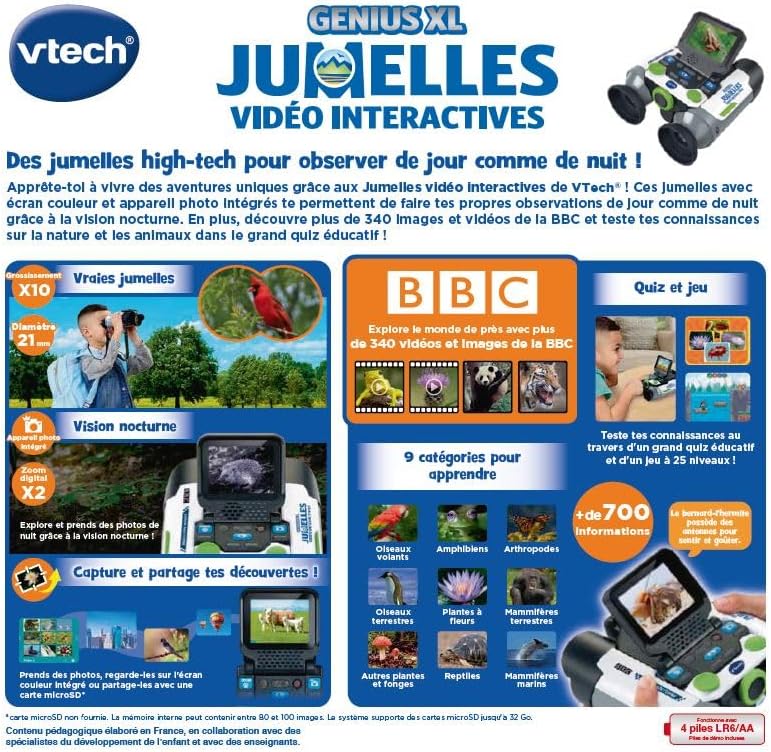
Image: A child holding the VTech Genius XL Interactive Video Binoculars, playing an adventure game on its screen, demonstrating the interactive game feature.
8. Garsumo valdymas
Adjust the sound volume using the dedicated controls on the device.
Žiniasklaidos integracija
Oficialūs produktų vaizdo įrašai
The following video demonstrates the key features and interactive capabilities of the VTech Genius XL Interactive Video Binoculars.
Vaizdo įrašas: trumpas įžanginis vaizdo įrašasview vaizdo demonstracijaasing children using the VTech Genius XL Interactive Video Binoculars to observe nature, take photos, play games, and utilize the night vision mode. It highlights the educational BBC content and interactive features.
This video provides a broader overview of the Genius XL range, including the Interactive Video Binoculars and the Interactive Video Globe.
Video: A preview video demonstrating both the VTech Genius XL Interactive Video Binoculars and the Interactive Video Globe. It shows children engaging with both products, highlighting their educational and interactive aspects, including exploring animals and geography.
Priežiūra
Valymas
Nuvalykite prietaisą šiek tiek damp šluoste. Nenaudokite stiprių cheminių medžiagų ar abrazyvinių valiklių. Prieš padėdami prietaisą į saugyklą, įsitikinkite, kad jis sausas.
Sandėliavimas
Store the binoculars in a cool, dry place away from direct sunlight. Remove batteries if the device will not be used for an extended period.
Trikčių šalinimas
- Įrenginys neįsijungia: Patikrinkite baterijų įdėjimą ir įsitikinkite, kad jos nėra išsikrovusios. Jei reikia, pakeiskite jas naujomis.
- Ekranas tuščias arba užstrigo: Try turning the device off and on again. If the issue persists, remove and reinsert the batteries.
- Sound not working: Check the volume settings. If the issue persists after checking volume and restarting, contact customer support.
- Photos lost or unable to access gallery: Ensure a micro-SD card is properly inserted if you are relying on external storage. If using internal storage and experiencing issues, a factory reset might be necessary, but this will erase all stored photos. It is recommended to regularly transfer important photos to an external micro-SD card.
- Vaizdas neryškus: Sureguliuokite fokusavimo ratuką, kol vaizdas taps aiškus.
Specifikacijos
| Funkcija | Detalė |
|---|---|
| Gaminio matmenys | 12.1 x 6.9 x 16.2 cm |
| Svoris | 170 gramų |
| Rekomenduojamas amžius | 5 metai ir daugiau |
| Švietimo vertė | Learning, Creativity, Animal Discoveries, Interaction |
| Kalba | French (Note: Product content is in French as per specifications) |
| Gamintojo nuoroda | 618605 |
| Vienetų skaičius | 1 |
| Reikalingos baterijos | Taip (4 x LR6-AA) |
| Baterijos įtrauktos | Taip |
| Pagrindinė medžiaga | Plastikiniai |
| Spalva | Pilka |
| Ypatinga funkcija | Naktinis matymas |
| Objektyvo lęšio skersmuo | 21 milimetrų |
| Maksimalus padidinimas | 10x |
| Montavimo tipas | Collar (Neck Strap) |
| Modelio pavadinimas | X 21 |
| Binocular Prism Description | Poro prizmė |
Garantija ir palaikymas
Informacijos apie garantiją ir klientų aptarnavimą ieškokite prie pirkinio pridėtoje dokumentacijoje arba apsilankykite oficialioje „VTech“ svetainėje. websvetainėje. Išsaugokite pirkimo įrodymą, jei prireiktų pateikti garantinį ieškinį.
Product support and spare parts availability may vary by region. The manufacturer states that spare parts are unavailable for this product.