
1. Įvadas
Thank you for choosing the AVATTO WT410-BH-3A-W Smart Thermostat. This device is designed to provide intelligent control over your gas boiler system, allowing you to manage your home's heating efficiently. With Wi-Fi connectivity, you can remotely adjust temperatures via a mobile application, integrate with popular voice assistants, and utilize advanced scheduling options. This manual provides detailed instructions for installation, operation, and maintenance to ensure optimal performance and energy savings.
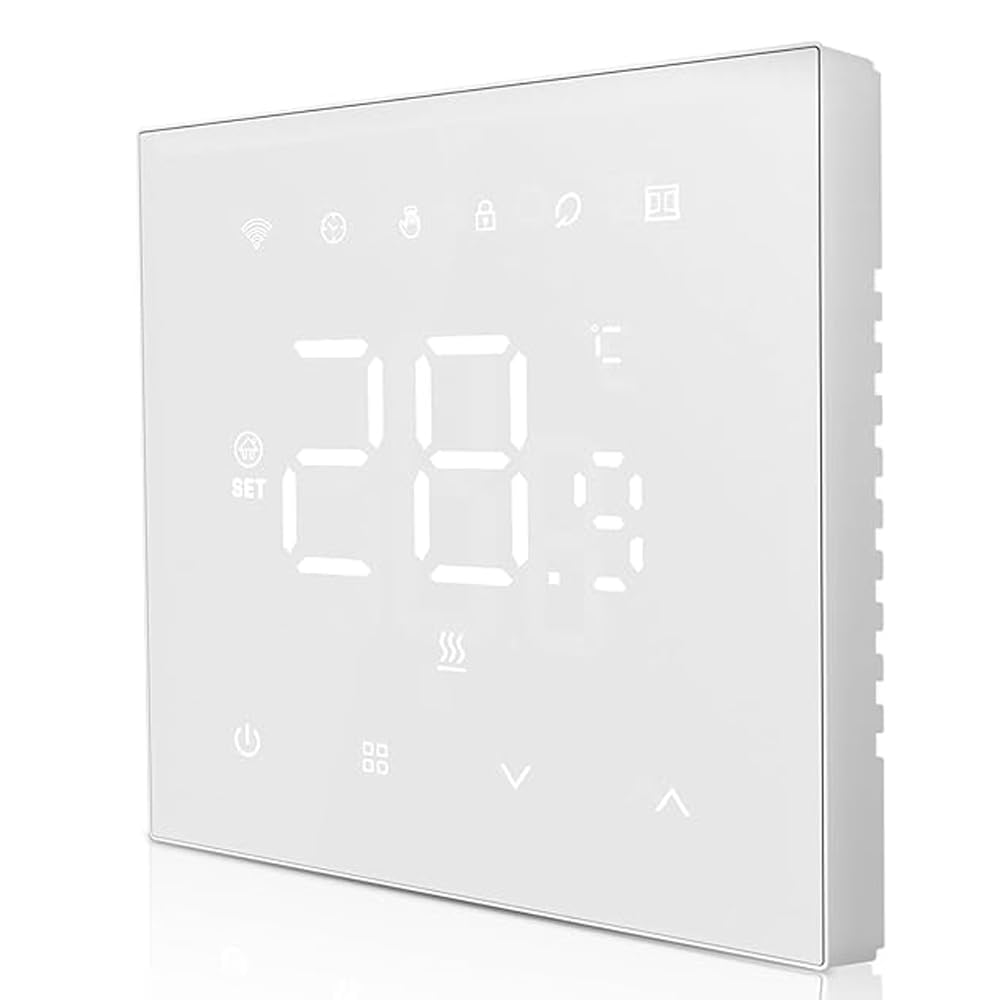
1 paveikslas: Priekyje view of the AVATTO WT410-BH-3A-W Smart Thermostat, showing its sleek design and LED display.
2. Saugos informacija
- Elektros pavojus: Installation must be performed by a qualified electrician. Disconnect power at the circuit breaker before installation to prevent electrical shock.
- ttage Suderinamumas: Įsitikinkite, kad termostato garsumastage requirements match your electrical system.
- Katilo suderinamumas: This thermostat is designed for gas boiler systems with a maximum load of 3A. Verify compatibility with your boiler before installation.
- Aplinkos sąlygos: Do not install in areas with high humidity, direct sunlight, or extreme temperatures.
- Vaikų sauga: Prietaisą laikykite vaikams nepasiekiamoje vietoje.
3. Pakuotės turinys
Patikrinkite pakuotę, ar joje yra šie daiktai:
- AVATTO WT410-BH-3A-W Smart Thermostat Unit
- Tvirtinimo varžtai (2 vnt.)
- Vartotojo vadovas (šis dokumentas)
4. Montavimas
Svarbu: Installation should only be carried out by a qualified professional. Ensure the main power supply to your heating system is turned off before proceeding.
- Maitinimo atjungimas: Turn off the main power supply to your boiler system at the circuit breaker. Verify that the power is off using a voltage testeris.
- Nuimkite seną termostatą (jei taikoma): Carefully remove your existing thermostat from the wall. Note the wiring connections before disconnecting them.
- Pagrindo plokštės montavimas: Separate the front panel of the AVATTO thermostat from its base plate. Secure the base plate to the wall using the provided mounting screws. Ensure it is level.
- Laidai: Connect the wires from your boiler system to the appropriate terminals on the thermostat's base plate. Refer to the "Wiring Diagram" section for detailed instructions. Ensure all connections are secure.
- Termostato bloko prijungimas: Carefully attach the front panel of the thermostat onto the mounted base plate, ensuring it clicks securely into place.
- Atkurti maitinimą: Turn the main power supply back on at the circuit breaker. The thermostat display should illuminate.
5. Laidų schema
The AVATTO WT410-BH-3A-W thermostat typically requires connections for power supply and boiler control.
Standard Wiring (Gas Boiler 3A):
- L (tiesiogiai): Connect to the live wire from your power supply.
- N (neutralus): Connect to the neutral wire from your power supply.
- NE (įprastai atidaryta): Connect to the boiler's control input (often labeled as 'SW' or 'COM' on the boiler).
- COM (bendra): Connect to the other boiler control input.
Note: Always refer to your boiler's specific wiring diagram and consult a qualified electrician if you are unsure about any connections. Incorrect wiring can damage the thermostat or your boiler system.
6. App and Wi-Fi Setup
To unlock the full potential of your AVATTO Smart Thermostat, connect it to your home Wi-Fi network and the compatible mobile application.
- Atsisiųskite programą: Ieškokite "Smart Life" or "Tuya Smart" in your mobile app store (iOS or Android) and download the application.
- Registruotis / Prisijungti: Atidarykite programėlę ir užregistruokite naują paskyrą arba prisijunkite, jei jau turite.
- Pridėti įrenginį: In the app, tap the "+" icon (usually in the top right corner) to add a new device. Select "Thermostat" or "Heater" from the device list.
- Susiejimo režimas: On the thermostat, press and hold the Wi-Fi icon button (or a similar pairing button) until the Wi-Fi indicator light starts blinking rapidly. This indicates it's in pairing mode.
- Prisijunkite prie „Wi-Fi“: Follow the on-screen instructions in the app. You will need to enter your home Wi-Fi network name (SSID) and password. Ensure your phone is connected to a 2.4GHz Wi-Fi network (5GHz networks are generally not supported by smart home devices).
- Patvirtinimas: Once connected, the Wi-Fi indicator on the thermostat will become solid, and the app will confirm successful pairing. You can now control your thermostat remotely.
For voice assistant integration (e.g., Amazon Alexa, Google Assistant), follow the instructions within the "Smart Life" or "Tuya Smart" app to link your account.
7. Veikimo režimai
The AVATTO WT410-BH-3A-W thermostat supports four main operating modes to suit your heating needs:
- Rankinis režimas: In this mode, the thermostat maintains a constant temperature set by the user until manually changed. It overrides any programmed schedules.
- Programavimo režimas: The thermostat follows the pre-set weekly schedule, automatically adjusting the temperature at specified times.
- Temporary Programming Mode: While in Programming Mode, you can temporarily adjust the temperature. The thermostat will maintain this new temperature until the next scheduled program change, then revert to the schedule.
- Absence Mode (Holiday Mode): Designed for extended periods away from home. You can set a lower, energy-saving temperature for a specified duration, and the thermostat will automatically resume normal operation afterward.
Switch between modes using the dedicated mode button on the thermostat or through the mobile application.
8. Savaitinis programavimas
The thermostat allows for advanced weekly programming, enabling you to set different temperatures for specific time periods throughout the week. This helps optimize comfort and energy efficiency.
You can set up to 6 laikotarpiai for weekdays (Monday-Friday) and 2 laikotarpiai for weekends (Saturday-Sunday).
- Prieigos programavimas: Press and hold the "M" (Mode) button or navigate to the "Schedule" section in the mobile app.
- Nustatyti savaitės dienos tvarkaraštį: For Monday to Friday, define up to 6 time periods (e.g., Wake, Leave, Return, Sleep) and their corresponding desired temperatures.
- Nustatyti savaitgalio tvarkaraštį: For Saturday and Sunday, define up to 2 time periods and their desired temperatures.
- Išsaugoti nustatymus: Confirm and save your programming. The thermostat will now follow this schedule when in Programming Mode.
The thermostat offers high precision with temperature settings, accurate to 0.5°C, and displays temperature with 0.1°C precision. An adjustable hysteresis function (0.5°C to 10°C) allows fine-tuning of temperature deviation.
9. Priežiūra
The AVATTO WT410-BH-3A-W Smart Thermostat requires minimal maintenance to ensure long-term performance.
- Valymas: Švelniai nuvalykite ekraną ir casing with a soft, dry cloth. Do not use abrasive cleaners, solvents, or chemical sprays, as these can damage the device.
- Venkite kliūčių: Ensure no objects are blocking the thermostat's vents or sensors, as this can affect temperature readings.
- Programinės įrangos atnaujinimai: Periodically check the mobile application for firmware updates for your thermostat. Updates can improve performance and add new features.
10. Problemų sprendimas
| Problema | Galima priežastis | Sprendimas |
|---|---|---|
| Termostato ekranas tuščias. | Nėra maitinimo. | Check the circuit breaker for your heating system. Ensure wiring is correct and secure. |
| Termostatas neprisijungia prie „Wi-Fi“. | Incorrect Wi-Fi password; 5GHz network; thermostat too far from router. | Ensure correct 2.4GHz Wi-Fi password. Move thermostat closer to router or use a Wi-Fi extender. Re-enter pairing mode. |
| Katilas nereaguoja į termostatą. | Incorrect wiring; boiler issue; thermostat not in heating mode. | Verify wiring connections. Check boiler's power and status. Ensure thermostat is set to a temperature higher than the current room temperature and is in an active heating mode. |
| Netikslūs temperatūros rodmenys. | Thermostat placed near heat sources/drafts; sensor obstruction. | Relocate thermostat if possible. Ensure no objects are blocking the internal sensor. |
If you encounter issues not listed here or require further assistance, please contact AVATTO customer support.
11. Specifikacijos
| Funkcija | Detalė |
|---|---|
| Prekės ženklas | AVATTO |
| Modelio numeris | WT410-BH-3A-W |
| Suderinamumas | Gas Boiler (3A Max Load) |
| Ryšys | „Wi-Fi“ (2.4 GHz) |
| Temperatūros tikslumas | 0.5°C |
| Temperatūros rodymo tikslumas | 0.1°C |
| Histerezės diapazonas | 0.5°C iki 10°C |
| Programavimas | 6 periods (Mon-Fri), 2 periods (Sat-Sun) |
| Balso asistento palaikymas | Yes (via Smart Life/Tuya Smart app integration) |
12. Garantija ir palaikymas
AVATTO products are manufactured to the highest quality standards. For information regarding warranty coverage, please refer to the warranty card included with your purchase or visit the official AVATTO websvetainę.
For technical support, troubleshooting assistance, or any questions about your AVATTO WT410-BH-3A-W Smart Thermostat, please contact AVATTO customer service through their official channels.
Websvetainė: www.avatto.com (Pastaba: tai yra vietos žymeklis URL as no official support link was provided.)