
1. Įvadas
Thank you for choosing the RIGOL DS1102Z-E Digital Oscilloscope. This manual provides essential information for the safe and efficient use of your device. Please read it thoroughly before operation and keep it for future reference.
The DS1102Z-E is a high-performance digital oscilloscope designed for various applications including research and development, education, maintenance, and industrial testing. It features a 100 MHz bandwidth, 1 GSa/s sample rate, and a 24 Mpts memory depth, enabling precise analysis of complex waveforms.
2. Produktas baigtasview
The RIGOL DS1102Z-E is a versatile measurement instrument integrating a frequency counter and supporting protocol decoding for RS232/UART, I2C, and SPI. It also includes FFT analysis and automatic measurement functions to enhance testing efficiency.
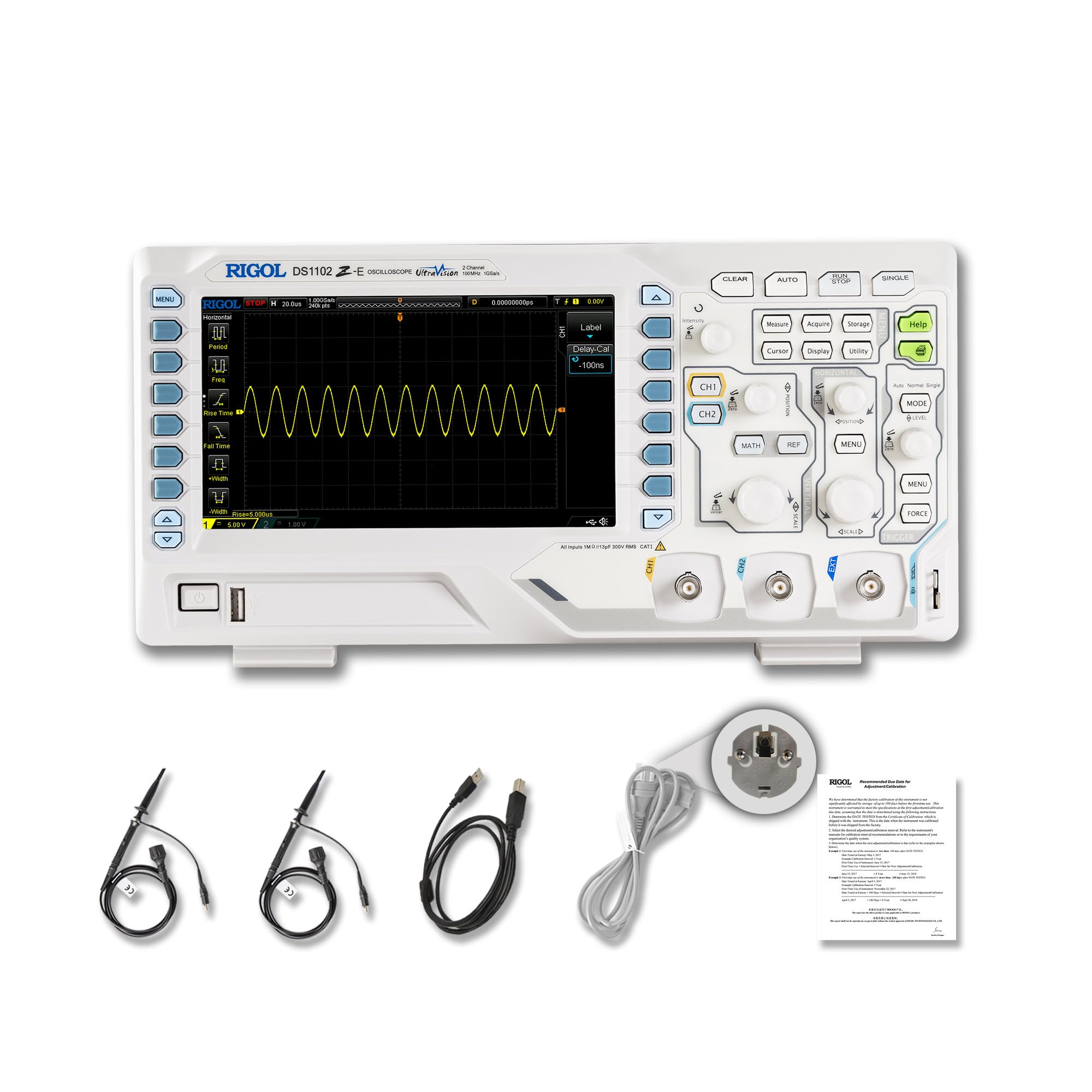
2.1 pav.: priekis view of the RIGOL DS1102Z-E Digital Oscilloscope.
2.1 Pagrindinės savybės
- 100 MHz Bandwidth, 1 GSa/s Sample Įvertinkite: Captures signals with high precision.
- 24 Mpts Memory Depth: Allows for extended signal capture and detailed waveform analysis.
- Multi-function Measurement Device: Includes frequency counter, protocol decoding (RS232/UART, I2C, SPI), FFT analysis, and automatic measurement functions.
- Waveform Recording and Playback: Records signal variations and replays them for fault identification.
- Didelės raiškos ekranas: 7-inch TFT screen with 256-level grayscale, offering a phosphor-like display effect for clear waveform details.
- Remote Control & Secondary Development Support: Equipped with USB and LAN ports for PC remote control, compatible with SCPI commands, LabVIEW, „Visual Basic“ ir „Visual C++“.
2.2 Kas yra dėžutėje

Figure 2.2: Contents included with the DS1102Z-E Oscilloscope.
- 1x Main Unit (DS1102Z-E Digital Oscilloscope)
- 2x Passive Probes (150MHz)
- 1x Power Cable (EU plug)
- 1x USB A-B Cable
- 1x garantinis talonas
- 1x Calibration Certificate
- 1 atitikties deklaracija
3. Sąranka
Follow these steps to set up your RIGOL DS1102Z-E oscilloscope:
- Išpakavimas: Atsargiai išimkite visus komponentus iš pakuotės. Apžiūrėkite, ar įrenginyje nėra kokių nors pažeidimų.
- Maitinimo jungtis: Connect the provided power cable to the oscilloscope's power input and then to a suitable AC power outlet.
- Zondo jungtis: Connect the passive probes to the BNC input connectors (CH1, CH2) on the front panel. Ensure a secure connection.
- Įžeminimas: Always ensure the oscilloscope is properly grounded through the power cable.
- USB/LAN Connection (Optional): If you plan to use remote control or secondary development, connect the USB cable to a PC or the LAN cable to your network.

3.1 pav. Baigtaview of the oscilloscope's physical dimensions and ports.
4. Naudojimo instrukcijos
This section covers the basic operation of your oscilloscope.
4.1 Įjungimas / išjungimas
- Maitinimas: Press the power button located on the front panel. The device will perform a self-test and display the main interface.
- Išjungti: Paspauskite ir palaikykite maitinimo mygtuką, kol įrenginys išsijungs.
4.2 Pagrindinis bangos formos ekranas
After powering on, connect a signal to one of the input channels (e.g., CH1). Adjust the vertical scale (Volts/Div) and horizontal scale (Time/Div) knobs to display the waveform clearly. Use the AUTO button for automatic setup of the waveform display.

4.1 pav. Pvzample of a waveform displayed on the oscilloscope screen.
4.3 Išplėstinės funkcijos
- Matavimo funkcijos: Paspauskite PAMATUOKITE button to access automatic measurements like frequency, period, peak-to-peak voltage ir kt.
- Trigerio sistema: Use the trigger controls to stabilize repetitive waveforms. Adjust the trigger level and mode (Edge, Pulse, Video, Slope, etc.) as needed.
- Waveform Recording: The oscilloscope allows recording and replaying waveforms. Access this feature through the menu to capture transient events.
- Protocol Decoding: For serial bus analysis (RS232/UART, I2C, SPI), configure the decoding settings via the menu.
- FFT analizė: Perform Fast Fourier Transform (FFT) to analyze the frequency components of your signal.

Figure 4.2: Complex waveform analysis with measurement data.

Figure 4.3: Multiple waveforms displayed simultaneously for comparison.
5. Priežiūra
Tinkama priežiūra užtikrina jūsų osciloskopo ilgaamžiškumą ir tikslumą.
- Valymas: Use a soft, dry cloth to clean the exterior of the oscilloscope. For stubborn dirt, a slightly damp cloth with mild detergent can be used. Avoid abrasive cleaners or solvents.
- Ekrano priežiūra: Clean the display screen with a soft, lint-free cloth. Do not use excessive force or harsh chemicals.
- Saugykla: When not in use, store the oscilloscope in a clean, dry environment, away from direct sunlight, extreme temperatures, and excessive dust.
- Zondų priežiūra: Handle probes carefully. Avoid bending or stressing the probe tips. Store them properly to prevent damage.
- Kalibravimas: For optimal performance, periodic calibration by qualified personnel is recommended. Refer to the official RIGOL website for calibration services.
6. Problemų sprendimas
Šiame skyriuje pateikiami dažniausiai pasitaikančių problemų, su kuriomis galite susidurti, sprendimai.
| Problema | Galima priežastis | Sprendimas |
|---|---|---|
| No power when turned on. | Power cable not connected, power outlet faulty, or power button issue. | Check power cable connection. Test the power outlet. Ensure the power button is fully pressed. |
| Nerodoma bangos forma. | No signal input, probe not connected correctly, vertical/horizontal scale incorrect, or trigger not set. | Verify signal source. Check probe connections. Adjust Volts/Div and Time/Div. Press AUTO or adjust trigger settings. |
| Bangos forma nestabili. | Incorrect trigger settings. | Adjust trigger level, mode, and source to stabilize the waveform. |
| Nuotolinio valdymo pultas neveikia. | USB/LAN cable issue, incorrect network settings, or software driver not installed. | Check cable connections. Verify network configuration. Install necessary drivers and software (e.g., UltraScope). |
If the problem persists, please contact RIGOL technical support.
7. Specifikacijos
Detailed technical specifications for the RIGOL DS1102Z-E Digital Oscilloscope.

Figure 7.1: Visual representation of key technical specifications.
| Funkcija | Specifikacija |
|---|---|
| Prekės ženklas | Rigolas |
| Modelis | DS1102Z-E |
| Pralaidumas | 100 MHz |
| Kanalai | 2 Channels + EXT |
| Sample Įvertinkite | 1 GSa/s |
| Atminties gylis | 24 Mpts |
| Bangos formos fiksavimo greitis | 30,000 XNUMX wfms/s |
| Vertikali skiriamoji geba | 8 bitas |
| Minimalus jautrumas | 1 mV/div |
| Minimum Time Base | 2 ns/div |
| Dekodavimo palaikymas | RS232/UART, I2C, SPI |
| FFT analizė | Standartinis |
| Ekranas | 7-inch TFT (800x480) |
| Ryšys | USB prievadas, USB įrenginys, LAN |
| Maitinimo šaltinis | Kintamosios srovės adapteris |
| Spalva | Pilka / balta |
| Prekės svoris | 2.9 kilogramo |
| Matmenys (I x P x A) | 31.31 x 16.08 x 12.24 centimetro |
| Atitinkami standartai | CE, RoHS |
| Gamintojo dalies numeris | DS1102Z-E |
| Kilmės šalis | Kinija |
8. Garantija ir palaikymas
RIGOL is committed to providing high-quality products and excellent customer service.
- Garantija: The RIGOL DS1102Z-E Digital Oscilloscope comes with a 3 metų garantija nuo pirkimo datos. Ši garantija apima medžiagų ir gamybos defektus normaliai naudojant.
- Techninė pagalba: RIGOL offers 24/7 techninė pagalba to assist you with any questions or issues you may encounter. Please refer to the official RIGOL websvetainė, kurioje rasite kontaktinę informaciją ir pagalbos išteklius.
- Internetiniai ištekliai: Visit the official RIGOL website for product documentation, software updates (e.g., UltraScope), and additional support materials.

Figure 8.1: RIGOL oscilloscopes support multiple languages for user convenience.