
Įvadas
Thank you for choosing the VTech ES2051 Digital Cordless Phone. This manual provides comprehensive instructions for setting up, operating, and maintaining your new phone system. The ES2051 is designed for ease of use, featuring a digital answering machine, call blocking capabilities, volume amplification, and an antibacterial plastic construction for enhanced hygiene.
Please read this manual thoroughly before using your phone to ensure proper operation and to take full advantage iš jo savybių.
Saugos informacija
Naudodami šį gaminį, visada laikykitės pagrindinių saugos priemonių, kad sumažintumėte gaisro, elektros smūgio ir asmenų sužalojimo riziką.
- Nenaudokite šio gaminio šalia vandens arba kai esate drėgnas.
- Avoid using the phone during a thunderstorm. There may be a remote risk of electric shock from lightning.
- Nenaudokite šio gaminio pranešdami apie dujų nuotėkį šalia nuotėkio.
- Use only the power adapter and batteries provided with this product.
- Do not dispose of batteries in a fire. They may explode. Check with local codes for special disposal instructions.
- Prieš valydami šį gaminį ištraukite iš sieninio elektros lizdo. Nenaudokite skystų ar aerozolinių valiklių. Naudokite skelbimąamp šluostė valymui.
Pakuotės turinys
Įsitikinkite, kad jūsų siuntinyje yra visi daiktai:
- Main Base Unit with Digital Answering Machine
- Cordless Handset(s) (typically two for this model)
- Handset Charger(s) (for additional handsets)
- Maitinimo adapteris (-iai)
- Telefono linijos laidas
- NiMH AAA Rechargeable Batteries (4 included)
- Vartotojo vadovas (šis dokumentas)
Sąranka
1. Pagrindinio įrenginio prijungimas
- Prijunkite mažąjį maitinimo adapterio galą prie maitinimo lizdo, esančio pagrindinio įrenginio gale.
- Didesnįjį maitinimo adapterio galą prijunkite prie sieninio lizdo, kurio nevaldo sieninis jungiklis.
- Prijunkite vieną telefono linijos laido galą prie telefono lizdo, esančio pagrindinio įrenginio gale.
- Kitą telefono linijos laido galą prijunkite prie sieninio telefono lizdo.
2. Installing and Charging Batteries
- Atidarykite akumuliatoriaus skyriaus dangtelį ragelio gale.
- Insert the supplied NiMH AAA batteries, observing the correct polarity (+ and -).
- Uždarykite akumuliatoriaus skyriaus dangtelį.
- Place the handset in the base unit or charger to charge. The handset will beep, indicating it is charging.
- Prieš pirmą kartą naudodami, leiskite rageliui įkrauti bent 16 valandų. Optimaliam akumuliatoriaus veikimui, kai nenaudojate, laikykite ragelį įkroviklyje.

Image: The VTech ES2051 Digital Cordless Phone system, showing the main base with one handset and a charging cradle for the second handset, ready for setup.
Naudojimo instrukcijos
Skambinimas ir skambučių priėmimas
- Norėdami paskambinti: Paspauskite TALK/Blykstė or GALBĖJAS, tada surinkite telefono numerį.
- Norėdami atsiliepti į skambutį: Paspauskite TALK/Blykstė or GALBĖJAS kai suskamba telefonas.
- Norėdami baigti skambutį: Paspauskite IŠJUNGTA/IŠVALYTI or place the handset back in the base/charger.
Skaitmeninis atsakiklis
The integrated digital answering machine can record up to 30 minutes of messages. It automatically answers calls when you are unavailable.
- Pranešimų grojimas: Paspauskite PLAY/STOP ant pagrindinio įrenginio.
- Laiškų trynimas: Paspauskite IŠTRINTI žinutės atkūrimo metu.
- Pranešimo įrašymas: Follow the instructions in the full manual for custom outgoing message recording.

Image: A woman interacting with the VTech ES2051 phone, highlighting the digital message counter on the base unit, which indicates the number of new messages.
Skambučių blokatorius
The selective call blocking feature allows you to block up to 100 unwanted numbers, preventing them from ringing your phone.
- Norėdami užblokuoti numerį: Skambučio metu arba skambintojo ID žurnale paspauskite SKAMBINKITE BLOKĄ button (often represented by a specific icon) and follow the on-screen prompts to add the number to the blacklist.
- Užblokuotų numerių valdymas: Access the call block list through the handset menu to review or remove blocked numbers.

Image: A visual representation of the call blocker feature, showing a family in a kitchen setting with an icon indicating unwanted calls are being blocked.
Apimtis Ampgyvybingesnis
Apimtis amplification feature enhances incoming sounds and voices, improving clarity and volume in the handset earpiece. This is particularly useful for users with hearing impairments or those who prefer a louder audio experience.
- Activating/Adjusting: Skambučio metu paspauskite specialų mygtuką GAMYBOS PADIDINIMAS button (often indicated by a speaker icon with a plus sign) or use the volume up/down keys to increase the earpiece volume.
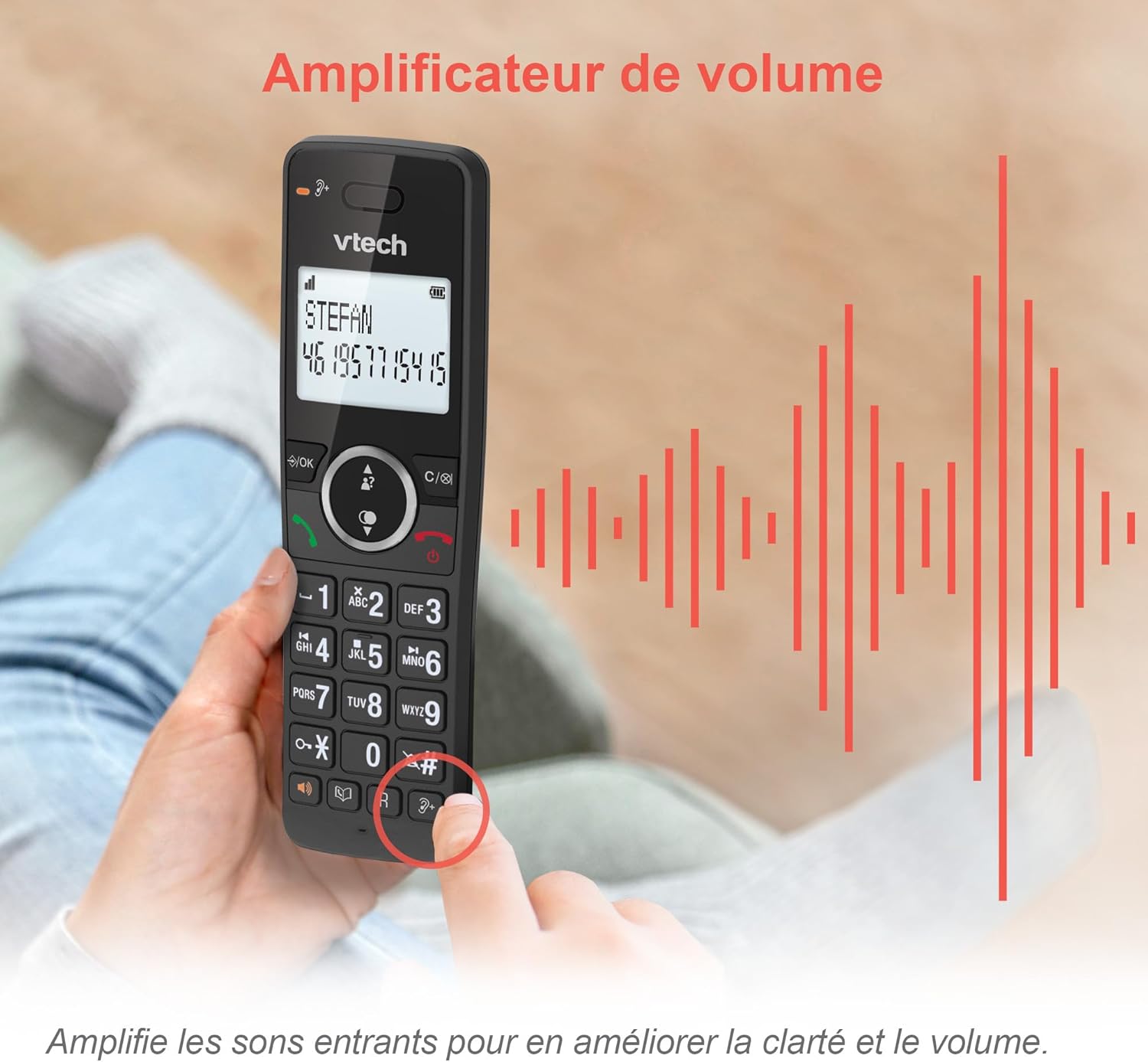
Image: A hand holding the VTech ES2051 handset, with graphic sound waves emanating from the earpiece, illustrating the volume amplifikacijos funkcija.
Conference Function
The conference function allows multiple users to participate in a single conversation. You can set up a three-way conference call with two internal callers (handsets) and one external caller.
- Konferencinio skambučio inicijavimas: Refer to the detailed instructions in the full manual for specific steps on how to add a third party to an ongoing call.

Image: Three people engaged in a conversation, visually representing the three-way conference call capability of the VTech ES2051 phone system.
Intercom funkcija
The intercom feature allows you to communicate between handsets within your home without using the landline. This is useful for calling family members in different rooms.
- Naudojant domofoną: Paspauskite TARPININKAS button (if available) or access the intercom function through the handset menu, then select the desired handset to call.
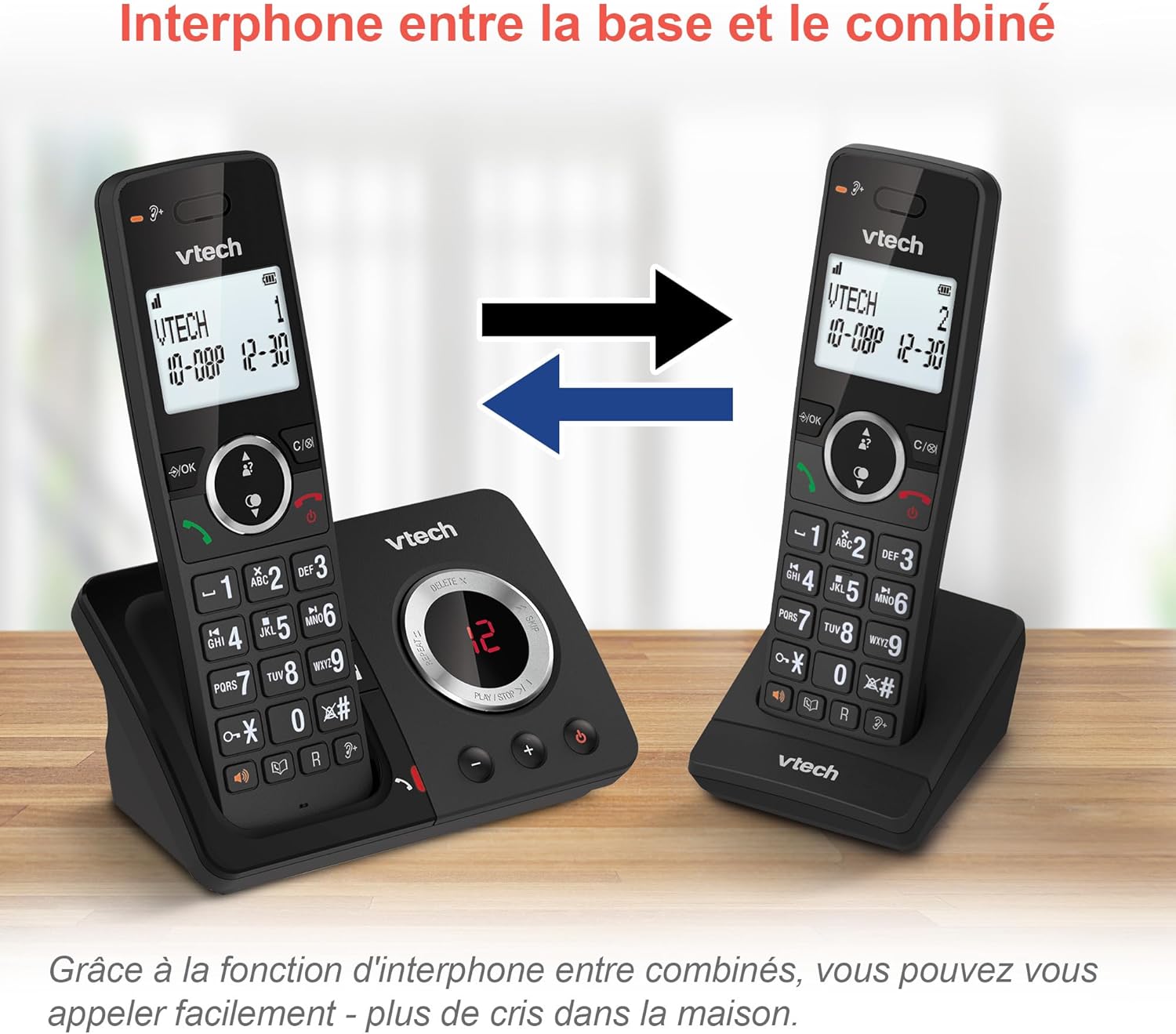
Image: A diagram showing two VTech ES2051 handsets with arrows indicating communication between them, illustrating the intercom feature.
Phonebook and Call Features
The phone includes a 100-name and number phonebook, 8 speed dial keys, and a backlit screen and keypad for easy visibility.
- Kontaktų saugojimas: Navigate to the phonebook menu to add, edit, or delete contacts.
- Greitasis rinkimas: Assign frequently called numbers to the 8 speed dial keys for quick access.
- Skambinančiojo ID žurnalas: Review the last 20 incoming calls with Caller ID information.
- Perskambinti: Access the list of the last 10 dialed numbers for quick redialing.

Paveikslėlis: vaizdų koliažasasing various VTech ES2051 phone features, including the 100-entry phonebook, call display, redial function, and an 18-hour talk time battery life indicator.
EKO režimas
The ECO mode automatically adjusts and minimizes the radio frequency power based on the distance between the handset and the base unit. This feature helps conserve energy and reduce power consumption.
Priežiūra
Telefono valymas
The VTech ES2051 is made with antibacterial plastic and features a seamless, easy-to-clean design. To clean your phone:
- Unplug the base unit from the wall outlet and telephone line.
- Nuvalykite telefono paviršius minkšta,amp audinys. Nenaudokite skystų ar aerozolinių valiklių.
- Ensure the phone is completely dry before plugging it back in.
Akumuliatoriaus priežiūra
- Use only the supplied rechargeable NiMH AAA batteries.
- Nemeskite baterijų į ugnį.
- Jei telefonas nebus naudojamas ilgesnį laiką, išimkite baterijas, kad išvengtumėte elektrolito pratekėjimo.
Trikčių šalinimas
If you experience any issues with your VTech ES2051 phone, try the following troubleshooting steps:
| Problema | Sprendimas |
|---|---|
| Nėra rinkimo tono | Įsitikinkite, kad telefono linijos laidas yra tvirtai prijungtas prie pagrindinio įrenginio ir sieninio lizdo. Patikrinkite, ar veikia kiti telefonai, prijungti prie tos pačios linijos. |
| Negalima skambinti arba priimti skambučių | Check the power connection to the base unit. Ensure the handset batteries are charged. If using a DSL service, you may need a DSL filter. |
| Handset displays "Out of Range" or "No Power at Base" | Move the handset closer to the base unit. Ensure the base unit's power adapter is securely plugged in. |
| Atsakiklis neįrašo pranešimų | Check if the answering machine is turned ON. Ensure there is enough recording time available (max 30 minutes). |
| Prasta garso kokybė arba statinis garsas | Perkelkite ragelį arčiau pagrindinio įrenginio. Nestatykite pagrindinio įrenginio šalia kitų elektroninių prietaisų (pvz., mikrobangų krosnelių, „Wi-Fi“ maršrutizatorių), kurie gali sukelti trikdžius. |
If the problem persists after trying these steps, please refer to the VTech support websvetainėje arba susisiekite su klientų aptarnavimo tarnyba, jei reikia daugiau pagalbos.
Specifikacijos
| Funkcija | Detalė |
|---|---|
| Prekės ženklas | „VTech“ |
| Modelio numeris | ES2051 |
| Spalva | juodas |
| Telefono tipas | Belaidis |
| Atsiliepimo sistemos tipas | Skaitmeninis |
| Atsakiklio įrašymo laikas | Iki 30 minučių |
| Suderinami įrenginiai | Landlines, Answering Machine |
| Baterijos | 4 AAA baterija (įskaičiuota) |
| Baterijos sudėtis | NiMH |
| Maitinimo šaltinis | Maitinamas baterijomis |
| Medžiaga | Plastic (Antibacterial) |
| Rinkiklio tipas | Paprasta klaviatūra |
| Prekės matmenys (I x P x A) | 18.3 x 13.5 x 11 centimetro |
| Kilmės šalis | Kinija |
Garantija ir palaikymas
VTech products are manufactured to high-quality standards. For information regarding warranty coverage, please refer to the warranty card included with your product or visit the official VTech websvetainė jūsų regionui.
For technical support, frequently asked questions, or to download the full user manual, please visit the VTech support section online or contact their customer service helpline. Contact details can typically be found on the VTech websvetainėje arba ant produkto pakuotės.