
1. Įvadas ir pabaigaview
The ARROWMAX Electric Engraving Pen (Model AM-230312) is a versatile, cordless rotary tool designed for fine work such as engraving, sanding, grinding, polishing, and carving on various materials including metal, wood, glass, and plastic. It features a high-performance hollow-core motor, an OLED display for status, and magnetic charging for convenience. This manual provides essential information for safe and effective operation, maintenance, and troubleshooting.

Figure 1: ARROWMAX Electric Engraving Pen and accessories.
2. Pakuotės turinys
Patikrinkite, ar pakuotėje yra visi reikalingi daiktai:
- 1 x ARROWMAX Electric Engraving Pen
- 30 x Engraving Bits
- 12 x Polishing Bits
- 1 x saugojimo krepšys
- 1 x Vartotojo vadovas
- 1 x USB Charging Cable (Magnetic)

Figure 2: Complete set of included components.
3. Produkto ypatybės
The ARROWMAX Electric Engraving Pen is equipped with several features designed for precision and ease of use:
- Hollow-Core Motor: Provides 3 times the torque of a regular motor for enhanced precision.
- OLED ekranas: Shows battery status, selected mode, and rotation direction.
- Magnetinis įkrovimas: Convenient and secure charging directly in the storage case.
- Reguliuojamas greitis: Four RPM modes (15000, 20000, 25000, 30000 RPM) for various tasks.
- Dvikryptis sukimasis: Easily switch between forward and reverse rotation.
- Aliuminio lydinio korpusas: Durable and ergonomic design for comfortable handling.
- Greito keitimo griebtuvas: Allows for easy bit changes without additional tools.

Figure 3: Key features of the ARROWMAX Engraving Pen.

Figure 4: Adjustable speed settings.

Figure 5: OLED display indicators.
4. Sąranka
- Pradinis mokestis: Before first use, fully charge the engraving pen. Connect the magnetic USB charging cable to the pen's magnetic charging port and a suitable USB power source (e.g., computer USB port, USB wall adapter). The OLED display will indicate charging status. A full charge takes approximately 90 minutes and provides up to 120 minutes of uninterrupted work.
- Bito pasirinkimas: Choose the appropriate engraving or polishing bit for your task. The kit includes 30 engraving bits and 12 polishing bits suitable for various materials and applications.
- Įdėjus antgalį:
- Unscrew the chuck at the tip of the pen counter-clockwise.
- Insert the desired bit into the collet. Ensure the bit is fully seated.
- Tighten the chuck clockwise until the bit is securely held. Ensure it is tightened firmly to prevent the bit from dislodging during operation.

Figure 6: Inserting a bit into the chuck.
5. Naudojimo instrukcijos
- Power On/Off and Rotation Direction:
- Press the Power button (marked with a circle and vertical line) to turn the pen on. The OLED display will activate.
- Press the Power button again to switch between clockwise and anti-clockwise rotation. The display will show the current direction.
- To turn off the pen, press and hold the Power button for a few seconds.
- Greičio reguliavimas:
- Press the Gear Adjustment button (marked with a 'G' or gear icon) to cycle through the four available RPM modes (15000, 20000, 25000, 30000 RPM).
- Select the appropriate speed based on the material and task. Lower speeds are suitable for delicate work, while higher speeds are for more aggressive material removal.
- Naudojimo patarimai:
- Always wear appropriate safety glasses to protect your eyes from debris.
- Hold the pen firmly but comfortably. The ergonomic design allows for precise control.
- Apply light and consistent pressure. Excessive force can damage the bit, the material, or the tool.
- For engraving, use a steady hand and guide the bit smoothly along your desired path.
- For polishing, use the appropriate polishing bits and compounds, moving the tool in small, circular motions.
- Practice on scrap materials before working on your final project.

Figure 7: Engraving a 3D printed object.

Figure 8: Polishing a metal piece.

Figure 9: Sanding or carving wood.
Video 1: Demonstration of the ARROWMAX SGS ULTRA engraving pen rotary tool in various applications, including engraving and polishing different materials.
6. Priežiūra
- Valymas: After each use, wipe down the engraving pen with a soft, dry cloth to remove dust and debris. For stubborn residue, a slightly damp galima naudoti šluostę, užtikrinant, kad į vidinius komponentus nepatektų drėgmės.
- Bitų priežiūra: Clean bits regularly. Use a small brush to remove accumulated material. Store bits in their designated slots within the aluminum case to prevent damage and loss.
- Saugykla: Store the engraving pen and all accessories in the provided aluminum case in a cool, dry place, away from direct sunlight and extreme temperatures.
- Akumuliatoriaus priežiūra: To prolong battery life, avoid fully discharging the battery frequently. Charge the pen when the battery indicator is low. If storing for an extended period, charge the battery to about 50% every few months.
7. Problemų sprendimas
| Problema | Galima priežastis | Sprendimas |
|---|---|---|
| Rašiklis neįsijungia. | Senka baterija. | Charge the pen using the provided USB cable. |
| Bit is loose or falls out during operation. | Griebtuvas nepakankamai priveržtas. | Ensure the chuck is tightened firmly after inserting the bit. |
| Reduced performance or unusual noise. | Bit is dull or damaged; debris in chuck/motor. | Replace the bit. Clean the chuck area. If problem persists, contact support. |
| Pen does not charge. | Cable or power source issue; magnetic connection not secure. | Check USB cable and power source. Ensure magnetic connector is properly aligned and connected. |
8. Specifikacijos
| Funkcija | Detalė |
|---|---|
| Prekės ženklas | ARROWMAX |
| Modelio numeris | AM-230312 |
| ttage | 5 voltų |
| Maitinimo šaltinis | Maitinamas baterijomis |
| Baterijos tipas | 1 ličio polimero baterija (pridedama) |
| Maksimalus sukimosi greitis | 30000 aps./min |
| Minimalus greitis | 10000 aps./min |
| Chuck dydis | 2.35mm diameter bits (compatible with standard bits) |
| Prekės svoris | 12.7 uncijos |
| Matmenys | 8.78 x 7.95 x 1.14 colių (pakuotė) |
| Įtraukti komponentai | 1 engraving pen, 30 engraving bits, 12 polish bits, 1 storage bag, 1 manual, 1 USB charging cable |
9. Garantija ir palaikymas
For warranty information, technical support, or service inquiries, please refer to the contact details provided on the product packaging or the official ARROWMAX websvetainėje. Išsaugokite pirkimo kvitą kaip pirkimo įrodymą bet kokiems garantiniams prašymams.
Manufacturer: Freemax Technology Company Limited (IMPORT)
Contact information (from product box image):
- Address: Flat C, 2/F, Infotech Centre, 21 Hung To Road, Kwun Tong, Hong Kong
- Tel.: +852 3590 9790
- El. paštas: hello@arrowmax-rc.com
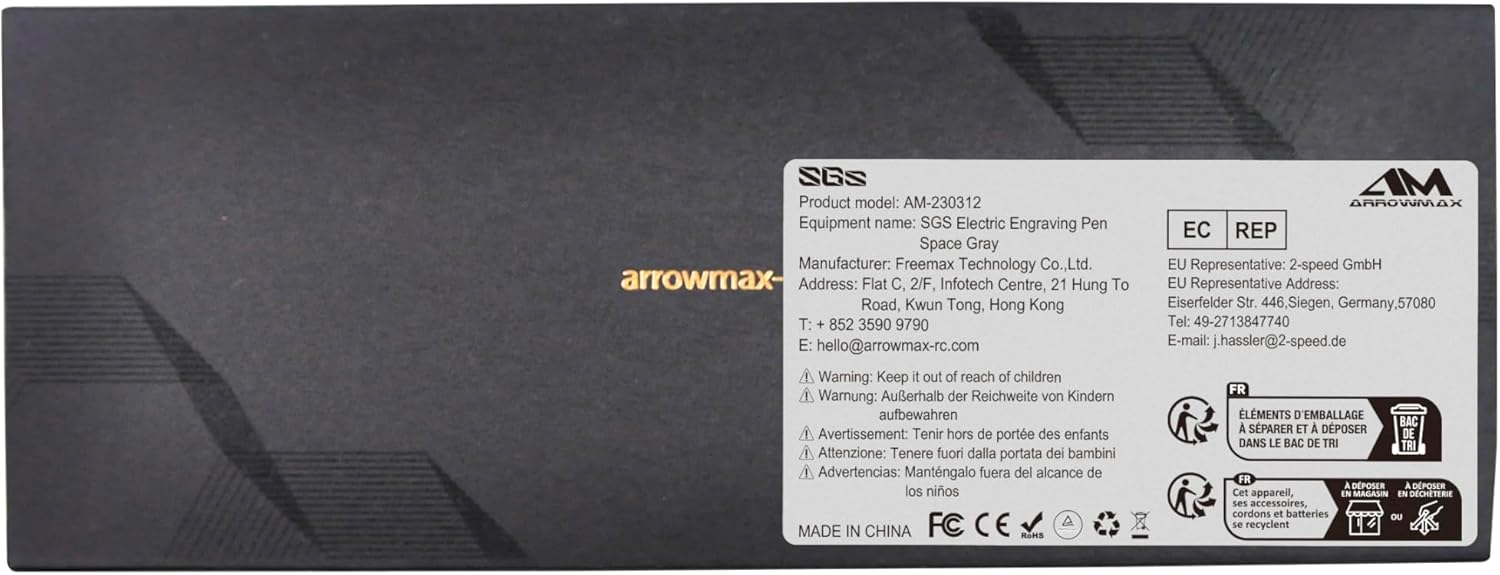
10 pav.: Produkto pakuotė su gamintojo duomenimis.