
1. Įvadas
The OWON HDS25 is a compact, multi-functional handheld device integrating a 2-channel oscilloscope and a 20,000-count multimeter. Designed for portability and versatility, it features a 3.5-inch LCD display, USB Type-C connectivity for charging and data transfer, and supports SCPI commands for remote control. This manual provides essential information for the safe and effective operation, maintenance, and troubleshooting of your HDS25 device.
2. Produktas baigtasview
2.1 Pagrindinės savybės
- 3 viename funkcionalumas: Combines a 2-channel oscilloscope and a 20,000-count True RMS multimeter.
- Osciloskopas: 25MHz bandwidth, 250MSa/s real-time sample rate, 8K record length.
- Multimetras: Matuoja AC/DC ttage, AC/DC current, resistance, capacitance, diode, and continuity.
- Ekranas: 3.5 colių didelės raiškos LCD.
- Ryšys: USB Type-C for charging and PC communication, supports SCPI commands.
- Perkeliamumas: Compact design with approximately 4 hours of continuous battery operation.
2.2 Įrenginio komponentai
The following image illustrates the main components of the OWON HDS25 device:
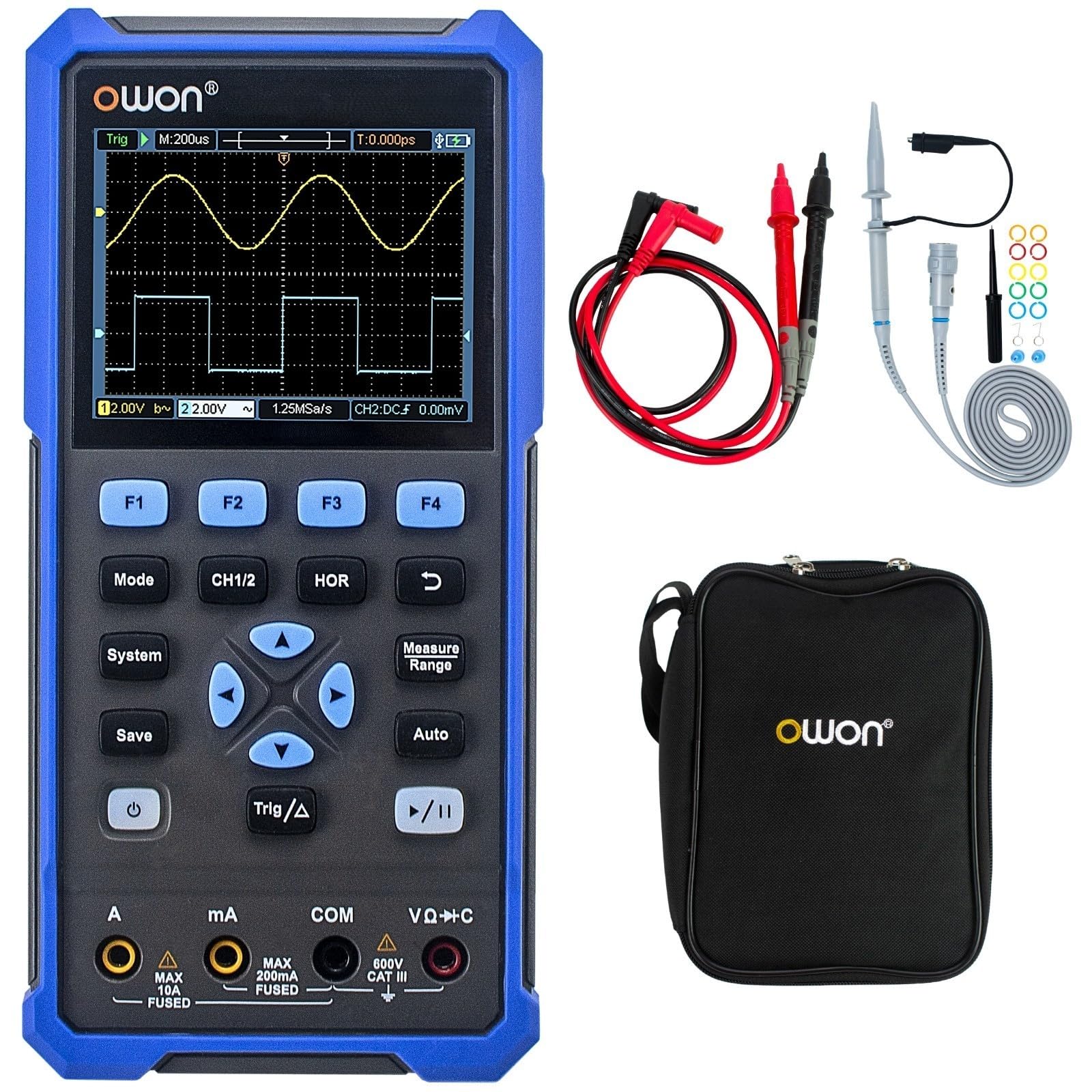
The device features a central 3.5-inch LCD screen for waveform display and measurement readings. Below the screen are function buttons (F1-F4), mode selection buttons (Mode, CH1/2, HOR, System, Save, Auto, Trig/Δ, Power, Play/Pause), and a directional pad for navigation. At the bottom, there are input jacks for current (A, mA), common ground (COM), and voltage/resistance/capacitance (VΩ+C) measurements.

2.3 Pridedami priedai
- C tipo USB kabelis
- Osciloskopo zondai (2)
- Zondo reguliavimo įrankis
- Multimetro bandymo laidai
- Apsauginis krepšys

3. Sąranka
3.1 Įrenginio įkrovimas
Before initial use, fully charge the device using the provided USB Type-C cable and a compatible power adapter (not included). The charging indicator on the device will show the charging status.
3.2 Zondų ir laidų prijungimas
- Osciloskopo zondai: Connect the BNC connector of the oscilloscope probes to the CH1 and CH2 input ports on the top of the device. Ensure a secure connection.
- Multimetro bandymo laidai: For multimeter functions, insert the red test lead into the VΩ+C jack and the black test lead into the COM jack. For current measurements, use the A or mA jacks as appropriate.
3.3 Įjungimas / išjungimas
Paspauskite ir palaikykite Galia button (usually marked with a circle and vertical line symbol) to turn the device on or off.
4. Naudojimo instrukcijos
4.1 Bendroji navigacija
- Naudokite Režimas button to switch between Oscilloscope and Multimeter modes.
- The directional pad (up, down, left, right) is used to navigate menus and adjust parameters.
- Mygtukai F1 į F4 correspond to on-screen menu options.
- The Sistema button accesses system settings.
- The Išsaugoti button allows saving waveforms or measurement data.
4.2 Osciloskopo režimas
In Oscilloscope mode, the device displays real-time waveforms. Use the following controls:
- CH1/2: Selects the active channel or displays both.
- HOR (Horizontal): Adjusts the time base (horizontal scale) of the waveform.
- Vertical Scale: Use the directional pad (up/down) to adjust the voltage scale for the selected channel.
- Trig/Δ (Trigger): Configures trigger settings (edge, level, mode) to stabilize the waveform display.
- Auto: Automatically adjusts vertical, horizontal, and trigger settings for a stable waveform display.
- Leisti / pristabdyti: Freezes or resumes the waveform acquisition.
4.3 Multimetro režimas
In Multimeter mode, the device functions as a digital multimeter. Use the directional pad to select the desired measurement function (Voltage, Current, Resistance, etc.). Ensure the test leads are connected to the correct input jacks for the selected measurement type.
- ttage Measurement (V): Connect leads in parallel with the circuit.
- Current Measurement (A/mA): Connect leads in series with the circuit. Ensure correct jack selection (A or mA) based on expected current.
- Varžos matavimas (Ω): Connect leads across the component when power is off.
- Continuity/Diode: For checking circuit continuity or diode function.
- Talpos matavimas (F): Connect leads across the capacitor when power is off.
5. Priežiūra
5.1 Valymas
Nuvalykite įrenginio išorę minkšta,amp cloth. Do not use abrasive cleaners or solvents. Ensure the device is powered off and disconnected from all power sources and measurement circuits before cleaning.
5.2 Akumuliatoriaus priežiūra
To prolong battery life, avoid fully discharging the battery frequently. Charge the device regularly, especially if it will be stored for an extended period. Store the device in a cool, dry place.
5.3 Saugykla
When not in use, store the HDS25 in its protective bag in a clean, dry environment away from direct sunlight, extreme temperatures, and high humidity.
6. Problemų sprendimas
Jei kyla problemų dėl OWON HDS25, žr. šias dažniausiai pasitaikančias problemas ir sprendimus:
| Problema | Galima priežastis | Sprendimas |
|---|---|---|
| Įrenginys neįsijungia. | Low battery or faulty power button. | Įkraukite įrenginį bent 30 minučių. Jei jis vis tiek nereaguoja, susisiekite su palaikymo tarnyba. |
| Oscilloskopo režimu nerodoma bangos forma. | Incorrect probe connection, wrong vertical/horizontal scale, or trigger settings. | Įsitikinkite, kad zondai yra tvirtai prijungti. Paspauskite Auto button. Adjust vertical (voltage) and horizontal (time) scales. Check trigger level. |
| Multimetro rodmenys yra netikslūs arba lygūs nuliui. | Incorrect lead connection, wrong measurement function selected, or open circuit. | Verify test leads are in the correct jacks for the selected function. Ensure proper connection to the circuit. Check for open circuits. |
| Įrenginys užstringa arba nereaguoja. | Programinės įrangos triktis. | Perform a soft reset by holding the power button until the device turns off, then restart. If the issue persists, contact support. |
7. Specifikacijos
| Funkcija | Specifikacija |
|---|---|
| Modelis | HDS25 |
| Pralaidumas | 25 MHz |
| Kanalai | 2 |
| Sample Įvertinkite | 250 MSa/s |
| Įrašo ilgis | 8K |
| Multimetro skaičiavimai | 20,000 |
| Ekranas | 3.5 colių LCD |
| Ryšys | USB Type-C (charging & data) |
| Baterijos veikimo laikas | apytiksliai 4 valandas |
| Sertifikatai | CE, RoHS, UL |
| Įtraukti daiktai | USB cable, probes, probe adjustment tool, multimeter leads, bag |
8. Garantija ir palaikymas
8.1 Informacija apie garantiją
The OWON HDS25 comes with a 3 metų gamintojo garantija for the main unit and a 1 metų garantija for included accessories. Please retain your proof of purchase for warranty claims.
8.2 Pagalba klientams
For technical assistance, troubleshooting, or warranty inquiries, please contact OWON customer support. You can also find the latest user manual and support resources on the official OWON websvetainė (owon.co.jp) or on the product page where you purchased the device.