
1. Įvadas
This manual provides detailed instructions for the safe and effective operation of your Andoer Mini WiFi Action Camera L11. This compact digital video camera is designed for capturing high-quality 1080P video at 30 frames per second, featuring a 0.96-inch LCD screen, built-in rechargeable battery, motion detection, and versatile mounting options. Please read this manual thoroughly before using the device.
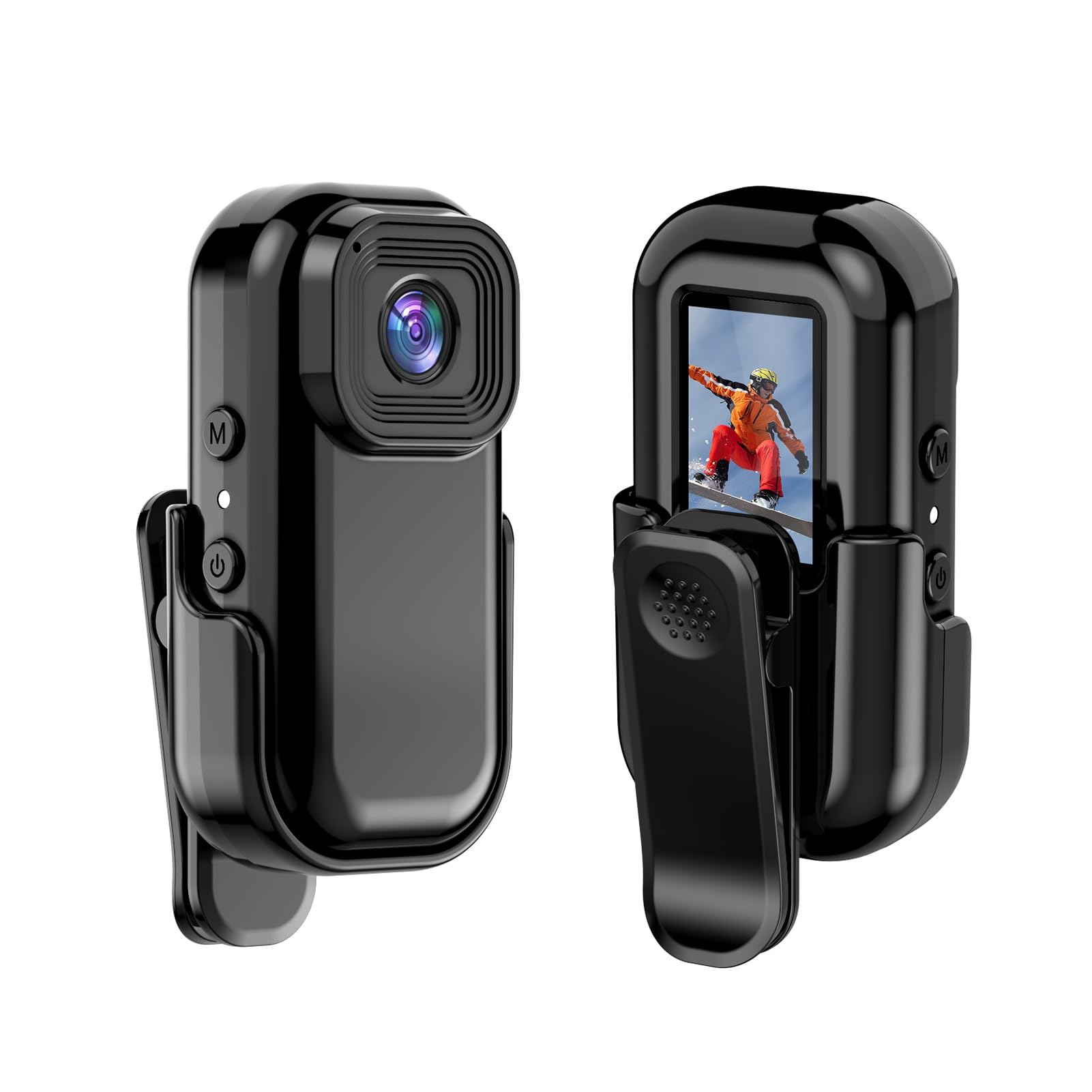
Vaizdas: Priekinė ir galinė dalys view of the Andoer Mini WiFi Action Camera L11, showing the lens and the 0.96-inch LCD screen.
2. Pakuotės turinys
Patikrinkite, ar pakuotėje yra visi toliau išvardyti daiktai. Jei kurių nors daiktų trūksta arba jie pažeisti, susisiekite su klientų aptarnavimo tarnyba.
- 1 x Andoer Mini WiFi Action Camera L11
- 1 x apsauginis dangtelis
- 1 x 1/4in Adapter Mount
- 1 x Back Clip Mount
- 1 x kortelių skaitytuvas
- 1 x tipo C laidas
- 1 x Naudotojo vadovas (šis dokumentas)
3. Produkto ypatybės
- Aukštos kokybės vaizdo įrašas: Records in 1080P at 30 frames per second, suitable for various applications including live broadcasting and video conferencing.
- Kompaktiškas ir nešiojamas: Super mini size allows for easy portability and discreet placement.
- Magnetinis korpusas: Features a magnetic base for secure attachment to smooth metal surfaces.
- Seamless WiFi Connectivity: Connects wirelessly to a dedicated app for live view ir kontroliuoti.
- Universalus montavimas: Includes a 1/4-inch adapter mount and a back clip mount for diverse installation options.

Vaizdas: pvzamples of application scenarios for the camera, including parachute jumping, cycling, parent-child activities, and skiing.

Image: The camera being used as a portable video recorder in various outdoor activities like camping, cycling, climbing, and sports.
4. Sąranka
4.1 Akumuliatoriaus įkrovimas
Before first use, fully charge the camera's built-in 400mAh battery. Connect the provided Type-C cable to the camera's USB port and the other end to a standard USB power adapter (5V, ≥1A). The charging indicator light will typically show the charging status and turn off or change color when fully charged.
4.2 Atminties kortelės įdėjimas
The camera supports TF (Micro SD) cards up to 128GB. Ensure the card is formatted to FAT32 for optimal performance. Gently insert the TF card into the designated slot until it clicks into place. To remove, press the card in slightly until it springs out.
Note: A memory card is required for recording video and taking photos.
4.3 Įjungimas / išjungimas
- Norėdami įjungti: Press and hold the Power button (usually marked with a power symbol) for a few seconds until the screen illuminates.
- Norėdami išjungti: Press and hold the Power button again for a few seconds until the screen turns off.
5. Naudojimo instrukcijos
5.1 Pagrindinės operacijos
The 0.96-inch color display provides visual feedback for modes and settings. Use the navigation buttons (if present, typically 'M' for Mode and another for selection/shutter) to cycle through options and confirm selections.
5.2 Vaizdo įrašymas
In video mode, press the Shutter/Record button to start recording. Press it again to stop. Videos are saved in AVI format at 1920x1080P resolution. The camera supports loop recording with 3-minute segments.

Image: The camera's screen displaying a family scene, indicating video recording at 1920x1080P resolution.
5.3 Fotografavimas
Switch to photo mode using the Mode button. Press the Shutter button to capture a still image. Photos are saved in JPG format.

Image: Icons representing photo, video, and audio recording modes, illustrating the camera's ability to capture various moments.
5.4 Judesio aptikimas
The camera features motion detection capabilities. Refer to the on-screen menu or the dedicated app for instructions on how to activate and configure this feature. When enabled, the camera will automatically begin recording when motion is detected within its field of view.
6. WiFi ryšys
The Andoer L11 camera supports wireless WiFi connectivity for remote control and live viewing via a smartphone application. Follow these general steps:
- Download the official Andoer camera app from your device's app store (iOS or Android).
- Power on the camera and activate its WiFi mode (refer to the camera's on-screen menu).
- On your smartphone, go to WiFi settings and connect to the camera's WiFi network (SSID and password will be displayed on the camera screen or in the app).
- Open the Andoer app. You should now see a live view from the camera and be able to control recording and settings remotely.

Vaizdas: išmanusis telefonas, rodantis tiesioginį vaizdą view from the camera, demonstrating the WiFi connectivity feature.
7. Montavimo parinktys
The Andoer L11 offers flexible mounting solutions:
- Magnetinis laikiklis: The camera body has a magnetic feature, allowing it to be securely attached to smooth metal surfaces like refrigerator doors or metal poles.
- 1/4-inch Adapter Mount: Use the included 1/4-inch adapter mount to attach the camera to standard tripods, monopods, or other accessories with a 1/4-inch screw.
- Back Clip Mount: The back clip mount allows you to attach the camera to clothing, backpacks, or other thin objects for hands-free recording.
8. Priežiūra
- Valymas: Fotoaparato korpusą valykite minkšta, sausa šluoste. Objektyvui valyti naudokite specializuotą objektyvo valymo šluostę ir tirpalą. Venkite stiprių cheminių medžiagų.
- Saugykla: Fotoaparatą laikykite vėsioje, sausoje vietoje, toliau nuo tiesioginių saulės spindulių ir ekstremalių temperatūrų.
- Akumuliatoriaus priežiūra: Ilgalaikio sandėliavimo metu įkraukite akumuliatorių maždaug iki 50 % kas kelis mėnesius, kad palaikytumėte jo būklę.
- Firmware atnaujinimai: Check the official Andoer websvetainėje periodiškai ieškokite visų galimų programinės įrangos atnaujinimų, kad užtikrintumėte optimalų našumą ir naujas funkcijas.
9. Problemų sprendimas
| Problema | Galimas sprendimas |
|---|---|
| Kamera neįsijungia. | Įsitikinkite, kad akumuliatorius visiškai įkrautas. Prijunkite prie maitinimo šaltinio ir bandykite dar kartą. |
| Nepavyksta įrašyti vaizdo / fotografuoti. | Check if a TF card is inserted and properly formatted. Ensure there is sufficient storage space. |
| „Wi-Fi“ ryšio problemos. | Ensure WiFi is enabled on the camera and your smartphone. Restart both devices. Verify the correct app is installed. |
| Prasta vaizdo / vaizdo kokybė. | Ensure the lens is clean. Check lighting conditions. Verify camera settings are correct (e.g., resolution). |
| Kamera užstringa arba nereaguoja. | Perform a soft reset by holding the power button until it turns off, then restart. If persistent, remove and reinsert the memory card. |
10. Specifikacijos
| Funkcija | Detalė |
|---|---|
| Mašinos tipas | L11 |
| Objektyvo kampas | 140 laipsnių |
| TFT ekranas | 0.96 colio spalvotas ekranas |
| Vaizdo raiška | 1920 * 1080P |
| Baterija | 400 mAh |
| Vaizdo įrašas File Formatas | AVI |
| Nuotraukos formatas | JPG |
| Ciklo vaizdo įrašas | 3 minučių |
| Įrašymas File Formatas | WAV (Audio) |
| Darbinė drėgmė | 30 % |
| Darbinė temperatūra | Nuo -25 iki + 75 ° C (nuo -13 iki + 167 ° F) |
| Maitinimo šaltinis | USB ttage 5V, srovė ≥1A |
| Atminties kortelė | TF kortelė, palaiko iki 128G |
| Ryšio technologija | Wi-Fi |
| Formos faktorius | Kompaktiškas |
| Prekės svoris | 4.2 uncijos (apie 119 g) |
| Pakuotės matmenys | 3.94 x 2.36 x 1.97 colio |
11. Saugos informacija
- Do not expose the camera to extreme temperatures outside the specified operating range (-25°C to +75°C).
- Avoid operating the camera in humidity levels exceeding 30%.
- Keep the device away from water and other liquids unless explicitly stated as waterproof.
- Nebandykite ardyti ar modifikuoti fotoaparato, nes tai panaikins garantiją ir galite jį sugadinti.
- Use only the specified power supply (USB 5V, ≥1A) for charging.
- Laikyti vaikams nepasiekiamoje vietoje.