
SENTRY HPXBTA1000
SENTRY BT Pro Sq Headset User Manual
Model: HPXBTA1000
1. Įvadas
Welcome to the user manual for your new SENTRY BT Pro Sq Headset with Active Noise Canceling. This manual provides essential information on setting up, operating, maintaining, and troubleshooting your headset to ensure optimal performance and longevity. Please read this manual thoroughly before using the product.
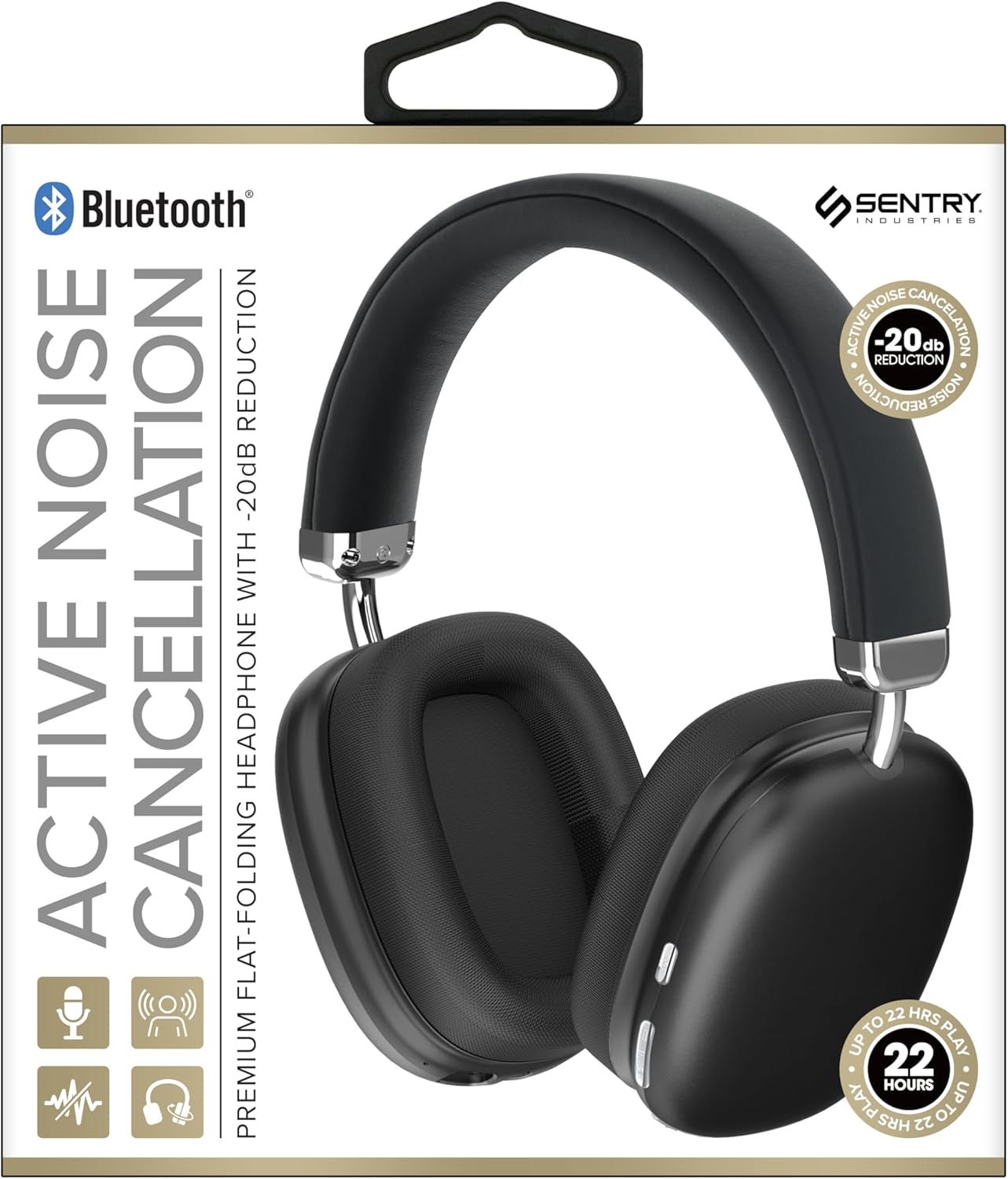
This image displays the SENTRY BT Pro Sq Headset in black, highlighting its over-ear design, adjustable headband, and the control buttons located on the earcups. The packaging indicates features such as Bluetooth connectivity, Active Noise Cancellation with -20dB reduction, and up to 22 hours of play time.
2. Svarbi saugos informacija
To ensure safe and proper operation, please observe the following guidelines:
- Saugokite ausines nuo ekstremalių temperatūrų, drėgmės ar ėsdinančių medžiagų.
- Venkite ausinių numetimo ir stiprių smūgių.
- Neardykite ir nebandykite taisyti ausinių patys. Tai panaikins garantiją.
- Ausines valykite tik minkštu, sausu skudurėliu. Nenaudokite skystų valiklių.
- Ilgalaikis klausymasis dideliu garsumu gali pažeisti klausą. Sureguliuokite garsumą iki saugaus lygio.
- Do not use the headset in situations where inability to hear ambient sounds could be dangerous (e.g., driving, cycling, walking in traffic).
3. Pakuotės turinys
Patikrinkite pakuotę, ar joje yra šie daiktai:
- SENTRY BT Pro Sq Headset
- USB įkrovimo laidas
- Vartotojo vadovas
4. Produktas baigtasview
The SENTRY BT Pro Sq Headset features an over-ear design with soft ear pads for comfort and noise isolation. It includes an adjustable folding headband for portability. Key components include:
- Ausinės: House the audio drivers and provide passive noise isolation.
- Galvos juosta: Adjustable for a comfortable fit, designed to fold for compact storage.
- Valdymo mygtukai: Located on the earcups for power, volume, track control, and Active Noise Cancellation (ANC).
- Mikrofonas: Integruota laisvų rankų įranga skambučiams.
- Įkrovimo prievadas: USB įkrovimo laido prijungimui.
Refer to the product image in the Introduction section for visual identification of these components.
5. Sąranka
5.1 Ausinių įkrovimas
- Prijunkite mažąjį USB įkrovimo laido galą prie ausinių įkrovimo prievado.
- Prijunkite didesnį USB įkrovimo laido galą prie USB maitinimo adapterio (nepridedamas) arba kompiuterio USB prievado.
- The LED indicator on the headset will illuminate to show charging status. It will change color or turn off when fully charged.
- Pilnas įkrovimas paprastai trunka maždaug 2–3 valandas.
5.2 Susiejimas su „Bluetooth“ įrenginiais
Before using the headset wirelessly, you must pair it with your Bluetooth-enabled device (smartphone, laptop, tablet, smart speaker, gaming console).
- Įsitikinkite, kad ausinės yra visiškai įkrautos.
- With the headset powered off, press and hold the Power button for approximately 5-7 seconds until the LED indicator flashes rapidly, indicating pairing mode.
- „Bluetooth“ įrenginyje įjunkite „Bluetooth“ ir ieškokite naujų įrenginių.
- Select "SENTRY BT Pro Sq" (or similar name) from the list of available devices.
- Once paired, the LED indicator on the headset will stop flashing and may turn solid blue or off, depending on the model.
- Įjungus ausines, jos automatiškai bandys prisijungti prie paskutinio suporuoto įrenginio.
6. Naudojimo instrukcijos
6.1 Maitinimo įjungimas/išjungimas
- Maitinimas: Press and hold the Power button for 2-3 seconds. The LED indicator will light up.
- Išjungti: Press and hold the Power button for 3-4 seconds. The LED indicator will turn off.
6.2 Aktyvus triukšmo slopinimas (ANC)
The headset features Active Noise Cancellation to reduce ambient noise.
- Suaktyvinti ANC: Locate the ANC button (if separate) or press the designated control. The ANC indicator light will turn on.
- Išjungti ANC: Dar kartą paspauskite ANC mygtuką. ANC indikatoriaus lemputė užges.
6.3 Media Control (Touch Control)
Control your audio playback directly from the headset:
- Leisti / pristabdyti: Vieną kartą palieskite daugiafunkcį mygtuką.
- Pagarsink: Tap the Volume Up button.
- Patildyti: Tap the Volume Down button.
- Kitas takelis: Dukart spustelėkite daugiafunkcį mygtuką.
- Ankstesnis takelis: Tris kartus spustelėkite daugiafunkcį mygtuką.
6.4 Skambučių valdymas
Manage phone calls with the built-in microphone:
- Atsiliepti į skambutį: Single tap the multi-function button when a call comes in.
- Baigti skambutį: Single tap the multi-function button during a call.
- Atmesti skambutį: Kai skambinate, 2 sekundes palaikykite nuspaudę daugiafunkcį mygtuką.
7. Priežiūra ir priežiūra
- Valymas: Wipe the headset with a soft, dry, lint-free cloth. Do not use abrasive cleaners, alcohol, or chemical solvents.
- Saugykla: When not in use, store the headset in a cool, dry place, away from direct sunlight and extreme temperatures. Utilize the folding headband feature for compact storage.
- Akumuliatoriaus priežiūra: To preserve battery life, charge the headset regularly, even if not used for extended periods. Avoid fully discharging the battery frequently.
- Venkite vandens: The headset is not waterproof. Keep it away from water and moisture.
8. Problemų sprendimas
Jei kyla problemų dėl ausinių, žr. toliau pateiktas dažniausiai pasitaikančias problemas ir sprendimus:
| Problema | Galimas sprendimas |
|---|---|
| Ausinės neįsijungia. | Ensure the headset is fully charged. Connect to a power source and allow it to charge for at least 30 minutes before attempting to power on again. |
| Negalima susieti su Bluetooth įrenginiu. | Ensure the headset is in pairing mode (LED flashing rapidly). Make sure Bluetooth is enabled on your device and it is within range (10 meters). Try restarting both the headset and your device. |
| Nėra garso iš ausinių. | Check the volume level on both the headset and your connected device. Ensure the headset is properly paired and connected. Try playing audio from a different application or device. |
| Aktyvus triukšmo slopinimas (ANC) neveikia. | Ensure ANC is activated. Make sure the earcups are properly sealed around your ears. ANC is most effective against low-frequency, constant noise. |
| Mikrofonas neveikia. | Ensure the headset is connected and selected as the input device on your computer or smartphone. Check privacy settings on your device that might restrict microphone access. |
9. Specifikacijos
| Funkcija | Detalė |
|---|---|
| Modelio pavadinimas | HPXBTA1000 |
| Ryšio technologija | Belaidis ryšys („Bluetooth“) |
| Triukšmo valdymas | Aktyvus triukšmo slopinimas |
| Ausų išdėstymas | Virš ausies |
| Formos faktorius | Virš ausies |
| Valdymo tipas | Medijos valdymas, lietimas |
| Dažnių diapazonas | nuo 20 Hz iki 20,000 Hz |
| Garso tvarkyklės tipas | Dinaminis vairuotojas |
| Suderinami įrenginiai | Smartphones, Laptops, Tablets, Smart Speakers, Gaming Consoles |
| Spalva | Juoda |
| Prekės svoris | 1.2 svaro |
| UPC | 080068501503 |
| Gamintojas | SENTRY |
10. Garantija ir palaikymas
SENTRY products are designed and manufactured to the highest quality standards. For information regarding warranty coverage, technical support, or service inquiries, please refer to the warranty card included with your product or visit the official SENTRY websvetainėje. Prašome išsaugoti pirkimo įrodymą garantiniams reikalavimams.
Ask a question about this manual
Ask about setup, troubleshooting, compatibility, parts, safety, or missing instructions. Manuals+ will review the question and use this page’s manual context to help answer it.