
Įvadas
This manual provides detailed instructions for the installation, operation, and maintenance of your DELLA 6000 BTU Window Air Conditioner. Please read this manual thoroughly before using the appliance and retain it for future reference.
Saugos informacija
Naudodami elektros prietaisus, visada laikykitės pagrindinių saugos priemonių, kad sumažintumėte gaisro, elektros smūgio ir asmenų sužalojimo riziką.
- Įsitikinkite, kad įrenginys tinkamai įžemintas.
- Nenaudokite įrenginio su pažeistu laidu arba kištuku.
- Nekiškite pirštų ar pašalinių daiktų į oro įleidimo / išleidimo angas.
- Prieš valydami ar atlikdami bet kokią techninę priežiūrą, atjunkite įrenginį nuo elektros tinklo.
- Degias medžiagas laikykite toliau nuo įrenginio.
Produktas baigtasview
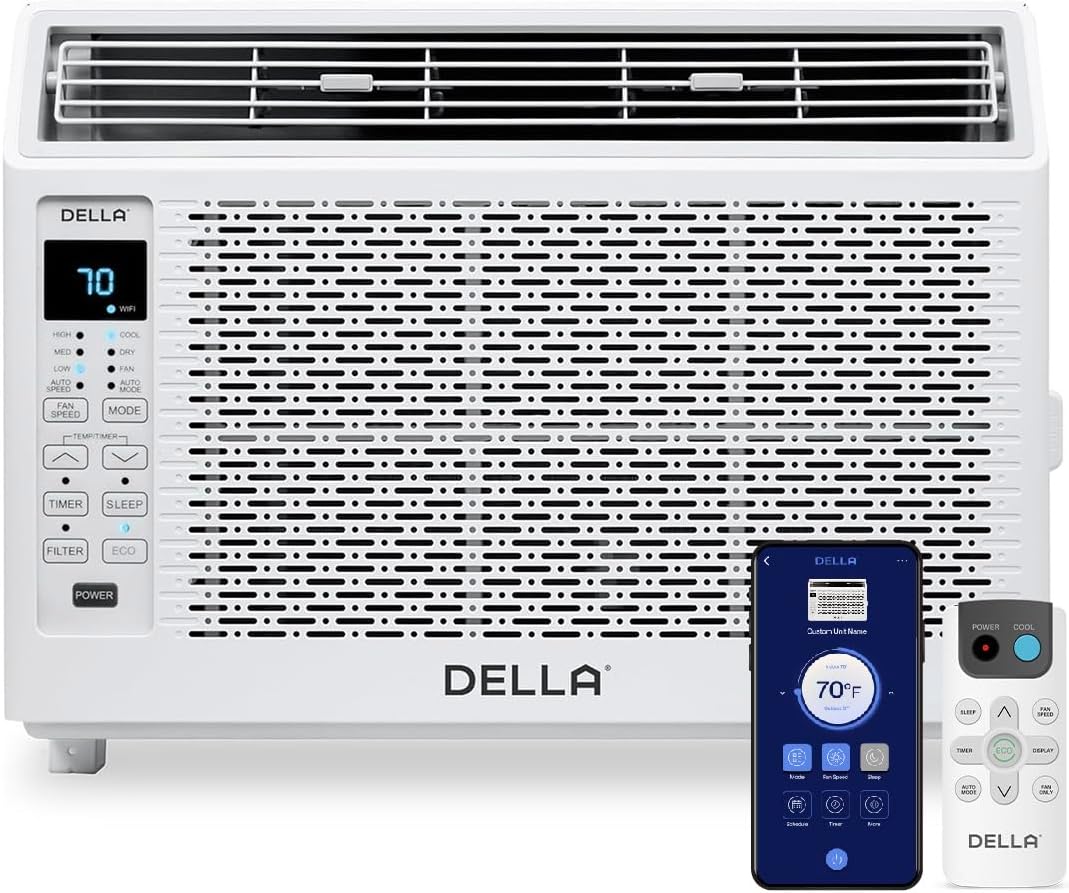
Figure 1: DELLA 6000 BTU Window Air Conditioner Unit, Remote Control, and Smartphone App Interface.
Valdymo skydelis
The unit features an intuitive control panel with various buttons and indicator lights for easy operation.
- Maitinimo mygtukas: Įjungia arba išjungia įrenginį.
- Režimo mygtukas: Cycles through Cool, Dry (Dehumidifier), Fan, Auto Mode, and ECO Mode.
- Ventiliatoriaus greičio mygtukas: Adjusts fan speed (High, Med, Low, Auto Speed).
- Temp/Timer Buttons: Adjusts temperature settings or sets timer.
- Miego mygtukas: Activates sleep mode for quiet, energy-efficient operation overnight.
- Filtro mygtukas: Indicates when the filter needs cleaning.
- WiFi indikatorius: Rodo „Wi-Fi“ ryšio būseną.
Nuotolinio valdymo pultas

Figure 2: Remote Control for the DELLA Air Conditioner.
The remote control allows for convenient operation of all unit functions from a distance. Ensure batteries are correctly installed.
Montavimas
The DELLA 6000 BTU Window Air Conditioner features a T-design for simplified installation.
Diegimo žingsniai

Figure 3: T-design installation allows for flexible window opening.

Figure 4: Simplified 3-step installation process.
- Step 1: Secure into window frame. Place the unit into the window opening, ensuring it is securely seated.
- Step 2: Mount with four screws. Fasten the unit to the window frame using the provided screws for stability.
- Step 3: Extend side panels into wall. Extend the accordion side panels to fill the gap between the unit and the window frame, providing insulation and reducing air leaks.
Montavimo rinkinio komponentai

Figure 5: Included installation kit components.
The installation kit includes filler panels, insulation strips, lock frame & sash lock, screws, window sash seal, and a top mounting rail to ensure a secure and efficient installation.
Gaminio matmenys

Figure 6: Unit dimensions and recommended window opening.
The unit dimensions are approximately 15.94"D x 16.02"W x 12.05"H. It is designed for window widths between 23"-34" and requires at least 14.5" vertical clearance.
Naudojimo instrukcijos
Modes and Fan Speeds

Figure 7: Available operating modes and fan speeds.
The unit offers 5 operating modes (Cool, Auto, Dehumidify, Fan Only, ECO Mode) and 4 fan speeds (Auto, Low, Mid, High) to suit various comfort needs. Use the 'Mode' and 'Fan Speed' buttons on the control panel or remote to select your desired settings.
Temperatūros kontrolė
Use the up and down arrow buttons on the control panel or remote to set your desired temperature. The digital display will show the current setting.
Smart Features (Wi-Fi Control)

Figure 8: Control your unit wirelessly with the Della+ APP.

Figure 9: Della+ app supports Google Assistant and Alexa for voice control.
Download the free Della+ app to control your unit from anywhere. The app allows for remote control, scheduling, and integration with smart home systems like Google Assistant and Alexa.
Geo Location Function

Figure 10: Smart Geo Location feature for automatic operation.
The Geo Location feature allows the unit to automatically turn on or off based on your proximity to your home. This feature can be configured via the Della+ app.
Video 1: Demonstration of the Geo Location Function setup and customization within the Della+ app.
Miego režimas

Figure 11: Intelligent sleep mode adjusts temperature for optimal comfort.
Intelligent sleep mode automatically adjusts the temperature overnight to maintain comfort and save energy. Activate it using the 'Sleep' button.
Laikmačio funkcija
The 24-hour auto on/off timer allows you to program the unit to turn on or off at specific times, enhancing convenience and energy efficiency.
Priežiūra
Daugkartinio naudojimo filtrų valymas

Figure 12: The unit features a washable and reusable filter.
The unit is equipped with a washable and reusable filter. A clean filter helps maintain optimal cooling performance and air quality. When the 'Filter' indicator light illuminates, it's time to clean the filter.
- Išjunkite ir atjunkite oro kondicionierių.
- Remove the front panel and slide out the air filter.
- Nuplaukite filtrą šiltu muiluotu vandeniu. Kruopščiai nuskalaukite.
- Prieš vėl įdėdami filtrą, leiskite jam visiškai išdžiūti.
- Pakeiskite priekinį skydelį.
Bendroji priežiūra
- Nuvalykite įrenginio išorę minkšta, damp audinys.
- Nenaudokite stiprių chemikalų ar abrazyvinių valiklių.
- Įsitikinkite, kad drenažo zona nėra užtvaruota.
Trikčių šalinimas
If you experience issues with your air conditioner, refer to the following common problems and solutions:
| Problema | Galima priežastis | Sprendimas |
|---|---|---|
| Įrenginys neįsijungia | Nėra elektros; suveikė grandinės pertraukiklis; įrenginys atjungtas nuo elektros tinklo. | Patikrinkite maitinimo šaltinį; atstatykite grandinės pertraukiklį; įsitikinkite, kad kištukas yra iki galo įkištas. |
| Įrenginys nevėsina efektyviai | Dirty air filter; blocked air intake/outlet; room too large; windows/doors open. | Clean air filter; clear obstructions; ensure unit is sized correctly for room; close windows/doors. |
| Triukšmingas veikimas | Atsilaisvinusios dalys; įrenginys nelygus; ventiliatoriaus užsikimšimas. | Check for loose components; ensure unit is level; remove any fan obstructions. |
| Lauke varva vanduo | Normalus veikimas (kondensatas). | This is normal during cooling. Ensure proper drainage. |
Specifikacijos
| Funkcija | Detalė |
|---|---|
| Prekės ženklo pavadinimas | Della |
| Modelio informacija | 048-TL-W6KWD |
| Gaminio matmenys | 15.94 x 16.02 x 12.05 colio |
| Prekės modelio numeris | 048-TL-W6KWD |
| Efektyvumas | Energetiškai efektyvus |
| Talpa | 0.5 tonos |
| Triukšmas | 51 dB |
| Diegimo tipas | Langas |
| Dalies numeris | 048-TL-W6KW_2 |
| Formos faktorius | Langų oro kondicionierius |
| Ypatingos savybės | Nuotolinio valdymo pultas |
| ttage | 115 voltai (kintamoji srovė) |
| Vattage | 517.5 vatų |
| Baterijos įtrauktos? | Nr |
| Grindų plotas | 250 kvadratinių pėdų |
| Aušinimo galia | 6000 britų šiluminiai vienetai |
| BEE žvaigždučių įvertinimas | Taip |
| Sezoninis energijos vartojimo efektyvumo koeficientas (SEER) | 11 |
| Maitinimo šaltinis | Su laidu elektra |
Garantija ir palaikymas
Your DELLA 6000 BTU Window Air Conditioner comes with a 1 metų garantija. For any inquiries or technical assistance, Della provides 24/7 klientų aptarnavimas.
Prašome apsilankyti „Della“ parduotuvė „Amazon“ platformoje Norėdami gauti daugiau informacijos arba susisiekti su palaikymo tarnyba.