
Įvadas
This manual provides detailed instructions for the safe and effective use of your Andoer Portable Digital Camera. Please read this manual thoroughly before operating the device and retain it for future reference.
Pakuotės turinys
Patikrinkite, ar pakuotėje yra visi toliau išvardyti daiktai:
- 1 x Andoer Digital Camera
- 1 x 32GB atminties kortelė
- 1 x USB laidas (C tipo)
- 1 x Valymo šluostė
- 1 x dirželis
- 1 x saugojimo krepšys
- 1 x Vartotojo vadovas
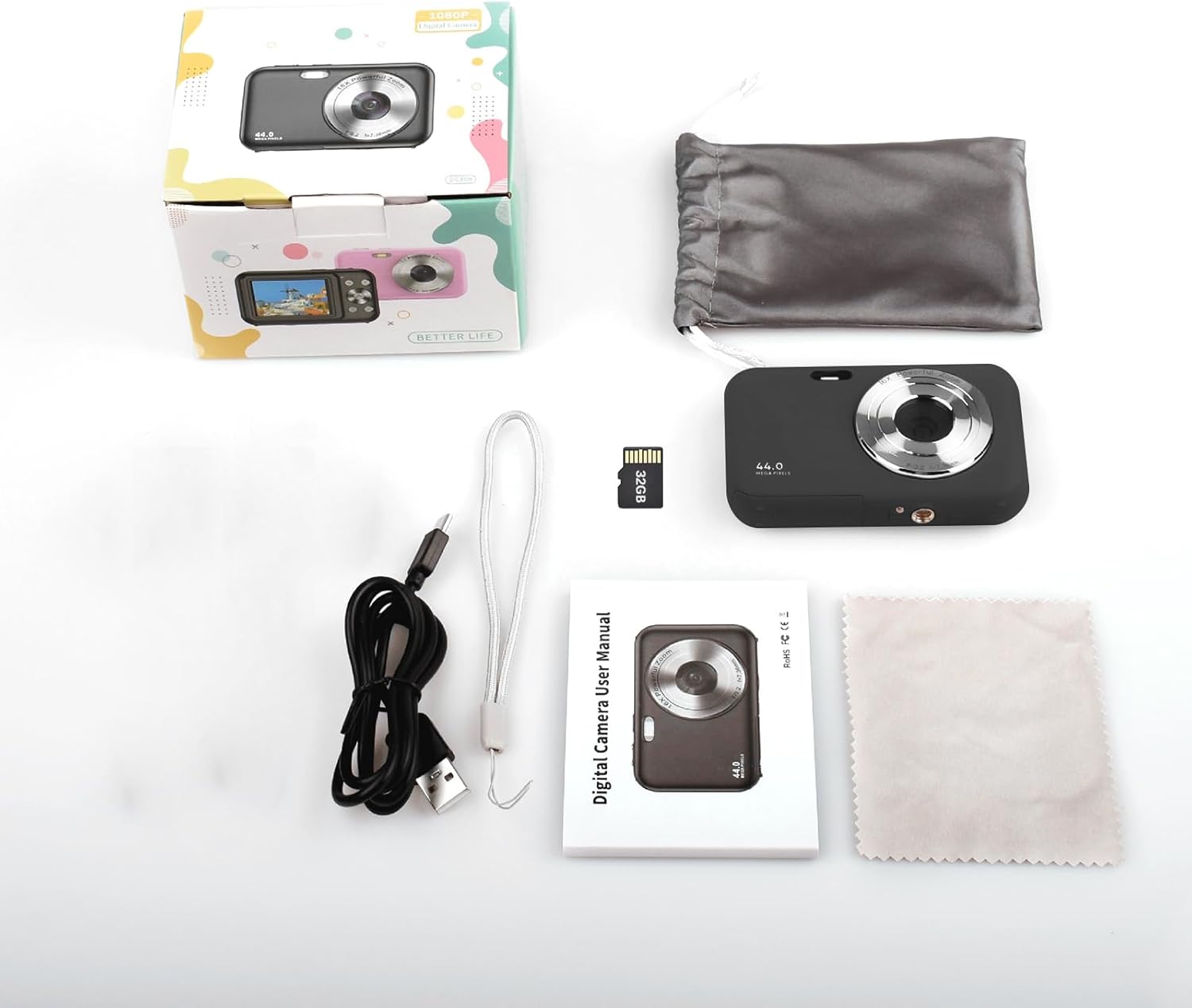
Image: Contents of the Andoer Digital Camera package.
Fotoaparatas baigtasview
Susipažinkite su įvairiomis savo fotoaparato dalimis.

Image: Multi-angle view of the Andoer Digital Camera, highlighting its compact design and button layout.
- Priekyje: Lens, Flash, Microphone.
- Į viršų: Power Button, Shutter Button.
- Atgal: 2.4-inch IPS Screen, Navigation Buttons (Up, Down, Left, Right, OK), Menu Button, Mode Button, Zoom (W/T).
- Šonas: USB Type-C Port.
- Apačia: Battery/Memory Card Compartment.
Sąranka
1. Akumuliatoriaus įkrovimas
The camera is equipped with a built-in 700mAh rechargeable lithium battery. Before first use, fully charge the battery.
- Connect the included USB Type-C cable to the camera's USB port.
- Kitą USB kabelio galą prijunkite prie USB maitinimo adapterio (nepridedamas) arba kompiuterio USB prievado.
- Užsidegs įkrovimo indikatoriaus lemputė. Kai įkrovimas bus baigtas, ji užges arba pakeis spalvą.
Pastaba: The camera can be used while charging. A full charge provides approximately 150 minutes of continuous shooting or 90 minutes of video recording.

Image: Battery life information for the 700mAh battery.
2. Atminties kortelės įdėjimas
The camera supports a 32GB memory card (included). Ensure the camera is powered off before inserting or removing the memory card.
- Locate the battery/memory card compartment cover on the bottom of the camera.
- Atidarykite dangtelį.
- Insert the 32GB memory card into the designated slot with the metal contacts facing the correct direction (refer to the diagram inside the compartment if available) until it clicks into place.
- Saugiai uždarykite skyriaus dangtelį.
Svarbu: Format the memory card in the camera's settings menu before first use to ensure optimal performance.
Naudojimo instrukcijos
1. Įjungimas/išjungimas
- Norėdami įjungti, paspauskite ir palaikykite Maitinimo mygtukas on the top of the camera.
- Norėdami išjungti, paspauskite ir palaikykite Maitinimo mygtukas again. The camera also features an auto power-off function (configurable in settings).
2. Fotografavimas
The camera captures photos up to 44MP resolution.
- Įjunkite fotoaparatą.
- Ensure the camera is in photo mode (indicated on the 2.4-inch IPS screen). If not, press the Režimo mygtukas persijungti.
- Frame your shot using the IPS screen.
- Paspauskite Užrakto mygtukas halfway down to focus, then press it fully to take the picture.

Vaizdas: pvzample of a high-resolution photo taken with the 44MP camera.
3. Vaizdo įrašų įrašymas
The camera records videos in 1080P resolution.
- Įjunkite fotoaparatą.
- Paspauskite Režimo mygtukas to switch to video recording mode.
- Paspauskite Užrakto mygtukas to start recording. A red indicator will typically appear on the screen.
- Paspauskite Užrakto mygtukas dar kartą, kad sustabdytumėte įrašymą.

Image: Screen view during 1080P video recording.
4. Skaitmeninio priartinimo naudojimas
The camera features 16X digital zoom.
- In photo or video mode, press the T (Telephoto) button priartinti.
- Paspauskite W (Wide-angle) button norėdami nutolinti.

Image: Comparison of 1x and 16x digital zoom effects.
5. Kitos funkcijos
- Laikmatis: Set a delay (e.g., 2s, 5s, 10s) before a photo is taken. Access this option in the camera's menu.
- Nepertraukiamas fotografavimas: Take multiple photos in quick succession. This setting is also found in the menu.
- Anti-drebėjimas: Digital image stabilization helps reduce blur from camera movement. This feature is typically enabled by default or can be toggled in settings.
- Atkūrimas: Paspauskite Atkūrimo mygtukas (often indicated by a triangle icon) to view photos and videos. Use the navigation buttons to browse.
- Meniu nustatymai: Paspauskite Meniu mygtukas to access various camera settings, including resolution, white balance, exposure, date/time, and formatting the memory card.
Perkeliama Files to a Computer or Phone
You can transfer photos and videos from the camera to a computer or a mobile phone.
1. Via USB Cable (to Computer)
- Prijunkite fotoaparatą prie kompiuterio naudodami pridedamą USB C tipo laidą.
- Įjunkite fotoaparatą.
- The camera should appear as a removable disk or media device on your computer.
- Open the camera's folder and copy the desired files prie kompiuterio.
2. Via Memory Card Reader (to Computer/Phone)
For direct transfer from the memory card, you can use a card reader.
- Remove the memory card from the camera.
- Insert the memory card into a compatible card reader.
- Connect the card reader to your computer or mobile phone (via an OTG adapter if necessary).
- Prisijunkite prie files on the memory card and transfer them.

Image: OTG usage diagram for transferring files from memory card to phone.
Priežiūra
- Kameros korpuso valymas: Kameros korpusą nuvalykite minkšta, sausa šluoste. Jei nešvarumai sunkiai įveikiami, šiek tiek pamirkykite.ampNuplaukite šluostę vandeniu. Venkite stiprių cheminių medžiagų.
- Objektyvo valymas: Use the included cleaning cloth or a specialized lens cleaning cloth. Gently wipe the lens in a circular motion. Do not use abrasive materials.
- Ekrano priežiūra: The 2.4-inch IPS screen can be cleaned with a soft, lint-free cloth. Avoid pressing too hard.
- Saugykla: When not in use for extended periods, store the camera in the provided storage bag in a cool, dry place, away from direct sunlight and extreme temperatures.
- Akumuliatoriaus priežiūra: Recharge the battery regularly, even if the camera is not used frequently, to maintain battery health. Avoid fully discharging the battery for long periods.
Trikčių šalinimas
| Problema | Galima priežastis | Sprendimas |
|---|---|---|
| Kamera neįsijungia. | Baterija išsikrovusi arba netinkamai įdėta. | Visiškai įkraukite akumuliatorių. Įsitikinkite, kad akumuliatorius tinkamai įdėtas. |
| Negalima fotografuoti / įrašyti vaizdo įrašų. | Atminties kortelė pilna, neįdėta arba sugadinta. | Patikrinkite atminties kortelės įdėjimą. Ištrinkite nereikalingą fileArba pakeiskite kortelę. Formatuokite kortelę (tai ištrins visus duomenis). |
| Vaizdai neryškūs. | Lens is dirty, insufficient light, or camera shake. | Clean the lens. Ensure adequate lighting. Hold the camera steady or enable anti-shaking. |
| Kamera užstringa arba nereaguoja. | Programinės įrangos gedimas arba senka baterija. | Remove and reinsert the battery (if possible) or press and hold the power button for 10 seconds to force a shutdown. Recharge the battery. |
| Negalima perkelti files prie kompiuterio. | Neteisingas USB prijungimas arba tvarkyklės problema. | Ensure the USB cable is securely connected. Try a different USB port or computer. Check if the camera is recognized as a device. |
Specifikacijos
| Funkcija | Detalė |
|---|---|
| Ekranas | 2.4 colio IPS ekranas |
| Vaizdo raiška | 1080P/720P/480P |
| Vaizdo raiška | 44MP/42MP/36MP/24MP (Effective Still Resolution: 44 MP) |
| File Formatas | JPG (Image), AVI (Video) |
| Elektroninis priartinimas | 16X |
| USB prievadas | C tipas |
| Baterija | 3.7V/ 700mAh Rechargeable Lithium Battery |
| Židinio nuotolis | f = 7.36 mm |
| Diafragma | F/3.2 |
| Energijos taupymo | Auto power off in 1Min/2Mins/3Mins/4Mins/5Mins/10Mins |
| Palaikoma sistema | Windows XP, Vista, 7, 8, 10, Mac 10.2 and above |
| Atminties talpa | 32 GB (įtraukta) |
| Automatinio fokusavimo technologija | Kontrasto aptikimas |
| Vaizdo stabilizavimas | Skaitmeninis |
| Amžiaus diapazono aprašymas | Vaikinas |
Garantija ir palaikymas
For warranty information and technical support, please refer to the contact details provided with your purchase documentation or visit the official Andoer websvetainėje. Išsaugokite pirkimo įrodymą garantiniams reikalavimams.