
1. Saugos informacija
Please read all instructions carefully before installation and operation. Failure to follow these instructions may result in damage to the product, vehicle, or personal injury. Keep this manual for future reference.
- Ensure the vehicle's ignition is off and the negative battery terminal is disconnected before installation to prevent electrical shorts.
- Jei nesate tikri dėl kurių nors žingsnių, kreipkitės į specialistą dėl įrengimo.
- Nenaudokite įrenginio taip, kad tai atitrauktų jūsų dėmesį nuo vairavimo. Visada teikite pirmenybę eismo saugumui.
- Saugokite įrenginį nuo ekstremalių temperatūrų, tiesioginių saulės spindulių ar drėgmės.
- Naudokite tik nurodytus maitinimo laidus ir priedus.
2. Pakuotės turinys
Prieš tęsdami montavimą, patikrinkite, ar pakuotėje yra visi reikalingi daiktai.

Image: Components included in the UNITOPSCI A3612A3 package, including the main unit, wiring harnesses, and accessories.
- UNITOPSCI A3612A3 Car Stereo Unit
- Power Cable & Speaker Cable Harnesses
- Vairo valdymo pultas
- Mikrofonas
- 12 LED galinio vaizdo kamera
- Antena
- Vartotojo vadovas (šis dokumentas)
- Montavimo laikikliai
3. Montavimas
Proper installation is crucial for optimal performance. Refer to the wiring diagram and consult a professional if needed.
3.1 Sujungimo schema

Image: Detailed wiring connections for the car stereo unit.
Connect the power and speaker cables according to the diagram. Ensure all connections are secure to prevent malfunctions.
- Raudona (ACC): Connect to ignition switch +12V.
- Yellow (BATTERY+): Connect to constant +12V.
- Juoda (GND): Connect to vehicle ground.
- Mėlyna (ANT): Connect to antenna power.
- Orange (ILLUMINATION): Connect to vehicle illumination wire.
- Pink (REVERSE): Connect to reverse light signal for backup camera activation.
- Brown (KEY): Connect to steering wheel control wire.
- Speaker wires (White, Gray, Green, Purple) should be connected to corresponding vehicle speakers (Front Left, Front Right, Rear Left, Rear Right).
3.2 Įrenginio montavimas
Use the provided mounting brackets to secure the double din unit into your vehicle's dashboard opening. Ensure a snug fit to prevent vibrations.
3.3 Galinio vaizdo kameros įrengimas
Mount the backup camera at the rear of your vehicle. Connect its video output to the 'CAM IN' input on the stereo and its power to the reverse light circuit.
4. Sąranka
4.1 Pradinis įjungimas
After installation, reconnect the vehicle battery. Turn on the ignition. The unit should power on and display the main interface.
4.2 Pagrindiniai nustatymai
Navigate to the 'Settings' menu to configure basic parameters such as language, time, and date.
4.3 Display Backlight Adjustment
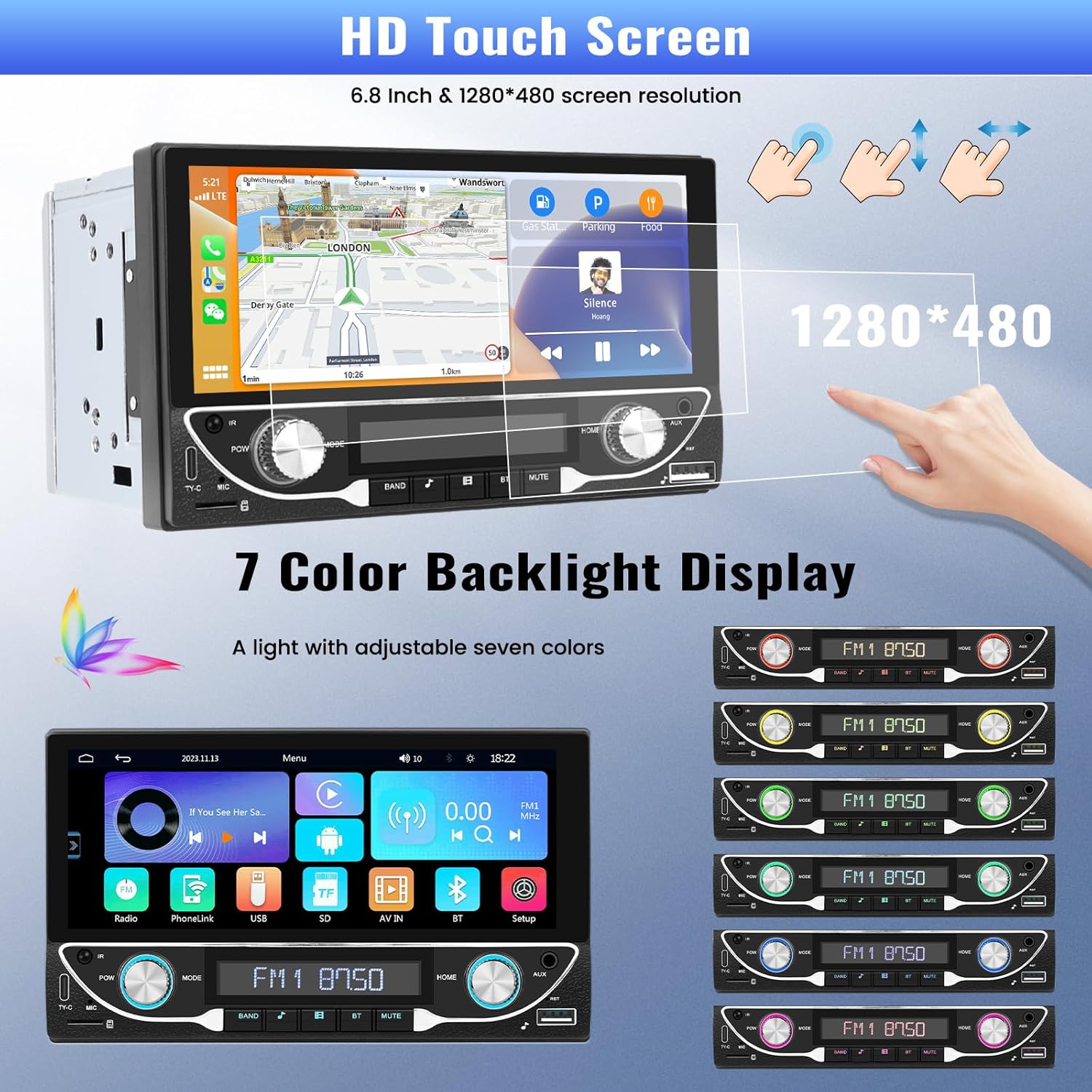
Image: The HD touchscreen and customizable 7-color backlight display options.
Access the display settings to adjust brightness and select from 7 available backlight colors for the physical buttons.
5. Naudojimo instrukcijos
5.1 Belaidis „Apple CarPlay“ ir „Android Auto“
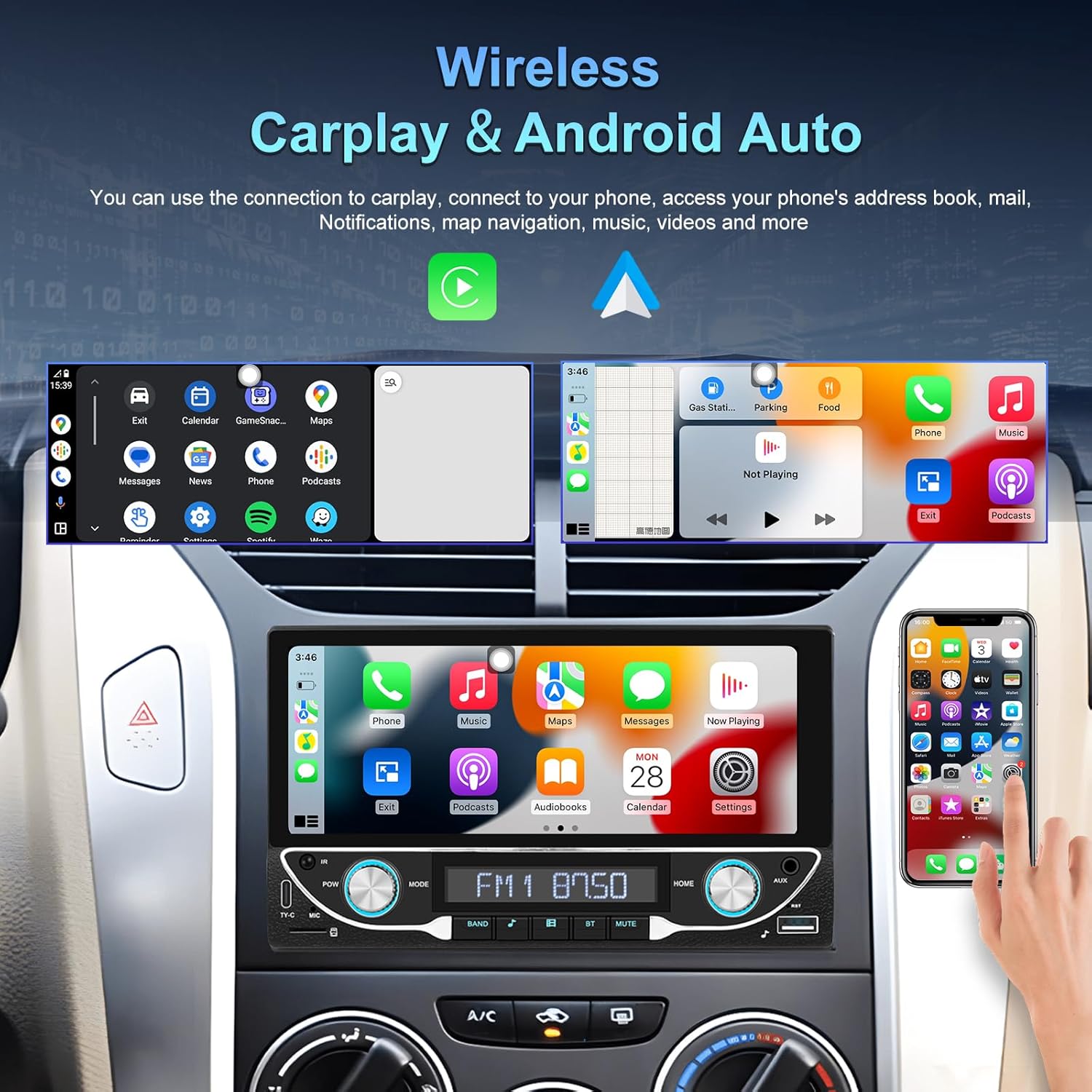
Image: The car stereo displaying both Apple CarPlay and Android Auto interfaces.
Connect your smartphone wirelessly to access Apple CarPlay or Android Auto. This allows for navigation, music, calls, and messages directly from the car stereo display.
- Įsitikinkite, kad jūsų išmaniajame telefone įjungti „Bluetooth“ ir „Wi-Fi“.
- Automobilio stereo sistemoje pasirinkite „CarPlay“ arba „Android Auto“ piktogramą.
- Vykdykite ekrane pateikiamus nurodymus, kad susietumėte savo įrenginį.
5.2 „Bluetooth“ 5.1 Ryšys
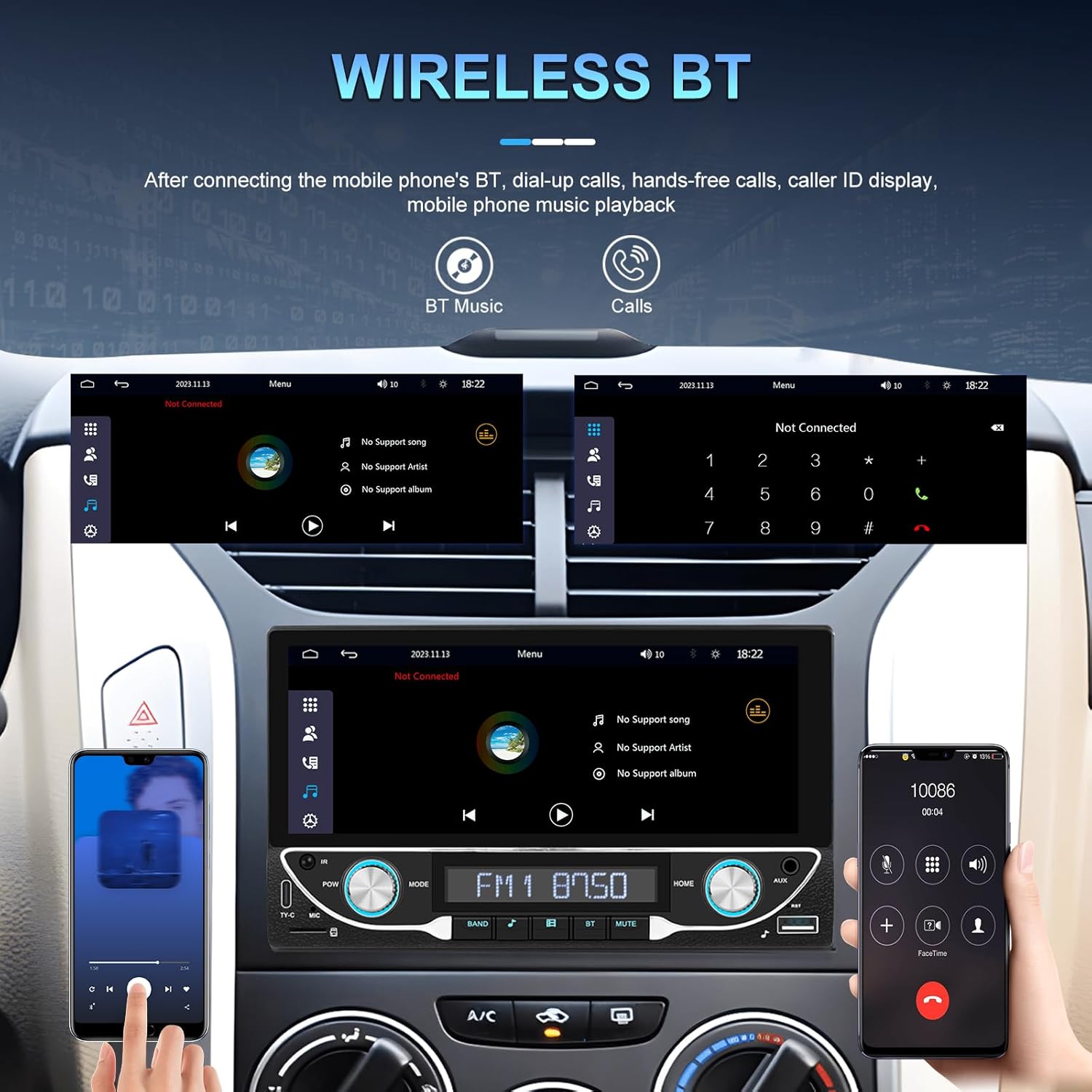
Image: Bluetooth interface for hands-free calling and music streaming.
Susiekite telefoną per „Bluetooth“, kad galėtumėte skambinti laisvų rankų įranga ir transliuoti garsą belaidžiu būdu.
- Go to the 'Bluetooth' menu on the stereo.
- Įjunkite „Bluetooth“ savo telefone ir ieškokite galimų įrenginių.
- Select 'UNITOPSCI A3612A3' (or similar name) from your phone's list and confirm pairing.
- Use the built-in microphone for calls and stream music from your phone.
5.3 FM radijo veikimas

Image: FM radio interface with frequency display and sound quality DSP/EQ settings.
Select the 'FM' icon to access the radio tuner. Use the on-screen controls or physical buttons to scan for stations, save presets, and adjust frequency.
5.4 Audio & Video Playback (USB/TF/AUX/Type-C)

Image: Available input options for audio and video playback: USB, TF Card, Type-C, and AUX-in.
The unit supports various media inputs for audio and video playback:
- USB įvestis: Connect a USB drive with media files.
- TF kortelių lizdas: Insert a TF (MicroSD) card with media files.
- AUX įvestis: Connect external audio devices using a 3.5mm audio cable.
- C tipo prievadas: For charging compatible devices and potentially data transfer.
Select the corresponding input source from the main menu to access your media.
5.5 Vairo valdymas

Image: Steering wheel control setup interface on the car stereo.
If your vehicle supports steering wheel controls, connect the 'KEY' wire during installation. Access the 'Steering Wheel Control' settings to program the buttons for functions like volume, track change, and mode selection.
5.6 Galinis View Camera / HD Reversing Video
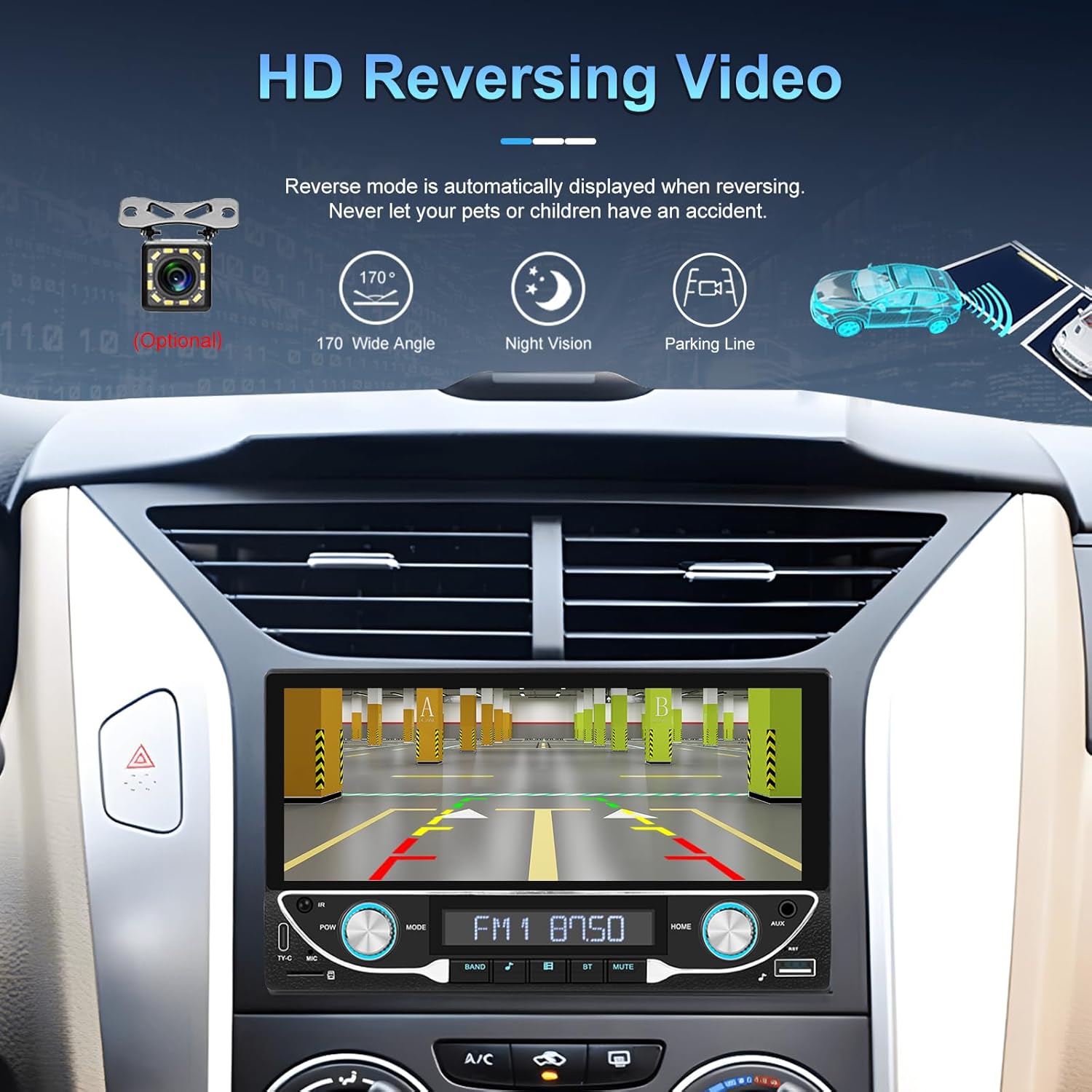
Image: High-definition reversing video display with parking guidelines.
When the vehicle is shifted into reverse, the stereo automatically displays the rear view camera feed. The included camera offers a 170-degree wide angle and night vision capabilities, along with parking lines for assistance.
5.7 DVR Function Support
The unit supports an optional DVR (Digital Video Recorder) function. Connect a compatible USB DVR camera to the dedicated USB input on the rear of the car radio to record driving footage.
5.8 Veidrodinio susiejimo funkcija
Use the Mirror Link function to display your smartphone's screen directly on the car stereo. This feature is compatible with both Android and iOS devices, allowing you to view apps and content from your phone on the larger display.
5.9 Balso valdymas ir GPS navigacija
When connected via Apple CarPlay or Android Auto, you can utilize voice commands (e.g., Siri, Google Assistant) for navigation, making calls, sending messages, and controlling music, enhancing driving safety and convenience.
5.10 Sound Quality (DSP & EQ)
The built-in Digital Sound Processor (DSP) and Equalizer (EQ) allow for precise audio customization. Access the 'EQ Setup' menu to adjust bass, treble, and other frequency bands to match your audio preferences. Pre-set EQ modes (e.g., Jazz, Rock, Pop) are also available.
6. Priežiūra
Norėdami užtikrinti automobilio garso sistemos ilgaamžiškumą ir optimalų veikimą, laikykitės šių priežiūros nurodymų:
- Ekrano valymas: Use a soft, lint-free cloth to gently wipe the touchscreen. Avoid abrasive cleaners or solvents that could damage the display.
- Bendras valymas: Keep the unit free from dust and debris. Use a soft brush or compressed air for hard-to-reach areas.
- Programinės įrangos atnaujinimai: Periodically check the manufacturer's websvetainėje, kurioje rasite visus galimus programinės įrangos atnaujinimus, skirtus našumui pagerinti ir naujoms funkcijoms pridėti.
- Venkite skysčių: Do not spill liquids on the unit. If accidental spillage occurs, power off the unit immediately and allow it to dry completely before use.
7. Problemų sprendimas
If you encounter issues with your UNITOPSCI A3612A3 car stereo, refer to the following common problems and solutions:
| Problema | Galima priežastis | Sprendimas |
|---|---|---|
| Nėra galios | Neteisingas laidų pajungimas; Perdegęs saugiklis; Atsilaisvinusi jungtis. | Check power cable connections (ACC, BATTERY+, GND). Verify vehicle fuse and unit's fuse. Ensure all wires are securely connected. |
| Nėra garso | Atjungti garsiakalbio laidai; per mažas garsumas; įjungta nutildymo funkcija; neteisingas garso šaltinis. | Check speaker wire connections. Increase volume. Deactivate mute. Select correct audio source (FM, USB, BT, etc.). |
| „Bluetooth“ neprisijungia | Bluetooth off on phone/stereo; Device not in pairing mode; Interference. | Ensure Bluetooth is enabled on both devices. Put stereo in pairing mode. Delete previous pairings and try again. Move closer to the unit. |
| „CarPlay“ / „Android Auto“ neveikia | Wi-Fi/Bluetooth off; Phone not compatible; App issues. | Ensure Wi-Fi and Bluetooth are active on your phone. Restart phone and stereo. Check phone's settings for CarPlay/Android Auto permissions. |
| Galinė kamera nerodoma | Kamera neįjungta; vaizdo kabelis atsilaisvinęs; atbulinės eigos trigerio laidas neprijungtas. | Check camera power connection. Ensure video cable is securely connected to 'CAM IN'. Verify Pink (REVERSE) wire connection. |
| Jutiklinis ekranas nereaguoja | Sistema užstringa; ekrane yra nešvarumų. | Restart the unit (if possible, by briefly disconnecting power). Clean the screen. |
If the problem persists after trying these solutions, please contact UNITOPSCI customer support for further assistance.
8. Specifikacijos
Key technical specifications for the UNITOPSCI A3612A3 car stereo:
- Modelio numeris: A3612A3
- Ekrano dydis: 6.86 colių
- Ekrano raiška: 1280 x 480 pikselių
- Išėjimo vattage: 180 Watts (4 channels)
- Bluetooth versija: 5.1
- Palaikomos interneto paslaugos: Maps (via CarPlay/Android Auto)
- Garso išvesties tipas: Vidinis
- Palaikomi medijos formatai: AVI, WAV, WMA
- Įėjimai: USB, TF Card, AUX, Type-C
- Savybės: Wireless Apple CarPlay, Wireless Android Auto, FM Radio, Mirror Link, DSP, EQ, Steering Wheel Control, Backup Camera Input, DVR Function Support, 7-Color Backlight.
Image: Front, rear, and side dimensions of the UNITOPSCI A3612A3 car stereo.
Matmenys (apytiksliai):
- Front Panel: 17.8cm (7.0in) width x 10.3cm (4.0in) height
- Chassis: 17.8cm (7.0in) width x 10.0cm (3.9in) height x 11cm (4.3in) depth
9. Garantija ir palaikymas
UNITOPSCI products are designed for reliability and performance. For warranty information and technical support, please refer to the warranty card included in your package or visit the official UNITOPSCI websvetainę.
When contacting support, please have your product model number (A3612A3) and purchase details ready.