
1. Įvadas
Thank you for choosing the Vortex Powerhub30 Black 30000 mAh External Battery. This device is designed to provide reliable portable power for your electronic devices. Please read this manual carefully before use to ensure proper operation and to maximize the lifespan of your power bank.
2. Saugos informacija
- Do not expose the power bank to extreme temperatures (above 60°C / 140°F or below 0°C / 32°F), direct sunlight, or fire.
- Nenumeskite, neišardykite ir nebandykite patys taisyti įrenginio. Tai gali jį sugadinti ir panaikinti garantiją.
- Laikykite išorinę bateriją atokiau nuo vandens, drėgmės ir koroziją sukeliančių medžiagų.
- Nenaudokite išorinės baterijos, jei ji yra akivaizdžiai pažeista, išsipūtusi arba praleidžia skystį.
- Laikyti vaikams nepasiekiamoje vietoje.
- Naudokite tik sertifikuotus įkrovimo laidus ir adapterius.
- Atsakingai išmeskite išorinę bateriją pagal vietinius reikalavimus.
3. Pakuotės turinys
- Vortex Powerhub30 Black 30000 mAh External Battery
- USB Charging Cable (Micro-USB/Type-C compatible)
- Vartotojo vadovas
4. Produktas baigtasview
The Vortex Powerhub30 is equipped with multiple ports and an LED display for convenient charging and monitoring.

1 vaizdas: priekis view of the Vortex Powerhub30 Black external battery, showing its compact design and the Vortex logo. The image also highlights its 30000 mAh capacity and illustrates its use with various devices like smartphones, tablets, and headphones.
Komponentai:
- USB-A išvesties prievadai (x2): Skirta išoriniams įrenginiams įkrauti.
- C tipo USB prievadas: Bidirectional, used for both charging the power bank and charging external devices.
- Mikro USB įvesties prievadas: Skirta išorinei baterijai įkrauti.
- Skystųjų kristalų ekranas: Rodo likusią baterijos procentątage.
- Maitinimo mygtukas: Įjungia LED ekraną ir pradeda įkrovimą.
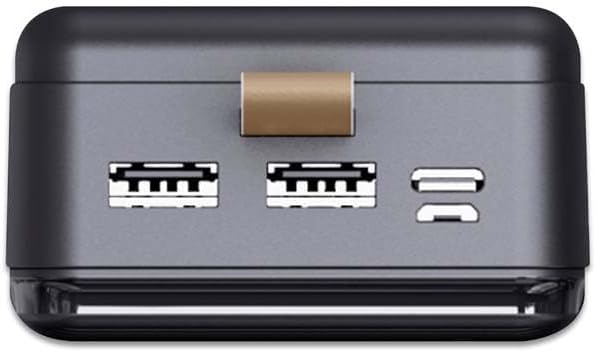
2 pav.: Viršus view of the Vortex Powerhub30, clearly displaying the two USB-A output ports and the single bidirectional USB Type-C port. This view illustrates the multiple connectivity options available.

Image 3: Close-up top view of the Vortex Powerhub30, highlighting the integrated LED indicator which displays the current battery charge level. The power button is also visible next to the indicator.
5. Sąranka
Pradinis išorinės baterijos įkrovimas:
- Before first use, fully charge your Powerhub30.
- Connect the provided USB charging cable to either the Micro-USB input port or the USB Type-C port on the power bank.
- Kitą laido galą prijunkite prie USB sieninio įkroviklio (nepridedamas) arba kompiuterio USB prievado.
- The LED display will show the charging progress. Once 100% is displayed, the power bank is fully charged.
6. Naudojimo instrukcijos
Išorinių įrenginių įkrovimas:
- Connect your device's charging cable to one of the USB-A output ports or the USB Type-C port on the Powerhub30.
- Kitą laido galą prijunkite prie išmaniojo telefono, planšetinio kompiuterio ar kito suderinamo įrenginio.
- Press the power button on the Powerhub30 to initiate charging. The LED display will show the power bank's remaining charge.
- The Powerhub30 can charge up to three devices simultaneously.
- Once your device is fully charged, disconnect it from the power bank. The power bank will automatically turn off after a period of inactivity.
7. Priežiūra
- Išorinę bateriją valykite minkštu, sausu skudurėliu. Nenaudokite stiprių cheminių medžiagų ar abrazyvinių valiklių.
- Nenaudojamą maitinimo bloką laikykite vėsioje, sausoje vietoje.
- To maintain battery health, fully charge the power bank at least once every three months, even if not in regular use.
- Venkite perkrovimo arba dažno visiško akumuliatoriaus iškrovimo.
8. Problemų sprendimas
Nesikrauna išorinė baterija:
- Įsitikinkite, kad įkrovimo laidas yra tvirtai prijungtas tiek prie išorinės baterijos, tiek prie maitinimo šaltinio.
- Išbandykite kitą įkrovimo laidą arba sieninį adapterį.
- Patikrinkite, ar maitinimo šaltinis yra aktyvus.
Įrenginys neįkraunamas iš išorinės baterijos:
- Įsitikinkite, kad išorinėje baterijoje yra pakankamai įkrovos (patikrinkite LED ekraną).
- Paspauskite išorinės baterijos maitinimo mygtuką, kad įjungtumėte išvestį.
- Išbandykite kitą įkrovimo laidą savo įrenginiui.
- Įsitikinkite, kad jūsų įrenginys suderinamas su išorinės baterijos išvesties specifikacijomis.
Lėtas įkrovimas:
- Įsitikinkite, kad naudojate aukštos kokybės įkrovimo laidą.
- Some devices may charge slower if multiple devices are connected simultaneously.
- Check if your device supports fast charging and if the cable/port used supports it.
9. Specifikacijos
| Modelis | Powerhub30 |
| Baterijos talpa | 30000 mAh |
| Įvesties prievadai | Mikro USB, USB C tipo |
| Išvesties prievadai | 2x USB-A, 1x USB Type-C (bidirectional) |
| Ypatinga funkcija | Compact design, LED battery display |
| Rekomenduojamas naudojimas | Smartphones, Tablets, other USB-powered devices |
| Matmenys | 14.8 × 7 × 2.8 cm (approx.) |
| Medžiaga | ABS Casing |
10. Garantija ir palaikymas
For warranty information and customer support, please refer to the official Vortex websvetainėje arba susisiekite su savo pardavėju. Taip pat galite apsilankyti Vortex Brand Store Norėdami gauti daugiau informacijos.