
Įvadas
The Perixx PERIMICE-513 is a wired ergonomic vertical mouse designed to provide a comfortable and efficient computing experience. Its unique vertical design promotes a natural handshake position, which can help reduce forearm strain and the risk of repetitive strain injuries (RSI) during extended use. This manual provides essential information for setting up, operating, maintaining, and troubleshooting your PERIMICE-513 mouse.
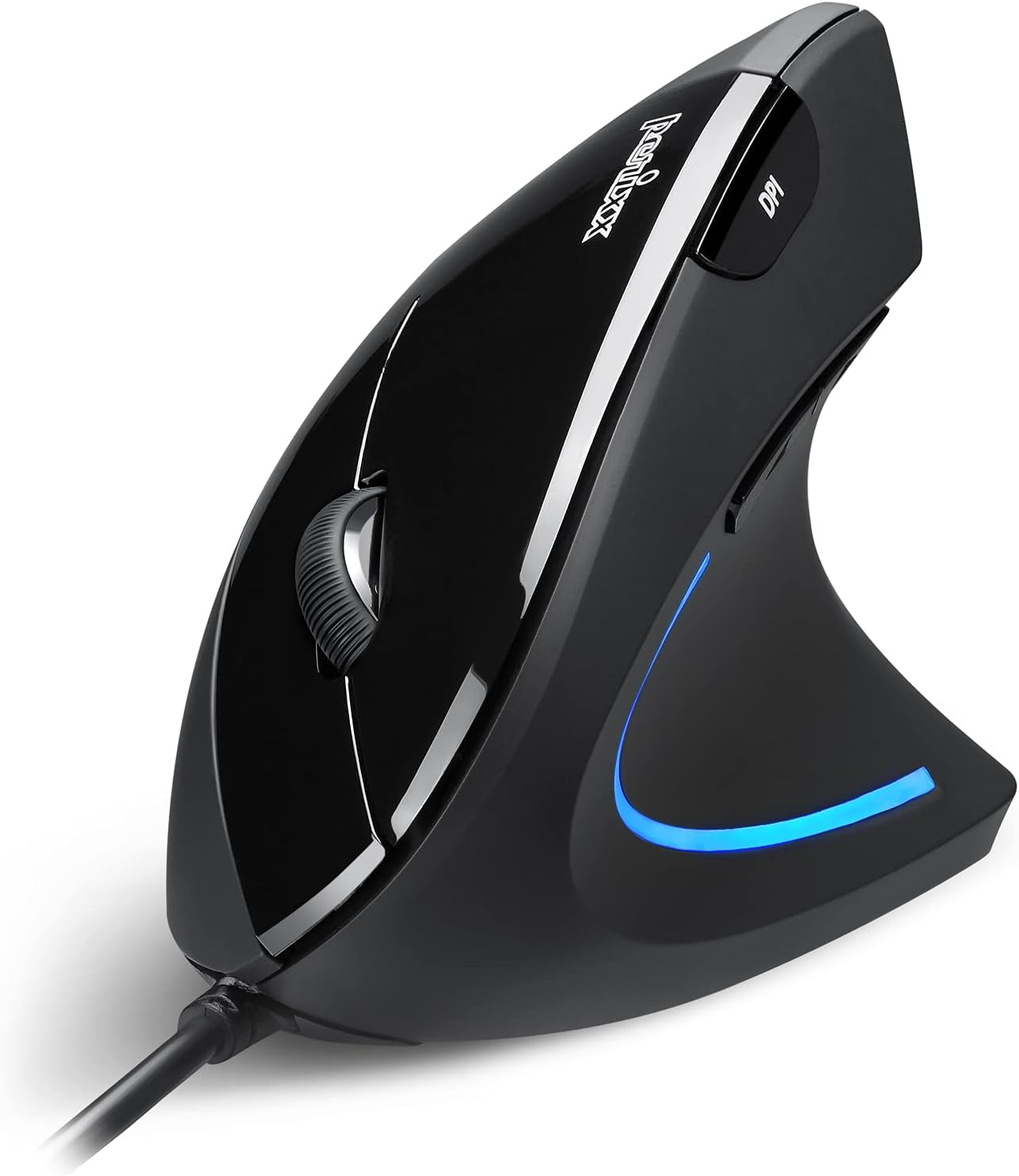
Image: The Perixx PERIMICE-513 Wired Ergonomic Vertical Mouse, showcasindėl juodos apdailos ir ergonomiško dizaino.
Produktas baigtasview
The PERIMICE-513 features six buttons and an adjustable DPI sensor for precise control. Familiarize yourself with the components:

Image: A diagram illustrating the six buttons of the Perixx PERIMICE-513 mouse, including Left Click, Right Click, Scroll Wheel, DPI Switch, Page Back, and Page Forward buttons.
- Kairysis paspaudimo mygtukas: Standartinė pagrindinio paspaudimo funkcija.
- Dešinysis pelės mygtuko paspaudimas: Standartinė antrinio paspaudimo funkcija.
- Slinkties ratukas: Vertikalaus slinkimo ir vidurinio pelės mygtuko paspaudimo funkcijai.
- DPI perjungimo mygtukas: Reguliuoja žymeklio jautrumą (DPI).
- Page Back Button: Naviguoja atgal web naršyklės arba file tyrinėtojai.
- Mygtukas „Puslapis pirmyn“: Naviguoja pirmyn web naršyklės arba file tyrinėtojai.
Sąranka
The Perixx PERIMICE-513 is designed for simple plug-and-play setup.
- Prijunkite USB kabelį: Įkiškite pelės USB jungtį į laisvą kompiuterio USB prievadą.
- Tvarkyklės diegimas: The mouse is plug-and-play and typically does not require additional drivers for basic functionality on compatible operating systems. Your computer should automatically detect and install the necessary drivers.
- Padėties nustatymas: Place the mouse on a flat, clean surface. The ergonomic design encourages a natural handshake grip.

Image: A hand connecting the USB cable of the Perixx PERIMICE-513 mouse to a computer, illustrating the plug-and-play setup.
Suderinamumas: The PERIMICE-513 is fully compatible with Windows 7, 8, 10, 11, and later versions.
Naudojimo instrukcijos
This section details the functions of your Perixx PERIMICE-513 mouse.
DPI reguliavimas
The DPI (Dots Per Inch) switch button, located on the top of the mouse, allows you to adjust the cursor sensitivity. Press this button to cycle through the available DPI settings: 1000, 1600, 3200, and 6400 DPI. Choose a setting that best suits your task and preference for cursor speed and precision.

Image: A hand demonstrating the natural, comfortable grip on the Perixx PERIMICE-513 vertical mouse, highlighting its ergonomic design.
Ergonomic Use
The vertical design of the PERIMICE-513 encourages a neutral wrist and forearm posture, similar to a handshake. This natural position helps to alleviate pressure on the wrist and reduce muscle tension, contributing to long-term comfort and preventing strain.

Image: A visual comparison showing a twisted wrist position with a traditional mouse versus a natural, untwisted wrist position achieved with an ergonomic vertical mouse.
Mygtukų funkcijos
- Kairysis/dešinysis spustelėjimas: Perform standard selection and context menu actions.
- Slinkties ratukas: Scroll documents and web pages vertically. Press down for middle-click functionality.
- DPI jungiklis: Cycle through 1000, 1600, 3200, and 6400 DPI settings.
- Page Back/Forward: Conveniently navigate web pages or folders.
Priežiūra
Tinkama priežiūra užtikrina pelės ilgaamžiškumą ir optimalų veikimą.
- Valymas: Naudokite minkštą, šiek tiek damp cloth to clean the surface of the mouse. Avoid using harsh chemicals, abrasive cleaners, or solvents, as these can damage the rubber coating and internal components.
- Optinis jutiklis: Kad užtikrintumėte tikslų sekimą, pelės apačioje esantį optinį jutiklį laikykite švarų, be dulkių ar šiukšlių.
- Kabelio priežiūra: Kad nepažeistumėte USB kabelio, venkite staigių lenkimų ar per didelio tempimo.
Trikčių šalinimas
If you encounter issues with your Perixx PERIMICE-513 mouse, refer to the following solutions:
- Pelė nereaguoja:
- Įsitikinkite, kad USB laidas yra tvirtai prijungtas prie veikiančio kompiuterio USB prievado.
- Pabandykite prijungti pelę prie kito USB prievado.
- Iš naujo paleiskite kompiuterį.
- Nereguliarus žymeklio judėjimas:
- Nuvalykite pelės apačioje esantį optinį jutiklį minkštu, sausu skudurėliu.
- Įsitikinkite, kad pelę naudojate ant tinkamo paviršiaus. Venkite labai atspindinčių ar skaidrių paviršių.
- DPI Setting Not Changing:
- Press the DPI switch button firmly. The change in DPI may be subtle depending on your current setting and screen resolution.
Specifikacijos
Detailed technical specifications for the Perixx PERIMICE-513 mouse:
| Funkcija | Specifikacija |
|---|---|
| Gaminio matmenys | 4.92 x 2.44 x 0.1 colio |
| Prekės svoris | 5.6 uncijos |
| Modelio numeris | 12364 |
| Ryšio technologija | USB |
| Judesio aptikimo technologija | Optinis |
| DPI nustatymai | 1000/1600/3200/6400 |
| Kabelio ilgis | 5.9 pėdos (1.8 m) |
| Suderinamumas | Windows 7, 8, 10, 11, and later |
| Ypatinga funkcija | Ergonomiškas dizainas |
Produktas baigtasview Vaizdo įrašas
Stebėkite šį oficialų produktąview video for a visual guide to the Perixx PERIMICE-513 mouse.
Vaizdo įrašas: Oficialus produktas baigtasview of the Perixx PERIMICE-513 Ergonomic Vertical Mouse, demonstrating its features and ergonomic benefits.
Garantija ir palaikymas
Perixx products are manufactured to high-quality standards. For specific warranty details, please refer to the warranty card included with your product or visit the official Perixx website. For further assistance or support, you may visit the „Perixx“ parduotuvė „Amazon“ platformoje.