Įvadas
Welcome to the user manual for your Samsung 75-inch QN95C Neo QLED 4K TV. This guide provides essential information for setting up, operating, maintaining, and troubleshooting your television. The Samsung QN95C features Neo QLED technology for stunning picture quality, 4K resolution, and a 144Hz refresh rate for smooth gaming performance. It also includes advanced audio features like Dolby Atmos for an immersive sound experience.

Vaizdas: priekis view of the Samsung QN95C Neo QLED 4K TV, showcasindėl plono rėmelio ir ryškaus ekrano.
Sąranka
1. Išpakavimas ir įdėjimas
Carefully remove the TV and its components from the packaging. The box typically includes the TV unit and a stand. Ensure you have a clean, flat surface for assembly. Place the TV in a location with adequate ventilation and away from direct sunlight or heat sources.
2. Stovo pritvirtinimas (jei taikoma)
If you are not wall-mounting, attach the provided stand to the TV according to the instructions in the separate quick setup guide. Ensure all screws are securely fastened.
Paveikslėlis: Šoninis profesionalasfile of the Samsung QN95C Neo QLED 4K TV, illustrating its slim design and the attached stand.
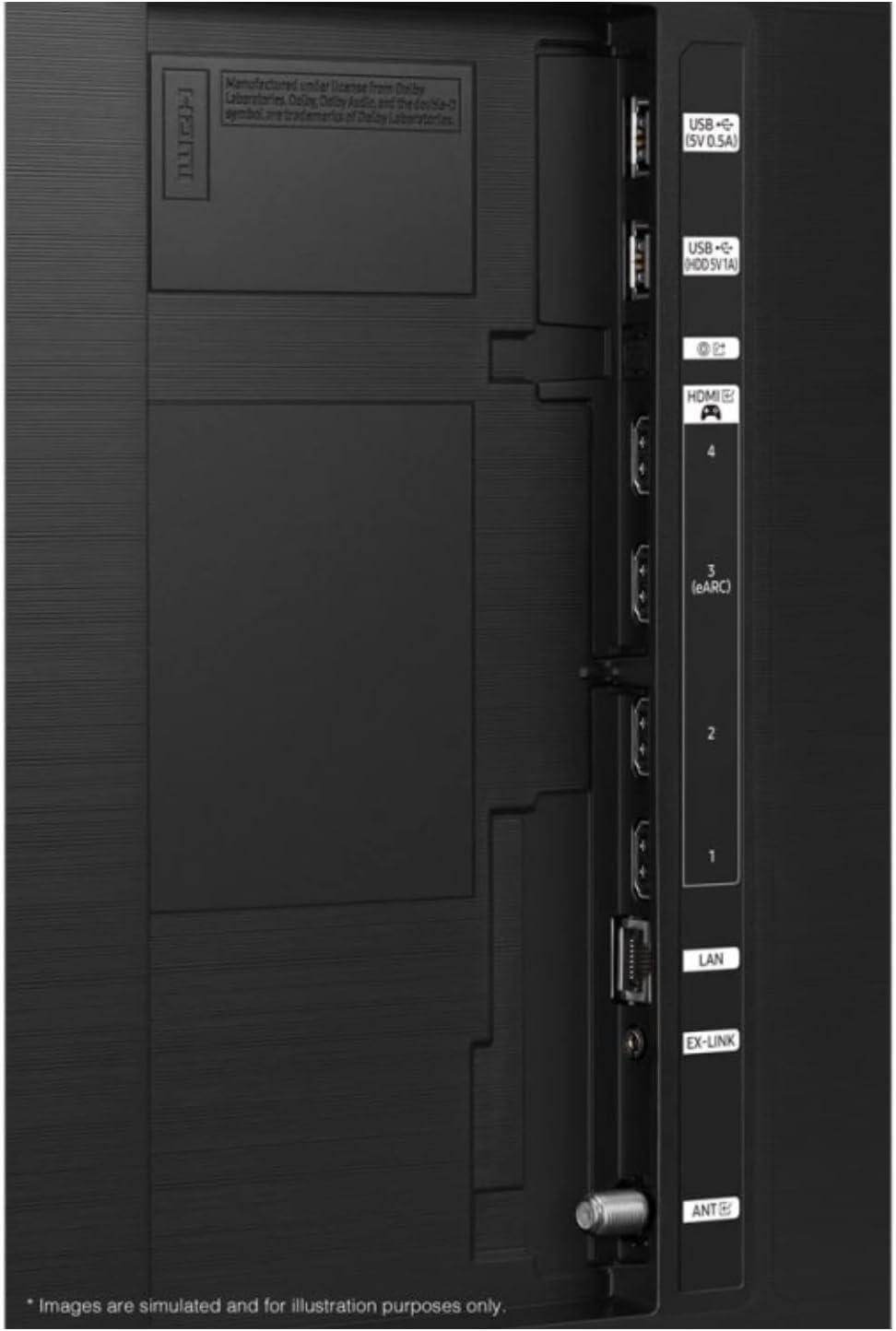
3. Išorinių įrenginių prijungimas
Prijunkite išorinius įrenginius, pvz., kabelinės televizijos priedėlius, žaidimų konsoles ar garso sistemas, prie atitinkamų prievadų televizoriaus gale.
- HDMI: For high-definition audio and video. Your TV features multiple HDMI ports, including one with eARC for enhanced audio return channel functionality.
- USB: For connecting USB storage devices (5V 0.5A and 5V 1A ports available).
- LAN: Laidiniam interneto ryšiui.
- ANT: Antenos prijungimui transliacijoms belaidžiu būdu.

Vaizdas: Išsamus view of the TV's back panel, highlighting the HDMI, USB, LAN, and ANT ports for connecting various devices.
4. Pradinis įjungimas ir konfigūracija
Plug the power cord into the TV and then into a wall outlet. Press the power button on the TV or remote control. The TV will guide you through the initial setup process, which typically includes:
- Kalbos pasirinkimas: Pasirinkite pageidaujamą kalbą.
- Tinklo prisijungimas: Connect to your home Wi-Fi network or use a wired LAN connection.
- Smart Setup Options: You will be presented with options to set up your TV using a smartphone (Quick and Easy) or via the remote control (Step-by-Step). Follow the on-screen prompts for your chosen method.
- Kanalo nuskaitymas: Jei naudojate anteną, televizorius ieškos galimų kanalų.
- Paskyros sąranka: Sign in to your Samsung account or create a new one to access Smart TV features and apps.
Televizoriaus valdymas
1. Pagrindiniai valdikliai
Norėdami naršyti televizoriaus sąsajoje, naudokite nuotolinio valdymo pultą. Įprastos funkcijos:
- Galia: Įjunkite arba išjunkite televizorių.
- Apimtis: Sureguliuokite garso lygį.
- Kanalas: Change TV channels (if an antenna is connected).
- Šaltinis / Įvestis: Switch between connected external devices (e.g., HDMI 1, HDMI 2).
- Namų mygtukas: Access the Smart Hub for apps, settings, and other features.
2. Išmaniojo televizoriaus funkcijos
Your Samsung QN95C is a Smart TV, offering access to a wide range of online content and applications. Supported internet services include a web browser and YouTube. You can download additional apps from the Samsung App Store.
3. Vaizdo nustatymai
Norėdami optimizuoti savo viewing experience, you can adjust various picture settings:
- Vaizdo režimas: Select from modes like Standard, Dynamic, Movie, or Filmmaker Mode.
- Ryškumas / kontrastas: Fine-tune the display's luminance and contrast levels.
- Spalva/atspalvis: Adjust color saturation and hue.
- Ryškumas: Enhance the detail of the image.
- Eksperto nustatymai: Access advanced calibration options for professional adjustments.
4. Garso nustatymai
The TV supports Dolby Atmos for an immersive audio experience. You can customize sound settings:
- Garso režimas: Choose from various sound modes (e.g., Standard, Adaptive Sound, Amp(gyvybingai).
- Ekvalaizeris: Manually adjust frequency bands.
- Dolby Atmos: Ensure this feature is enabled for compatible content to experience spatial audio.
- Q-simfonija: If you have a compatible Samsung soundbar, enable Q-Symphony to synchronize the TV speakers and soundbar for richer, more immersive audio.
5. Žaidimų funkcijos
The QN95C is optimized for gaming with a 144Hz refresh rate. Ensure your gaming console is connected to an HDMI port that supports high refresh rates. Activate Game Mode in the TV settings for reduced input lag and optimized picture settings for gaming.
Priežiūra
1. Televizoriaus valymas
Norėdami išlaikyti televizoriaus skaidrumą ir ilgaamžiškumą, laikykitės šių valymo nurodymų:
- Ekranas: Švelniai nuvalykite ekraną minkšta, sausa mikropluošto šluoste. Jei dėmės sunkiai įveikiamos, švelniai nuvalykiteampen the cloth with distilled water or a screen-specific cleaning solution (never spray directly onto the screen).
- Rėmas ir stovas: Minkšta, sausa šluoste nuvalykite dulkes nuo televizoriaus rėmo ir stovo.
- Nenaudokite: Venkite naudoti abrazyvinius valiklius, alkoholį, benzeną ar skiediklius, nes jie gali pažeisti televizoriaus paviršių.
2. Programinės įrangos atnaujinimai
Regularly check for and install software updates to ensure your TV has the latest features, performance improvements, and security patches. You can usually find this option in the TV's settings menu under Support > Software Update.
Trikčių šalinimas
If you encounter issues with your TV, try the following solutions before contacting service.
| Problema | Galimas sprendimas |
|---|---|
| Nėra galios | Įsitikinkite, kad maitinimo laidas yra tvirtai prijungtas ir prie televizoriaus, ir prie veikiančio sieninio lizdo. Išbandykite kitą lizdą. |
| Nėra vaizdo, bet yra garsas | Check the input source. Ensure all cables are securely connected. Try restarting connected devices. |
| Nėra garso, bet vaizdas yra | Check the volume level. Ensure mute is not activated. Verify audio output settings (TV speakers, external sound system). Check audio cables. |
| Nuotolinio valdymo pultas neveikia | Replace the batteries. Ensure there are no obstructions between the remote and the TV. Try pairing the remote again if it's a Bluetooth remote. |
| Nepavyksta prisijungti prie „Wi-Fi“. | Check your router and modem. Restart your router. Ensure the Wi-Fi password is correct. Try moving the TV closer to the router or using a wired LAN connection. |
| Vaizdo kokybės problemos (pvz., neryškus, iškraipytas) | Check the resolution of the input source. Adjust picture settings. Ensure cables are not damaged. |
Specifikacijos
Below are the key specifications for the Samsung QN95C Neo QLED 4K TV (QN75QN95CAFXZA):
| Funkcija | Detalė |
|---|---|
| Prekės ženklas | Samsung |
| Modelio pavadinimas | QN95C |
| Ekrano dydis | 75 colių |
| Ekrano technologija | QLED |
| Rezoliucija | 4K |
| Ypatinga funkcija | Butas |
| Krašto santykis | 16:9 |
| Ryšio technologija | Wi-Fi |
| Palaikomos interneto paslaugos | Naršyklė, „YouTube“ |
| Įtraukti komponentai | Stovas, televizorius |
| ASIN | B0D19GL7JP |
| Pasiekiama pirmoji data | 9 m. balandžio 2024 d |
Garantija ir palaikymas
As this product is a renewed item, warranty terms may differ from new products. Please refer to the specific warranty information provided at the time of purchase or contact the seller directly for details regarding your renewed product's warranty coverage.
Dėl techninės pagalbos, produkto registracijos ar papildomos pagalbos apsilankykite oficialioje „Samsung“ palaikymo svetainėje website or contact Samsung customer service. Have your TV's model number (QN75QN95CAFXZA) and serial number ready when seeking support.