
Angrox NS-RCFNA-21-Upgrade
„Angrox“ universalaus televizoriaus nuotolinio valdymo pulto naudojimo instrukcija
Model: NS-RCFNA-21-Upgrade
Prekės ženklas: Angrox
1. Įvadas
Thank you for choosing the Angrox Universal TV Remote Control. This remote is designed to simplify your entertainment experience by providing a single control solution for a wide range of smart TVs. It offers seamless compatibility and intuitive operation, making it an ideal replacement for lost or broken original remotes.

1.1 pav.: priekis view of the Angrox Universal TV Remote Control.
2. Saugos informacija
- Baterijas laikykite vaikams nepasiekiamoje vietoje. Prarijus, nedelsiant kreipkitės medicininės pagalbos.
- Nemaišykite senų ir naujų baterijų arba skirtingų tipų baterijų.
- Jei nuotolinio valdymo pultas nebus naudojamas ilgesnį laiką, išimkite baterijas, kad išvengtumėte pratekėjimo.
- Avoid exposing the remote to direct sunlight, heat sources, or excessive moisture.
- Nebandykite ardyti ar modifikuoti nuotolinio valdymo pulto.
3. Pakuotės turinys
Pakuotėje turi būti šie elementai:
- 1 x Angrox Universal TV Remote Control
- 1 x naudojimo instrukcija (šis dokumentas)
Pastaba: veikimui reikalingos 2 AAA baterijos, kurios neįeina į pakuotę.
4. Dalys ir savybės
Familiarize yourself with the buttons and functions of your new remote control.
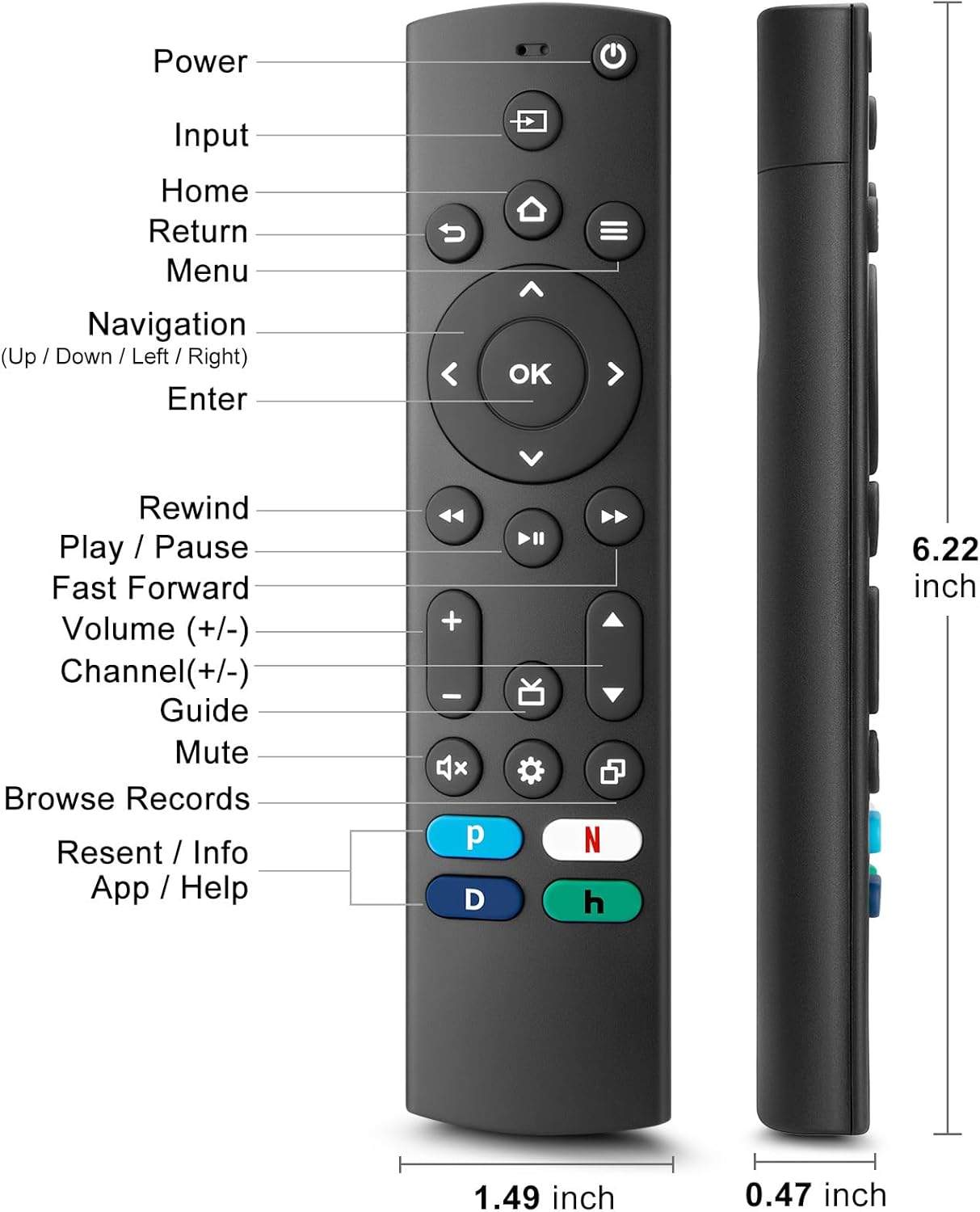
Figure 4.1: Labeled buttons and dimensions of the remote control.
- Maitinimo mygtukas: Įjungia arba išjungia televizorių.
- Įvesties mygtukas: Pasirenka įvesties šaltinį (HDMI, AV ir kt.).
- Namų mygtukas: Grąžina į televizoriaus pagrindinį ekraną.
- Navigacijos skydelis (aukštyn / žemyn / kairėn / dešinėn) ir mygtukas „Gerai“: Meniu naršymui ir pasirinkimui.
- Grįžimo mygtukas: Grįžta į ankstesnį ekraną.
- Meniu mygtukas: Accesses TV settings or options menu.
- Rewind/Play/Pause/Fast Forward Buttons: Medijos atkūrimo valdikliai.
- Garsumo didinimas / sumažinimas: Reguliuoja televizoriaus garsumą.
- Kanalas aukštyn/žemyn: Keičia televizijos kanalus.
- Nutildymo mygtukas: Išjungia arba įjungia televizoriaus garsą.
- Nustatymų mygtukas: Pasiekia greituosius nustatymus.
- Dedicated Hotkeys (Netflix, P-Video, Disney+, Hulu): Tiesioginė prieiga prie populiarių transliacijos paslaugų.
This remote control utilizes infrared (IR) technology for stable performance and a fast response time of 0.2 seconds, with a control range of up to 40 feet. Please note that this remote does NE support voice search functions.

Figure 4.2: Remote's stable performance and precise control features.

Figure 4.3: This remote does not include voice search functionality.
5. Sąranka
5.1. Akumuliatoriaus įdėjimas
- Atidarykite nuotolinio valdymo pulto gale esantį baterijų skyriaus dangtį.
- Insert two (2) AAA batteries, ensuring the positive (+) and negative (-) terminals align with the markings inside the compartment.
- Saugiai uždarykite akumuliatoriaus skyriaus dangtelį.
5.2. Initial Pairing and TV Compatibility
This universal remote is designed for easy setup with most major TV brands. Simply press and hold two specific buttons simultaneously to pair it with your TV.

Figure 5.1: Easy 2-button setup for various TV brands.
| TV prekės ženklas | Button Combination (Press & Hold) | Pastabos |
|---|---|---|
| „Insignia“ televizija | OK + Home Button | |
| Toshiba televizorius | OK + Home Button | |
| Roku televizija | OK + Up Arrow | |
| „Hisense“ televizorius | OK + Down Arrow | Hulu not supported |
| TCL televizorius | OK + Right Arrow | Hulu not supported |
| Samsung televizorius | OK + Return Button | |
| „Vizio“ televizija | OK + Menu Button | |
| LG televizorius | OK + Rewind Button | Hulu not supported |
| Philips televizorius | OK + Play/Pause Button | Prime Video, Disney+, Hulu not supported |
| Sony televizorius | OK + Fast Forward Button | Hulu not supported |
Once the remote is paired, it should function immediately. No further programming is typically required.
5.3. Suderinamumo pastabos
This remote is designed to be a universal replacement for many TV models, including specific Insignia and Toshiba smart TV remotes (e.g., NS-RCFNA-21, NS-RCFNA-19, CT-95018, CT-RC1US-21, CT-RC1US-19). However, it is important to note that it may not be compatible with all specific original remote models or streaming devices, particularly those with unique pairing methods or voice control features.

5.2 pav. Pvzamples of remote controls and devices that are NOT compatible with this universal remote.

Figure 5.3: This remote is not compatible with TV Cube or TV Stick streaming devices.
For optimal performance, ensure your TV's infrared receiver is unobstructed.
Video 5.1: An official product video demonstrating the features and ease of use of the Angrox Universal TV Remote. This video highlights the remote's compatibility and quick access buttons for streaming services.
6. Nuotolinio valdymo pulto valdymas
Once paired, the Angrox Universal TV Remote operates like a standard TV remote. Point the remote directly at your TV's infrared receiver for best results.
6.1. Pagrindinės funkcijos
- Galia: Paspauskite Galia mygtuką vieną kartą, kad įjungtumėte arba išjungtumėte televizorių.
- Apimtis: Naudokite Garsumo padidinimas (+) ir Patildyti (-) mygtukai garso lygiui reguliuoti.
- Kanalas: Naudokite Kanalas aukštyn (▲) ir Kanalo perjungimas žemyn (▼) mygtukai kanalams keisti.
- Navigacija: Naudokite Aukštyn, Žemyn, Kairėn, Dešinėn arrows to navigate through menus and options. Press OK patvirtinti pasirinkimą.
- Pagrindinis puslapis: Paspauskite Pradžia button to return to the main smart TV interface.
- Grąžinti: Paspauskite Grįžti button to go back to the previous screen or menu.
6.2. Dedicated Hotkeys
The remote features dedicated hotkeys for quick access to popular streaming platforms:
- „Netflix“: Instantly launch the Netflix application.
- P-Video (Prime Video): Instantly launch the Prime Video application.
- Disney+: Instantly launch the Disney+ application.
- Hulu: Instantly launch the Hulu application.

Figure 6.1: Quick access to streaming services with dedicated hotkeys.
7. Priežiūra
- Valymas: Nuotolinio valdymo pultą valykite minkštu, sausu skudurėliu. Nenaudokite abrazyvinių valiklių ar tirpiklių.
- Baterijos keitimas: Replace batteries when the remote's response becomes sluggish or it stops functioning. Always replace both batteries at the same time.
- Saugykla: Nuotolinio valdymo pultą laikykite vėsioje, sausoje vietoje, apsaugotoje nuo tiesioginių saulės spindulių ir ekstremalių temperatūrų.
8. Problemų sprendimas
| Problema | Galima priežastis | Sprendimas |
|---|---|---|
| Nuotolinio valdymo pultas nereaguoja į televizorių. | Low or dead batteries. Incorrect pairing. Obstruction between remote and TV. | Replace batteries with new AAA batteries. Re-attempt pairing using the correct button combination for your TV brand (refer to Section 5.2). Ensure no objects are blocking the TV's IR receiver. |
| Specific hotkey (e.g., Hulu) not working. | TV brand incompatibility with specific hotkey functions. | Some TV brands (e.g., Hisense, TCL, LG, Philips, Sony) may not support all dedicated hotkeys. This is a limitation of the TV's software, not the remote. You may need to navigate to these apps manually. |
| Nėra balso valdymo funkcijos. | This remote does not support voice commands. | The Angrox Universal TV Remote Control is designed for infrared (IR) control and does not include a microphone for voice search. This is an intended feature. |
| Remote feels unresponsive or delayed. | Weak batteries. Remote too far from TV. | Replace batteries. Ensure you are within the effective range (up to 40 feet) and pointing directly at the TV. |
9. Specifikacijos
| Funkcija | Detalė |
|---|---|
| Modelio numeris | NS-RCFNA-21-Upgrade |
| Prekės ženklas | Angrox |
| Matmenys (I x P x A) | 6.22 x 1.49 x 0.47 colio |
| Prekės svoris | 1.76 uncijos |
| Maitinimo šaltinis | 2 x AAA baterijos (į komplektą neįeina) |
| Medžiaga | Aukštos kokybės ABS ir silikonas |
| Valdymo technologija | Infraraudonųjų spindulių (IR) |
| Reagavimo laikas | 0.2 sekundžių |
| Valdymo diapazonas | Iki 40 pėdų |
| Ypatingos savybės | Universal, Ergonomic, Lightweight, Pre-Programmed, No Programming Required (for most TVs) |
| Spalva | Juoda |
| Suderinami įrenginiai | Television (Insignia, Toshiba, Pioneer, Samsung, TCL, LG, Hisense, Vizio, Sony, Philips, Roku TVs) |
10. Garantija ir palaikymas
Angrox products are manufactured with high-quality materials and undergo strict quality control. For information regarding warranty coverage, returns, or technical support, please refer to the product listing page on Amazon or contact Angrox customer service directly through the Amazon platform.
You can visit the official Angrox store on Amazon for more information and contact options: Angrox Store
Ask a question about this manual
Ask about setup, troubleshooting, compatibility, parts, safety, or missing instructions. Manuals+ will review the question and use this page’s manual context to help answer it.