
Įvadas
This manual provides detailed instructions for the GAMFAMI TERIOS Wireless Controller. Please read this manual carefully before using the product to ensure proper operation and to maximize your gaming experience. This controller is designed for use with PlayStation 4, PS4 Pro, and PS4 Slim consoles.
Produkto savybės
- Holo efekto valdymo svirtys: Equipped with Hall joysticks to prevent drift and ensure a longer lifespan with smooth, precise control.
- Makro programavimas: Two programmable back buttons (M1, M2) allow mapping of various inputs (X, O, Triangle, Square, Up, Down, Left, Right, L3, R3, L1, R1, L2, R2) for enhanced gameplay.
- Belaidis ryšys: Enjoy a seamless wireless gaming experience with Bluetooth technology.
- Dual Shock Vibration: Enhanced dual shock motors provide immersive haptic feedback for a realistic gaming experience.
- Turbo funkcija: Activate the Turbo feature for rapid, repeated button presses, offering a competitive advantage.
- Ilgai veikianti baterija: Features a 1000mAh rechargeable battery for extended play sessions.
- Ergonomiškas dizainas: Lightweight and durable ABS construction with textured grips for comfortable handling.
- Built-in Speaker & 3.5mm Audio Jack: Provides high-quality audio directly from the controller and supports headset connection.
Pakuotės turinys
Išpakuodami, patikrinkite pakuotės turinį:
- GAMFAMI TERIOS Wireless Controller
- USB įkrovimo laidas
- Instrukcijų vadovas
Valdiklio išdėstymas
Familiarize yourself with the buttons and features of your GAMFAMI TERIOS Wireless Controller.
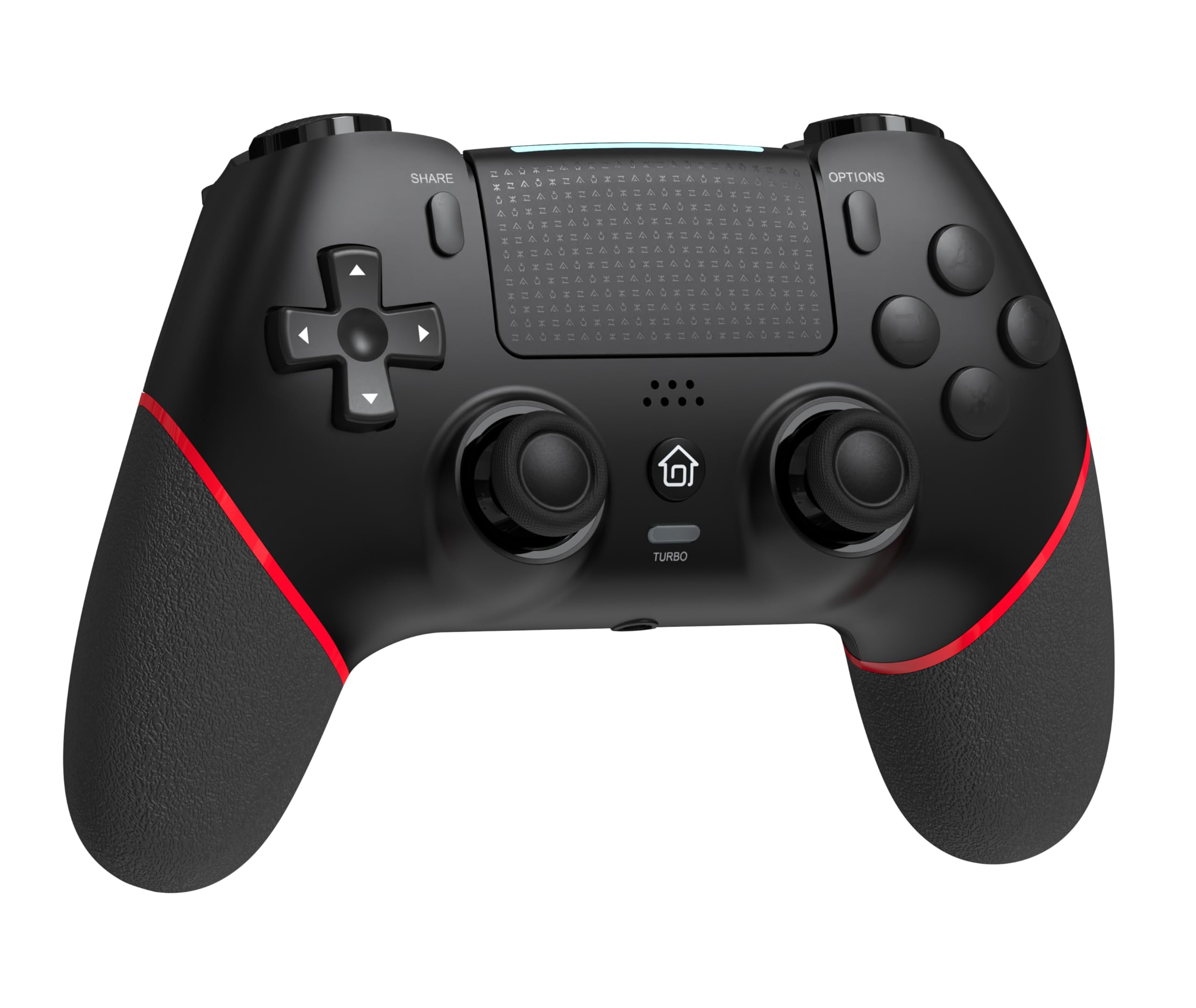
Priekyje view of the GAMFAMI TERIOS Wireless Controller, showing the joysticks, D-pad, action buttons, Share, Options, Home, and Turbo buttons, and the touchpad.
- Krypties valdikliai (D-Pad): Krypties įvedimui.
- Veiksmų mygtukai (trikampis, apskritimas, kryžius, kvadratas): Standard PlayStation action buttons.
- Kairysis/dešinysis analoginiai valdikliai: For precise movement and camera control. Features Hall Effect technology.
- BENDRINIMO mygtukas: Žaidimo turinio bendrinimui.
- Mygtukas PARINKTYS: Žaidimo meniu ir parinktims.
- PS Button (Home Button): To access the PS4 system menu.
- L1/R1 mygtukai: Pečių sagos.
- L2/R2 paleidikliai: Analoginiai trigeriai.
- Jutiklinė dalis: Multi-touch input area.
- M1/M2 mygtukai: Programuojami mygtukai atgal.
- TURBO mygtukas: Įjungia / išjungia turbo funkciją.
- 3.5 mm ausinių lizdas: Skirta prijungti suderinamas ausines.
- USB-C prievadas: Įkrovimui ir laidiniam prijungimui.

Atgal view of the controller, highlighting the M1 and M2 programmable buttons and product information.
Sąranka ir prijungimas
Pairing with PS4/PS4 Pro/PS4 Slim
- Įsitikinkite, kad jūsų PS4 konsolė įjungta.
- Connect the controller to your PS4 console using the included USB charging cable.
- Press the PS button on the controller. The light bar will flash, indicating it is pairing.
- Once the light bar turns solid, the controller is successfully paired and ready for use.
- You can now disconnect the USB cable for wireless play.
Reconnecting to PS4
After initial pairing, simply press the PS button on the controller to reconnect wirelessly to your PS4 console.
Naudojimo instrukcijos
Turbo funkcijos naudojimas
- Paspauskite ir palaikykite TURBO mygtuką.
- Laikant TURBO, press the action button (e.g., Cross, Circle, Square, Triangle, L1, R1, L2, R2) you wish to apply the turbo function to.
- Release both buttons. The selected action button will now rapidly repeat its input when held down.
- Norėdami išjungti konkretaus mygtuko turbo režimą, pakartokite procesą: palaikykite TURBO and press the turbo-enabled action button.
- To disable turbo for all buttons, press and hold the TURBO mygtuką 5 sekundes.
Makrokomandų programavimas (M1/M2 mygtukai)
The M1 and M2 buttons on the back of the controller can be programmed to replicate other button inputs.
- Paspauskite ir palaikykite DALINTIS mygtuką ir M1 or M2 button simultaneously for 3 seconds until the light bar flashes rapidly. This indicates macro programming mode.
- Press the button(s) you wish to map to M1 or M2 (e.g., X, O, Triangle, Square, Up, Down, Left, Right, L3, R3, L1, R1, L2, R2). You can map a single button or a sequence of buttons.
- Paspauskite M1 or M2 button again to save the macro. The light bar will stop flashing rapidly and return to its normal state.
- To clear a macro, repeat step 1, then press the M1 or M2 button twice without pressing any other buttons.

Illustration of the advanced buttons and their programming capabilities.
Įkrovimas ir akumuliatoriaus valdymas
Valdiklis aprūpintas 1000 mAh įkraunama baterija.
Valdiklio įkrovimas
- Connect the included USB charging cable to the USB-C port on the controller.
- Connect the other end of the cable to a USB port on your PS4 console (when powered on or in rest mode) or a compatible USB wall adapter (5V/1A recommended).
- The light bar on the controller will slowly pulse orange while charging.
- Once fully charged, the light bar will turn off.
Baterijos lygio indikacija
The controller's light bar will indicate battery status. A low battery will cause the light bar to flash red. It is recommended to charge the controller when this occurs.
Priežiūra
- Valymas: Valdiklį valykite minkštu, sausu skudurėliu. Nenaudokite stiprių cheminių medžiagų ar abrazyvinių medžiagų.
- Saugykla: Laikykite valdiklį vėsioje, sausoje vietoje, apsaugotoje nuo tiesioginių saulės spindulių ir ekstremalių temperatūrų.
- Venkite lašų: Saugokite valdiklį nuo kritimų ir smūgių, kurie gali pažeisti vidinius komponentus.
Trikčių šalinimas
| Problema | Sprendimas |
|---|---|
| Valdiklis neprisijungia / nesusijungia. |
|
| Controller experiences input lag or disconnection. |
|
| Joysticks exhibit drift. |

Illustration of Hall Effect joystick technology, designed to prevent drift. |
| Valdiklis neįkraunamas. |
|
Specifikacijos
| Modelio pavadinimas | TERIOS |
| Prekės ženklas | GAMFAMI |
| Suderinami įrenginiai | PS4, PS4 Pro, PS4 Slim |
| Valdiklio tipas | Žaidimų pultelis |
| Ryšio technologija | Bluetooth (belaidis) |
| Maitinimo šaltinis | Maitinamas baterijomis |
| Baterijos talpa | 1000 mAh |
| Prekės svoris | 0.37 kilogramo |
| Spalva | Juoda Raudona |
Garantija ir palaikymas
For warranty information and technical support, please refer to the documentation included with your purchase or visit the official GAMFAMI websvetainėje. Išsaugokite pirkimo kvitą kaip pirkimo įrodymą bet kokiems garantiniams prašymams.
For further assistance, please contact GAMFAMI customer service through their official channels.