
VENZ R7246
VENZ Smart Air Conditioner Controller (Model R7246)
Instrukcijų vadovas
1. Produktas baigtasview
The VENZ Smart Air Conditioner Controller (Model R7246) transforms traditional air conditioners and heat pumps into smart, energy-efficient devices. It features a built-in thermohygrometer sensor for real-time temperature and humidity monitoring, enabling intelligent climate control. This controller supports remote operation via a mobile application and voice commands through Amazon Alexa and Google Home. Advanced features include 7-day programming, geo-fencing, and an IR learning function to manage a wide range of infrared-controlled appliances.
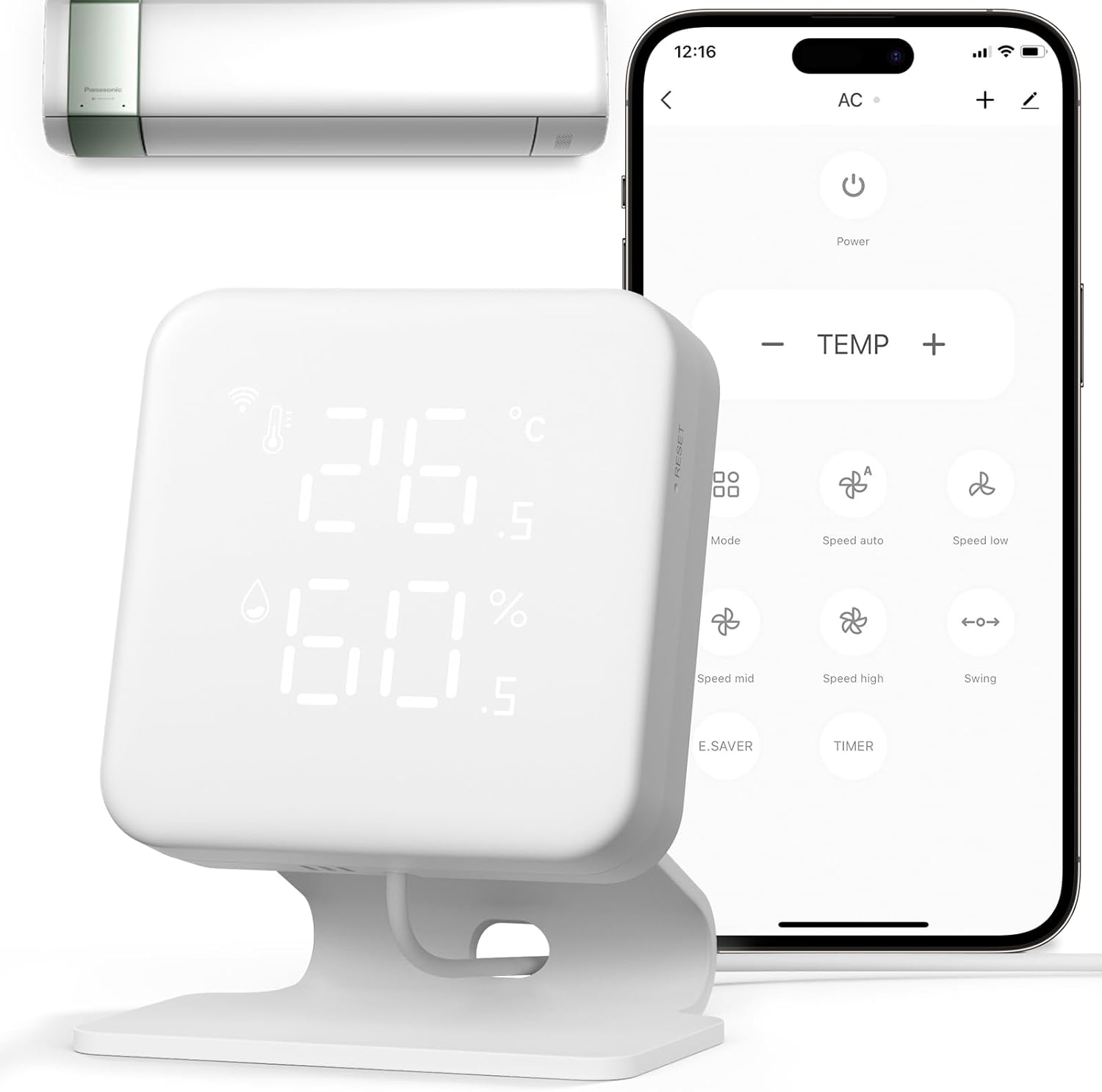
Image: The VENZ Smart Air Conditioner Controller, a white square device displaying temperature and humidity, shown alongside a smartphone displaying its control app and a mini-split air conditioner unit.
2. Pakuotės turinys
Įsitikinkite, kad jūsų siuntinyje yra visi daiktai:
- Smart Controller (Model R7246) x 1
- Laikiklis x 1
- USB C tipo duomenų kabelis x 1
- Adapteris x 1
- Metal Panel x 1
- Atstatyti PIN kodą x 1

Image: All components included in the VENZ Smart Air Conditioner Controller package, including the controller, bracket, cables, adapter, and manual.
3. Sąrankos vadovas
3.1 Pradinis įjungimas ir susiejimas
- Maitinimas: Connect the provided USB Type-C cable to the controller and an adapter, then plug it into a power source. The device display will light up.
- Observe Wi-Fi Signal: After powering on, the Wi-Fi signal icon in the upper left corner of the controller's display should turn white and start flashing. This indicates the device is in pairing mode. If it does not flash, proceed to Section 3.2 for reset instructions.
- Paleisti programą: Open the "WOOX Home" application on your smartphone.
- Pridėti įrenginį: The app should automatically detect the smart remote and a quick pairing pop-up window will appear. Tap "Add" to proceed.
- Confirm Wi-Fi Network: Įveskite savo 2.4 GHz „Wi-Fi“ tinklo pavadinimą ir slaptažodį. Note: Only 2.4GHz Wi-Fi is supported.
- Įrenginio registracija: Programėlė ieškos įrenginio ir užregistruos jį jūsų paskyroje.
- Įrenginio pavadinimas: Once successfully added, you can enter a custom name for your device. This name will also be used for voice control with Amazon Alexa and Google Home.
Video: This video demonstrates the initial setup process for the VENZ Smart Air Conditioner Controller, including powering on, observing the Wi-Fi signal, launching the app, adding the device, confirming Wi-Fi details, and naming the device. It also covers the reset procedure.
3.2 Įrenginio nustatymas iš naujo
If the Wi-Fi signal does not flash or you need to re-pair the device, follow these steps to reset:
- Užtikrinkite maitinimą: Įsitikinkite, kad įrenginys įjungtas.
- Patikrinkite „Wi-Fi“ signalą: Confirm that the device's Wi-Fi signal is flashing white.
- Atlikti atstatymą: If the Wi-Fi signal is not flashing, use the provided reset pin (or a similar thin object) to press and hold the reset button on the side of the device for more than 5 seconds. The Wi-Fi signal should then start flashing, indicating it's ready for pairing again.
4. Naudojimo instrukcijos
4.1 Nuotolinis valdymas per programėlę
Once paired, use the "WOOX Home" app to control your air conditioner or heat pump remotely. You can adjust modes, air speed, and temperature settings from anywhere.

Image: A visual representation of the smartphone app sending a Wi-Fi signal to the VENZ controller, which then transmits an infrared (IR) signal to control an air conditioner.
4.2 Balso valdymo integravimas
The controller is compatible with Amazon Alexa and Google Home. After linking your WOOX Home account to your voice assistant, you can use voice commands to control your connected appliances. For example, "Alexa, set the heat pump to seventy-two degrees."

Image: A woman in bed interacting with an Amazon Echo device, demonstrating voice control functionality for the smart AC controller. The controller is visible on a bedside table.
4.3 Temperatūros ir drėgmės stebėjimas
The built-in Swiss-made chip thermohygrometer sensor provides real-time temperature and humidity readings directly on the device's LED display and within the app. This allows for precise environmental monitoring and intelligent control based on these values.

Vaizdas: Stambus planas view of the VENZ Smart Air Conditioner Controller, highlighting its LED display showing current temperature (26.5°C) and humidity (64.5%).
4.4 Smart Programming and Geo-fencing
Utilize the 7-day programming feature to set automated schedules for your AC or heat pump based on your daily habits. Geo-fencing allows the controller to automatically adjust your climate control settings when you enter or leave a predefined area, enhancing comfort and energy efficiency.

Image: A man relaxing on a couch, with the VENZ controller mounted on the wall in the background. A smartphone in the foreground displays the app's weekly scheduling interface, showing options for intelligent climate control.
4.5 IR mokymosi funkcija
The smart IR learning function allows the controller to copy commands from 99% of traditional infrared remotes. This enables you to consolidate control of various IR-controlled devices, such as TVs, projectors, sound systems, lights, and motorized curtains, all within the WOOX Home app.

Image: The VENZ Smart Air Conditioner Controller prominently displayed, surrounded by a variety of traditional infrared remote controls and other IR-controlled appliances like TVs, fans, and air purifiers, illustrating its universal control capability.
5. Priežiūra
To ensure optimal performance and longevity of your VENZ Smart Air Conditioner Controller, follow these maintenance guidelines:
- Valymas: Gently wipe the device with a soft, dry cloth. Avoid using abrasive cleaners, solvents, or strong chemicals, as these can damage the surface and internal components.
- Vieta: Place the controller in a location free from direct sunlight, excessive heat, moisture, or extreme cold. Ensure it has a clear line of sight to the appliances it controls for effective IR transmission.
- Maitinimas: Use only the provided power adapter and cable. Ensure the power source is stable and meets the device's voltage reikalavimai (5 voltų).
- Firmware atnaujinimai: Periodically check the WOOX Home app for available firmware updates. Keeping the device's firmware up-to-date ensures access to the latest features and performance improvements.
6. Problemų sprendimas
If you encounter issues with your VENZ Smart Air Conditioner Controller, refer to the following common troubleshooting steps:
- Įrenginys neprisijungia prie „Wi-Fi“:
- Įsitikinkite, kad jūsų „Wi-Fi“ tinklas yra 2.4 GHz dažnio. Įrenginys nepalaiko 5 GHz tinklų.
- Patikrinkite, ar programoje teisingai įvestas „Wi-Fi“ slaptažodis.
- Move the controller closer to your Wi-Fi router to improve signal strength.
- Perform a device reset as described in Section 3.2.
- App Not Finding Device During Pairing:
- Check your smartphone's system settings to ensure Bluetooth and location permissions are enabled for the WOOX Home app.
- Ensure the device's Wi-Fi signal is flashing white, indicating it's in pairing mode. If not, reset the device.
- Neveikia IR valdymas:
- Ensure there is a clear line of sight between the controller and the appliance you are trying to control. Obstructions can block the IR signal.
- Verify that the correct appliance model has been selected or that the IR learning process was successful for custom remotes.
- Check if the controller is powered on and connected to Wi-Fi.
- Netikslūs temperatūros / drėgmės rodmenys:
- Ensure the device is not placed near heat sources (e.g., direct sunlight, vents, electronics) or sources of moisture that could affect readings.
- Po pradinio nustatymo arba perkėlimo palaukite, kol jutiklis stabilizuosis.
For further assistance, please refer to the manufacturer's support channels.
7. Specifikacijos
| Funkcija | Detalė |
|---|---|
| Prekės ženklas | VENZAS |
| Modelio pavadinimas | Išmanusis oro kondicionieriaus valdiklis |
| Modelio numeris | R7246 |
| Valdiklio tipas | „Amazon Alexa“, „Android“, „Google Assistant“, „iOS“ |
| Ypatingos savybės | Air Conditioner And Fan Smart Control, Date Display, Geofence Technology, Temperature And Humidity Monitor, Weekly Auto-Scheduling |
| Spalva | Baltas |
| Specifinis produkto naudojimas | Air Conditioner Controller, Humidifier Monitor, Temperature Monitor |
| Temperatūros valdymo tipas | Aušinimas |
| Ryšio technologija | Bluetooth, IR, Wi-Fi |
| ttage | 5 voltų |
| Medžiaga | Akrilnitrilo butadieno stirenas (ABS), polikarbonatas (PC) |
| Ekrano tipas | LED |
| Valdymo tipas | Programų valdymas |
| Kontrolės metodas | Programėlė, Balsas |
| Ryšio protokolas | „Bluetooth“, „Wi-Fi“ |
| Stilius | Modernus |
| Foninis apšvietimas | Taip |
| Gaminio matmenys | 2.76 x 0.73 x 2.76 colio |
| Prekės svoris | 7.8 uncijos |
8. Garantija ir palaikymas
For warranty information, technical support, or further inquiries, please contact VENZ customer service through their official website or the contact details provided in your product packaging. Keep your purchase receipt for warranty claims.
Ask a question about this manual
Ask about setup, troubleshooting, compatibility, parts, safety, or missing instructions. Manuals+ will review the question and use this page’s manual context to help answer it.