
Yimaut IR Remote for Roku Devices and Roku TVs (B0D2CVNT1L)
Yimaut IR Remote Control User Manual
Model: IR Remote for Roku Devices and Roku TVs
Įvadas
Thank you for choosing the Yimaut IR Remote Control. This manual provides comprehensive instructions for setting up, operating, and maintaining your new remote controls. This pack includes two infrared (IR) remote controls designed for a wide range of Roku devices and Roku-enabled televisions. Please read this manual carefully to ensure optimal performance and longevity of your remotes.

Image: A pair of Yimaut IR remote controls, showcasing their design and button layout. These remotes are designed for ease of use with Roku devices and TVs.
Sąrankos vadovas
1. Akumuliatoriaus įdėjimas
Each remote requires 2 x AAA baterijos (neįtraukta).
- Nuotolinio valdymo pulto gale raskite baterijų skyrių.
- Atidarykite akumuliatoriaus dangtelį.
- Įdėkite dvi AAA tipo baterijas, užtikrindami teisingą poliškumą (+ ir -), kaip nurodyta skyrelio viduje.
- Saugiai uždarykite akumuliatoriaus dangtelį.
2. Initial Pairing and Operation
The setup process varies slightly depending on whether you are using a Roku Player (Box, Express, Ultra, Premiere, Soundbar) or a Built-in Roku TV.
For All Built-in Roku TVs (TCL, Hisense, Onn, Sharp, Haier, Insignia, Sanyo, Hitachi, RCA, Philips, Element, LG, JVC, Magnavox, Westinghouse):
- No setup or programming is required. Simply insert batteries, and the remote is ready to use directly with your Built-in Roku TV.

Image: Visual representation of compatibility with various built-in Roku TV brands, emphasizing that no setup is needed for these models.
For Roku Players (Roku Box, Express, Ultra, Premiere, Soundbar):
A simple pairing process is required. Please refer to the instructions included with your remote for specific pairing steps. Generally, this involves a combination of button presses.
- Read the front and reverse side of the instruction sheet carefully for simple pairing.
- After setup, you may need to configure TV volume and power functions. See the "Troubleshooting" section for details on learning these functions from your old TV remote.
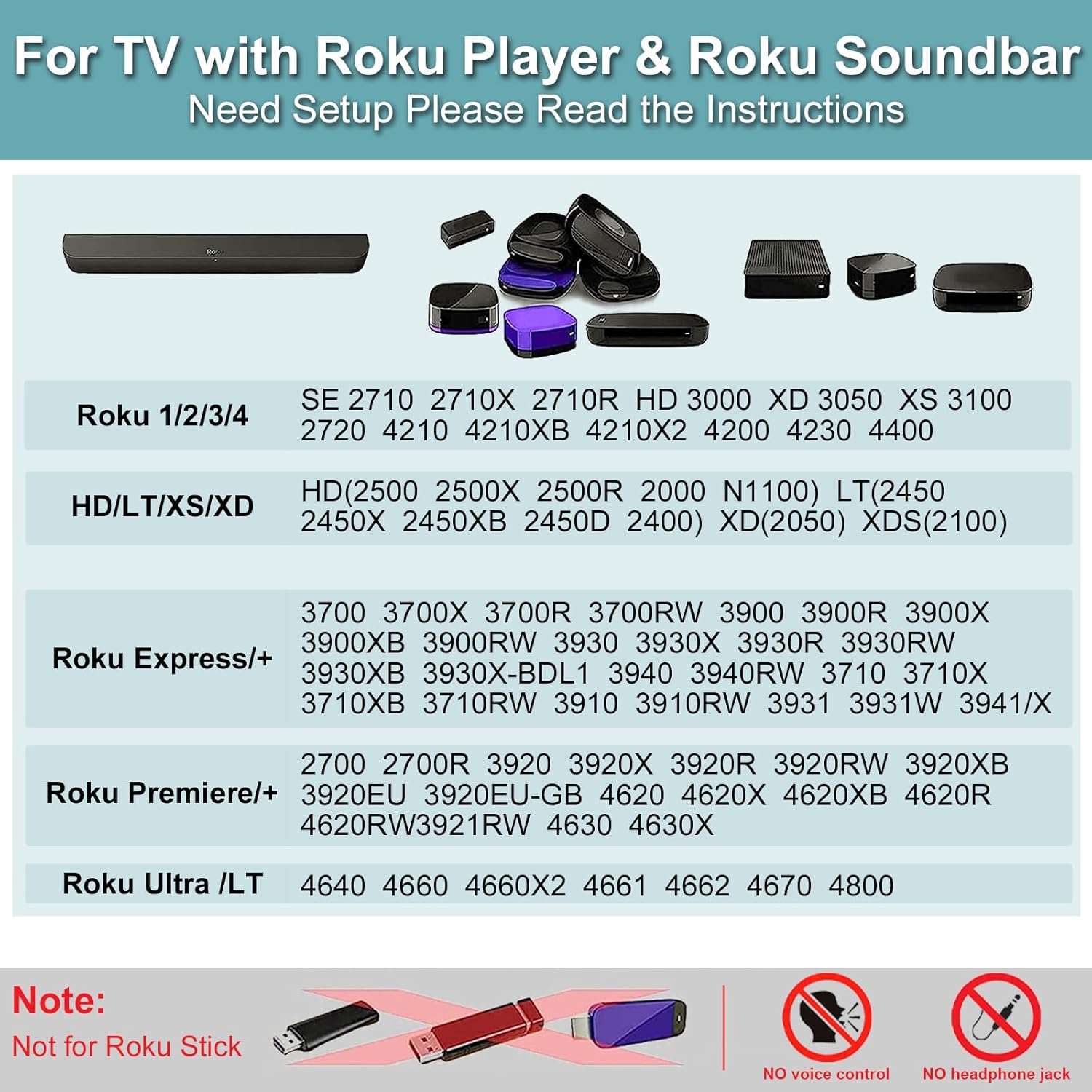
Image: A detailed chart outlining the specific Roku Player models (Roku 1/2/3/4, Express, Premiere, Ultra, Soundbar) that are compatible with this remote.
Pastaba: This is a Standard IR Remote. It does not support Wi-Fi, Bluetooth, voice control, or have a headphone jack. It is NOT compatible with Roku Stick modeliai.
Naudojimo instrukcijos
Nuotolinio valdymo mygtukų funkcijos
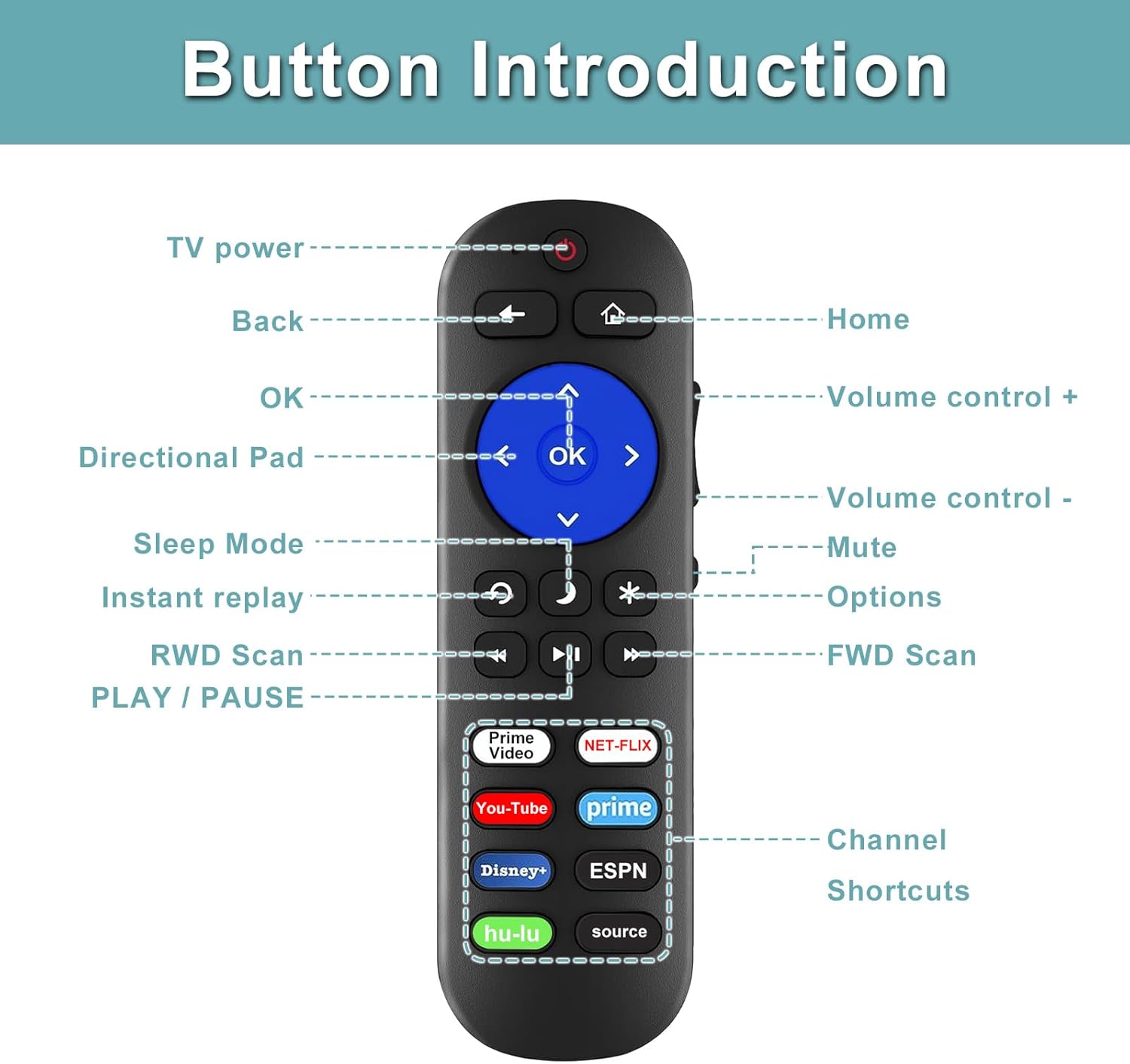
Image: A comprehensive diagram illustrating the function of each button on the Yimaut IR remote control.
| Mygtukas | Funkcija |
|---|---|
| Galia (⏻) | Turns the TV power on/off. |
| Atgal (←) | Grįžta į ankstesnį ekraną arba meniu. |
| Pradžia (⌂) | Grąžina į „Roku“ pagrindinį ekraną. |
| Directional Pad (Arrows) | Naršo meniu ir pasirinkimus. |
| OK | Patvirtina pasirinkimą ar veiksmą. |
| Garsas (+/-) | Didina arba mažina televizoriaus garsumą. |
| Nutildyti (🔇) | Nutildo arba įjungia televizoriaus garsą. |
| Miegojimo rezimas (☽) | Activates sleep timer or standby mode. |
| Momentinis pakartojimas (↻) | Replays the last few seconds of content. |
| Galimybės (*) | Prieina prie papildomų parinkčių arba nustatymų. |
| Atsukti atgal (⏪) | Atsuka medijos atkūrimą. |
| Leisti / pristabdyti (⏸) | Paleidžia arba pristabdo medijos atkūrimą. |
| Pirmyn (⏩) | Greitai persukti medijos atkūrimą į priekį. |
Channel Shortcut Buttons
The remote features 8 dedicated shortcut buttons for quick access to popular streaming services and input sources. These include:
- „Amazon Prime“ vaizdo įrašas
- NETFLIX
- "YouTube"
- Prime (likely another Prime Video shortcut)
- Disney+
- ESPN+
- Hulu
- Source (for changing TV input)

Image: A visual comparison emphasizing the Yimaut remote's advantage of having 8 dedicated channel shortcut buttons for quick access to streaming services.
Priežiūra ir priežiūra
- Valymas: Nuotolinio valdymo pultą valykite minkšta, sausa šluoste. Nenaudokite skystų valiklių ar abrazyvinių medžiagų.
- Baterijos keitimas: Pakeiskite baterijas, kai nuotolinio valdymo pultas reaguoja lėtai arba nustoja veikti. Visada keiskite abi baterijas vienu metu naujomis.
- Saugykla: Nuotolinio valdymo pultą laikykite vėsioje, sausoje vietoje, apsaugotoje nuo tiesioginių saulės spindulių ir ekstremalių temperatūrų.
- Patvarumas: The buttons are tested to support over 165,000 clicks, ensuring long-term durability.
- Medžiagų sauga: The remote is made from 100% safe ABS material, which is harmless.

Image: Illustrates the safety of the remote's materials, highlighting its construction from 100% safe ABS material.
Trikčių šalinimas
Bendros problemos ir sprendimai
- Nuotolinis nereaguoja:
- Įsitikinkite, kad baterijos įdėtos teisingai, laikantis poliškumo.
- Pakeiskite senas baterijas naujomis AAA baterijomis.
- Ensure there are no obstructions between the remote and the Roku device/TV's IR receiver.
- Confirm you are within the effective operating range (up to 32 ft/10m).
- Volume or Power buttons not working (for Roku Players):
- After initial setup for Roku Players, you may need to program the remote to control your TV's volume and power.
- This typically involves a learning function where the Yimaut remote learns from your original TV remote. Refer to the specific instructions included with your remote for the learning procedure.
- If you encounter difficulties, please contact customer support for a PDF manual on this process.
- Remote not working with Roku Stick:
- This remote is an IR (Infrared) remote and is not compatible with Roku Stick models, which typically use Wi-Fi Direct or Bluetooth remotes.
- Delayed response:
- The remote has a quick response time of 0.2 seconds. If you experience delays, check battery levels and ensure a clear line of sight to the IR receiver.
Specifikacijos
- Produkto tipas: Infraraudonųjų spindulių (IR) nuotolinio valdymo pultas
- Suderinamumas:
- Roku Players: Roku Box, Roku 1 2 3 4 HD LT XS XD, Roku Express/+, Roku Premiere/+, Roku Ultra LT, Roku Ultra, Roku Soundbar.
- Built-in Roku TVs: TCL, Hisense, Onn, Sharp, Haier, Insignia, Sanyo, Hitachi, RCA, Philips, Element, LG, JVC, Magnavox, Westinghouse.
- Not compatible with Roku Stick models.
- Maitinimo šaltinis: 2 x AAA baterijos (į komplektą neįeina)
- Veikimo atstumas: Iki 32 pėdų (10 m)
- Atsakymo laikas: 0.2 sekundžių
- Mygtuko tarnavimo laikas: Daugiau nei 160 000 paspaudimų
- Medžiaga: 100% Safe ABS
- Spalva: Juoda
- Pakuotės matmenys: 6.81 x 4.17 x 1.06 colio
- Prekės svoris: 3.84 uncijos

Image: Demonstrates the upgraded transport features of the remote, including its extended range of 32 feet and rapid 0.2-second response time.
Garantija ir palaikymas
For any questions, troubleshooting assistance, or to request a PDF version of the manual for specific programming instructions (e.g., for TV volume/power learning), please contact Yimaut customer support through the Amazon platform. We are committed to providing excellent service and support for our products.
While specific warranty details are not provided in this manual, please refer to your purchase documentation or contact the seller directly for information regarding product warranty and returns.
Ask a question about this manual
Ask about setup, troubleshooting, compatibility, parts, safety, or missing instructions. Manuals+ will review the question and use this page’s manual context to help answer it.