
1. Įvadas
This manual provides detailed instructions for the installation, operation, and maintenance of your Dosilkc UltraHD 4K POE Outdoor Bullet Security Camera (Model DS-T461). This 8MP IP network camera offers advanced surveillance features including human/vehicle detection, color night vision, and two-way audio. Please read this manual thoroughly before use to ensure proper setup and optimal performance.

Figure 1: Application Scenarios for the Dosilkc 4K POE Bullet Camera. The camera is suitable for various indoor and outdoor environments such as garages, warehouses, corridors, and courtyards.
2. Saugos informacija
Kad nesugadintumėte gaminio ir užtikrintumėte naudotojo saugumą, laikykitės šių saugos priemonių:
- Ensure the power supply meets the camera's requirements (PoE).
- Nebandykite ardyti ar modifikuoti kameros. Tai panaikins garantiją.
- Install the camera in a secure location to prevent unauthorized removal.
- Venkite ilgą laiką nukreipti fotoaparatą tiesiai į stiprius šviesos šaltinius.
- Saugokite fotoaparatą nuo stiprių elektromagnetinių trukdžių.
- Naudokite tik gamintojo patvirtintus priedus.
3. Pakuotės turinys
Patikrinkite, ar pakuotėje yra visi reikalingi daiktai:
- Dosilkc UltraHD 4K POE Outdoor Bullet Security Camera
- Vartotojo vadovas (šis dokumentas)
- Install Screw Bag
- Waterproof Cable Cover
4. Produktas baigtasview
Familiarize yourself with the components of your security camera.

Figure 2: Camera Components and Dimensions. This diagram labels the lens, microphone, IR LEDs, speaker, SD card slot, and mounting bracket, along with the camera's physical dimensions.
- Objektyvas: Užfiksuoja vaizdo įrašą footage.
- Mikrofonas: Integruotas mikrofonas garso įvestims.
- IR šviesos diodai: Infrared LEDs for night vision in low-light conditions.
- Pranešėjas: Built-in speaker for two-way audio output.
- SD kortelės lizdas: Palaiko iki 512 GB talpos „Micro SD“ korteles vietiniam saugojimui.
- Laikiklis: Adjustable mounting bracket for installation.
5. Sąranka ir diegimas
5.1 Fizinis įrengimas
The camera is designed for both indoor and outdoor use with an IP66 weatherproof housing.

Figure 3: IP66 Weatherproof Housing. The camera's robust design ensures protection against various weather conditions including rain, snow, and high temperatures.
- Pasirinkite vietą: Select a suitable location for optimal surveillance coverage. Consider the camera's 105° diagonal field of view.
- Sumontuokite fotoaparatą: Norėdami tvirtai pritvirtinti kamerą prie sienos arba lubų, naudokite pridedamą varžtų maišelį.
- Connect POE Cable: Connect a single Ethernet cable to the camera's POE port. This cable will provide both power and data transmission. Use the waterproof cable cover for outdoor installations to protect the connection.
5.2 Pradinė konfigūracija
The camera supports Plug & Play with Hikvision NVRs and is compatible with other NVRs (e.g., Da-hua) via Open Network Video Interface protocol. It also works with third-party software like Blue Iris and iSpy.

Figure 4: Multiple Storage and Compatibility Options. The camera offers flexible storage solutions including NVRs, FTP, NAS, and local SD card, and integrates with various surveillance software.
- NVR ryšys:
- For Hikvision NVRs: Connect the camera directly to the NVR's POE port. The camera should be automatically detected.
- For other NVRs: Refer to your NVR's manual for adding ONVIF-compatible IP cameras.
- Programinės įrangos integravimas: If using third-party software (e.g., Blue Iris, iSpy), follow their respective guides for adding an ONVIF IP camera.
- Programėlės mobiliesiems sąranka: Download the recommended mobile application (refer to packaging or quick start guide for app name). Follow the in-app instructions to add your camera and access live view ir nustatymai.
Video 1: Camera Setup Guide
This video demonstrates the basic setup process for the Dosilkc 4K POE Bullet Security Camera, including physical installation and initial connection steps.
6. Operacija
6.1 Tiesiogiai View ir Įrašymas
Prisijunkite prie tiesioginės transliacijos view through your NVR or mobile application. Recordings can be stored on an NVR, FTP server, NAS server, or a local Micro SD card (up to 512GB, not included).

Figure 5: Superior 4K UHD Image Quality. This image illustrates the enhanced detail provided by the 8MP (3840x2160) resolution compared to lower resolutions.
6.2 Naktinio matymo režimai
The camera features dual-light full-color technology with three smart night vision modes, selectable via the mobile app:
- IR Night Vision Mode: Standard black-and-white infrared vision.
- Spalvotas naktinio matymo režimas: Utilizes white light to provide full-color images in darkness.
- Išmanusis naktinis matymas: Automatically switches between IR and full-color based on detected motion or alarm settings.
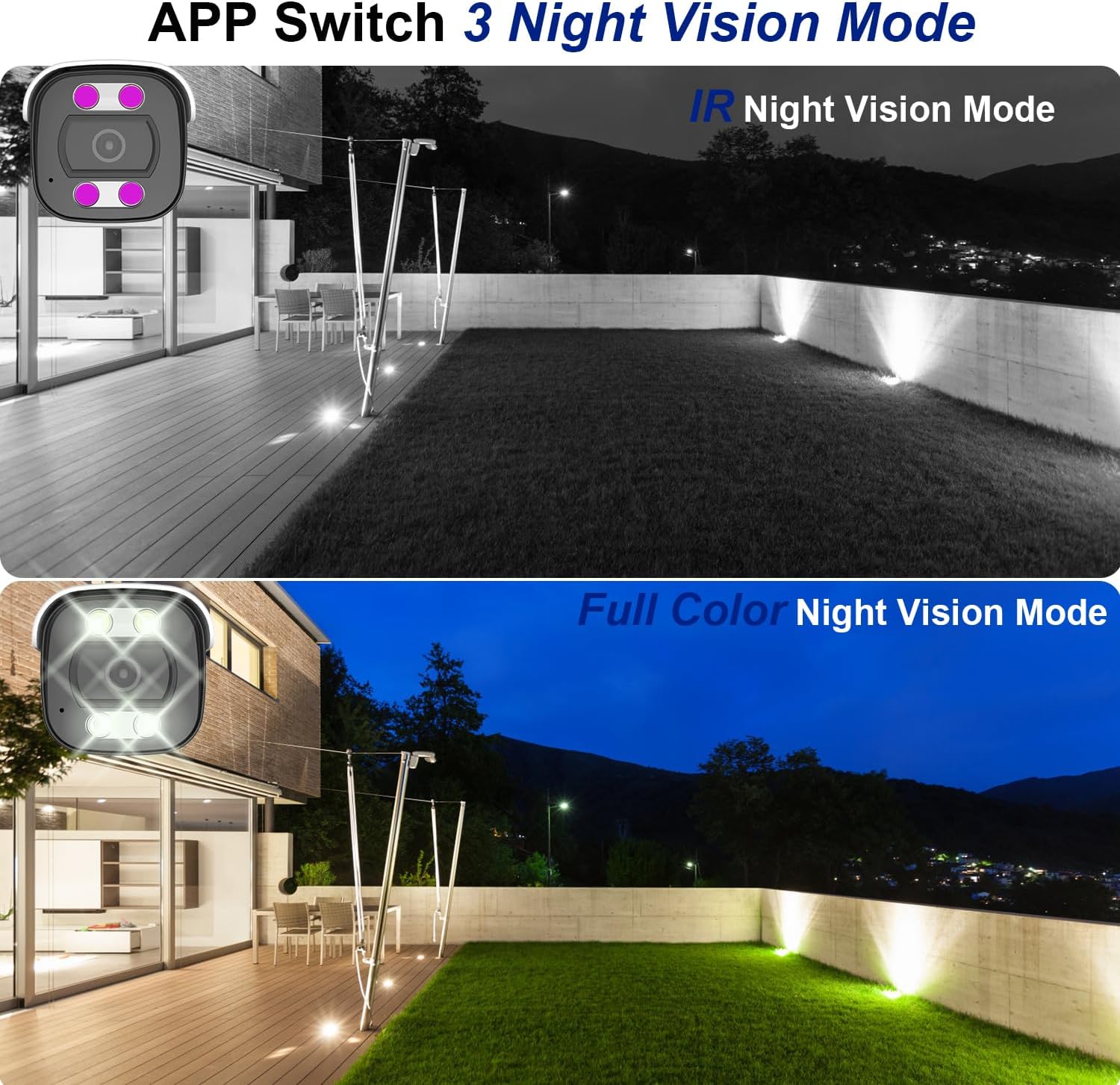
Figure 6: Night Vision Modes. This image demonstrates the difference between traditional IR (black and white) and full-color night vision capabilities.
6.3 Person/Vehicle Detection
The camera is equipped with professional human/vehicle detection functions to reduce false alarms. When a person or vehicle enters the configured detection area, the camera will automatically send real-time video or snapshots to your mobile phone.
- Aptikimo sritis: Configure specific zones within the camera's view aptikimui.
- Jautrumas: Adjust the detection sensitivity to optimize performance and minimize unwanted alerts.

Figure 7: Smart Human/Vehicle Detection. The camera identifies human presence and sends an immediate alert to a connected mobile device.
Video 2: Smart Detection Features
This video demonstrates the human and vehicle detection capabilities of the camera, showing how it identifies subjects and triggers alerts.
6.4 Dvipusis garsas
The built-in microphone and speaker allow for two-way communication. You can listen to audio from the camera's location and speak through the camera using the mobile app or NVR interface.

Figure 8: Two-Way Audio Functionality. The camera enables real-time communication, allowing users to speak and listen remotely.
Video 3: Two-Way Audio Demonstration
This video illustrates the two-way audio feature, demonstrating how users can communicate through the camera.
7. Priežiūra
Reguliarus fotoaparato aptarnavimas užtikrina jo ilgaamžiškumą ir optimalų veikimą:
- Valymas: Švelniai nuvalykite kameros objektyvą ir korpusą minkšta,amp audinys. Nenaudokite stiprių cheminių medžiagų ar abrazyvinių valiklių.
- Firmware atnaujinimai: Periodiškai tikrinkite, ar yra programinės įrangos atnaujinimų, naudodami mobiliąją programėlę arba gamintojo website to ensure the latest features and security patches.
- Kabelio apžiūra: Regularly inspect the Ethernet cable and waterproof cover for any signs of wear or damage, especially in outdoor installations.
- Saugyklos valdymas: Jei naudojate SD kortelę, periodiškai ją peržiūrėkiteview ir tvarkyti įrašytą footage, kad kortelė neužsipildytų.
8. Problemų sprendimas
Čia pateikiami dažniausiai pasitaikančių problemų, su kuriomis galite susidurti, sprendimai:
| Problema | Galima priežastis | Sprendimas |
|---|---|---|
| Kamera neįsijungia. | No power from PoE switch/NVR; faulty Ethernet cable. | Ensure PoE switch/NVR is powered on. Check Ethernet cable connection and integrity. Try a different PoE port or cable. |
| Nėra vaizdo transliacijos. | Network connectivity issue; incorrect NVR/app settings. | Verify network connection. Ensure camera is properly added to NVR/app. Check IP address settings. |
| Poor night vision. | IR LEDs obstructed; incorrect night vision mode. | Pašalinkite visas kliūtis nuo kameros view. Switch night vision mode in the app (IR, Full Color, Smart). |
| False alarms from detection. | Detection sensitivity too high; detection area too broad. | Adjust detection sensitivity and refine the detection area in the camera settings via the app or NVR. |
| Dvipusis garsas neveikia. | Microphone/speaker disabled; volume too low; network latency. | Check audio settings in the app/NVR. Ensure volume is up. Verify stable network connection. |
Video 4: Advanced Troubleshooting Tips
This video provides additional tips and solutions for common operational issues with the Dosilkc security camera.
9. Specifikacijos
| Funkcija | Detalė |
|---|---|
| Modelio numeris | DS-T461 |
| Vaizdo įrašymo raiška | 4K (3840*2160@20fps) |
| Vaizdo jutiklis | 1/3 colio progresyvaus skenavimo CMOS jutiklis |
| Objektyvas | 2.8 mm |
| Viewing Angle (FoV) | 105 Degrees (diagonal) |
| Naktinio matymo diapazonas | 88 Feet (Color Night Vision available) |
| Garsas | Built-in 2-way audio (microphone & speaker) |
| Aptikimas | Žmogaus/transporto priemonės aptikimas |
| Sandėliavimas | Micro SD Card Slot (up to 512GB), NVR, FTP, NAS |
| Suspaudimas | H.265/H.264 |
| Ryšys | Laidinis (PoE - maitinimas per Ethernet) |
| Atsparumas oro sąlygoms | IP66 Atsparus vandeniui |
| Matmenys (I x P x A) | 17.98 x 6.99 x 6.99 cm (apytiksliai 7.08 x 2.75 x 2.75 colio) |
| Svoris | 481 g |
| Montavimo tipas | Ceiling Mount, Screw In |
| Suderinami įrenginiai | Digital Video Recorder (NVR), Blue Iris, iSpy |
10. Garantija ir palaikymas
For warranty information and technical support, please refer to the official Dosilkc websvetainėje arba susisiekite tiesiogiai su jų klientų aptarnavimo tarnyba. Išsaugokite pirkimo kvitą kaip pirkimo įrodymą garantijos pretenzijoms.
Palaikymas internetu: Visit the Dosilkc official webDUK, programinės įrangos atsisiuntimų ir pagalbos išteklių svetainė.
Susisiekite su palaikymo komanda: Žiūrėkite savo produkto pakuotę arba oficialų websvetainė, kurioje rasite klientų aptarnavimo kontaktinę informaciją.