
1. Įvadas
This manual provides detailed instructions for the installation, setup, and operation of your Roinvou Android Radio Upgrade for Jeep Compass 2017-2020. This unit features a 10.1-inch HD touchscreen, Wireless CarPlay, Android Auto, GPS Navigation, WiFi, Bluetooth, FM/RDS radio, and supports a backup camera.
Please read this manual thoroughly before installation and use to ensure proper function and to maximize your driving experience.
2. Suderinamumas
This Roinvou Android Radio Upgrade is specifically designed for Jeep Compass models manufactured between 2017 and 2020.
Svarbu: Prieš pirkimąasing and installing, verify that the power cable port on the detail page matches your vehicle's original car wiring. The stereo supports most stock features, including the backup camera and steering wheel controls.

Image: Comparison of the dashboard before and after installation of the Roinvou Android Radio in a Jeep Compass (2017-2020 model). The image highlights key features like Apple CarPlay, Android Auto, Mirror Link, Android 13 OS, 8 Cores, 6GB RAM + 128GB ROM, 1280x720 resolution, and 32-band EQ.
3. Pakuotės turinys
Į paketą įeina šie komponentai:
- Jeep Compass Car Stereo (Head Unit)
- Maitinimo kabelis
- Canbus Box
- Radijo antena
- Originalus USB laidas
- RCA diržai
- GPS antena
- AHD atsarginė kamera
- Išorinis mikrofonas
- Galinės kameros įvesties kabelis
- Dvigubas USB kabelis
- Diegimo įrankis

Image: Visual representation of the complete package contents, including the head unit, various cables, antennas, CANBUS box, backup camera, external microphone, and installation tools.
4. Montavimas
Rekomenduojamas profesionalus montavimas. Prieš pradėdami montavimą, įsitikinkite, kad transporto priemonės maitinimas yra atjungtas.
4.1. Laidų jungtys
Refer to the port details and wiring diagrams for correct connections. Ensure all cables are securely connected to their respective ports on the head unit and the vehicle's wiring harness.

Image: Detailed diagram illustrating the various input/output ports on the rear of the head unit and their corresponding cable connections, including Power Cable, RCA Input/Output, USB Cable, 8pin CANBUS Serial Port (Optional), Reversing Camera Input, GPS Antenna, Radio Antenna, MIC, CVBS IN 1, VIDEO OUT, SUB WOOFER, VIDEO IN, AUX R IN, AUX L IN, AUDIO OUT R, AUDIO OUT L, and AMP TĘSTI.
4.2. Galinio vaizdo kameros laidai
Connect the AHD backup camera as shown in the diagram. The camera supports both CVBS and AHD formats, which can be configured in the factory settings under camera type settings.

Image: Wiring diagram for the included AHD backup camera, showing connections for video output, power (red wire to reversing lamp, black to GND), and the camera power cable.
5. Pradinė sąranka ir pritaikymas
5.1. Display and Themes
The unit features a 1280 x 720 HD capacitive touchscreen. You can customize the interface:
- Fonai: Norėdami perjungti iš 19 galimų fonų, palieskite spalvų ratą apatiniame kairiajame ekrano kampe.
- Darbalaukio temos: Ilgai paspauskite pagrindinę sąsają, kad perjungtumėte 59 darbalaukio temas.

Image: Illustration of the 1280 x 720 resolution display and various touch gestures supported by the screen.

Vaizdas: pvzamples of the 19 wallpaper options and 59 desktop themes available for customization on the head unit.
6. Naudojimo instrukcijos
6.1. Belaidis „CarPlay“ ir „Android Auto“
The unit supports both wireless and wired CarPlay and Android Auto. Connect your smartphone via WiFi hotspot or the phone's original USB cable for seamless integration. This allows access to navigation, calls, messages, and music directly from the head unit.
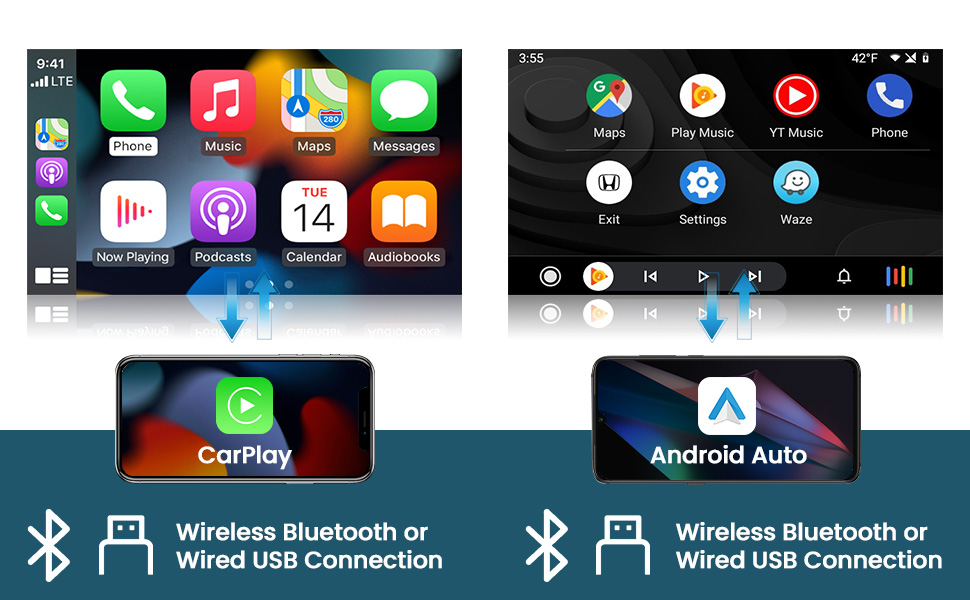
Paveikslėlis: Vizualinis pavyzdysamples of the Wireless CarPlay and Android Auto interfaces, showing music playback, navigation, and phone call functions.
6.2. Veidrodinis saitas
Mirror Link functionality allows you to display your phone's screen directly onto the head unit. This can be achieved via WiFi hotspot or USB connection.

Image: A visual representation of the Mirror Link feature, showing a smartphone screen being mirrored onto the larger head unit display.
6.3. GPS navigacija ir „Wi-Fi“
The unit includes a built-in GPS module. Navigation software like Waze and free offline maps can be used. Connect to WiFi or a mobile hotspot to use online maps and download additional applications from the Play Store, such as YouTube or TikTok.
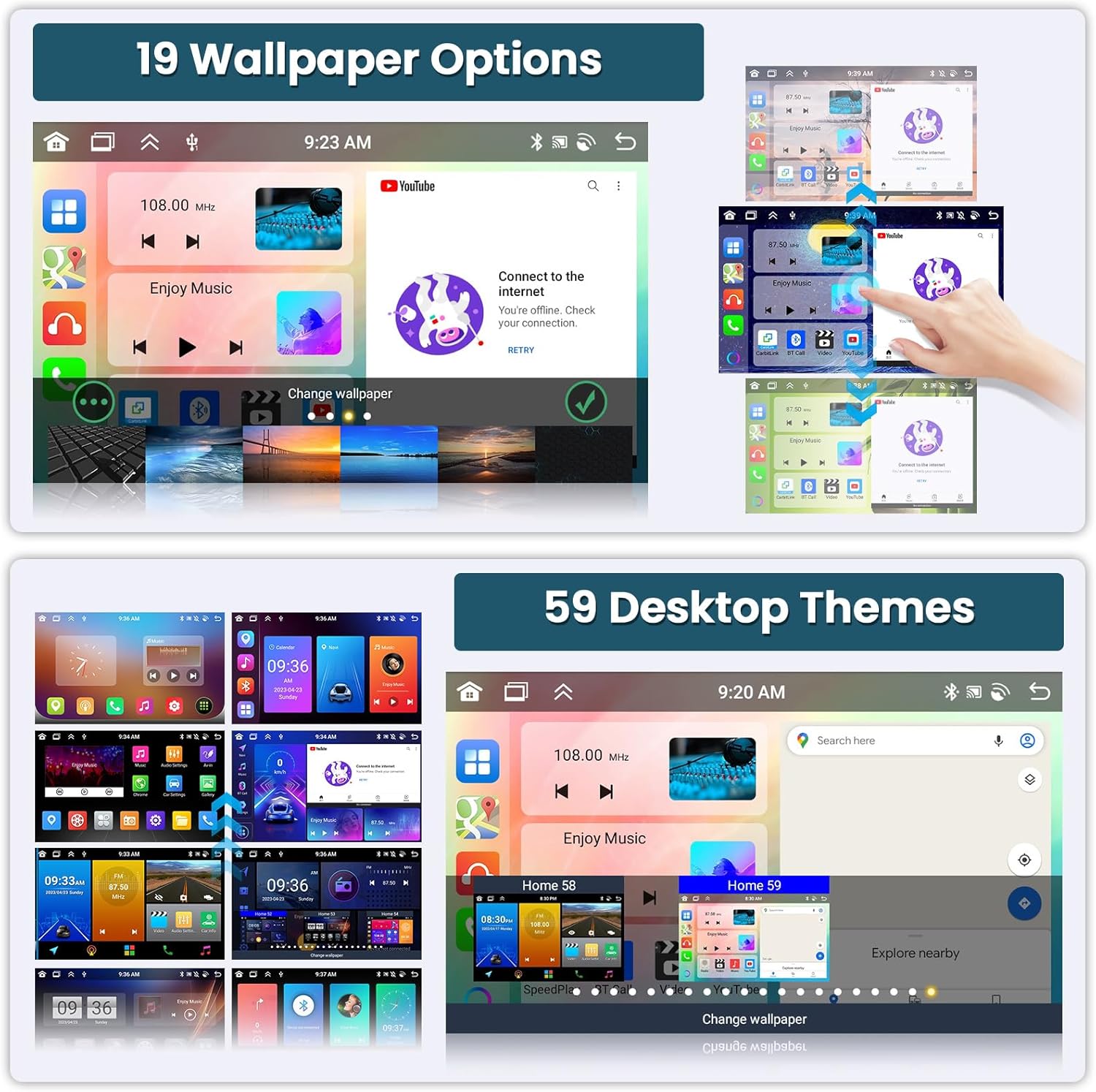
Image: Displays of the GPS navigation interface showing a map with route information, and a screen demonstrating WiFi connectivity for accessing online apps like YouTube, Facebook, and TikTok.
6.4. „Bluetooth“ ir FM/RDS radijas
Utilize the built-in and external microphone for hands-free calling, music playback, and voice functions. Sync contacts for easy access. The stable FM radio offers 18 preset stations and supports manual, semi-automatic, and fully automatic channel search. High-quality FM/RDS radio provides channel broadcasting, weather forecasts, and real-time road conditions.

Image: Displays the Bluetooth dialer interface for hands-free calls and the FM/RDS radio interface showing station tuning and presets.
6.5. Valdymas balsu
The system supports voice control for various functions, enhancing convenience and safety while driving. Use voice commands to open applications, make calls, or control media playback.
6.6. Padalinto ekrano funkcionalumas
Padalyto ekrano funkcija leidžia ekrane vienu metu veikti dviem programoms, pavyzdžiui, navigacijai ir muzikos atkūrimui.

Image: A screenshot showing the head unit display split into two sections, with a radio interface on one side and a music player on the other.
6.7. AHD galinio vaizdo kamera
When the vehicle is shifted into reverse gear, the head unit will automatically display the reversing image from the connected AHD backup camera, aiding in safer parking maneuvers. The camera offers night vision, is waterproof, and provides a wide-angle view.
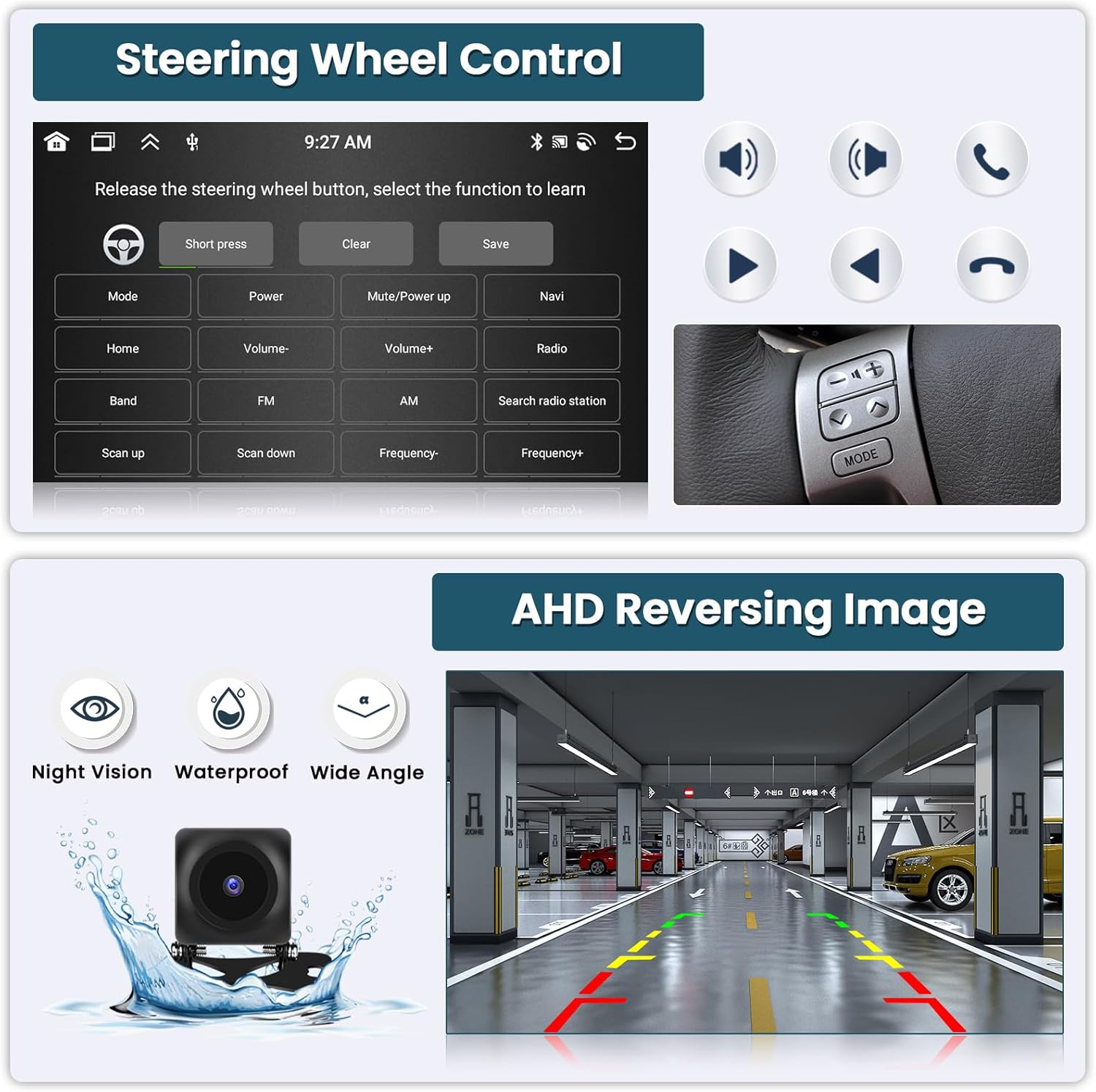
Image: A display of the AHD reversing image on the head unit, showing parking guidelines and highlighting the camera's night vision, waterproof, and wide-angle capabilities.
6.8. Vairo valdymas (SWC)
The unit supports existing steering wheel controls, allowing you to manage radio channels, volume, and songs directly from your steering wheel for a safer driving experience.

Image: The interface for programming steering wheel controls, showing options to assign functions like volume, mode, power, and navigation to physical buttons.
6.9. Garso ekvalaizeris (32 juostų ekvalaizeris)
The integrated 32-band EQ allows for precise audio tuning, enabling you to customize the sound output to your preference for a superior music listening experience.
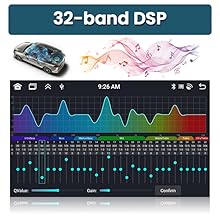
Image: The 32-band Digital Sound Processor (DSP) interface, allowing users to adjust frequency bands for customized audio output.
7. Media Demonstration
Video: This video demonstrates various UI functions, CarPlay, Android Auto, and GPS navigation features of the Roinvou Android Radio. It shows the user interface, music playback, map navigation, and hands-free calling.
8. Specifikacijos
| Funkcija | Detalė |
|---|---|
| Prekės ženklas | Roinvou |
| Modelio numeris | Roinvou-A7208A3572H1MI2US31-C251 |
| Operacinė sistema | Android 13 |
| Procesorius | 8 šerdys |
| Atmintis (RAM) | 6 GB |
| Saugykla (ROM) | 128 GB |
| Ekrano dydis | 10.1 colių |
| Rezoliucija | 1280 x 720 |
| Jutiklinio ekrano tipas | Talpinis |
| Ryšys | „Bluetooth“, USB, „Wi-Fi“ |
| Ypatingos savybės | Wireless/Wired CarPlay, Wireless/Wired Android Auto, Mirror Link, Voice Control, GPS Navigation, FM/RDS Radio, SWC, 32-band EQ, Split Screen, AHD Backup Camera Support |
| Žemėlapio tipas | Šiaurės Amerika (žemėlapiai neprisijungus pasiekiami) |
| Garso išvesties režimas | Stereo |
| Žmogaus sąsajos įvestis | Mikrofonas, Jutiklinis ekranas |
9. Problemų sprendimas
Jei kyla problemų, žr. šiuos įprastus sprendimus:
- Nėra galios: Check all power connections and ensure the vehicle's ignition is on. Verify the power cable port matches your original car's wiring.
- Nėra garso: Check speaker connections, volume levels, and equalizer settings. Ensure the correct audio output source is selected.
- GPS signalo praradimas: Įsitikinkite, kad GPS antena tinkamai sumontuota ir turi laisvą view dangaus.
- „CarPlay“ / „Android Auto“ ryšio problemos: Verify your phone's USB cable is original and undamaged. Ensure WiFi hotspot is active for wireless connections. Restart both the head unit and your phone.
- Galinio vaizdo kamera nerodoma: Check the camera's power and video input connections. Ensure the camera type setting (CVBS/AHD) is correctly configured in the factory settings.
- Sistema užstringa / nereaguoja: Perform a soft reset by pressing the reset button (if available) or by turning off the vehicle's ignition and restarting.
For further assistance, please contact Roinvou customer support.
10. Garantija ir palaikymas
This Roinvou Android Radio Upgrade comes with a 1 metų garantija.
For technical support, warranty claims, or any questions regarding your product, please contact Roinvou customer service. You can often find contact information on the manufacturer's websvetainėje arba per savo pirkimo platformą.
Susisiekite: roinvouservices@l63.com