
1. Įvadas
The Fuers WLAN Water Leak Detector (Model WFSJ01) is designed to provide real-time monitoring for water leaks and drips in your home or office. This device connects to your 2.4 GHz Wi-Fi network and sends instant notifications to your smartphone via the Tuya app, allowing for prompt action to prevent potential water damage. Its robust design and dual detection capabilities make it an essential tool for safeguarding your property.
2. Saugos informacija
- Nelaikykite prietaiso nuo ekstremalių temperatūrų ar tiesioginių saulės spindulių.
- Prietaisą laikykite atokiau nuo vaikų ir naminių gyvūnėlių.
- Naudokite tik nurodyto tipo baterijas (2 x AAA).
- Montuodami įsitikinkite, kad akumuliatoriaus poliškumas yra teisingas.
- Išmeskite panaudotas baterijas laikydamiesi vietinių taisyklių.
- Nebandykite patys ardyti ar taisyti įrenginio. Jei reikia, susisiekite su palaikymo tarnyba.
3. Pakuotės turinys
- 1 x Fuers WLAN Water Leak Detector (Model WFSJ01)
- 2x AAA baterijos
- 1 x Vartotojo vadovas
4. Produktas baigtasview
The Fuers WLAN Water Leak Detector features a compact design with advanced sensors for reliable water detection. It operates wirelessly and integrates with the Tuya Smart Life app for remote monitoring and alerts.
Pagrindinės funkcijos:
- Smart Monitoring & Remote Notifications: Connects via 2.4 GHz Wi-Fi to send real-time alerts to your smartphone.
- Dual Detection Modes: Equipped with rear sensors for leak detection and a front probe for small drip detection.
- 100dB Local Alarm: Emits a loud audible alarm upon water detection.
- IP67 atsparumo vandeniui įvertinimas: Designed for long-term use in humid environments.
- Patvari ABS medžiaga: High-quality construction ensures longevity and resistance to breakage.
- Maitinamas su baterijomis: Operates on 2 AAA batteries (included) for flexible placement and continuous protection during power outages.
- Įspėjimas apie senkantį akumuliatorių: Sends app notifications when batteries need replacement.
Komponentai:
The device consists of a main body housing the electronics, battery compartment, and an audible alarm. It features two types of sensitive probes:
- Galiniai jutikliai: For detecting widespread water leaks.
- Front Probe: Specifically designed for detecting small drips.

Image: The Fuers Water Leak Detector with its battery compartment open, revealing two AAA batteries and illustrating the front and rear sensitive probes.
5. Sąranka
5.1 Akumuliatoriaus įdėjimas
- Gently twist the cover of the device counter-clockwise to open it.
- Confirm the positive (+) and negative (-) poles inside the battery compartment.
- Insert the two AAA batteries, ensuring correct polarity.
- Align the cover and twist clockwise to tighten and secure it.

Image: A four-step visual guide demonstrating how to open the device cover, confirm battery polarity, insert AAA batteries, and securely close the cover.
5.2 App Pairing (Tuya Smart Life)
- Atsisiųskite programėlę „Tuya Smart“ arba „Smart Life“ iš savo išmaniojo telefono programėlių parduotuvės („iOS“ arba „Android“).
- Prisiregistruokite arba prisijunkite prie savo paskyros.
- Ensure your smartphone is connected to a 2.4 GHz Wi-Fi network. The device does not support 5 GHz Wi-Fi.
- Atidarykite programėlę ir palieskite piktogramą „+“, kad pridėtumėte naują įrenginį.
- Select "Security & Video Surveillance" > "Water Leak Sensor (Wi-Fi)" or search for "Water Leak Sensor".
- Follow the on-screen instructions to put the device into pairing mode (usually involves pressing and holding a button on the device until an indicator light flashes).
- Programėlėje įveskite savo „Wi-Fi“ tinklo slaptažodį.
- Wait for the device to connect. Once connected, you can rename the device and assign it to a specific room.
6. Naudojimo instrukcijos
Once set up, the Fuers WLAN Water Leak Detector continuously monitors for water presence. It features two primary detection methods:
- Nuotėkio aptikimas: The rear sensors detect larger water leaks, triggering a 100dB alarm and sending an immediate app notification.
- Lašėjimo aptikimas: The front probe is designed to detect small drips, ideal for placement under faucets or pipes. This also triggers the alarm and app notification.
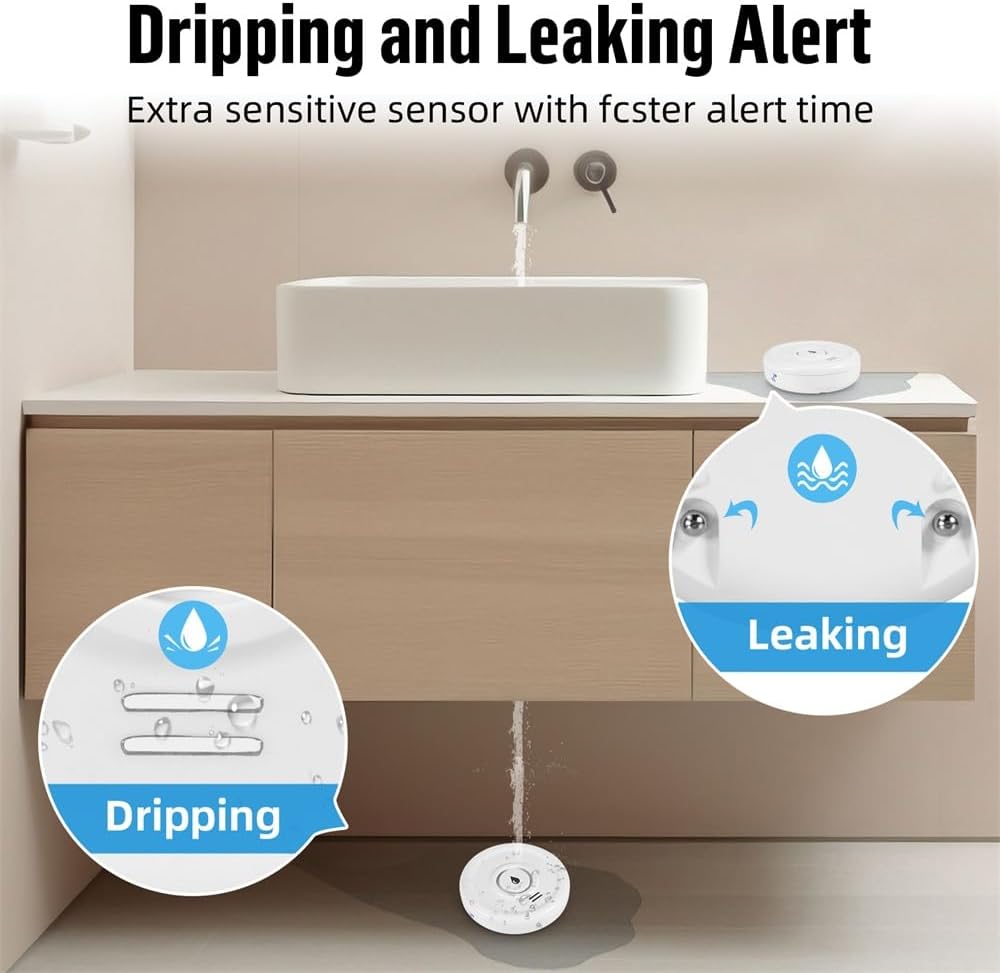
Image: A visual representation of the device's ability to detect both small drips and larger leaks, highlighting its versatile sensing capabilities.
Receiving Alerts:
When water is detected, the device will:
- Emit a loud 100dB audible alarm.
- Send a real-time push notification to your smartphone via the Tuya Smart Life app.

Image: The water leak detector placed on a wet surface, indicating a leak, while a smartphone displays a 'Water Leakage Alarm' notification from the app.
You can customize notification settings within the Tuya Smart Life app. The app also allows you to view the device's status and battery level.
7. Priežiūra
7.1 Akumuliatoriaus keitimas
The device operates on 2 AAA batteries with a standby time of up to two years. The app will send a low battery warning notification to your smartphone when the batteries need replacement. To replace batteries, follow the steps in Section 5.1.

Image: The Fuers Water Leak Detector with its battery compartment open, showing two AAA batteries and a graphical representation of battery life, indicating up to 2 years of standby time.
7.2 Valymas
Wipe the device with a soft, dry cloth. Do not use abrasive cleaners or immerse the device in water (beyond its intended IP67 rating for detection) as this may damage internal components.
8. Problemų sprendimas
| Problema | Galima priežastis | Sprendimas |
|---|---|---|
| Įrenginys neprisijungia prie „Wi-Fi“ | Incorrect Wi-Fi password; Not a 2.4 GHz network; Device too far from router; Pairing mode not activated. | Verify Wi-Fi password. Ensure router is 2.4 GHz. Move device closer to router. Re-enter pairing mode as per app instructions. |
| Nėra programėlių pranešimų | App notifications disabled; Device offline; Low battery. | Check app notification settings. Verify device is online in the app. Replace batteries if low battery warning is present. |
| Signalizacija neskamba | Žema akumuliatoriaus įkrova; įrenginio gedimas. | Pakeiskite baterijas. Jei problema išlieka, kreipkitės į klientų aptarnavimo tarnybą. |
| Klaidingi pavojaus signalai | Condensation or high humidity; Device placed on a damp paviršius. | Ensure placement is on a dry surface. Avoid areas with excessive condensation. |
9. Specifikacijos
- Modelio numeris: WFSJ01
- Matmenys: 20 mm (ilgis) x 50 mm (plotis) x 65 mm (aukštis)
- Maitinimo šaltinis: 2 x AAA baterijos (pridedamos)
- Belaidis ryšys: „Wi-Fi“ 2.4 GHz (IEEE 802.11b/g/n)
- Suderinama programa: Tuya Smart / Smart Life
- Signalizacijos garsumas: 100 dB
- Atsparumo vandeniui įvertinimas: IP67
- Medžiaga: Aukštos kokybės ABS plastikas
- Max Range (Wireless): 20 metrų (be kliūčių)
- Jutiklio technologija: Kontaktinis jutiklis
- Diegimo tipas: Floor/Surface Mount

Image: The Fuers Water Leak Detector partially submerged in water, demonstrating its IP67 waterproof and durable construction.
10. Garantija ir palaikymas
This product comes with a standard manufacturer's warranty. For detailed warranty information, please refer to the documentation included with your purchase or contact the retailer. For technical support, troubleshooting assistance, or any inquiries regarding your Fuers WLAN Water Leak Detector, please visit the official Fuers websvetainėje arba susisiekite su klientų aptarnavimo skyriumi.
Internetiniai ištekliai:
- „Tuya“ išmanioji programėlė: www.tuya.com/app
- „Smart Life“ programa: www.smartlife.com/app