
1. Įvadas
The Ulefone Armor Pad 3 Pro is a rugged tablet designed for durability and high performance in challenging environments. It features a large 33280mAh battery, a 10.36-inch 2K display, powerful cameras, and dual 1100LM LED lights. This manual provides essential information for setting up, operating, and maintaining your device.
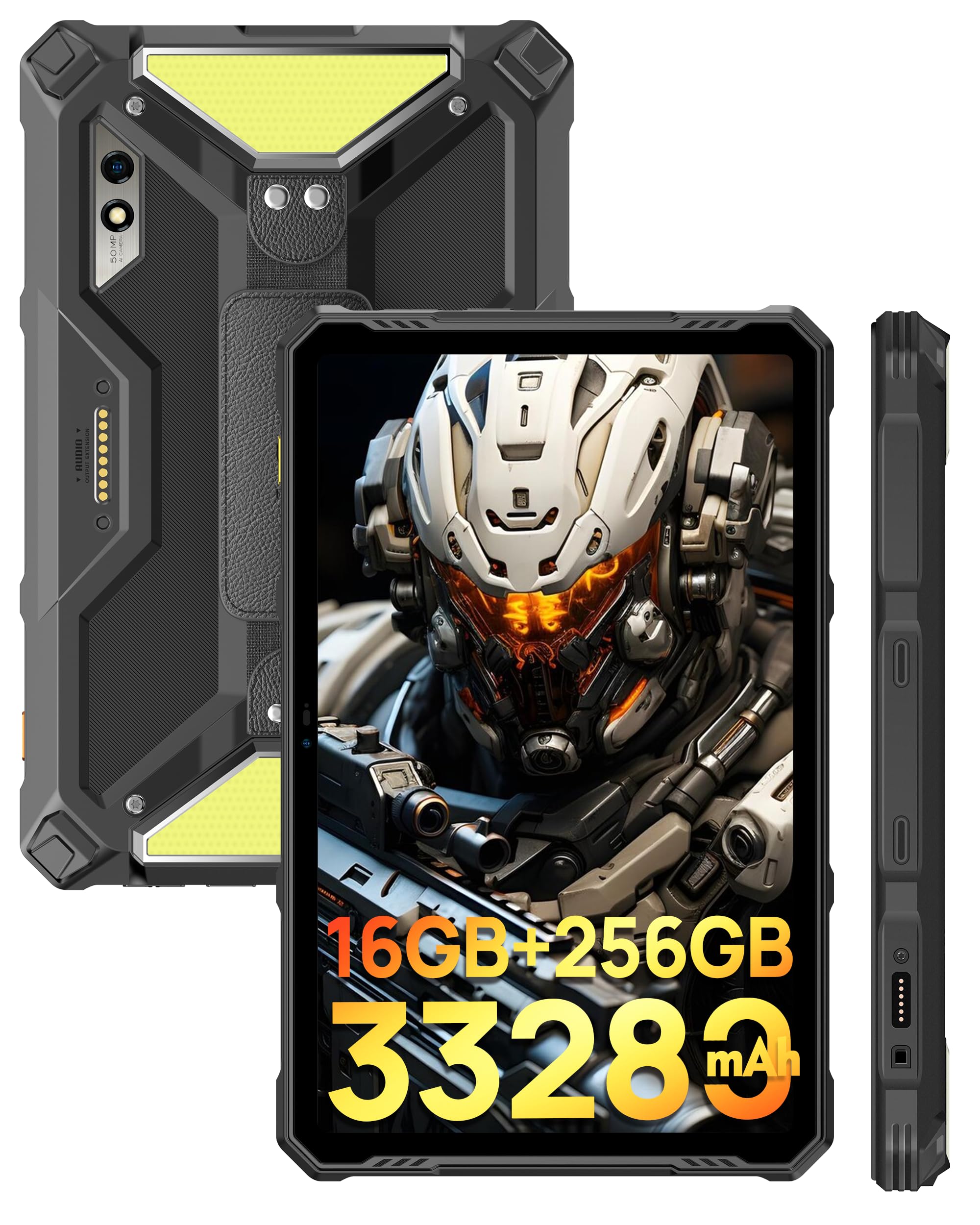
Vaizdas: Priekinė ir galinė dalys view of the Ulefone Armor Pad 3 Pro Rugged Tablet, highlighting its robust design.
Vaizdo įrašas: Viršijimasview of the Ulefone Armor Pad 3 Pro Rugged Tablet, showcasing jo savybes ir dizainą.
2. Kas yra dėžutėje
Patikrinkite, ar pakuotėje yra visi reikalingi daiktai:
- 1 x AC Power Charger
- 1 x USB Type-C 2.0 Charging Cable
- 1 x Hand Strap & 1 x Screwdriver & 4 x Screws
- 1 x SIM adata
- 1 x apsauginė plėvelė (iš anksto sumontuota)

Image: The Ulefone Armor Pad 3 Pro tablet displayed with its standard accessories, including charger, cables, and tools.
3. Sąranka
3.1. Įrenginio įkrovimas
Before first use, fully charge the tablet using the provided AC power charger and USB Type-C cable. The device supports 66W fast charging.
3.2. Maitinimo įjungimas/išjungimas
- To power on: Press and hold the Power button until the Ulefone logo appears.
- Norėdami išjungti: paspauskite ir palaikykite maitinimo mygtuką, tada iš parinkčių pasirinkite „Išjungti“.
3.3. SIM ir TF kortelių įdėjimas
The tablet supports dual Nano SIM cards and one TF card for expandable storage. Use the provided SIM needle to open the card tray.
- Planšetinio kompiuterio šone raskite SIM kortelės dėklą.
- Įkiškite SIM kortelės adatą į mažą skylutę šalia dėklo ir švelniai paspauskite, kol dėklas išslys.
- Place your Nano SIM cards and/or TF card into the designated slots on the tray. Ensure correct orientation.
- Atsargiai stumkite dėklą atgal į planšetinį kompiuterį, kol jis spragtelėdamas užsifiksuos.
4. Naudojimo instrukcijos
4.1. Ekranas ir navigacija
The Ulefone Armor Pad 3 Pro features a 10.36-inch 2K display protected by Corning Gorilla Glass 5. Navigate the Android 13 operating system using touch gestures.

Image: The tablet's 10.36-inch 2K display showcasing vibrant visuals and its durable Corning Gorilla Glass 5 protection.
4.2. Baterijos valdymas
The tablet is equipped with a 33280mAh mega battery. It supports 66W fast charging and 10W reverse charging (OTG) to power other devices.

Image: Visual representation of the 33280mAh battery capacity, 66W fast charging, and reverse charging capabilities.
4.3. Kameros funkcijos
Capture high-quality photos and videos with the 50MP rear camera (Samsung ISOCELL GN1 sensor) and the 32MP front camera.
- Atidarykite programėlę „Kamera“ iš pagrindinio ekrano arba programėlių stalčiaus.
- Norėdami nufotografuoti, palieskite užrakto mygtuką.
- Prireikus perjunkite fotografavimo ir filmavimo režimus.
- Norėdami perjungti kameras, naudokite priekinės / galinės kameros perjungiklį.

Image: Details of the 50MP rear camera, including sensor size and aperture, with exampnuotraukos.

Image: The 32MP front camera in use for video calls or selfies.
4.4. Dual 1100LM LED Lights
The tablet features two powerful 1100 lumen LED lights for illumination. These lights have 3 lighting modes and 3 brightness levels, accessible via a physical button on the left side.
- Press the dedicated light button to activate the LED lights.
- Press repeatedly to cycle through brightness levels and modes.

Image: The tablet's dual 1100 lumen LED lights in action, providing powerful illumination for various scenarios.
4.5. Ryšys
The Armor Pad 3 Pro supports 4G cellular, 2.4G/5G WiFi, Bluetooth 5.2, NFC, and HDMI output.
- WiFi: Prisijunkite prie belaidžių tinklų per Nustatymai > Tinklas ir internetas > „Wi-Fi“.
- Bluetooth: Susiekite su „Bluetooth“ įrenginiais per Nustatymai > Prijungti įrenginiai > „Bluetooth“.
- NFC: Enable NFC for contactless payments and data transfer via Settings > Connected devices > Connection preferences > NFC.
- HDMI: Connect to an external display using an HDMI cable for screen mirroring.

Image: The tablet connected to an external display via HDMI, demonstrating its screen mirroring capability.

Image: Illustrates the tablet's dual 4G LTE and 2.4G/5G WiFi connectivity, along with fingerprint ID and face unlock security features.
4.6. „uSmart“ išplėtimo jungtis
The uSmart Expansion Connector allows for fast and stable connections to professional tools such as endoscopes and microscopes (sold separately).

Image: The uSmart Expansion Connector shown with compatible accessories like a digital microscope and endoscopes, demonstrating its versatility.
Video: A showcase of the Ulefone Armor Pad 3 Pro's accessory ecosystem, including the uSmart expansion tools like endoscopes and microscopes.
4.7. Kitos funkcijos
- Stereo Dual Speakers: Enjoy enhanced audio with built-in front-facing speakers.
- Fingerprint Sensor & Face Unlock: Secure your device with biometric authentication.
- Pirštinių režimas: Use the touchscreen while wearing gloves.
- GPS: Integrated GPS + GLONASS + Galileo + BeiDou for accurate navigation.
- Skaitmeninis įrankių rinkinys: Access various utility tools like Sound Meter, Compass, Magnifier, etc.

Image: The tablet's stereo front-facing dual speakers for spatial audio effects and its headset-free FM radio function.
5. Priežiūra
To ensure the longevity and optimal performance of your Ulefone Armor Pad 3 Pro, follow these maintenance guidelines:
- Valymas: Nuvalykite prietaisą minkšta, damp cloth. Avoid harsh chemicals or abrasive materials. Ensure all port covers are securely closed before cleaning with water.
- Temperatūra: Operate the tablet within its specified temperature range. Avoid prolonged exposure to extreme heat or cold.
- Apsauga nuo smūgių: Nors ir tvirtas, venkite nereikalingų kritimų ar smūgių.
- Uostų dangčiai: Always ensure the USB-C and SIM/TF card slot covers are tightly sealed to maintain water and dust resistance.
6. Problemų sprendimas
Jei kyla problemų dėl planšetinio kompiuterio, žr. šiuos dažniausiai pasitaikančius sprendimus:
- Įrenginys neįsijungia: Įsitikinkite, kad akumuliatorius įkrautas. Prijunkite prie įkroviklio ir palaukite kelias minutes, prieš bandydami vėl įjungti.
- Ekranas užstrigo arba nereaguoja: Paspauskite ir palaikykite maitinimo mygtuką maždaug 10–15 sekundžių, kad priverstumėte paleisti iš naujo.
- Connectivity issues (Wi-Fi/Bluetooth/4G): Try toggling the respective feature off and on in Settings. For cellular issues, ensure your SIM card is correctly inserted and your plan is active.
- Programėlės stringa: Išvalykite probleminės programėlės talpyklą („Nustatymai“ > „Programos“ > [Programėlės pavadinimas] > Atmintis ir talpykla > Išvalyti talpyklą). Jei problema išlieka, pabandykite iš naujo įdiegti programėlę.
- Lėtas veikimas: Uždarykite nereikalingas fonines programas, išvalykite talpyklą arba apsvarstykite gamyklinių parametrų atkūrimą kaip paskutinę išeitį (pirmiausia sukurkite atsarginę duomenų kopiją).
7. Specifikacijos
| Funkcija | Specifikacija |
|---|---|
| Prekės ženklas | Ulefone |
| Modelio pavadinimas | Ulefone Armor Pad 3 Pro |
| Operacinė sistema | Android 13 |
| Procesorius | „MediaTek MT8788“ aštuonių branduolių (2 GHz) |
| RAM atmintis | 16 GB (8 GB fizinės + 8 GB virtualios) |
| Sandėliavimo talpa | 256 GB (expandable up to 2 TB via TF card) |
| Ekrano dydis | 10.36 colių |
| Ekrano raiška | 2048x1536 (2K), 500 Nits Brightness |
| Ekrano tipas | LCD with Corning Gorilla Glass 5 |
| Galinė kamera | 50 MP |
| Priekinė kamera | 32 MP |
| Baterijos talpa | 33280 mAh |
| Greitas įkrovimas | 66W |
| Atvirkštinis įkrovimas | 10W OTG |
| Tvirtumas | IP68/IP69K, sertifikuotas MIL-STD-810H |
| Ryšys | 4G LTE, Wi-Fi (2.4G/5G), Bluetooth 5.2, NFC, HDMI |
| GPS | GPS + GLONASS + Galileo + BeiDou |
| Ypatingos savybės | Dual 1100LM LED Lights, uSmart Expansion Connector, Stereo Dual Speakers, Fingerprint Sensor, Glove Mode, Custom Key, PTT |
| Dimensions (L x W x Thickness) | 6.57 cm ilgio x 10.3 cm pločio x 0.83 cm storio |
| Prekės svoris | 1018 gramų |
8. Garantija ir palaikymas
The Ulefone Armor Pad 3 Pro comes with a 1-Year Limited Warranty from the manufacturer, Ulefone. For technical support, warranty claims, or service inquiries, please contact Ulefone customer service through their official websvetainę arba mažmenininką, iš kurio buvo pirktas produktas.
Prašome išsaugoti pirkimo įrodymą garantijos galiojimui.