
Įvadas
Thank you for choosing the Lekaby Wireless Ear Buds, Model Q26-GB-2024. This manual provides detailed instructions for the proper setup, operation, maintenance, and troubleshooting of your new Bluetooth 5.3 headphones. Please read this manual thoroughly before use to ensure optimal performance and longevity of your device.
Pakuotės turinys
Patikrinkite, ar jūsų siuntinyje yra visi toliau išvardyti daiktai:
- Earbuds (2 units)
- 2600 mAh Charging Case (1 unit)
- C tipo įkrovimo laidas (1 vnt.)
- Ear Caps (6 units - S/M/L sizes)
- Vartotojo vadovas (1 vnt.)
Produktas baigtasview
The Lekaby Q26-GB-2024 Wireless Ear Buds feature Bluetooth 5.3 connectivity, Environmental Noise Cancelling (ENC) for clear calls, a digital LED display for battery status, and IPX7 waterproofing. They are designed for comfort and provide powerful audio performance.

LED Digital Power Display: The charging case features an LED screen that accurately displays the battery percentage of both the charging case and each earbud.

Enhanced Audio Driver: Equipped with a 13.44mm graphene diaphragm for an 85% bass boost and high-fidelity sound.

Ergonomiškas dizainas: Lightweight at 4.5g per earbud, designed for a comfortable and secure fit with multiple ear cap sizes (S/M/L) included.
Sąranka
1. Ausinių ir dėklo įkrovimas
Prieš pirmą kartą naudodami, visiškai įkraukite ausines ir įkrovimo dėklą.
- Įdėkite ausines į įkrovimo dėklą.
- Prijunkite C tipo įkrovimo laidą prie dėklo įkrovimo prievado ir prie USB maitinimo šaltinio.
- The LED digital display on the case will show the charging progress.
- The charging case takes approximately 2 hours to fully charge. Earbuds can be fully charged in the case in about 1.5 hours. A 10-minute charge provides up to 2 hours of music playback for the earbuds.

Baterijos veikimo laikas: Earbuds provide 8 hours of playback on a single charge, with the charging case extending total playtime up to 128 hours.
2. Susiejimas su jūsų įrenginiu
Ausinės turi patogumo dėlei automatinį vieno žingsnio susiejimą.
- Atidarykite įkrovimo dėklo dangtelį. Ausinės automatiškai įsijungs susiejimo režimu.
- Savo įrenginyje (išmaniajame telefone, planšetiniame kompiuteryje, nešiojamajame kompiuteryje) eikite į „Bluetooth“ nustatymus ir įjunkite „Bluetooth“.
- Ieškokite galimus įrenginius ir iš sąrašo pasirinkite „Q26“.
- Once connected, you will hear a confirmation sound, and the device will show "Connected".
- Po pradinio susiejimo, išėmus iš dėklo, ausinės automatiškai prisijungs prie paskutinio susieto įrenginio.
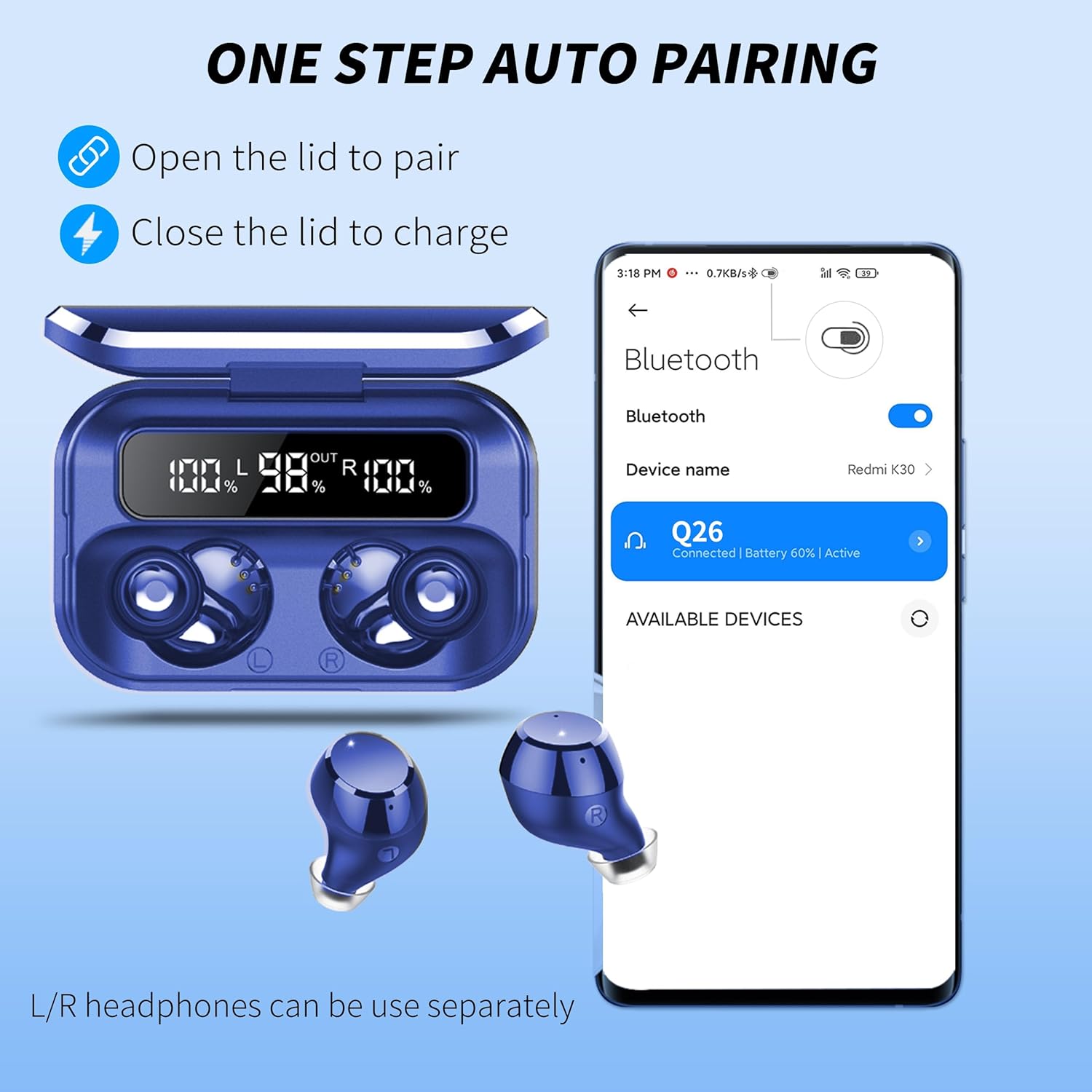
Vieno žingsnio automatinis susiejimas: Simply open the charging case lid to initiate pairing. Close the lid to charge the earbuds.
Naudojimo instrukcijos
Palieskite valdiklius
The earbuds are equipped with smart touch controls. Tap the touch area on either earbud to perform various functions:
- Leisti / pristabdyti: Vienas palietimas.
- Kitas takelis: Dukart bakstelėkite dešinę ausinę.
- Ankstesnis takelis: Dukart palieskite kairę ausinę.
- Pagarsink: Tris kartus bakstelėkite dešinę ausinę.
- Patildyti: Tris kartus palieskite kairiąją ausinę.
- Atsiliepti / Baigti skambutį: Single tap during an incoming call or active call.
- Atmesti skambutį: Press and hold for 2 seconds during an incoming call.
- Įjunkite balso asistentą („Siri“ / „Google“ asistentas): Press and hold for 2 seconds (when not on a call).
- Maitinimo įjungimas/išjungimas: Earbuds power on automatically when removed from the case and power off when placed back in the case. Manual power on/off may be available by pressing and holding the touch area for 5 seconds.
Avarinio maitinimo banko funkcija
The 2600mAh charging case can also serve as an emergency power bank for other devices.
- Connect your smartphone or other compatible device to the USB-A output port on the charging case using an appropriate cable (not included).
- The charging case will begin to charge your device.

Avarinis įkrovimas: The 2600mAh charging case can provide emergency power to your mobile phone or other devices.
Priežiūra
Valymas
- Reguliariai valykite ausines ir įkrovimo dėklą minkštu, sausu, nepūkuotu skudurėliu.
- Nenaudokite abrazyvinių valiklių, alkoholio ar cheminių tirpiklių.
- Gently remove any earwax or debris from the earbud mesh using a small, clean brush or cotton swab.
Atsparumas vandeniui
The earbuds feature IPX7 nano-coating technology, protecting them from sweat and light rain. They are not designed for swimming or prolonged submersion. Ensure the earbuds are dry before placing them back into the charging case to prevent damage.
Sandėliavimas
Kai nenaudojate, laikykite ausines įkrovimo dėkle, kad apsaugotumėte jas nuo dulkių, pažeidimų ir kad jos būtų įkrautos.
Trikčių šalinimas
If you encounter issues with your Lekaby Wireless Ear Buds, please refer to the following common solutions:
- Ausinės nesusijungia:
- Įsitikinkite, kad abi ausinės yra įkrautos.
- Išjunkite „Bluetooth“ savo įrenginyje, tada vėl jį įjunkite.
- Delete "Q26" from your device's Bluetooth list and attempt to re-pair.
- Įdėkite ausines atgal į dėklą, uždarykite dangtelį, palaukite kelias sekundes, tada atidarykite, kad iš naujo inicijuotumėte susiejimo režimą.
- Veikia tik viena ausinė:
- Įsitikinkite, kad abi ausinės yra įkrautos.
- Try resetting the earbuds by placing them in the charging case, closing the lid, and then opening it again.
- Check if the earbuds are connected as separate devices in your Bluetooth settings; if so, disconnect both and re-pair.
- Ausinės neįkraunamos:
- Įsitikinkite, kad įkrovimo laidas yra tvirtai prijungtas tiek prie dėklo, tiek prie maitinimo šaltinio.
- Patikrinkite, ar ausinių ir dėklo viduje esantys įkrovimo kontaktai yra švarūs ir be šiukšlių.
- Išbandykite kitą įkrovimo laidą arba maitinimo adapterį.
- Prasta garso kokybė arba ryšio sutrikimai:
- Įsitikinkite, kad ausinės yra ne toliau kaip 15 metrų „Bluetooth“ diapazone nuo jūsų įrenginio.
- Reduce interference by moving away from other wireless devices or obstacles.
- Try adjusting the earbud fit or changing ear cap sizes.
Jei problema išlieka, susisiekite su klientų aptarnavimo tarnyba.
Specifikacijos
| Funkcija | Specifikacija |
|---|---|
| Modelio pavadinimas | Q26-GB-2024 |
| Ryšio technologija | Belaidis ryšys („Bluetooth 5.3“) |
| Bluetooth diapazonas | Iki 15 metrų |
| Ausinių baterijos veikimo laikas | 8 valandos (vienas įkrovimas) |
| Bendras grojimo laikas (su dėklu) | Iki 128 valandų |
| Įkrovimo dėklo talpa | 2600 mAh |
| Įkrovimo laikas (dėklas) | apytiksliai 2 valandos |
| Atsparumo vandeniui lygis | IPX7 (atsparus vandeniui) |
| Triukšmo valdymas | ENC triukšmo slopinimas |
| Kontrolės metodas | Touch Control, Siri Voice Assistant |
| Ausų išdėstymas | Ausyje |
| Medžiaga | Plastikiniai |
| Gaminio matmenys | 0.79 x 0.39 x 0.39 colio |
Garantija ir palaikymas
Your Lekaby Wireless Ear Buds Model Q26-GB-2024 come with a 12-month warranty from the date of purchase. We also offer a 30-day hassle-free return policy.
For any questions, technical support, or warranty claims, please contact our customer service team. We are available 24 hours online to assist you.
Customer satisfaction is our top priority.