
1. Įvadas
This manual provides instructions for the VOLT PLUS TECH Dual USB-C + MicroUSB Switch Cable, Model VPT-2074. This versatile cable is designed to provide efficient charging and data transfer for a wide range of devices, featuring both Micro USB and USB-C connectors. Please read this manual carefully to ensure proper use and maintenance of your cable.
2. Pakuotės turinys
- 2 x VOLT PLUS TECH Dual USB-C + MicroUSB Switch Cables
3. Produkto ypatybės
The VOLT PLUS TECH Dual USB-C + MicroUSB Switch Cable offers advanced functionality and durability:
- Dvigubas suderinamumas: Features both Micro USB and USB-C connectors, allowing compatibility with a vast majority of modern devices. The switch tip design ensures seamless transition between connector types.
- Greito įkrovimo palaikymas: Engineered to support fast charging technologies, including Quick Charge 3.0 (QC3.0/QC2.0/QC1.0), when used with compatible chargers and devices.
- Didelės spartos duomenų perdavimas: Supports USB 3.1 for ultra-fast data syncing between your device and computer, enabling quick transfer of large files such as pictures and videos.
- Patvari konstrukcija: Built with premium materials and advanced engineering for enhanced durability, designed to withstand daily use, twists, tugs, and tangles.
- Safety Support: The cable's design supports safe charging by working in conjunction with intelligent circuit systems in compatible chargers and devices to help prevent issues like overcharging, over-currents, and overheating.

3.1 vaizdas: Baigtaview of the Dual USB-C + MicroUSB Switch Cable. This image displays the USB-A connector on one end and the innovative dual Micro USB and USB-C switch tip on the other end, highlighting its versatile design.

3.2 pav.: Išsamus view of the cable's connectors. This image illustrates the craftsmanship of the USB-A, USB-C, and Micro USB interfaces, emphasizing their clean outlines and robust construction.

Image 3.3: Close-up of the cable's switch tip mechanism. This image shows how the USB-C connector slides over the Micro USB connector, demonstrating the dual compatibility feature.

Image 3.4: Illustration of the cable's durability. This image highlights the cable's robust design, indicating a bend lifespan of more than 3000 cycles, ensuring long-term performance.

3.5 paveikslas: Skerspjūvis view of the cable's internal structure. This image details the high-purity copper core, TPE jacket, metal mesh layer, aluminum foil layer, anti-interference rubber layer, and tinned ground wire, all contributing to better conductivity and durability.
4. Sąranka
To set up your VOLT PLUS TECH Dual USB-C + MicroUSB Switch Cable:
- Identify the charging port on your device. It will either be a Micro USB port or a USB-C port.
- Connect the appropriate end of the cable to your device. If your device has a Micro USB port, use the smaller connector. If it has a USB-C port, slide the USB-C adapter over the Micro USB connector and then insert it into your device.
- Connect the standard USB-A end of the cable to a compatible power source (e.g., wall charger, power bank, computer USB port) for charging, or to a computer's USB port for data transfer.
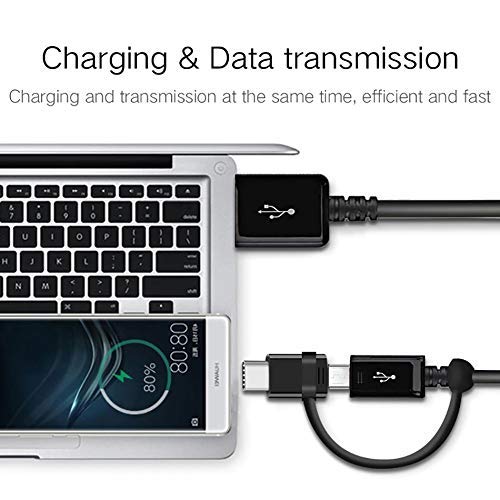
Image 4.1: Cable connected for charging and data transmission. This image demonstrates the cable simultaneously charging a smartphone and connecting it to a laptop for data transfer, illustrating its dual functionality.
5. Naudojimo instrukcijos
5.1 Įrenginio įkrovimas
Connect the cable as described in the Setup section. Ensure your power source is active. Your device should indicate that it is charging. For fast charging, ensure both your device and power adapter support Quick Charge technology.
5.2 Duomenų perdavimas
Connect the cable between your device and a computer. Once connected, your computer should recognize the device. You may need to select a data transfer mode (e.g., "File Transfer" or "MTP") on your device's screen. You can then access your device's storage to transfer files.
5.3 Switching Connectors
The cable features a Micro USB connector with an attached USB-C adapter. To use Micro USB, simply plug the Micro USB end into your device. To use USB-C, slide the USB-C adapter over the Micro USB connector until it clicks into place, then insert the combined connector into your USB-C device.
6. Priežiūra
To ensure the longevity and optimal performance of your cable:
- Saugykla: Store the cable in a clean, dry place away from extreme temperatures. Avoid tightly coiling or bending the cable at sharp angles, especially near the connectors.
- Valymas: If necessary, gently wipe the cable and connectors with a soft, dry cloth. Do not use harsh chemicals or abrasive materials.
- Tvarkymas: Always grasp the connector head when plugging or unplugging the cable, rather than pulling on the cable itself, to prevent damage to the internal wires.
7. Problemų sprendimas
- Įrenginys neįkraunamas:
- Įsitikinkite, kad abu kabelio galai yra tvirtai prijungti.
- Verify that the power source (wall adapter, computer port) is functional.
- Test the cable with a different device or charger to isolate the issue.
- Check if the correct connector (Micro USB or USB-C) is being used for your device.
- Lėtas įkrovimas:
- Ensure your charger supports fast charging and is adequately powered.
- Some devices may limit charging speed if used while charging or if the battery is very low/full.
- Duomenų perdavimas neveikia:
- Confirm the cable is connected to a computer's data-enabled USB port.
- On your device, check for a notification to select "File Transfer" or "MTP" mode.
- Įsitikinkite, kad jūsų kompiuterio tvarkyklės yra atnaujintos.
8. Specifikacijos
| Prekės ženklas | VOLT PLUS TECH |
| Modelio numeris | VPT-2074 |
| Jungties tipas | Mikro USB, A tipo USB, C tipo USB |
| Kabelio tipas | USB Type-C / MicroUSB to USB-A |
| Suderinami įrenginiai | Android, iOS, Mac, Windows, ZTE Grand X 4, and other USB-powered devices |
| Ypatingos savybės | Digital IC Chip (supports intelligent charging), Heavy Duty, Lightweight, Multi-Functional, Tangle Free Cord |
| Pakuotės matmenys | 2 x 0.3 x 0.3 colio |
| Prekės svoris | 1.4 uncijos |
9. Garantija ir palaikymas
For warranty information and customer support, please refer to the official VOLT PLUS TECH websvetainėje arba susisiekite su pardavėju. Išsaugokite pirkimo kvitą kaip pirkimo įrodymą.