
1. Įvadas
Thank you for choosing the VOLT PLUS TECH Dual USB-C + MicroUSB Switch Cable. This versatile cable is designed to provide efficient charging and high-speed data transfer for a wide range of devices, featuring both Micro USB and USB-C connectors. This manual provides essential information for setup, operation, maintenance, and troubleshooting to ensure optimal performance of your cable.
2. Pagrindinės savybės
- Visuotinis suderinamumas: Equipped with both Micro USB and USB-C connectors, ensuring compatibility with a vast majority of modern devices.
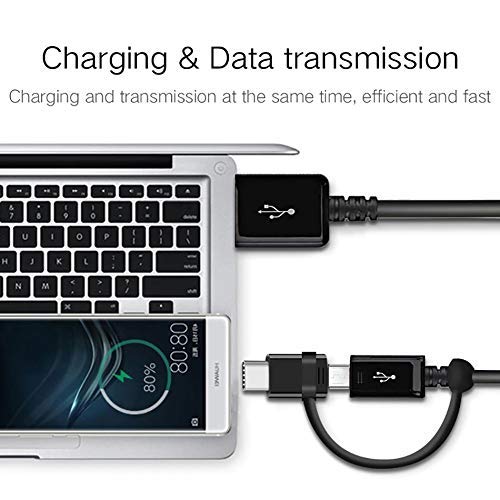
- Dvigubas funkcionalumas: Supports both power delivery for charging and high-speed data transmission simultaneously.
- Greito įkrovimo palaikymas: Engineered to support various fast charging technologies, including Quick Charge (QC 3.0/2.0/1.0) and Power Delivery (PD) up to 25W, for compatible devices.
- Didelės spartos duomenų perdavimas: Utilizes USB 3.1 technology for rapid data synchronization between your device and computer.
- Patvari konstrukcija: Built with premium materials and advanced engineering for enhanced durability and a long lifespan, designed to withstand daily use.
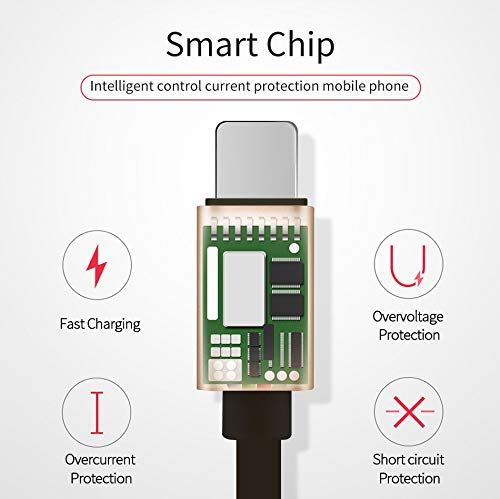
- Integrated Smart Chip: Features an intelligent circuit system for automatic device recognition and protection against overcharging, overcurrent, overvoltage, ir trumpieji jungimai.

3. Sąrankos instrukcijos
Follow these steps to connect your VOLT PLUS TECH Dual USB-C + MicroUSB Switch Cable:
- Identify Device Connector: Determine whether your device requires a Micro USB or a USB-C connection. The cable features a switch tip design where the USB-C connector attaches over the Micro USB connector.
- Prisijunkite prie įrenginio: Gently insert the appropriate connector (Micro USB or USB-C) into your device's charging/data port. Ensure a secure fit.
- Prijunkite prie maitinimo šaltinio arba kompiuterio: Insert the standard USB-A end of the cable into a compatible USB power adapter for charging, or into a USB port on your computer for both charging and data transfer.

4. Kabelio valdymas
4.1 Įrenginio įkrovimas
Once connected as described in the Setup section, your device will begin charging. The cable supports fast charging when paired with a compatible fast charger and a device that supports fast charging protocols.
4.2 Duomenų perdavimas
To transfer data between your device and a computer:
- Prijunkite USB-A kabelio galą prie kompiuterio USB prievado.
- Connect the appropriate Micro USB or USB-C end to your mobile device.
- Your computer should recognize the connected device. You may need to select a 'File Transfer' or 'MTP' mode on your mobile device if prompted.
- You can now access your device's storage to copy files, photos, or videos. The cable's USB 3.1 support ensures efficient transfer speeds.
5. Priežiūra ir priežiūra
To ensure the longevity and optimal performance of your cable, please observe the following guidelines:
- Saugykla: Laikykite laidą švarioje, sausoje vietoje, apsaugotoje nuo tiesioginių saulės spindulių ir ekstremalių temperatūrų.
- Tvarkymas: Kad išvengtumėte vidinių pažeidimų, venkite per daug lenkti, sukti ar traukti kabelį, ypač šalia jungčių.
- Valymas: Jei reikia, švelniai nuvalykite laidą ir jungtis minkštu, sausu skudurėliu. Nenaudokite skystų valiklių ar abrazyvinių medžiagų.
- Apsauga: Do not expose the cable to water or other liquids.

6. Problemų sprendimas
If you encounter issues with your cable, please refer to the following common problems and solutions:
- Įrenginys neįkraunamas:
- Įsitikinkite, kad abu laido galai yra tvirtai prijungti prie įrenginio ir maitinimo šaltinio.
- Verify that the power adapter or USB port is functional by testing with another cable or device.
- Patikrinkite, ar įrenginio įkrovimo prievadas nėra pažeistas ar kitaip pažeistas.
- Lėtas įkrovimas:
- Confirm that your power adapter supports fast charging (e.g., QC 3.0, PD) and provides sufficient wattage.
- Ensure your device itself is compatible with fast charging technology.
- Duomenų perdavimo problemos:
- Make sure the cable is firmly connected to both your device and computer.
- On your mobile device, check if you have selected the correct USB connection mode (e.g., 'File Transfer' or 'MTP') when prompted.
- Pabandykite prijungti laidą prie kito kompiuterio USB prievado.
7. Specifikacijos
| Prekės ženklas | VOLT PLUS TECH |
| Modelio numeris | VPT-2074 |
| Jungties tipas | Mikro USB, A tipo USB, C tipo USB |
| Kabelio tipas | USB Type-C / MicroUSB to USB-A |
| Suderinami įrenginiai | Android, iOS, Mac, Vivo Xplay5 Elite, Windows devices |
| Ypatingos savybės | Digital IC Chip, Heavy Duty, Lightweight, Multi-Functional, Tangle Free Cord |
| Pakuotės matmenys | 2 x 0.3 x 0.3 colio |
| Prekės svoris | 1.4 uncijos |

8. Informacija apie garantiją
For detailed warranty information regarding your VOLT PLUS TECH Dual USB-C + MicroUSB Switch Cable, please refer to the documentation included with your purchase or visit the official VOLT PLUS TECH websvetainėje. Garantijos sąlygos gali skirtis.
9. Pagalba klientams
If you require further assistance or have questions not covered in this manual, please contact VOLT PLUS TECH customer support through their official website or the retailer from whom you purchased the product. Please have your model number (VPT-2074) and purchase details ready when contacting support.