
Andoer 0226b5d0-9fdc-46fa-87a1-023ef5ed8edc
Andoer 4K Digital Camera User Manual
Model: 0226b5d0-9fdc-46fa-87a1-023ef5ed8edc
Įvadas
This manual provides detailed instructions for the safe and effective use of your Andoer 4K Digital Camera. Please read this manual thoroughly before operating the camera and retain it for future reference. This camera is designed for capturing high-quality photos at 48MP and videos at 4K resolution, featuring a 2.8-inch screen, 16X digital zoom, auto-focus, anti-shake technology, and a built-in flash.
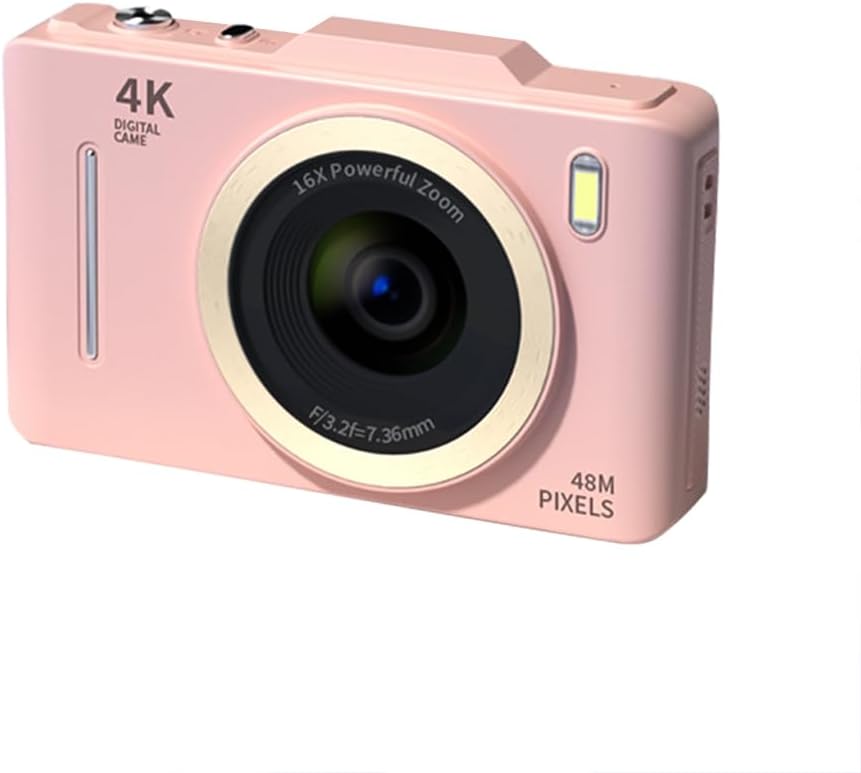
Vaizdas: priekis view of the Andoer 4K Digital Camera in pink, showcasing its lens, flash, and 4K Digital Camera branding.
Svarbi saugos informacija
Įspėjimas:
- Not suitable for children. Please read the product instructions and applicable age range carefully before purchase and use.
- Saugokite fotoaparatą nuo vandens ar per didelės drėgmės.
- Venkite fotoaparato numetimo ir stiprių smūgių.
- Use only specified batteries and charging methods.
- Nebandykite ardyti ar modifikuoti fotoaparato.

Image: A warning label indicating that the product is not suitable for children, with the warning translated into multiple languages.
Pakuotės turinys
Prašome patikrinti, ar pakuotėje yra visi reikalingi daiktai:
- Andoer 4K Digital Camera
- USB kabelis
- Įkraunama ličio baterija
- Vartotojo vadovas
- Riešo dirželis (gali skirtis priklausomai nuo pakuotės)
Produktas baigtasview
Susipažinkite su fotoaparato komponentais:
- Objektyvas: Pagrindinis optinis komponentas vaizdams užfiksuoti.
- Flash: Provides additional light in low-light conditions.
- 2.8 colių LCD ekranas: Už viewing live feed, reviewing photos/videos, and navigating menus.
- Valdymo mygtukai: Power, Shutter, Zoom (W/T), Menu, OK, Display, Delete.
- USB prievadas: Įkrovimui ir duomenų perdavimui.
- Baterijų skyrius: Talpina įkraunamą bateriją.
- Atminties kortelės lizdas: Skirta SD kortelei įdėti (nepridedama).

Vaizdas: Galinis view of the camera highlighting the 2.8-inch display screen and various control buttons for navigation and operation.
Sąranka
1. Baterijos įdėjimas ir įkrovimas
- Atidarykite baterijų skyriaus dangtelį, esantį fotoaparato apačioje.
- Insert the provided lithium battery, ensuring the correct polarity.
- Saugiai uždarykite akumuliatoriaus skyriaus dangtelį.
- Connect the camera to a power source using the USB cable for charging. The charging indicator light will illuminate.
- Įkrovimas baigtas, kai užgęsta indikatoriaus lemputė.
2. Atminties kortelės įdėjimas
Norint išsaugoti nuotraukas ir vaizdo įrašus, reikalinga atminties kortelė (SD kortelė, nepridedama).
- Raskite atminties kortelės lizdą, paprastai šalia akumuliatoriaus skyriaus.
- Įdėkite SD kortelę metaliniais kontaktais į kameros priekį, kol ji spragtelės ir užsifiksuos.
- Norėdami išimti, švelniai paspauskite kortelę, kol ji iššoks.
Naudojimo instrukcijos
Maitinimo įjungimas/išjungimas
- Paspauskite ir palaikykite Galia mygtuką, norėdami įjungti arba išjungti fotoaparatą.
Fotografavimas
- Įjunkite fotoaparatą.
- Kadruokite kadrą naudodami 2.8 colių LCD ekraną.
- Paspauskite Užraktas button halfway down to activate auto-focus (AF).
- Once focused, press the Užraktas button fully to capture the photo.
Vaizdo įrašų įrašymas
- Įjunkite fotoaparatą.
- Switch to video mode (refer to the on-screen icons or menu for mode selection).
- Paspauskite Užraktas mygtuką, kad pradėtumėte įrašymą.
- Paspauskite Užraktas mygtuką dar kartą, kad sustabdytumėte įrašymą.
Mastelio funkcija
- Naudokite W (Platus) ir T (Telephoto) buttons to adjust the 16X digital zoom.

Image: A visual comparison demonstrating the effect of 1x digital zoom versus 16x digital zoom, showing how the camera can magnify distant subjects.
„Flash“ naudojimas
- The built-in flash can be activated in low-light conditions. Access flash settings via the menu to select modes like Auto Flash, Fill-in Flash, or Flash Off.

Image: Illustrates the effect of the built-in flash, showing a scene with and without flash to demonstrate improved lighting in dark environments.
Anti-Shake Feature
- The camera features digital anti-shake technology to reduce blur caused by camera movement. This feature is typically active by default or can be enabled in the settings menu.

Image: Demonstrates the effectiveness of the anti-shake feature by comparing a clear image taken with anti-shake mode to a blurry image without it, both showing people in motion.
Grožio filtrai
- Access the menu to apply various beauty filters (e.g., Original, Cool colors, Retro, Black and white) to your photos for creative effects.

Image: Displays different beauty filter options available on the camera, including Original, Cool colors, Retro, and Black and white, applied to a portrait.
Judesio aptikimo vaizdo įrašas
- Enable motion detection in the video settings. The camera will automatically start recording when movement is detected within the frame.

Image: Illustrates the motion detection feature, showing a dog in motion with a white square indicating the detection area.
Atkūrimas ir pakartotinis atkūrimasview
- Paspauskite Atkūrimas button (often labeled with a play icon) to view užfiksuotų nuotraukų ir vaizdo įrašų.
- Norėdami slinkti per mediją, naudokite naršymo mygtukus.
- Paspauskite Ištrinti mygtukas, skirtas pašalinti nereikalingus files.
Prisijungimas prie kompiuterio
- Prijunkite fotoaparatą prie kompiuterio naudodami pateiktą USB kabelį.
- The camera will appear as a removable disk drive, allowing you to transfer files.
Priežiūra
- Objektyvo valymas: Naudokite minkštą, nepūkuotą šluostę, specialiai skirtą fotoaparatų objektyvams. Nenaudokite abrazyvinių medžiagų ar stiprių cheminių medžiagų.
- Ekrano valymas: Wipe the LCD screen gently with a soft, dry cloth.
- Saugykla: When not in use for extended periods, remove the battery and store the camera in a cool, dry place away from direct sunlight.
- Akumuliatoriaus priežiūra: Prieš pirmą kartą naudodami, visiškai įkraukite bateriją. Venkite dažnai visiškai iškrauti bateriją, kad pailgintumėte jos tarnavimo laiką.
Trikčių šalinimas
| Problema | Galimas sprendimas |
|---|---|
| Kamera neįsijungia. | Įsitikinkite, kad akumuliatorius yra tinkamai įdėtas ir visiškai įkrautas. |
| Negalima fotografuoti / įrašyti vaizdo įrašų. | Check if a memory card is inserted and has sufficient free space. Ensure the camera is in the correct mode (photo/video). |
| Vaizdai neryškūs. | Ensure the lens is clean. Check lighting conditions. Enable anti-shake feature. Hold the camera steady. |
| Flash is not working. | Check flash settings in the menu; ensure it's not set to 'Flash Off'. |
| Kompiuteris neatpažįsta kameros. | Ensure the USB cable is securely connected. Try a different USB port or cable. Restart both camera and computer. |
Specifikacijos
| Funkcija | Detalė |
|---|---|
| Prekės ženklas | Andoer |
| Modelio numeris | 0226b5d0-9fdc-46fa-87a1-023ef5ed8edc |
| Veiksminga nejudančioji raiška | 48 MP |
| Vaizdo raiška | 4K (2160p) |
| Ekrano dydis | 2.8 colių |
| Skaitmeninis priartinimas | 16X |
| Automatinis fokusavimas | Yes (Contrast Detection) |
| Vaizdo stabilizavimas | Skaitmeninis anti-shake |
| Integruota blykstė | Taip |
| Baterijos tipas | Ličio jonas |
| Nuotraukos formatas | JPEG |
| Vaizdo įrašo formatas | MP4 |
| Išorinė sąsaja | USB |
| Jutiklio tipas | CMOS |
| Spalva | Pink (variant) |
| Atsparumo vandeniui lygis | Neatsparus vandeniui |
Garantija ir palaikymas
For warranty information and technical support, please refer to the documentation included with your purchase or visit the official Andoer websvetainėje. Išsaugokite pirkimo įrodymą garantiniams reikalavimams.
Andoer Official Store: Visit Andoer Store on Amazon
Ask a question about this manual
Ask about setup, troubleshooting, compatibility, parts, safety, or missing instructions. Manuals+ will review the question and use this page’s manual context to help answer it.