
1. Įvadas
Thank you for choosing the TONGVEO PTZ HDMI Camera. This manual provides essential information for the proper installation, operation, and maintenance of your camera. Please read this manual thoroughly before using the product to ensure optimal performance and to prevent damage. This camera is designed for high-quality video capture in various settings, including live streaming, video conferencing, education, and worship services.
2. Produktas baigtasview
2.1 Pagrindinės savybės
- Didelės raiškos vaizdo įrašas: 1080p resolution at 60 frames per second (fps) for clear and smooth video.
- Optinis priartinimas: 3x optical zoom lens with a 55.8° field of view, allowing for detailed close-ups without loss of quality.
- Pakreipimo / pasukimo / priartinimo (PTZ) funkcija: Silent movement with 350° pan and 180° tilt capabilities, controllable remotely.
- Keli išėjimai: HDMI and USB 3.0 for versatile connectivity.
- Lengvas nustatymas: Plug and Play functionality, automatically recognized by computers without driver installation.
- Platus suderinamumas: Compatible with Windows, Mac, and popular conferencing software like Zoom, Skype, OBS, Google Hangouts, Cisco WebEx, and Microsoft Teams.
- Išplėstinis vaizdo apdorojimas: Superior white balance and exposure modes, supporting YUV, MJPG, and H.264 video compression formats.
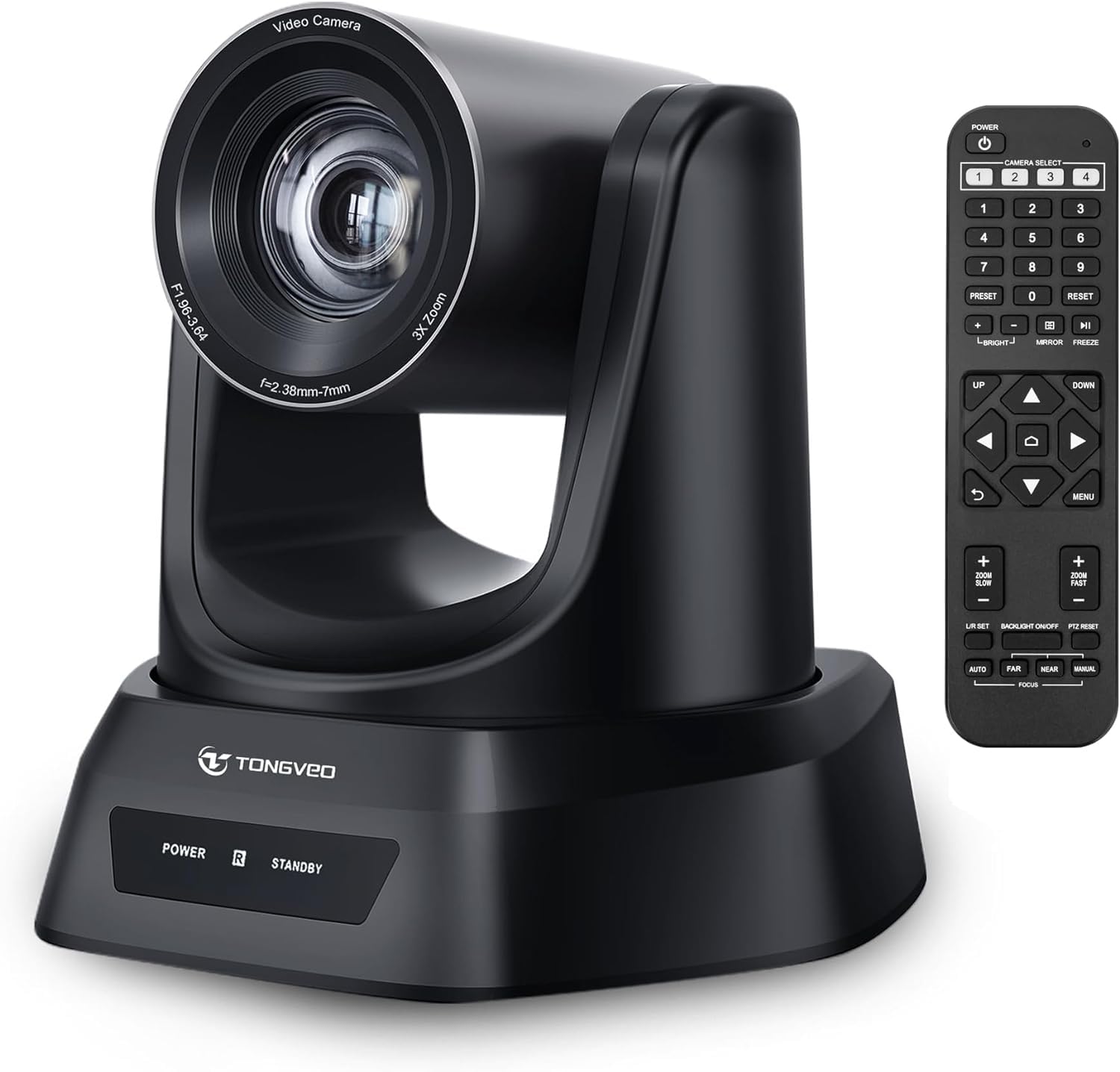
- Nuotolinio valdymo pultas: Includes an infrared (IR) remote control with 10 presets for quick camera positioning.
- Vairasvirtės valdymas: Supports external joystick control via RS485 or RS232 interfaces.
2.2 Pakuotės turinys
Patikrinkite, ar pakuotėje yra visi reikalingi daiktai:
- TONGVEO USB PTZ Camera
- 9.8 pėdų USB 3.0 kabelis
- DC 12V maitinimo adapteris
- IR nuotolinio valdymo pultas
- Wall Mount with Screws
- Vartotojo vadovas (šis dokumentas)

Image: Package contents including the camera, USB cable, power adapter, remote, wall mount, and user manual.
3. Sąranka
3.1 Fizinis įrengimas
The TONGVEO PTZ camera offers flexible mounting options to suit various environments:
- Vieta darbalaukyje: Padėkite fotoaparatą ant stabilaus, lygaus paviršiaus.
- Monitoriaus tvirtinimas: Securely attach to the top of a monitor.
- Montavimas ant sienos: Use the provided wall mount and screws to fix the camera to a wall.
- Trikojo tvirtinimas: Attach the camera to a standard tripod using the tripod screw hole at the base.
- Montavimas prie lubų: Install the camera upside down on the ceiling using a compatible mount (sold separately or included if specified).
Vaizdas: Viršview of the TONGVEO PTZ camera highlighting 3x optical zoom, 1080p 60fps, and pan/tilt capabilities.
3.2 Jungtys
Connect the camera to your devices using the ports on the rear panel:
- 12 V nuolatinės srovės maitinimas: Connect the included power adapter to the DC 12V port and then to a power outlet.
- USB 3.0: Connect the USB 3.0 cable from the camera to your computer (PC/Mac) for video and control.
- HDMI: Connect an HDMI cable from the camera to a display (TV/Monitor) or a video switcher (e.g., Blackmagic ATEM) for video output.
- RS232 / RS485: These ports are for connecting an external joystick controller for advanced PTZ control. RS485 supports daisy-chaining multiple cameras.

Image: Rear panel of the TONGVEO PTZ camera showing DC 12V, RS485, RS232, USB, and HDMI ports.
3.3 Programinės įrangos diegimas
The TONGVEO PTZ camera is a Plug and Play device. No specific drivers are required for most operating systems. Your computer should automatically recognize the camera when connected via USB. It supports the UVC1.1 standard.
4. Operacija
4.1 Nuotolinis valdymas
Use the included IR remote control to manage camera functions:
- PTZ Movement: Use the directional buttons to pan (left/right) and tilt (up/down) the camera.
- Mastelio keitimas: Adjust the optical zoom in and out. The remote typically offers fast and slow zoom options.
- Išankstiniai nustatymai: The remote allows you to save and recall up to 10 preset positions. To save a preset, move the camera to the desired position, then press the 'SET' button followed by a number (1-10). To recall a preset, press the corresponding number button.
- Camera Select: If multiple TONGVEO cameras are connected, use the camera select buttons to control a specific unit.
4.2 Vaizdo nustatymai
Access the On-Screen Display (OSD) menu via the remote control to adjust image parameters:
- Fokusas: The camera features auto-focus by default. Manual focus adjustment is available through the OSD menu.
- Baltos spalvos balansas: Adjust for accurate color reproduction under different lighting conditions.
- Poveikis: Control brightness and contrast to optimize image visibility.
4.3 Programinės įrangos suderinamumas
The camera is compatible with a wide range of operating systems and video conferencing applications:
- Operacinės sistemos: Windows XP, Vista, 7, 8, 8.1, 10, 11; Mac 10.4 or higher.
- Programos: Zoom, Skype, Google Hangouts, Cisco WebEx, Microsoft Teams, GoToMeeting, BlueJeans, OBS, and other UVC-compliant software.

Image: Diagram illustrating the TONGVEO PTZ camera's compatibility with various devices and software platforms.
5. Priežiūra
To ensure the longevity and optimal performance of your TONGVEO PTZ camera, follow these maintenance guidelines:
- Valymas: Use a soft, dry cloth to clean the camera body. For the lens, use a specialized lens cleaning cloth and solution. Avoid abrasive cleaners or solvents.
- Saugykla: Kai fotoaparato ilgesnį laiką nenaudojate, laikykite jį vėsioje, sausoje vietoje, toliau nuo tiesioginių saulės spindulių ir ekstremalių temperatūrų.
- Tvarkymas: Elkitės su fotoaparatu atsargiai. Venkite jo numesti ir stipriai vibruoti.
- Galia: Disconnect the power adapter when the camera is not in use or during electrical storms.
6. Problemų sprendimas
If you encounter issues with your TONGVEO PTZ camera, refer to the following common problems and solutions:
- Nėra galios:
- Įsitikinkite, kad maitinimo adapteris yra tvirtai prijungtas prie kameros ir veikiančio maitinimo lizdo.
- Patikrinkite, ar maitinimo lizdas veikia.
- Nėra vaizdo išvesties:
- Check all cable connections (USB, HDMI) are secure.
- Ensure the correct input source is selected on your display or video switcher.
- Verify the camera is selected as the video input device in your software (e.g., Zoom, OBS).
- Image is Blurry/Out of Focus:
- Allow the camera's auto-focus to adjust.
- Access the OSD menu to manually adjust the focus if needed.
- Įsitikinkite, kad objektyvas yra švarus ir be dėmių.
- Nuotolinio valdymo pultas neveikia:
- Patikrinkite nuotolinio valdymo pulto baterijas ir, jei reikia, pakeiskite.
- Ensure there are no obstructions between the remote and the camera's IR receiver.
- PTZ Movement is Unresponsive:
- Verify the camera is powered on and the remote control is functioning.
- If using a joystick, ensure it is correctly connected via RS232/RS485.
7. Specifikacijos
Detailed technical specifications for the TONGVEO PTZ HDMI Camera (Model TV-NV3H-UK):
| Funkcija | Specifikacija |
|---|---|
| Modelio numeris | TV-NV3H-UK (819988df-b012-4f6a-b3ce-5c96af8001c3) |
| Prekės ženklas | TONGVEO |
| Optinis priartinimas | 3x |
| Efektyvi vaizdo raiška | 1080 Pixels (1080p 60fps) |
| Nuotraukų jutiklių technologija | CMOS |
| Optinio jutiklio dydis | 1/2.7 colių |
| Maksimalus židinio nuotolis | 10 milimetrų |
| Minimalus židinio nuotolis | 5 milimetrų |
| Vaizdo įrašymo formatas | MP4 (Supports YUV, MJPG, H.264) |
| Pan judėjimas | 350° |
| Pakreipimo judėjimas | 180° |
| Ryšys | HDMI, USB 3.0, RS232, RS485 |
| Maitinimo šaltinis | DC 12V |
| Vaizdo stabilizavimas | Nr |
| Darbinė temperatūra | -10°C iki +50°C |
| Pakuotės matmenys | 28 x 21 x 19 cm |
| Svoris | 2 kilogramo |

Vaizdas: Apačia view of the TONGVEO PTZ camera showing model number (TV-V3H) and other regulatory information.
8. Garantija ir palaikymas
The TONGVEO PTZ HDMI Camera comes with a 3 metų garantija. For any questions, technical assistance, or warranty claims, please contact TONGVEO customer service. Our support team is available to respond to your inquiries within 24 hours.
Please refer to the contact information provided on the TONGVEO official webNaujausius pagalbos kanalus rasite svetainėje arba pirkimo dokumentuose.