
1. Svarbios saugos instrukcijos
When using electrical appliances, basic safety precautions should always be followed to reduce the risk of fire, electric shock, and personal injury. Read all instructions carefully before using the Milex Digital Steam Iron.
- Visada įsitikinkite, kad ttage, nurodyta ant vardinės etiketės, atitinka jūsų elektros tinklo įtampątage.
- Nemerkite lygintuvo, maitinimo laido ar kištuko į vandenį ar kitus skysčius.
- Atjunkite lygintuvą nuo elektros lizdo, kai pildote vandeniu, išpilate vandenį arba kai jo nenaudojate.
- Nenaudokite prietaiso, jei pažeistas laidas ar kištukas, arba po to, kai prietaisas veikia netinkamai, buvo numestas ar kaip nors pažeistas.
- Laikykite lygintuvą ir jo laidą vaikams ir naminiams gyvūnams nepasiekiamoje vietoje, kai jis įjungtas arba vėsta.
- Never leave the iron unattended while it is connected to the power supply or on an ironing board.
- Lygintuvą naudokite tik pagal paskirtį buitiniam naudojimui.
- The soleplate of the iron can become extremely hot. Avoid direct contact with the hot soleplate.
- Lygintuvą visada dėkite ant stabilaus, karščiui atsparaus paviršiaus, kai jis nenaudojamas.
2. Produktas baigtasview
The Milex Digital Steam Iron MSI004 is designed for efficient garment care. Familiarize yourself with its components before use.
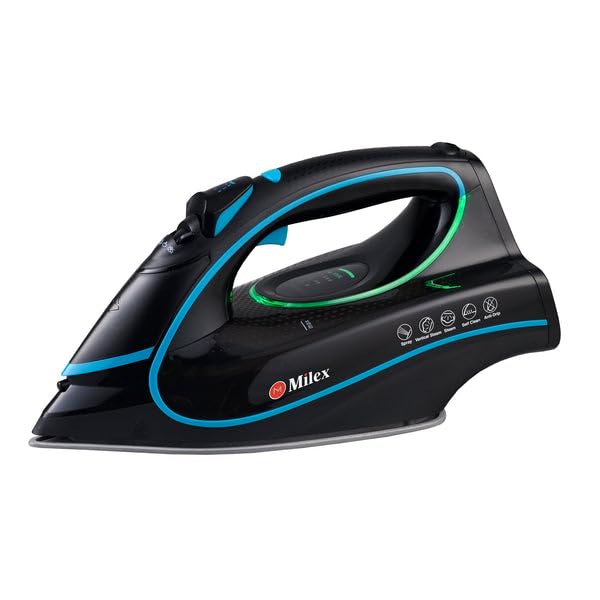
Figure 1: Milex Digital Steam Iron (3/4 view)
This image displays the Milex Digital Steam Iron from a three-quarter angle, highlighting its sleek black design with blue and green accents. Key features visible include the handle, water tank, and the general shape of the soleplate.
Komponentai:
- Vandens purškimo antgalis: Audinių drėkinimui.
- Vandens užpildymo anga: Kur į baką įpilama vandens.
- Steam Control Dial/Buttons: To adjust steam output.
- Temperature Control Dial/Buttons: To select desired heat setting.
- Skystųjų kristalų ekranas: Rodo dabartinius nustatymus.
- Rankena: For gripping the iron.
- Vandens bakas: Vandens rezervuaras.
- Padas: Šildomas paviršius, slystantis per audinį.
- Maitinimo laidas: Prijungia lygintuvą prie elektros lizdo.

Figure 2: Ceramic Soleplate
Šis paveikslėlis pateikia stambų planą view of the ceramic soleplate, showing its textured surface and steam vents designed for even heat distribution and smooth gliding.
3. Sąranka ir pirmasis naudojimas
3.1 Išpakavimas
- Remove the iron from its packaging.
- Remove any protective film or stickers from the soleplate.
- Patikrinkite lygintuvą, ar nėra kokių nors pažeidimų. Jei pažeistas, nenaudokite jo ir susisiekite su klientų aptarnavimo tarnyba.
3.2 Vandens bako užpildymas
- Įsitikinkite, kad lygintuvas yra atjungtas nuo maitinimo lizdo.
- Set the steam control to the "Dry Ironing" position (if applicable).
- Atidarykite vandens įpylimo angos dangtelį.
- Using a measuring cup, carefully pour clean tap water into the water tank up to the "MAX" fill line. Do not overfill.
- Tvirtai uždarykite vandens įpylimo angos dangtelį.
Pastaba: For areas with hard water, it is recommended to use a mixture of 50% tap water and 50% distilled water to prevent mineral buildup. Never use perfumed water, vinegar, starch, or descaling agents in the water tank.
4. Naudojimo instrukcijos
4.1 Pasiruošimas lyginimui
- Sort garments according to fabric type (e.g., linen, cotton, wool, silk, synthetics).
- Rekomenduojamą lyginimo temperatūrą rasite drabužių priežiūros etiketėse.
- Plug the iron into a suitable electrical outlet. The LED display will illuminate.
4.2 Setting Temperature and Steam
- Use the temperature control buttons to select the appropriate heat setting for your fabric. The LED display will show the selected temperature.
- Allow the iron to heat up until the indicator light (if present) or LED display confirms it has reached the desired temperature.
- For steam ironing, ensure the water tank is filled. Adjust the steam control to the desired steam level. Steam is typically available at higher temperature settings.
- For dry ironing, ensure the water tank is empty or the steam control is set to "Dry Ironing".
4.3 „Steam“ funkcijų naudojimas
- Nuolatinis garas: Select a steam setting on the control. Steam will be continuously emitted from the soleplate.
- Garų pliūpsnis: Press the "Burst" button for an extra shot of steam to remove stubborn wrinkles. Wait a few seconds between bursts.
- Vandens purškalas: Press the "Spray" button to lightly moisten fabric before ironing.
4.4 Auto-Shutoff Feature
The iron is equipped with an auto-shutoff safety feature. If left unattended horizontally for a certain period (e.g., 30 seconds) or vertically (e.g., 8 minutes), the heating element will automatically turn off. To reactivate, simply move the iron.
4.5 Apsaugos nuo lašėjimo sistema
The anti-drip system prevents water from dripping from the soleplate when the iron is not hot enough to produce steam. This helps prevent water stains on delicate fabrics.
5. Priežiūra ir valymas
Regular maintenance ensures optimal performance and extends the life of your Milex Digital Steam Iron.
5.1 Po kiekvieno naudojimo
- Atjunkite geležį nuo elektros tinklo ir leiskite jam visiškai atvėsti.
- Iš vandens bako išpilkite likusį vandenį.
5.2 Pagrindo pado valymas
- Kai padas atvės, nuvalykite jį drėgnu rankšluosčiuamp šluoste ir, jei reikia, neabrazyviniu valikliu.
- Nenaudokite abrazyvinių šveitimo kempinėlių ar stiprių cheminių medžiagų, nes jos gali pažeisti keraminę dangą.
5.3 Savaiminio išsivalymo funkcija
The iron features a self-cleaning function to remove mineral deposits from the steam vents.
- Pripildykite vandens baką iki linijos MAX.
- Įjunkite lygintuvą ir nustatykite maksimalią temperatūrą.
- Kai lygintuvas pasieks maksimalią temperatūrą, atjunkite jį nuo elektros tinklo.
- Laikykite lygintuvą horizontaliai virš kriauklės.
- Press and hold the self-clean button (refer to product diagram for location). Hot water and steam will be expelled from the soleplate, flushing out mineral deposits.
- Švelniai pakratykite lygintuvą pirmyn ir atgal, kol vandens bakelis ištuštės.
- Plug the iron back in and allow it to heat up again to dry the soleplate.
- Atjunkite ir laikykite, kai atvės.
5.4 Saugykla
Always store the iron upright on its heel rest, with the cord neatly wrapped, once it has completely cooled down and the water tank is empty.
6. Problemų sprendimas
| Problema | Galima priežastis | Sprendimas |
|---|---|---|
| Geležis neįkaista. | Neįjungta; maitinimas išjungtastage; auto-shutoff activated; faulty outlet. | Check power connection; check circuit breaker; move iron to reactivate; try a different outlet. |
| Nėra garų arba jų nepakanka. | Water tank empty; temperature too low for steam; steam vents clogged; steam control set to "Dry". | Pripildykite vandens baką; padidinkite temperatūros nustatymą; atlikite savaiminį valymą; sureguliuokite garų reguliatorių. |
| Nuo pado laša vanduo. | Temperature too low for steam (anti-drip system working); water tank overfilled. | Padidinkite temperatūrą; neperpildykite vandens bako. |
| Baltos dribsniai arba likučiai ant drabužių. | Mineral buildup in water tank/steam vents. | Perform self-clean function; use distilled water or a mix with tap water. |
7. Specifikacijos
| Modelio numeris | MSI004 |
| Prekės ženklas | Milex |
| Galia | 2400W |
| ttage | 220-240V, 50Hz |
| Funkcijos | Dry, Spray, Steam, Burst |
| Pado medžiaga | Keramika |
| Ekrano tipas | LED |
| Vandens rezervuaro talpa | 450 ml |
| Ypatingos savybės | Anti-drip, Auto-shutoff, Lightweight |
| Gaminio matmenys (ilgis x plotis) | 32L x 16W centimetrų |
8. Garantija ir klientų aptarnavimas
For information regarding warranty coverage, please refer to the warranty card included with your product or contact the retailer where the product was purchased.
If you experience any issues or have questions about your Milex Digital Steam Iron, please contact Milex customer support. You can find more information and contact details on the official Milex websvetainėje arba per Milex Store on Amazon.