
ZAQE M505
ZAQE M505 MP3 grotuvo naudotojo vadovas
Modelis: M505
1. Įvadas
Welcome to the ZAQE M505 MP3 Player user manual. This guide provides comprehensive instructions for setting up, operating, and maintaining your new device. The ZAQE M505 is a versatile MP3 player featuring 80GB of internal storage, Bluetooth and Wi-Fi connectivity, and a 4-inch touchscreen, designed to enhance your audio and video experience.
2. Produktas baigtasview
2.1 Pagrindinės savybės
- Saugykla: 80GB internal, expandable up to 512GB via SD card.
- Ryšys: Bluetooth and Wi-Fi for seamless streaming and file perkėlimas.
- Ekranas: 4-inch HD touchscreen for intuitive navigation and clear visuals.
- Operacinė sistema: Android 9.0 for app compatibility and smooth operation.
- Procesorius: 8-core CPU for efficient performance.
- Programos palaikymas: Pre-installed or downloadable apps like Spotify, Amazon Music, Audible, and Deezer.
- Garso kokybė: HiFi sound for an immersive listening experience.
- Baterija: 2000mAh for extended playback time.
- Įkrovimas: USB Type-C port for convenient charging.
- Formato palaikymas: Wide range of audio (MP3, OGG, FLAC, AAC, WAV, WMA, APE) and video (RM, RMVB, MP4, DAT, MKV, MPG, MOV, TS) formats.
2.2 Pakuotės turinys
- ZAQE M505 MP3 Player
- C tipo USB įkrovimo laidas
- Headphones (may vary by package)
- Ekrano apsauga (iš anksto užklijuota arba pridėta)
- Transparent Protective Case

Image: The ZAQE M505 MP3 Player, showcasing its 4.0-inch display with WiFi and Bluetooth capabilities.

Vaizdas: priekis view of the ZAQE M505 MP3 Player, highlighting its sleek design.
3. Sąranka
3.1 Įrenginio įkrovimas
Before first use, fully charge the MP3 player using the provided USB Type-C cable and a compatible power adapter (not included). The charging indicator will show progress.

Image: The ZAQE M505 MP3 Player connected to a USB Type-C charging cable.
3.2 Įjungimas / išjungimas
- Norėdami įjungti: Paspauskite ir palaikykite nuspaudę įrenginio šone esantį maitinimo mygtuką, kol ekranas užsidegs.
- Norėdami išjungti: Paspauskite ir palaikykite maitinimo mygtuką, tada ekrane rodomoje parinkčių sąraše pasirinkite „Išjungti“.
3.3 „Wi-Fi“ ryšys
- Eikite į Nustatymai > Tinklas ir internetas > Wi-Fi.
- Perjungti „Wi-Fi“ On.
- Iš sąrašo pasirinkite norimą „Wi-Fi“ tinklą.
- Jei būsite paraginti, įveskite slaptažodį ir palieskite Prisijunkite.
3.4 Expanding Storage with SD Card
The device supports an external SD card up to 512GB. Locate the SD card slot on the side of the player. Gently insert the SD card until it clicks into place. To remove, push the card in slightly until it springs out.

Image: The ZAQE M505 MP3 Player showing the SD card slot and an SD card.
3.5 Perdavimas Files
- Per USB: Connect the MP3 player to your computer using the USB Type-C cable. Select 'File Transfer' on the device when prompted. You can then drag and drop files to the internal storage or SD card.
- Per Wi-Fi: Use pre-installed file management apps or download third-party apps to transfer files wirelessly over your Wi-Fi network.
4. Naudojimo instrukcijos
4.1 Sąsajos naršymas
The ZAQE M505 features a 4-inch full touchscreen. Swipe left, right, up, or down to navigate through menus and applications. Tap icons to open apps or select options.

Image: The ZAQE M505 MP3 Player's home screen displaying various application icons.
4.2 Muzikos atkūrimas
- Vietinis Files: Open the 'Music' app to browse and play audio files stored on your device or SD card.
- Srautinio perdavimo programos: Open apps like Spotify, Amazon Music, Audible, or Deezer (requires Wi-Fi connection and subscription) to stream content.
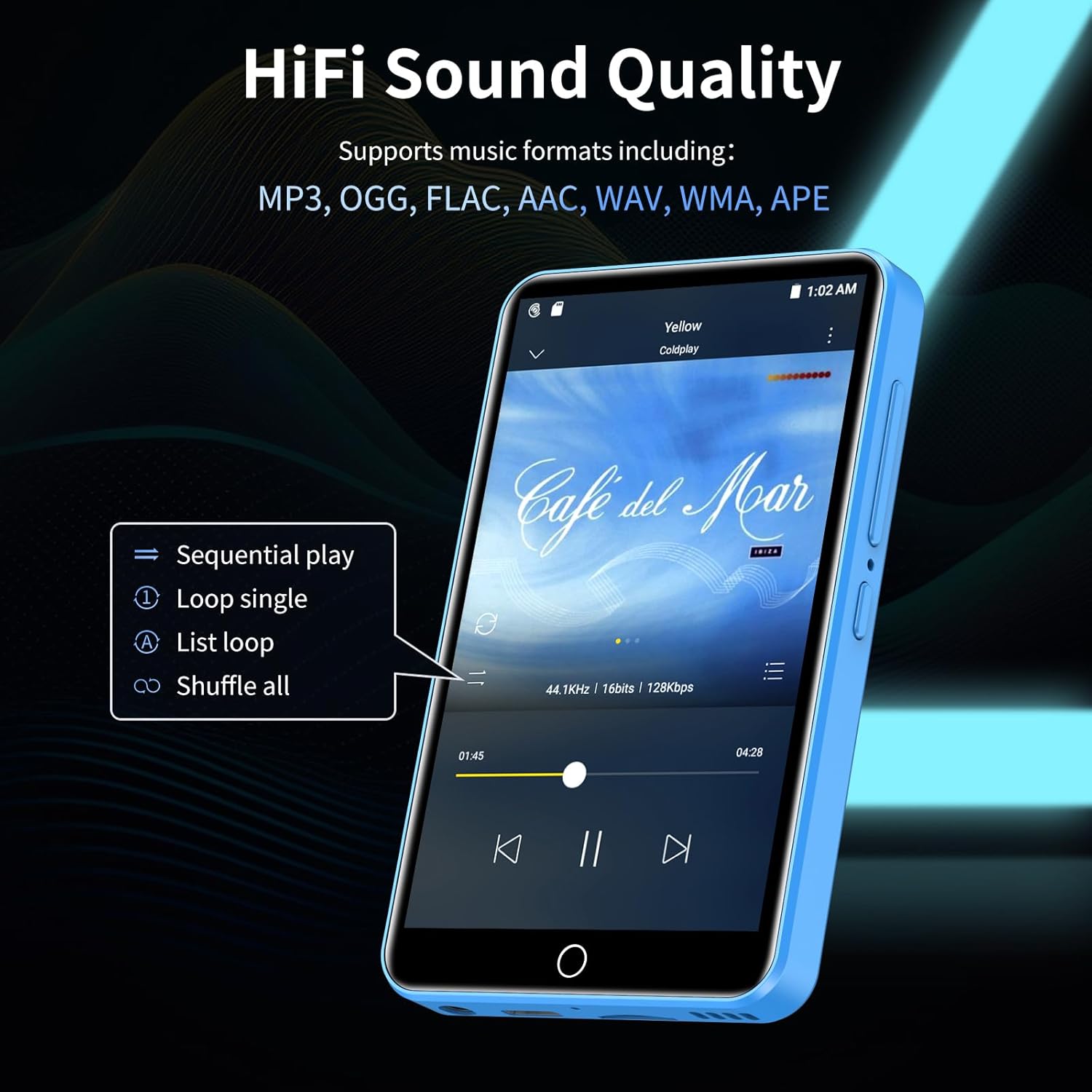
Image: The ZAQE M505 MP3 Player showing the music playback interface with album art and controls.
4.3 „Bluetooth“ ryšys
Pair your ZAQE M505 with Bluetooth headphones, speakers, or car audio systems for wireless audio playback.
- Eikite į Nustatymai > Prijungti įrenginiai > Bluetooth.
- Perjungti Bluetooth On.
- Įsitikinkite, kad jūsų „Bluetooth“ priedas veikia susiejimo režimu.
- Select the accessory from the list of available devices to pair.

Image: The ZAQE M505 MP3 Player displaying a Bluetooth connection icon, with wireless earbuds nearby.
4.4 Vaizdo įrašo atkūrimas
The device supports 1080P HD video playback. Use the pre-installed video player app to watch videos stored on your device or SD card. Supported formats include RM, RMVB, MP4, DAT, MKV, MPG, MOV, TS.

Image: The ZAQE M505 MP3 Player displaying a video on its 4-inch HD touchscreen.
4.5 FM radijas
To use the FM Radio function, connect wired headphones (acting as an antenna) to the device. Open the 'FM Radio' app and scan for available stations.

Image: The ZAQE M505 MP3 Player showing the FM radio interface tuned to 99.7.
4.6 Diktofonas
Utilize the built-in voice recorder for capturing audio notes or lectures. Open the 'Sound Recorder' app to start, pause, and save recordings.
5. Priežiūra
5.1 Valymas
Wipe the screen and body of the device with a soft, dry, lint-free cloth. Avoid using harsh chemicals or abrasive materials.
5.2 Akumuliatoriaus priežiūra
To prolong battery life, avoid fully discharging the device frequently. Charge the device regularly, and if storing for an extended period, ensure it has at least a 50% charge.

Image: The ZAQE M505 MP3 Player highlighting its 2000mAh battery and USB Type-C charging port.
5.3 Programinės įrangos naujiniai
Periodiškai tikrinkite, ar yra sistemos atnaujinimų, Nustatymai > Sistema > Išplėstinė > Sistemos atnaujinimas siekiant užtikrinti optimalų našumą ir saugumą.
5.4 Saugojimo valdymas
Reguliariai valdykite savo files to free up storage space. Delete unnecessary files or transfer them to an external SD card or computer.
6. Problemų sprendimas
- Įrenginys neįsijungia arba neįkraunamas:
Ensure the device is properly connected to the charger. Try a different USB Type-C cable or power adapter. If the battery is completely drained, it may take a few minutes for the charging indicator to appear. - Bluetooth ryšio problemos:
Ensure Bluetooth is enabled on both the MP3 player and the accessory. Place devices close to each other. Try unpairing and re-pairing the device. Restart both devices. - „Wi-Fi“ ryšio problemos:
Check if your Wi-Fi router is working correctly. Ensure you have entered the correct Wi-Fi password. Try restarting the MP3 player and your router. - Applications crashing or not working (e.g., Deezer):
Ensure the app is updated to the latest version. Clear the app's cache and data in Nustatymai > Programos ir pranešimai > [Programėlės pavadinimas] > Saugykla ir talpykla. If the issue persists, uninstall and reinstall the app. Note that older Android versions (like Android 9.0) may have compatibility issues with newer app versions over time. - Lėtas veikimas:
Uždarykite nenaudojamas programas. Išvalykite talpyklą ir laikinuosius files. Jei atlikus kitus trikčių šalinimo veiksmus našumo problemos išlieka, apsvarstykite galimybę atlikti gamyklinių parametrų atkūrimą (pirmiausia sukurkite atsarginę duomenų kopiją). - Nėra garso arba garso kokybė prasta:
Check volume levels on both the player and connected headphones/speakers. Ensure headphones are properly plugged in or Bluetooth devices are correctly paired. Test with different headphones/speakers. - Device unresponsive (frozen screen):
Press and hold the power button for about 10-15 seconds to force a restart. If a reset pinhole is available (often near the power/volume buttons), use a thin object like a paperclip to press it gently for a few seconds.
7. Specifikacijos
| Funkcija | Detalė |
|---|---|
| Prekės ženklas | ZAQE |
| Modelio pavadinimas | M505 |
| Vidinė saugykla | 80 GB |
| Išplečiama saugykla | Iki 512 GB (per SD kortelę) |
| Ryšio technologija | „Bluetooth“, „Wi-Fi“ |
| Ekrano dydis | 4 colių |
| Operacinė sistema | Android 9.0 |
| Procesorius | 8 branduolių procesorius |
| Baterijos talpa | 2000 mAh |
| Suderinami įrenginiai | Smartphone, PC, Speaker, Headphones |
| Palaikomi garso formatai | MP3, OGG, FLAC, AAC, WAV, WMA, APE |
| Palaikomi vaizdo formatai | RM, RMVB, MP4, DAT, MKV, MPG, MOV, TS |
| Prekės svoris | 221.2 gramų |
| UPC | 751528694652 |

Image: Technical illustration of the ZAQE M505's Android 9.0 operating system and 8-core CPU.
8. Garantija ir palaikymas
For warranty information and technical support, please refer to the documentation included with your purchase or contact ZAQE customer service through their official websvetainėje. Išsaugokite pirkimo įrodymą garantiniams reikalavimams.
Ask a question about this manual
Ask about setup, troubleshooting, compatibility, parts, safety, or missing instructions. Manuals+ will review the question and use this page’s manual context to help answer it.