
1. Produktas baigtasview
The Tenda TEG1120P-16-250W is an unmanaged 16-port Gigabit PoE+ switch designed for small to medium-sized businesses and surveillance systems. It features 16 PoE+ (802.3at/af) 10/100/1000 Mbps RJ45 ports, providing up to 30W per port with a total PoE power budget of 230W. Additionally, it includes 2 Gigabit RJ45 ports and 2 Gigabit SFP slots for high-speed uplink connections. This switch supports various operating modes to optimize network performance and security.
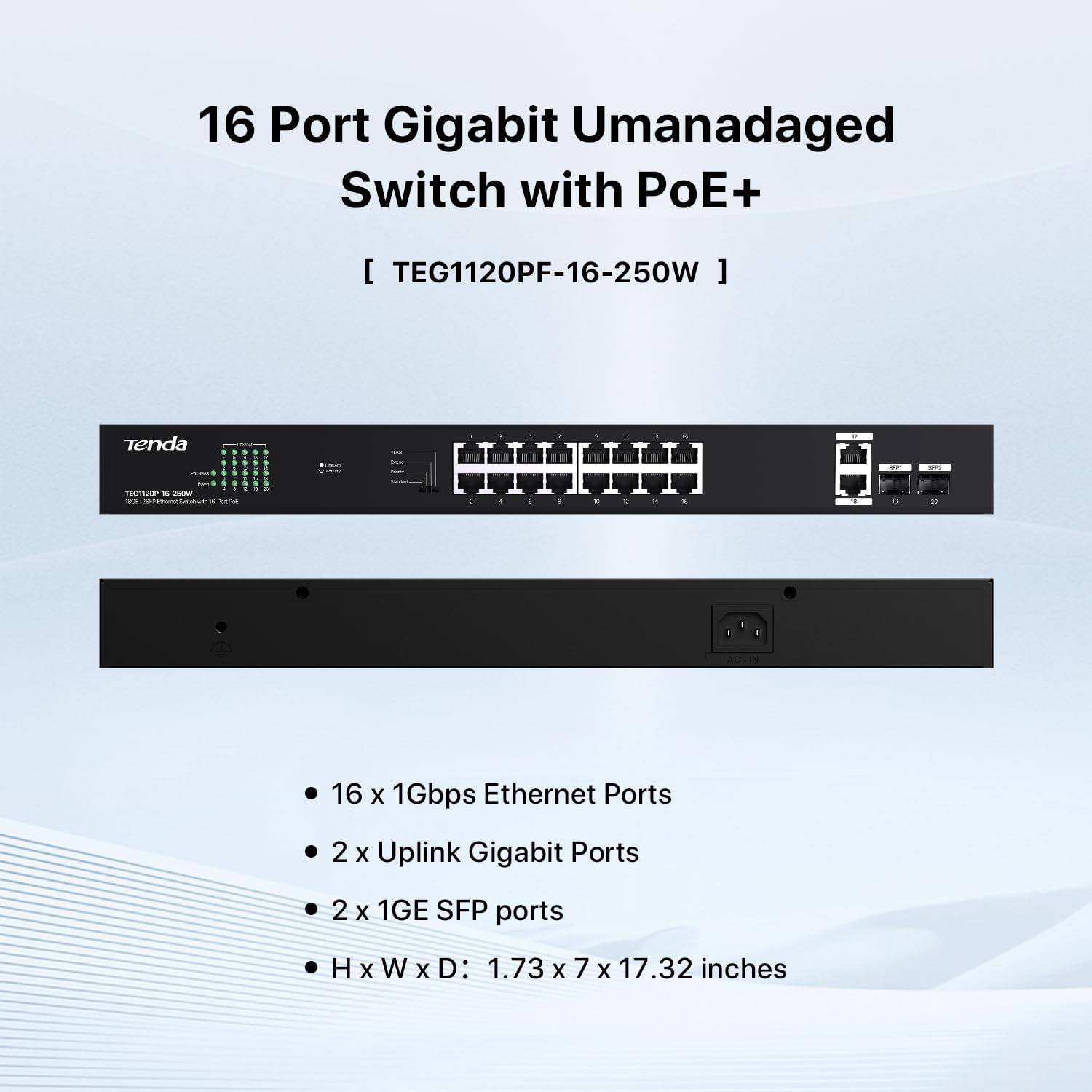
Figure 1: Front and Rear Panel Layout of the TEG1120P-16-250W Switch
The switch is equipped with intelligent power management, which automatically powers off low-priority ports if the total power usage exceeds the rated 250W, preventing overload and extending the switch's lifespan.
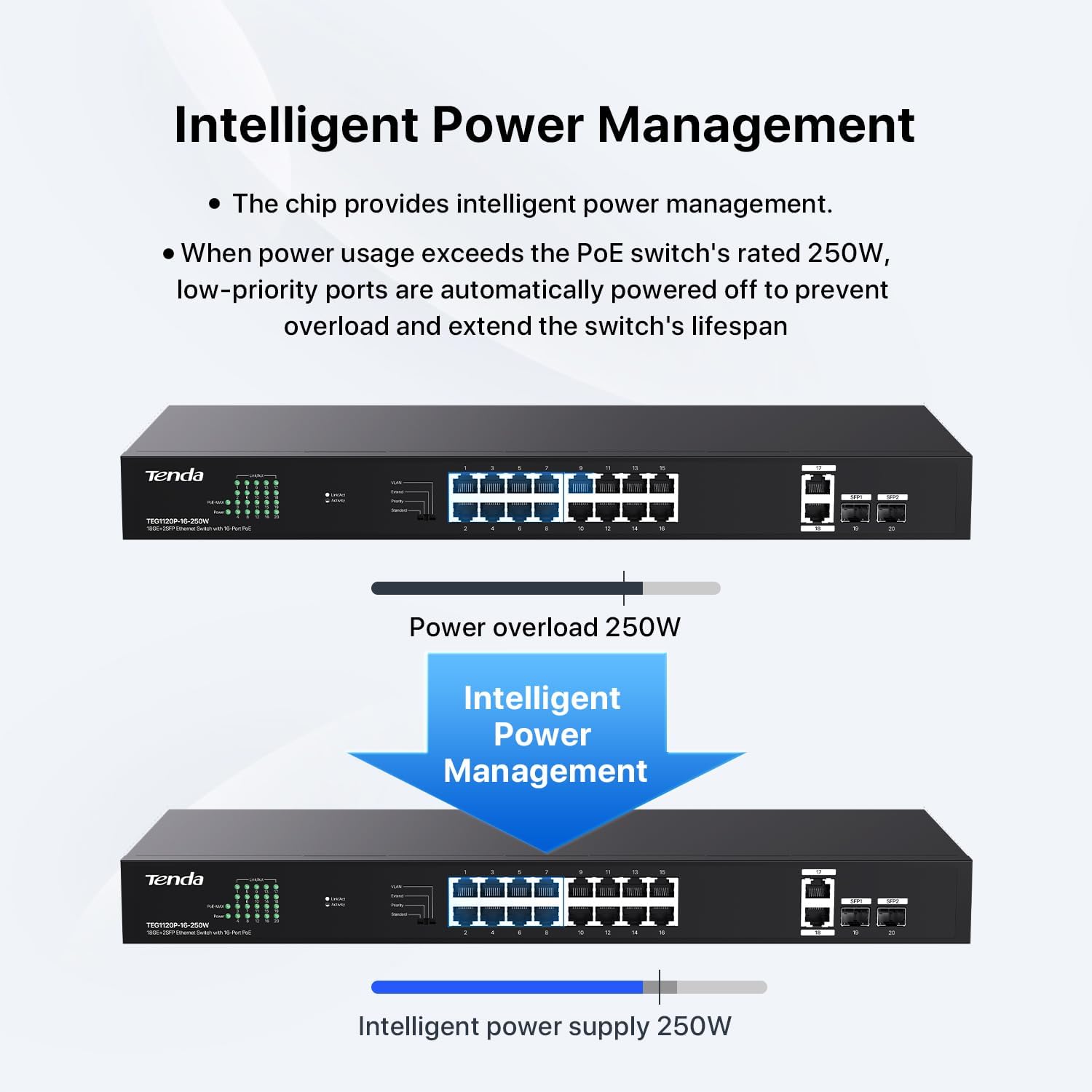
Figure 2: Intelligent Power Management Feature
2. Sąranka ir diegimas
The Tenda TEG1120P-16-250W switch offers flexible installation options including desktop, wall, and rack mounting. Follow the instructions below for proper setup.
2.1. Montavimo parinktys
The switch supports desktop, wall, and rack mounting. The installation video below demonstrates these methods.
Video: How to Install Tenda 16 & 24 Port PoE Switch (TEG1120P/1128P). This video provides a visual guide for desktop, wall, and rack mounting procedures for the Tenda PoE switches.
Darbastalio montavimas
- Remove the four footpads from the package.
- Paste the footpads to the four recesses on the bottom of the switch.
- Horizontally place the switch on a clean and stable desktop.
Montavimas ant sienos
- Remove the matching screws and L-shaped brackets from the package.
- Fix the L-shaped brackets on both sides of the switch.
- Place the switch horizontally onto the wall with its RJ45 ports facing upward.
- Screw the switch to the wall.
Stovo montavimas
- Remove the matching screws and L-shaped brackets from the package.
- Fix the L-shaped brackets on both sides of the switch.
- Place the switch ports horizontally on the rack facing outwards.
- Fix the L-shaped brackets to the rack with pre-prepared screws.
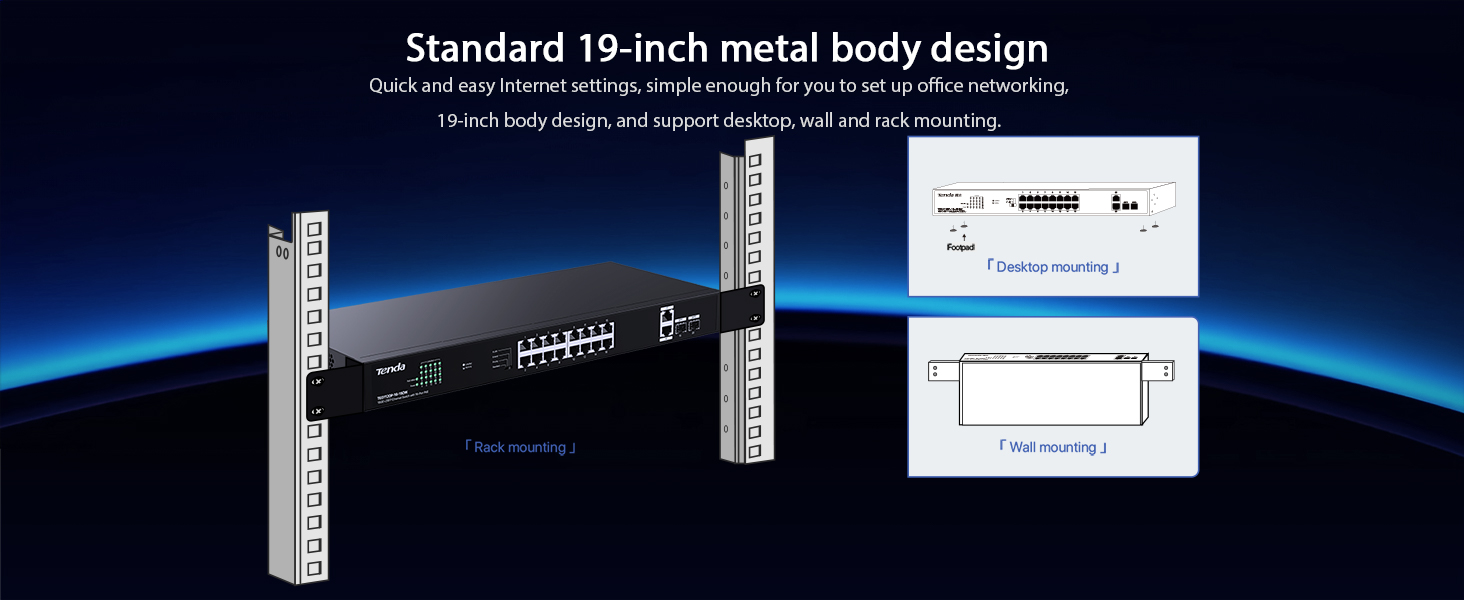
Figure 3: Various Mounting Options
2.2. Įrenginio prijungimas
Connect the switch to your network and power supply as follows:
- Connect the switch to the power supply using the provided power cord.
- The uplink RJ45 ports (17-18) on the switch can be connected to devices such as NVRs or routers.
- The uplink SFP interfaces (19-20) can be combined with fiber modules to connect fiber lines, enabling long-distance transmission.
- The 16 PoE power supply ports (1-16) can be connected to PoE-powered devices such as IP cameras, wireless access points (APs), and IP phones.

Figure 4: Basic Device Connection Diagram
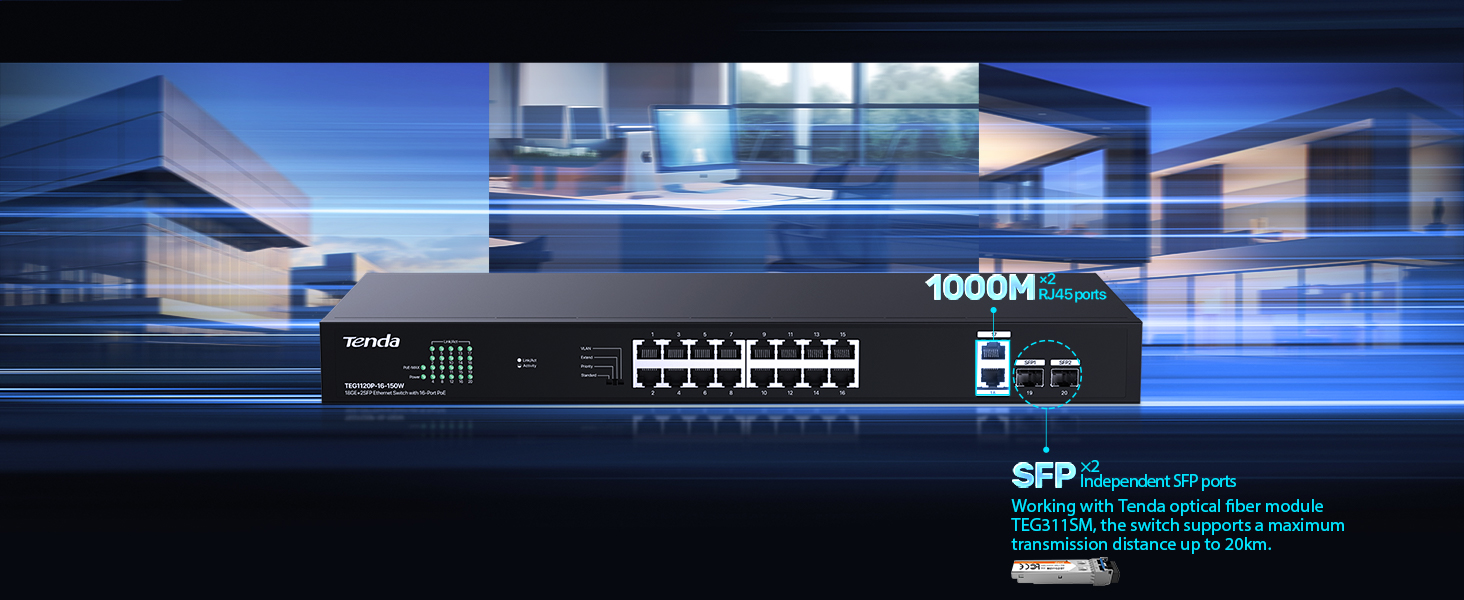
Figure 5: SFP Port Connectivity for Long-Distance Transmission
3. Veikimo režimai
The TEG1120P-16-250W switch features a mode switch that allows you to select from four operating modes to suit different network scenarios:
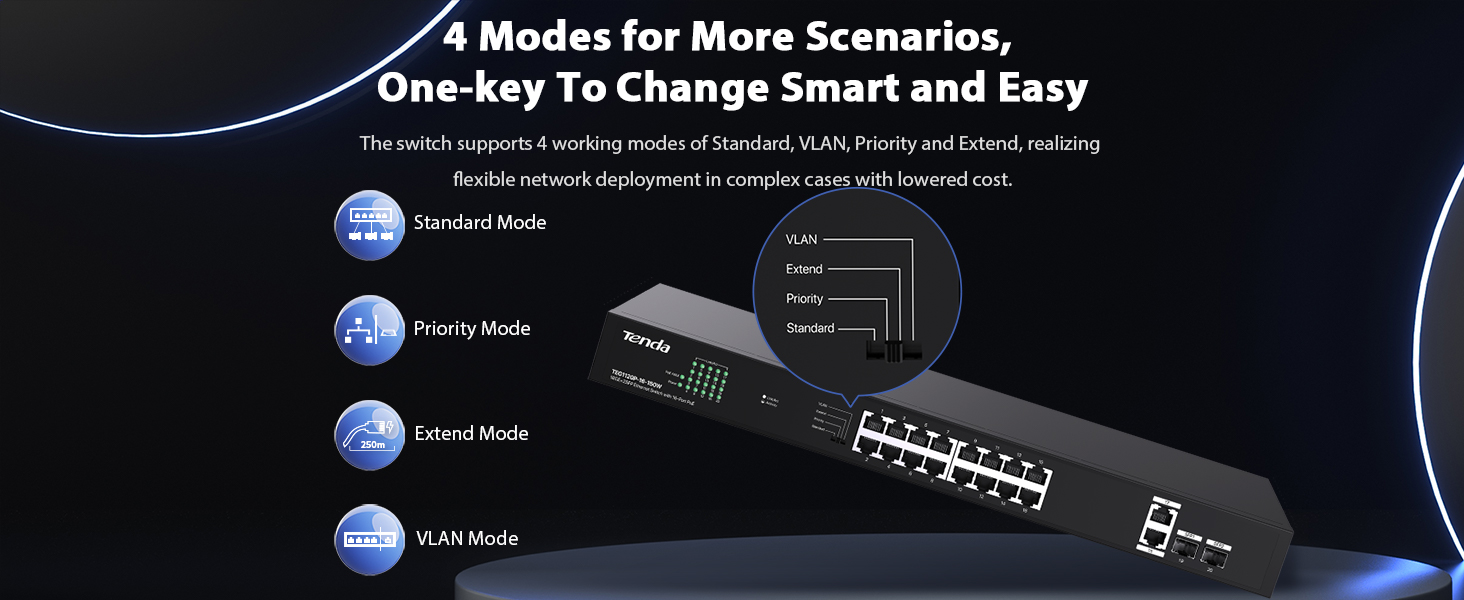
Figure 6: Mode Switch on the Device
- Standartinis režimas: All ports communicate freely, functioning as a typical unmanaged PoE switch.
- Prioritetinis režimas: Ports 1-8 are prioritized to reduce packet loss and congestion, ideal for critical devices.
- Išplėsti režimą: Ports 9-16 support extended transmission up to 250 meters, with full inter-port communication. Speed for these ports will be downgraded to 10 Mbps for distances between 100m-200m. This mode is ideal for surveillance systems.
- VLAN režimas: PoE+ ports 1-16 are isolated from each other but maintain communication with the uplink ports (17-20, SFP1, SFP2). This protects against broadcast storms and DHCP spoofing.
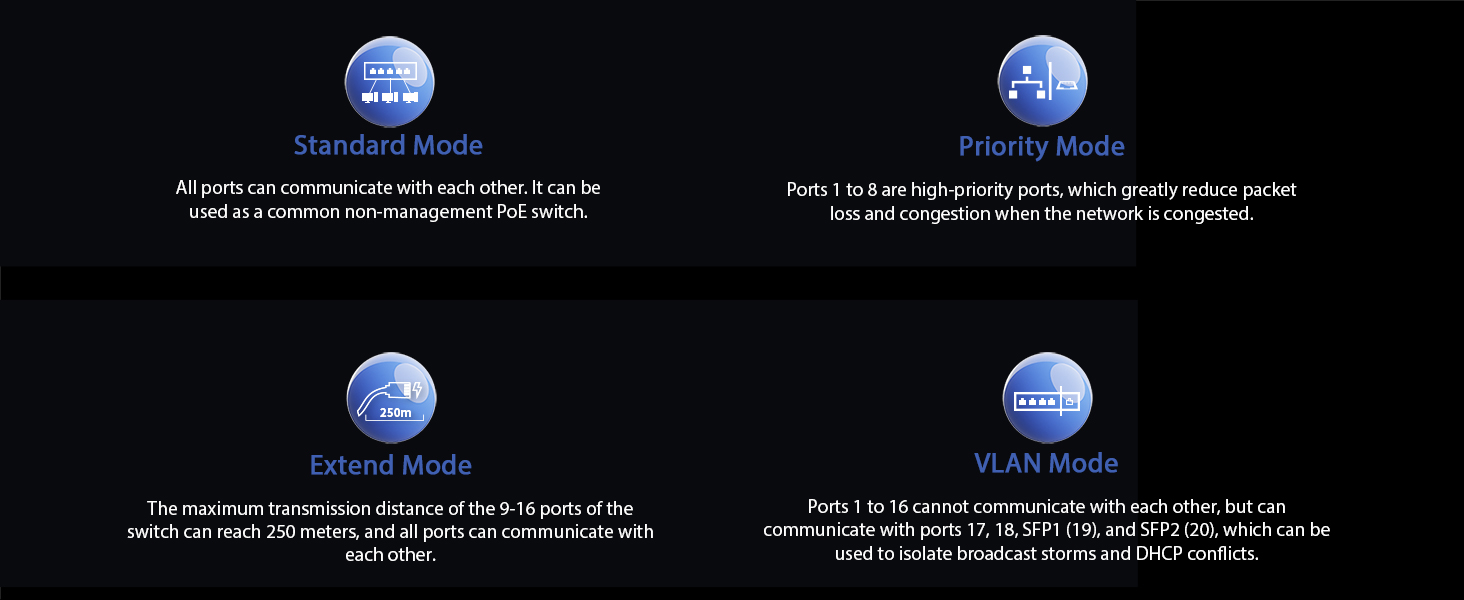
Figure 7: Description of Operating Modes
4. Priežiūra
To ensure optimal performance and longevity of your Tenda TEG1120P-16-250W switch, consider the following maintenance guidelines:
- Aplinka: Operate the switch within its specified temperature range (up to 40 Degrees Celsius) and in a well-ventilated area to prevent overheating.
- Valymas: Keep the device free from dust and debris. Use a soft, dry cloth for cleaning. Do not use liquid or aerosol cleaners.
- Kabelių valdymas: Ensure all network cables are properly organized and secured to prevent accidental disconnections or damage.
- Maitinimas: Use only the provided power adapter. Avoid overloading the power circuit.
- Firmware atnaujinimai: Periodiškai tikrinkite gamintojo website for any available firmware updates to enhance performance and security.
5. Problemų sprendimas
If you encounter issues with your Tenda TEG1120P-16-250W switch, try the following troubleshooting steps:
- Nėra galios: Ensure the power cord is securely connected to both the switch and a working power outlet. Check the power indicator LED on the switch.
- Nėra tinklo ryšio: Verify that Ethernet cables are properly connected to both the switch and the connected devices. Check the link/activity LEDs for each port. Try using different cables or ports.
- „PoE“ įrenginys neįsijungia: Confirm that the connected device is PoE compatible (IEEE 802.3af/at). Check the PoE status LED for the port. Ensure the total PoE power budget (230W) is not exceeded. If intelligent power management has activated, lower priority ports may be temporarily unpowered.
- Mažas tinklo greitis: Check for excessive network traffic or potential cable issues. In Extend Mode, ports 9-16 operate at 10 Mbps; ensure this is suitable for your application.
- Network Loops/Broadcast Storms: If experiencing network instability, ensure VLAN mode is enabled if required to isolate ports and prevent broadcast storms.
- Įrenginys neatpažintas: Restart both the switch and the connected device.
If problems persist after attempting these steps, please contact Tenda customer support for further assistance.
6. Specifikacijos
| Funkcija | Aprašymas |
|---|---|
| Prekės ženklas | Tenda |
| Modelio numeris | TEG1120P-16-250W |
| Prievadų skaičius | 20 (16 PoE+ RJ45, 2 Gigabit RJ45, 2 Gigabit SFP) |
| „PoE“ standartas | IEEE 802.3af / at |
| PoE energijos biudžetas | Iš viso 230 W, iki 30 W vienam prievadui |
| Duomenų perdavimo sparta | 10/100/1000 Mbps (gigabitas) |
| Jungiklio tipas | Nevaldoma |
| Sąsaja | RJ45, SFP |
| Bylos medžiaga | Metalas |
| Spalva | Juoda |
| Viršutinės temperatūros įvertinimas | 40 laipsniai Celsijaus |
| Įtraukti komponentai | TEG1120P-16-250W unit |
| GTIN / UPC | 885397276357 |
7. Informacija apie garantiją
The Tenda TEG1120P-16-250W switch comes with a 3 metų gamintojo garantija. Please retain your proof of purchase for warranty claims. For detailed terms and conditions, refer to the official Tenda websvetainėje arba susisiekite su klientų aptarnavimo tarnyba.
8. Parama
For technical support, product inquiries, or further assistance, please visit the official Tenda website or contact their customer service department. You can often find FAQs, updated drivers, and additional resources online.
Tenda Oficialus Websvetainė: www.tendacn.com


