
1. Įvadas
Thank you for choosing the Andoer 4K/30FPS Sports Camera. This high-performance action camera is designed for capturing stunning 4K videos and 48MP photos, featuring dual screens, 6-axis anti-shake technology, and Wi-Fi connectivity. It is built to withstand various environments, including underwater use with its waterproof housing, making it ideal for surfing, diving, and other outdoor activities.
This manual provides essential information on setting up, operating, maintaining, and troubleshooting your camera to ensure optimal performance and longevity.

Image: The Andoer 4K/30FPS Sports Camera, showcasing its front and rear screens.
2. Saugos informacija
Please read the following safety warnings carefully before using the product:
- Įspėjimas: Store the product separately from children's toys and other items to avoid accidental ingestion or choking.

Image: A safety warning graphic, emphasizing the importance of keeping the product away from children to prevent choking hazards.
3. Sąrankos vadovas
3.1. Pakuotės turinys
Prieš pradėdami, įsitikinkite, kad pakuotėje yra visi reikalingi daiktai:
- 1 x Sports Camera
- 1 x Waterproof Housing
- 1 x įkrovimo laidas (C tipo)
- 1 x Users Manual (English)
3.2. Akumuliatoriaus įkrovimas
The camera is equipped with a built-in 1300mAh polymer lithium battery. For first-time use, fully charge the camera.
- Connect the provided Type-C charging cable to the camera's Type-C interface.
- Connect the other end of the cable to a DC 5V power source (1000-2000mA recommended).
- Užsidegs įkrovimo indikatoriaus lemputė. Kai prietaisas bus visiškai įkrautas, lemputė pasikeis arba užges.
A full charge provides approximately 3 hours of continuous 4K video recording (without Wi-Fi and screen active).
3.3. TF kortelės įdėjimas
The camera supports TF cards from 8GB to 512GB. A high-speed card (Class 10 or U3 recommended for 4K recording) is required.
- Locate the TF card holder on the camera.
- Gently insert the TF card with the contacts facing the correct direction until it clicks into place.
- Norėdami išimti kortelę, švelniai ją paspauskite, kol ji iššoks.
3.4. Vandeniui atsparaus korpuso naudojimas
The included waterproof housing allows the camera to be submerged up to 30 meters (98 feet), making it suitable for diving, swimming, and surfing.
- Ensure the camera is dry before placing it inside the housing.
- Close the housing securely, ensuring the seal is clean and free of debris.
- Always test the waterproof housing without the camera inside before first use in water.

Image: The Andoer Sports Camera enclosed in its transparent waterproof housing, demonstrating its capability for deep waterproofing up to 30 meters for activities like swimming, surfing, and diving.
4. Naudojimo instrukcijos
4.1. Kameros komponentai ir valdikliai
Familiarize yourself with the camera's buttons and interfaces:

Image: A detailed diagram labeling the key functions and components of the Andoer Sports Camera, including lens, screens, buttons, and ports.
- 1. Mi Tou Kong: Mikrofono prievadas.
- 2. Objektyvas: Kameros lęšis.
- 3. Front high-definition screen: Front display for selfies and framing.
- 4. Power on/screen switch button: Powers the camera on/off and switches between screens.
- 5. Front indicator light: Rodo kameros būseną.
- 6. Reset hole: Dėl įrenginio atstatymo.
- 7. TF card holder: Lizdas microSD kortelei.
- 8. Type-C interface: Įkrovimui ir duomenų perdavimui.
- 9. Rear touch screen: Main display for navigation and settings.
- 10. Rear indicator light: Rodo kameros būseną.
- 11. Photo/WiFi key: Toggles between photo mode and Wi-Fi.
- 12. Mygtukas žemyn: Naršymo mygtukas.
- 13. Horn hole: Garsiakalbis.
- 14. 1/4 copper gong female interface: Standard tripod mount.
4.2. Power On/Off and Screen Switching
- Maitinimas: Press and hold the Power on/screen switch button (4) for a few seconds.
- Išjungti: Press and hold the Power on/screen switch button (4) again until the camera shuts down.
- Perjungti ekranus: Briefly press the Power on/screen switch button (4) to toggle between the front and rear screens. The rear screen supports touch control for easy navigation.
4.3. Vaizdo įrašymas
The camera supports various video resolutions, including 4K/30fps.
- Ensure the camera is in video mode (indicated on the screen).
- Press the Shutter/OK button to start recording. The recording indicator light will blink.
- Press the Shutter/OK button again to stop recording. The video file bus išsaugota TF kortelėje.
4.3.1. Video Pre-Recording Function
This feature allows the camera to continuously record footage without saving it until you press the record button, capturing the moments leading up to your action.
- Enable pre-recording in the camera settings.
- When you press the record button, the camera will save the past half-minute of footage along with the new recording.
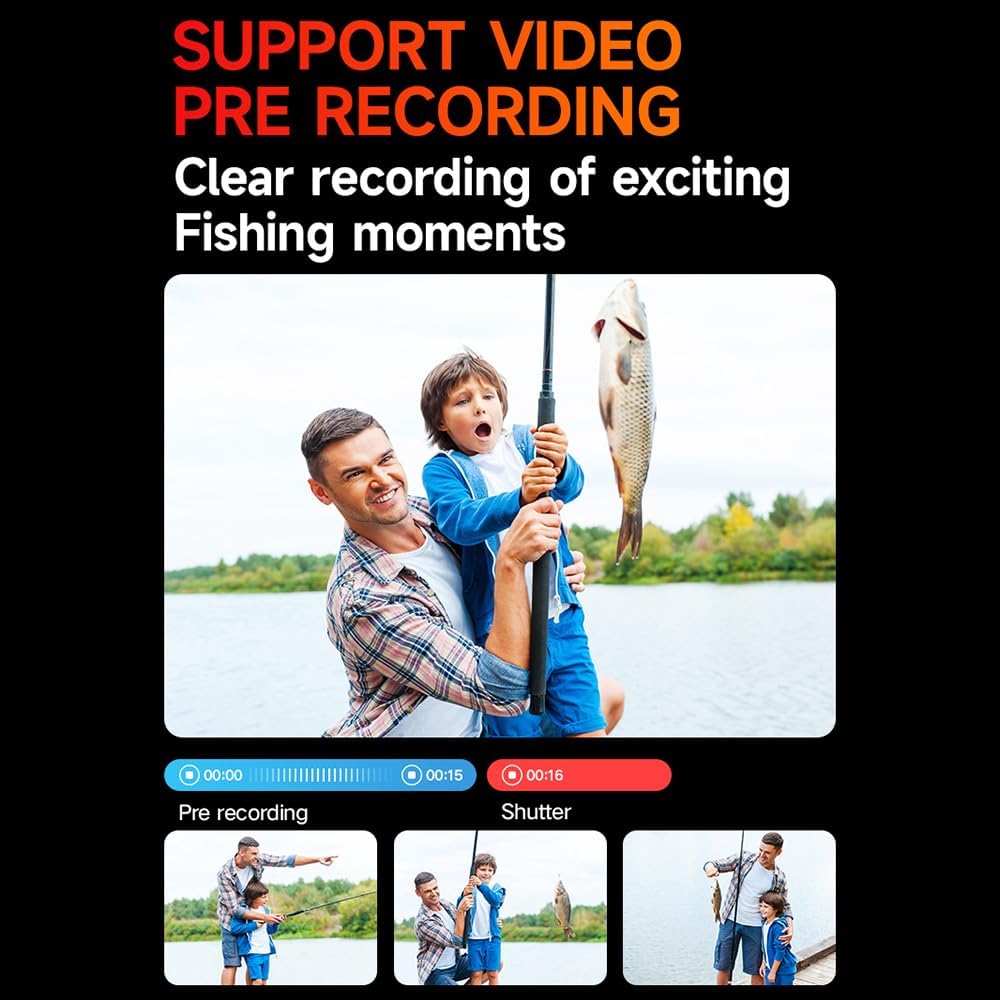
Image: An illustration demonstrating the video pre-recording feature, showing how it captures moments before the record button is pressed, useful for activities like fishing.
4.4. Nuotraukų fotografavimas
Darykite didelės raiškos nuotraukas iki 48 MP.
- Switch to photo mode using the Photo/WiFi key (11) or via the touch screen menu.
- Kadruokite kadrą naudodami priekinį arba galinį ekraną.
- Norėdami nufotografuoti, paspauskite užrakto / gerai mygtuką.
4.5. Wi-Fi Connectivity and APP Control
Connect your camera to a smartphone or tablet via Wi-Fi for remote control, live view, ir file perkėlimas.
- Press the Photo/WiFi key (11) to activate Wi-Fi mode on the camera.
- Download the dedicated Andoer APP from your device's app store.
- On your smartphone/tablet, go to Wi-Fi settings and connect to the camera's Wi-Fi network (SSID usually starts with 'Andoer' or similar).
- Open the Andoer APP to control the camera, view footage, and share content.

Image: An illustration depicting the camera's wireless Wi-Fi high-speed transmission capability, showing a smartphone connected to the camera for remote control and live viewing.

Image: A visual guide to the wireless remote control functions, including turning Wi-Fi on/off, remote photography, and starting/saving recordings.
4.6. Išplėstinės funkcijos
- 6-Axis Anti-Shake: The advanced stabilization technology ensures smooth and steady footage even during dynamic activities. This feature is automatically active.
- Night Shooting Function: Optimized settings for low-light conditions to capture clearer images and videos at night.
- Žuvies akies korekcija: Corrects the distortion often seen with wide-angle lenses, providing a more natural perspective.
- „Time-lapse“ įrašymas: Capture changes over time by recording frames at set intervals and compiling them into a video.
- Sulėtinto judesio įrašymas: Record high frame rate video to play back in slow motion for dramatic effects.

Paveikslėlis: Viršview of the camera's powerful configuration, highlighting features such as 4K/30FPS, pre-recording support, Wi-Fi, 6-axis gyroscope stabilization, dual color screens, H.265 decoding, high definition photography, night shooting, fisheye correction, time-lapse, slow motion, and 30-meter waterproofing.
4.7. Montavimas ir montavimas
The camera can be used with various accessories (not included) for multi-purpose and multi-angle recording.
- Bicycle Stand: Mount the camera on your bicycle handlebars.
- Helmet Stand: Securely attach the camera to your helmet for POV shots.
- Triangle Stand (Tripod): Use for stable shots on flat surfaces.
- Handheld Stand: For stable handheld shooting.

Vaizdas: pvzamples of how the Andoer Sports Camera can be mounted for various outdoor sports, including on a motorcycle, for parachute sports, on a tripod, on a helmet, worn around the neck, and with a handheld stand.
5. Priežiūra
5.1. Kameros valymas
- Kameros korpusą ir ekranus valykite minkštu, nepūkuotu audiniu.
- For the lens, use a specialized lens cleaning cloth and solution. Avoid touching the lens directly with fingers.
- Ensure the camera is dry before storing or placing it in the waterproof housing.
5.2. Akumuliatoriaus priežiūra
- Venkite akumuliatoriaus laikymo ekstremaliose temperatūrose (karštyje arba šaltyje).
- Reguliariai įkraukite bateriją, net jei jos nenaudojate, kad palaikytumėte jos būklę.
- If storing for a long period, charge the battery to about 50% before storage.
5.3. Sandėliavimas
- Store the camera in a cool, dry place away from direct sunlight and humidity.
- Remove the TF card if storing for extended periods.
6. Problemų sprendimas
If you encounter issues with your Andoer Sports Camera, refer to the following common problems and solutions:
6.1. Kamera neįsijungia
- Patikrinkite akumuliatorių: Ensure the battery is sufficiently charged. Connect the camera to a power source and try again.
- Atstatyti: Use a thin object (like a paperclip) to press the reset hole (6) on the camera.
6.2. Cannot Record/Take Photos
- TF kortelė: Ensure a TF card is inserted correctly and has sufficient free space.
- Card Format: If the card is new or causing issues, format it within the camera's settings (this will erase all data).
- Kortelių suderinamumas: Ensure the TF card is within the supported capacity (8-512GB) and is a high-speed card.
6.3. „Wi-Fi“ ryšio problemos
- Camera Wi-Fi: Ensure Wi-Fi is enabled on the camera.
- Programos versija: Make sure you are using the latest version of the Andoer APP.
- Iš naujo paleiskite įrenginius: Try restarting both the camera and your mobile device.
- Trikdžiai: Move away from other Wi-Fi devices or sources of interference.
6.4. Prasta vaizdo / vaizdo kokybė
- Objektyvo švara: Clean the camera lens and waterproof housing lens.
- Apšvietimas: Užtikrinkite tinkamą apšvietimą savo filmavimo aplinkai.
- Rezoliucijos nustatymai: Check that the camera's resolution settings are set to your desired quality (e.g., 4K for video, 48MP for photos).
- Anti-shake: Ensure the 6-axis anti-shake feature is active for smoother video.
7. Specifikacijos
| Funkcija | Specifikacija |
|---|---|
| Modelio pavadinimas | 4K/30FPS Sports Camera WiFi Camera Dual Screen |
| Vaizdo įrašo formatas | MP4, H.264, H.265 protocol |
| Vaizdo formatas | JPG |
| Vaizdo raiška | 4K/30fps (3840x2160), 2K 60/30fps (2560x1440), 1080P 120/60/30fps (1920x1080), 720P 120/60/30fps (1280x720), 1080P 30fps (1080x1920P) Vertical, 720P 30fps (720x1280) Vertical |
| Nuotraukų raiška | 48M (8000x6000), 32M (6560x4920), 20M (5184x3888), 16M (4608x3456), 14M (4320x3240), 12M (4032x3024), 10M (3648x2736), 8M (3264x2448), 5M (2592x1944), 3M (2048x1536), 2M (1600X1200) |
| Palaikymo sistema | Windows; Mac OSX10.4 or above; Linux |
| Baterijos talpa | 1300 mAh polimero ličio baterija |
| Darbo valandos | Approx. 3 hours (without Wi-Fi and screen) |
| Saugojimo palaikymas | 8-512GB TF kortelė |
| Įkrovimo ttage | DC 5V, 1000-2000mA |
| Sąsaja | C tipas |
| Fotoaparato dydis | 7 * 3.8 * 2.8 cm / 2.8 * 1.5 * 1.1 col. |
| Kameros svoris | 70 g / 2.5 uncijos |
| Ypatingos savybės | Anti-Shake, Waterproof (30M with housing), Dual Screens, Touch Control, Wi-Fi, Pre-Recording |
8. Garantija ir palaikymas
8.1. Informacija apie garantiją
This product comes with a standard limited warranty. Please refer to the warranty card included in your package or visit the official Andoer websvetainėje, kurioje pateikiamos išsamios garantijos sąlygos.
8.2. Pagalba klientams
For technical support, service, or inquiries, please contact Andoer customer service through their official channels. You can find more information and contact details on the Andoer Store on Amazon arba jų pareigūnas websvetainę.