
Ebitcam 8311
„Ebitcam“ apsaugos kameros naudotojo vadovas
Model: 8311 | Brand: Ebitcam
1. Įvadas
Thank you for choosing the Ebitcam Security Camera. This manual provides detailed instructions on how to set up, operate, and maintain your camera. This 3-megapixel camera offers robust security features, including IP66 weather resistance for both indoor and outdoor environments, two-way audio, and advanced AI-powered detection capabilities. Enjoy peace of mind with 24-hour monitoring and remote access from your smartphone.

The Ebitcam security camera provides high-resolution monitoring for various environments.
2. Pakuotės turinys
Patikrinkite pakuotę, ar joje yra šie daiktai:
- Ebitcam Security Camera (Model 8311)
- Maitinimo adapteris
- Tvirtinimo varžtai ir sieniniai kaiščiai
- Vartotojo vadovas
3. Produktas baigtasview
Familiarize yourself with the components of your Ebitcam security camera:

The camera features a lens, status LED, microphone, and a durable IP66-rated casing.
- Objektyvas: Užfiksuoja vaizdo įrašą footage.
- Būsenos šviesos diodas: Indicates camera status (e.g., power, connection).
- Mikrofonas: Garso įvesties ir dvipusio ryšio palaikymui.
- Pranešėjas: Garso išvesčiai ir dvipusiam ryšiui.
- SD kortelės lizdas: Supports up to 512GB microSD card for local storage. Located under the lens.
- Atkūrimo mygtukas: Used to reset the camera to factory settings. Located under the lens.
- Maitinimo prievadas: Jungiamas prie maitinimo adapterio.
- Montavimo pagrindas: Integrated base for various installation options.
4. Sąranka
4.1 Pradinis įjungimas
- Connect the power adapter to the camera's power port and plug it into a power outlet.
- Wait for the camera's status LED to indicate it is ready for setup (refer to app instructions for specific LED behavior).
4.2 Programėlės atsisiuntimas ir paskyros registravimas
- Download the "Ebitcam" app from your smartphone's app store (available for iPhone and Android).
- Atidarykite programėlę ir vykdykite ekrane pateikiamus nurodymus, kad užregistruotumėte naują paskyrą arba prisijunkite, jei jau turite.
- Add your camera by scanning the QR code located on the camera body using the app.
4.3 „Wi-Fi“ ryšys
- The camera supports 2.4GHz Wi-Fi networks only. Ensure your smartphone is connected to a 2.4GHz Wi-Fi network during setup.
- Follow the app's prompts to connect the camera to your Wi-Fi network.
- For optimal performance, choose an installation location with a strong Wi-Fi signal.
4.4 Fizinis įrengimas
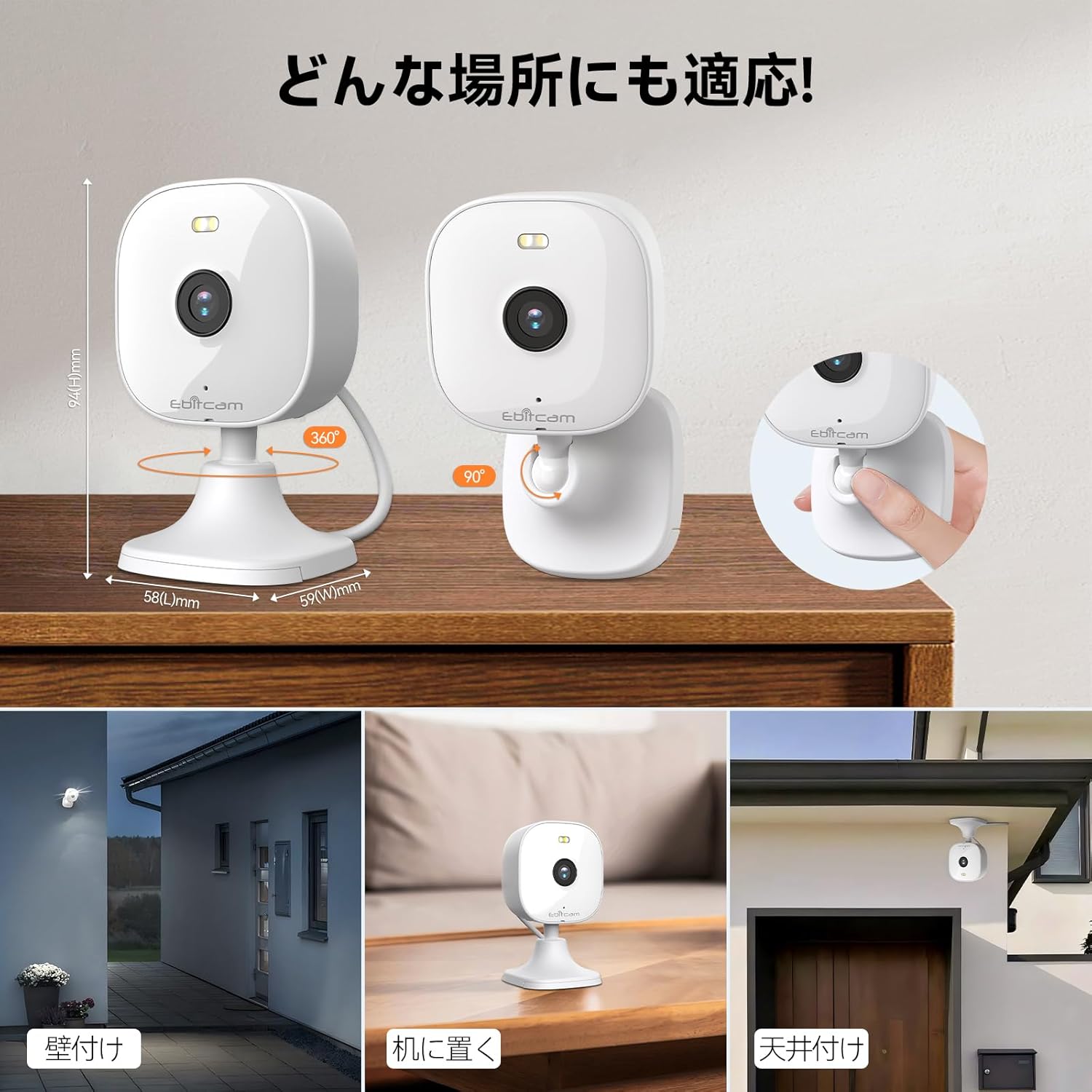
The camera offers versatile mounting options:

The camera can be mounted on walls, ceilings, or placed on a tabletop.
- Stalviršio išdėstymas: Simply place the camera on a flat surface. The integrated base allows for stable positioning.
- Tvirtinimas prie sienos / lubų: The camera's base can be detached by gently pulling the camera from its base. Use the included mounting screws and wall plugs to secure the base to your desired wall or ceiling location. Then, reattach the camera to the mounted base.
Note: The product package includes matching screw mounting tools for installation.
5. Naudojimo instrukcijos
5.1 Tiesiogiai View ir Įrašymas
Access the live video feed and manage recordings through the Ebitcam app.

The camera supports 2K (1296p) resolution for clear video capture.
- Tiesioginis tiekimas: Atidarykite programėlę ir pasirinkite savo fotoaparatą view the real-time video stream.
- Nepertraukiamas įrašymas: If an SD card is inserted or cloud storage is active, the camera can record continuously 24/7.
- Event-Triggered Recording: Configure settings to automatically start recording when motion, sound, or human presence is detected.
5.2 Dvipusis garsas
Communicate with people or pets on the camera's side using the built-in microphone and speaker.
Engage in real-time conversations through the camera's two-way audio feature.
- Norėdami kalbėti, programėlėje palieskite mikrofono piktogramą. Jūsų balsas bus perduodamas per kameros garsiakalbį.
- The camera's high-sensitivity microphone captures audio from the environment.
5.3 Motion, Sound, and Human Detection & Alerts
The camera utilizes advanced AI to detect specific events and notify you.

AI detection accurately distinguishes between humans and other moving objects.
- AI aptikimas: The camera can differentiate between human movement, general motion, and sound events.
- Mobile Alerts: Gaukite tiesioginius pranešimus savo išmaniajame telefone, kai aptinkamas įvykis.
- Automatic Lighting/Alarm: Configure settings to trigger automatic white light illumination or an audible alarm to deter unwanted visitors upon detection.
5.4 Naktinio matymo režimai
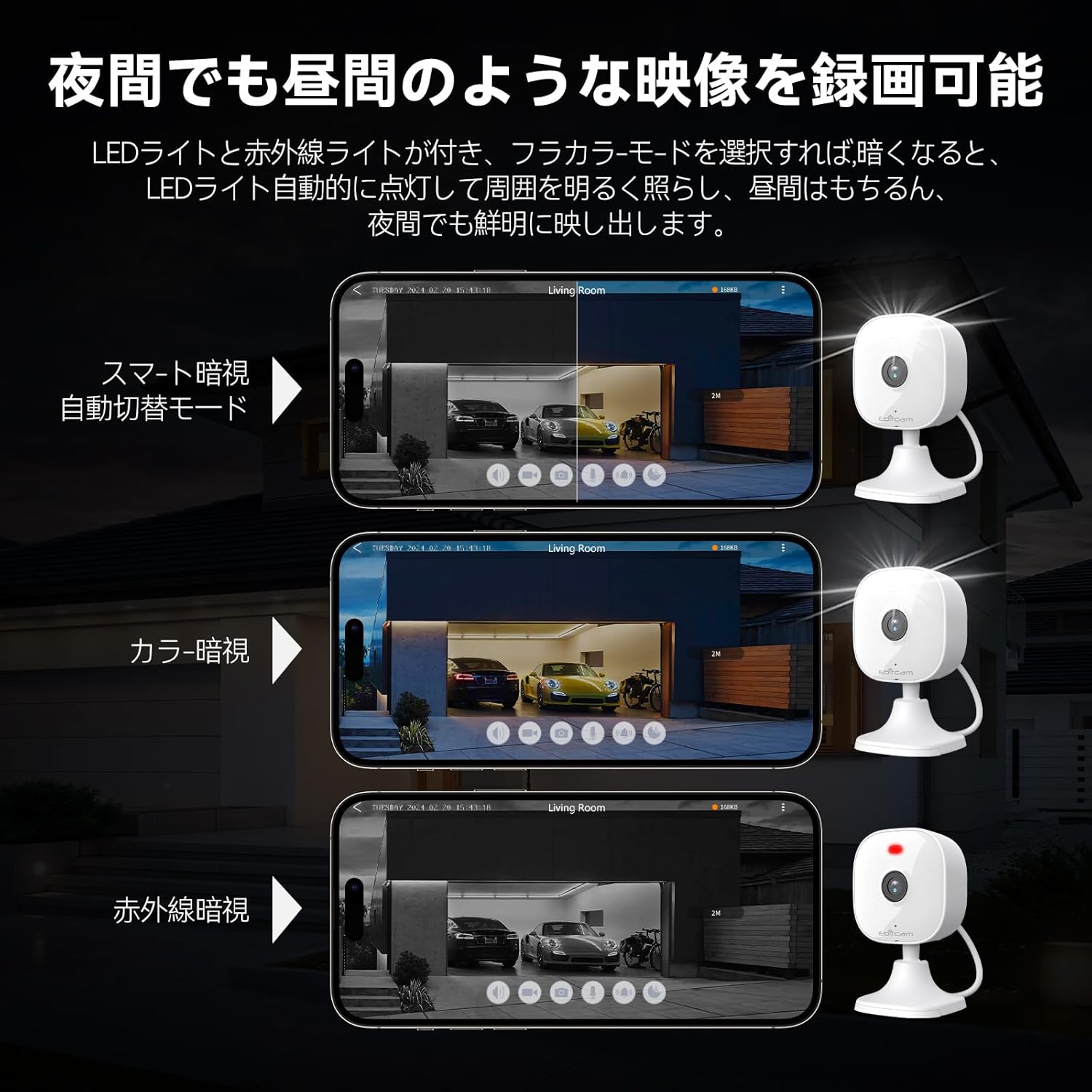
The camera provides clear visibility even in low-light or dark conditions.

Choose from various night vision modes for optimal clarity.
- Spalvotas naktinis matymas: Utilizes built-in white lights to provide color video footage in darkness (requires settings).
- Infraraudonųjų spindulių nakties vizija: Provides clear black-and-white video in complete darkness using infrared LEDs.
- Automatinis perjungimas: The camera can automatically switch between day and night modes based on ambient light.
5.5 Skaitmeninis mastelis
Zoom in on details within the live view arba įrašytas maistastage.

The camera supports up to 8x digital zoom.
- Use the pinch-to-zoom gesture on your smartphone screen within the app to digitally zoom in or out.
5.6 „Alexa“ integracija
Control your Ebitcam camera using voice commands with Amazon Alexa.
Integrate your camera with Alexa for convenient voice control.
- Enable the Ebitcam skill in your Alexa app.
- Use commands like "Alexa, show me the [camera name]" to view the live feed on compatible Alexa devices.
5.7 Šeimos bendrinimas
Share access to your camera with family members or trusted friends.
- Within the Ebitcam app, navigate to the sharing settings for your camera.
- You can share access by generating a QR code for others to scan, allowing them to view fotoaparato tiekimas.
6. Priežiūra
6.1 SD kortelės valdymas
The camera supports up to a 512GB microSD card for local video storage.

Insert a microSD card for local video storage.
- Įterpimas: Gently insert the microSD card into the slot located under the camera lens until it clicks into place.
- Formatavimas: It is recommended to format the SD card through the camera settings in the app before first use.
- Pašalinimas: Push the SD card gently to release it, then pull it out.
6.2 Valymas
- Wipe the camera lens with a soft, clean cloth to ensure clear image quality.
- Nuvalykite fotoaparato korpusą reklaminiu valikliuamp audinys. Nenaudokite stiprių cheminių medžiagų ar abrazyvinių valiklių.
6.3 Firmware atnaujinimai
- Periodically check for firmware updates through the Ebitcam app. Updates can improve performance, add new features, and enhance security.
- Follow the app's instructions carefully when performing a firmware update.
7. Problemų sprendimas
Čia pateikiami dažniausiai pasitaikančių problemų, su kuriomis galite susidurti, sprendimai:
- Unstable SD Card Performance: If you experience issues with recording or playback, an unstable SD card may be the cause. Please replace your SD card with a reliable, high-quality one and try again.
- App Not Functioning Correctly / Unstable Network: If the app does not function correctly, it might be due to an unstable network environment. Please ensure you have a stable 2.4GHz Wi-Fi connection.
- Camera Offline / Connection Issues: Ensure the camera is powered on and within range of your 2.4GHz Wi-Fi router. Check your Wi-Fi password in the app.
- Forgetting Login Password / Changing Network Environment: If you change your network environment or forget your login password, you can reset the camera. The camera's restart button is located under the lens. Press and hold it for a few seconds until the camera resets.
- False Alarms from Motion Detection: Adjust the motion detection sensitivity settings within the app. Consider setting specific detection zones to reduce unwanted alerts from areas like busy streets or swaying trees.
8. Specifikacijos
| Funkcija | Specifikacija |
|---|---|
| Produkto modelio numeris | 8311 |
| Prekių skaičius | 1 |
| Belaidžio ryšio technologija | Wi-Fi |
| Montavimo tipas | Freestanding, Wall Mount, Ceiling Mount, Tabletop Mount, Door Mount |
| Naktinio matymo diapazonas | 10 metrų |
| Kadrų dažnis | 25 kadrų per sekundę |
| Gaminio matmenys (IxPxH) | 10 x 5 x 5 cm |
| Atsparus vandeniui lygis | IP66 Atsparus vandeniui |
| Produkto svoris | 190 g |
| Rekomenduojami naudojimo būdai | Interior, Home, Living Room, Bedroom, Pet, Shop |
| Ryšio technologija | WiFi |
| Naudojimas viduje / lauke | Viduje, Lauke |
| Suderinami įrenginiai | iPhone, TV, Tablet, Desktop, Smartphone |
| Maitinimo šaltinis | Su laidu elektra |
| Ryšio protokolas | Wi-Fi |
| Vaizdo įrašymo raiška | 1296p (2K) |
9. Garantija ir palaikymas
Ebitcam provides the following warranty and support for your product:
- Garantija: A 2-year warranty is provided from the original purchase date.
- Palaikymas internetu: Online support is available Monday to Friday, from 8 AM to 5 PM (local time). Please refer to the Ebitcam app or official websvetainė, kurioje rasite kontaktinius duomenis.
Ask a question about this manual
Ask about setup, troubleshooting, compatibility, parts, safety, or missing instructions. Manuals+ will review the question and use this page’s manual context to help answer it.