
COCOCAM ZY-Q6
COCOCAM AOV 4G LTE Security Camera User Manual
Model: ZY-Q6 | Brand: COCOCAM
1. Įvadas
This user manual provides comprehensive instructions for the installation, operation, and maintenance of your COCOCAM AOV 4G LTE Security Camera. Please read this manual thoroughly before using the product to ensure proper functionality and safety.
1.1 Pakuotės turinys
- 1x COCOCAM AOV 4G LTE Security Camera
- 1x saulės baterija
- 1x Screw Package (for mounting)
- 1x duomenų kabelis
- 1x naudojimo instrukcija (šis dokumentas)
- 1x saulės kolektorių laikiklis
- 2x AA Batteries (pre-installed or included for initial setup)

Figure 1.1: COCOCAM AOV 4G LTE Security Camera and Solar Panel. The image displays the main camera unit with two antennas, a lens, and four LED lights, alongside a rectangular solar panel connected by a cable.
2. Saugos informacija
- Ensure the camera and solar panel are installed securely to prevent falling.
- Nelaikykite fotoaparato ekstremaliose temperatūrose, kurios yra už jo veikimo diapazono ribų.
- Saugokite įrenginį nuo stiprių magnetinių laukų.
- Nebandykite patys ardyti ar taisyti fotoaparato. Pagalbos kreipkitės į palaikymo tarnybą.
- Ensure all cables are properly connected and protected from environmental damage.
- This device is IP66 rated for water and dust resistance, but avoid submerging it in water.
3. Produktas baigtasview
3.1 Pagrindinės savybės
- 24/7 Recording & Fast Alarm Trigger: Continuous recording with quick alarm activation.
- Intelligent Sound and Light Alarm: Customizable alarm areas with real-time notifications.
- 30 Meters Night Vision: Clear visibility in low-light conditions with white light and infrared options.
- AI Detection/Tracking: Human form detection and movement tracking up to 30 meters.
- Lanksčios saugojimo parinktys: Supports TF card (up to 128GB) and cloud storage.
- Dvipusis garsas: Įmontuotas mikrofonas ir garsiakalbis bendravimui.
- Long-lasting Battery with Solar Panel: 15000mAh rechargeable battery with 8W solar panel for continuous power.
- IP66 atsparumas oro sąlygoms: Designed for outdoor use, resistant to water and dust.
- 3MP High Definition Video: 2304*1296 resolution for clear footage.
- 355° Pan/90° Tilt: Wide area coverage with remote adjustable viewkampų.
- Remote Monitoring and Mobile Compatibility: Access via COCOCAM app on Android/iOS devices.
- 4G LTE ryšys: Operates without Wi-Fi, includes a built-in SIM card with trial data.
4. Sąranka
4.1 Kameros ir saulės baterijos montavimas
The camera and solar panel can be mounted on walls or ceilings. Choose a location that provides optimal sunlight exposure for the solar panel and a clear view dėl kameros.
- Identify a suitable mounting surface.
- Use the provided screw package to secure the camera bracket and solar panel bracket.
- Attach the camera to its bracket and the solar panel to its bracket.
- Connect the solar panel cable to the camera's charging port. Ensure the connection is secure and waterproof.

Figure 4.1: Easy installation of the COCOCAM camera and solar panel. The image shows a person installing the camera and solar panel unit under an eave, demonstrating the ease of setup.

Figure 4.2: Self-sustaining power setup with solar panel and battery. This image illustrates the camera and solar panel mounted on a building, highlighting the 8W solar panel and 15000mAh rechargeable battery for continuous power.
4.2 SIM kortelės ir atminties kortelės įdėjimas
The camera comes with a built-in SIM card for initial use. You can also install an external SIM card or a TF (microSD) card for local storage.
- Locate the SIM card slot and TF card slot on the camera (refer to the product diagram in the quick start guide).
- Insert the TF card (up to 128GB) into the TF card slot with the contacts facing down.
- If using an external SIM card, insert it into the designated slot. Ensure it is properly seated.
- Close the protective cover to maintain IP66 rating.

Figure 4.3: 3G/4G LTE Connection without Wi-Fi. This image highlights the camera's ability to operate using 3G or 4G LTE networks, making it suitable for locations without Wi-Fi, such as farms, construction sites, or RVs.
4.4 App Download and Initial Configuration
Download the COCOCAM app from your device's app store (Android or iOS).
- Ieškokite "COCOCAM" in the Google Play Store or Apple App Store.
- Įdiekite programą ir sukurkite paskyrą.
- Norėdami pridėti kamerą, vadovaukitės programėlėje pateiktomis instrukcijomis. Paprastai tai reiškia, kad reikia nuskaityti QR kodą kameroje arba rankiniu būdu įvesti jos ID.
- Once connected, you can configure network settings, recording preferences, and alarm settings.

Figure 4.4: COCOCAM app for 24/7 continuous recording. This image shows a smartphone displaying the COCOCAM app interface, with the security camera mounted on a wall in the background, indicating continuous monitoring capabilities.
5. Naudojimo instrukcijos
5.1 24/7 Recording and Alarm Features
The camera supports continuous recording. When an alarm is triggered, the camera quickly switches to full-frame recording.
- Nepertraukiamas įrašymas: The camera records 2 seconds per frame during non-alarm periods.
- Fast Alarm Trigger: Upon detection, the camera initiates full-frame recording within 0.2 seconds.
- Customizable Alarm Areas: Apibrėžkite konkrečias zonas kameros viduje view judesio aptikimui.
- Intelligent Sound and Light Alarm: The camera can emit sound and light warnings upon detecting suspicious activity.
- Pranešimai realiuoju laiku: Receive instant alerts on your mobile device when an alarm is triggered.
5.2 PTZ valdymas (panoraminis posūkis, pakreipimas, priartinimas)
The camera offers extensive pan and tilt capabilities, allowing you to adjust the viewing angle remotely via the COCOCAM app.
- Pan: Pasukite kamerą horizontaliai iki 355°.
- Pakreipti: Vertikaliai sureguliuokite kamerą iki 90°.
- Skaitmeninis priartinimas: Use the app to digitally zoom into the live feed or recorded footage.

Figure 5.1: 355° Pan and 90° Tilt with AI Tracking. This image illustrates the camera's wide range of motion and its ability to track subjects, with icons for two-way audio, AI detection, and AI tracking.
5.3 AI Detection and Tracking
The camera's advanced AI capabilities allow for precise detection and tracking of human forms and vehicles.
- Žmogaus aptikimas: Identifies human shapes, reducing false alarms from animals or swaying branches.
- Vehicle Recognition: Distinguishes vehicles for specific alerts.
- AI sekimas: The camera can automatically follow detected subjects within its field of view iki 30 metrų.
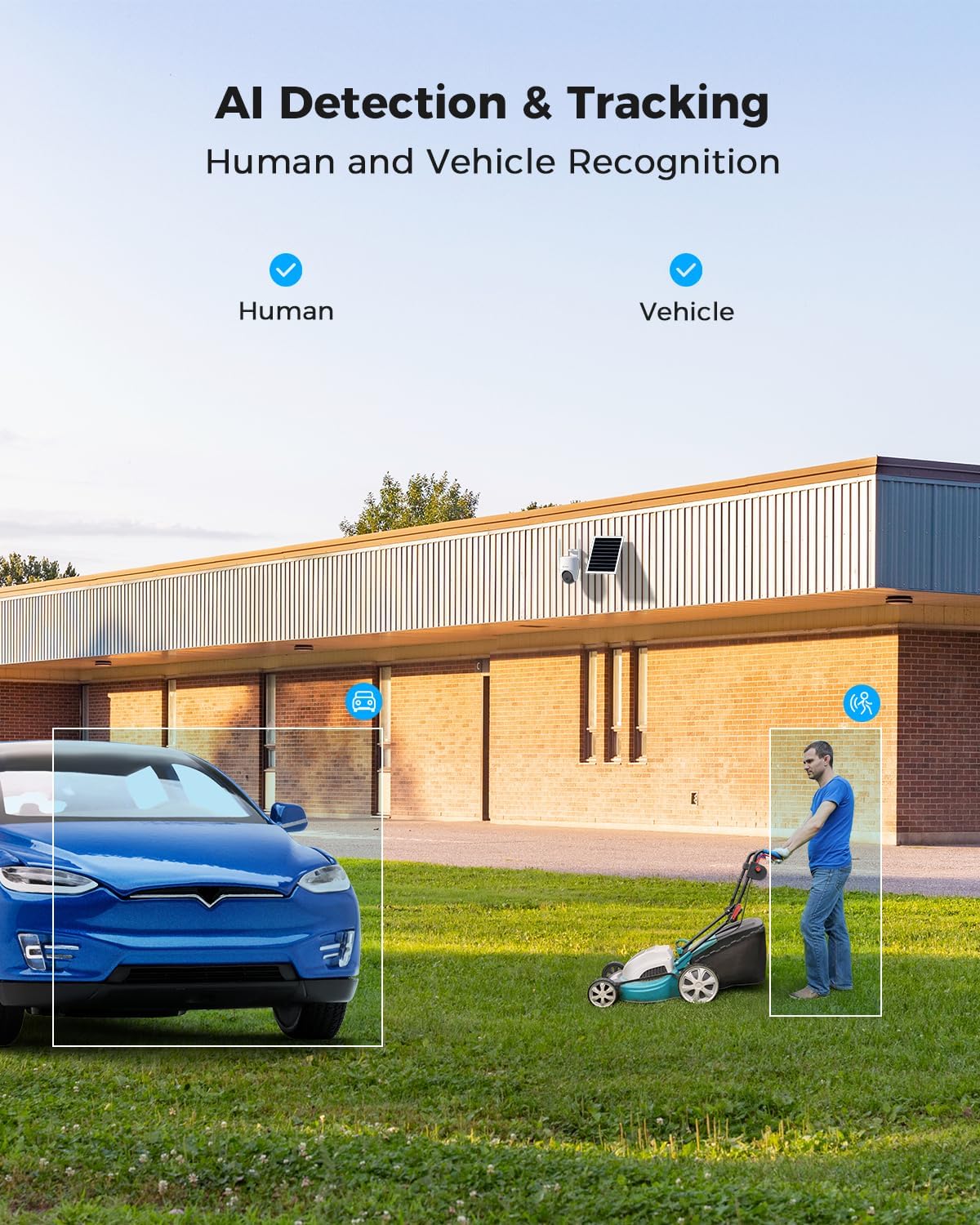
Figure 5.2: AI Detection & Tracking for Human and Vehicle Recognition. The image shows a security camera monitoring an outdoor area, with highlighted boxes indicating detected human and vehicle subjects, demonstrating its AI capabilities.
5.4 Dvipusis garsas
Bendraukite su lankytojais arba atbaidykite įsibrovėlius naudodami įmontuotą mikrofoną ir garsiakalbį.
- Access the two-way audio feature through the COCOCAM app.
- Kalbėkite į telefono mikrofoną, kad garsas būtų perduotas per kameros garsiakalbį.
- Listen to audio from the camera's surroundings through your phone.
5.5 Naktinis matymas
The camera provides clear visibility up to 30 meters in complete darkness.
- Infraraudonųjų spindulių nakties vizija: Automatically activates in low-light conditions for black and white video.
- Spalvotas naktinis matymas: Utilizes white light LEDs to provide color video at night when activated or upon detection.

Figure 5.3: 30m Night Vision and 2K Full Color Night Vision. This image compares standard black and white night vision with the camera's full-color night vision capability, showing enhanced detail and color in low light.
6. Priežiūra
6.1 Baterijos ir saulės baterijų priežiūra
The integrated 15000mAh battery is continuously charged by the 8W solar panel. To ensure optimal performance:
- Įsitikinkite, kad saulės baterijos modulis yra pastatytas taip, kad visą dieną gautų kuo daugiau tiesioginių saulės spindulių.
- Regularly clean the surface of the solar panel to remove dust, dirt, or debris that may obstruct sunlight.
- Venkite saulės baterijos statyti šešėlinėse vietose.

Figure 6.1: 8W Solar Panel for continuous power. This image focuses on the solar panel, highlighting its 8W power output and the 3-meter cable length for flexible installation.
6.2 Kameros valymas
- Naudokite minkštą, damp cloth to wipe the camera lens and body.
- Nenaudokite stiprių chemikalų ar abrazyvinių valiklių.
- Ensure the camera is dry before prolonged exposure to the elements.
6.3 Firmware atnaujinimai
Periodically check the COCOCAM app for available firmware updates. Keeping your camera's firmware updated ensures optimal performance, new features, and security enhancements.
7. Problemų sprendimas
| Problema | Galima priežastis | Sprendimas |
|---|---|---|
| Kamera neprisijungia prie programėlės. | Incorrect pairing process, weak 4G signal, camera not powered on. | Ensure camera is powered on. Re-attempt pairing process. Check 4G signal strength at installation location. |
| Prasta vaizdo kokybė. | Dirty lens, low light conditions, weak 4G signal. | Clean the camera lens. Ensure adequate lighting or verify night vision is active. Check 4G signal strength. |
| Akumuliatorius neįkraunamas. | Solar panel obstructed, faulty connection, insufficient sunlight. | Ensure solar panel is clean and receives direct sunlight. Check cable connection between solar panel and camera. |
| AI detection not working or too many false alarms. | Incorrect sensitivity settings, detection area not configured. | Adjust AI detection sensitivity in the app. Configure specific detection zones to exclude irrelevant areas. |
| Dvipusio garso problemos. | Microphone/speaker obstruction, app permissions, network delay. | Ensure nothing is blocking the camera's microphone or speaker. Check app permissions for microphone access. Verify stable 4G connection. |
8. Specifikacijos
| Funkcija | Detalė |
|---|---|
| Modelio pavadinimas | AOV 4G Camera with 7x24 Recording |
| Prekės modelio numeris | ZY-Q6 |
| Prekės ženklas | COCOCAM |
| Vaizdo įrašymo raiška | 1440p (3MP, 2304*1296) |
| Panardinimo / pakreipimo diapazonas | 355° pasukimas / 90° pakreipimas |
| Naktinio matymo diapazonas | 30 Meters (Infrared & White Light) |
| Ryšio technologija | Wireless (4G LTE) |
| Maitinimo šaltinis | Battery Powered (15000mAh) with 8W Solar Panel |
| Saugojimo parinktys | TF kortelė (iki 128 GB), debesies saugykla |
| Atsparumas oro sąlygoms | IP66 |
| Medžiaga | Akrilnitrilo butadieno stirenas (ABS) |
| Prekės matmenys (I x P x A) | 20 x 15 x 12 cm |
| Prekės svoris | 620 g |
| Baterijos | 2 AA baterijos (pridedamos) |
9. Garantija ir palaikymas
COCOCAM provides a viso gyvenimo garantija šiam produktui, užtikrinant ilgalaikį patikimumą ir klientų pasitenkinimą.
For technical support, troubleshooting assistance, or warranty claims, please contact COCOCAM customer service:
- Gamintojas: COCOCAM
- Oficialus Websvetainė: www.cococamtech.com
- El. paštas: service@cococamtech.com
Please have your model number (ZY-Q6) and purchase information ready when contacting support.