
Micsig SM-ETO3504
„Micsig ETO3504 / ETO5004“ planšetinio osciloskopo naudotojo vadovas
Model: ETO3504 (SM-ETO3504) / ETO5004
1. Produktas baigtasview
The Micsig ETO Series Tablet Oscilloscopes (models ETO3504 and ETO5004) are advanced portable measurement instruments designed for professional use in laboratories and field environments. These devices feature a 14-inch integrated touch screen, a large-capacity battery, and a multi-tasking operating system, providing a comprehensive solution for waveform analysis.
Pagrindinės funkcijos:
- Up to 500MHz bandwidth and 3GSa/s samplingo norma.
- 4 analog channels for multi-signal analysis.
- 360Mpts memory depth for extended waveform capture.
- 14-inch, 1920x1200 resolution touch screen display.
- Integrated 13,500mAh Li-ion battery for portable operation.

Figure 1.1: Micsig ETO Series Tablet Oscilloscope in operation, displaying multiple waveforms.
2. Pradinė sąranka
2.1 Išpakavimas ir patikrinimas
Carefully remove the oscilloscope and all accessories from the packaging. Inspect for any signs of damage. Retain the packaging for future transport or storage.
2.2 Įjungimas ir įkrovimas
The device includes a 13,500mAh Lithium Metal battery. Before first use, it is recommended to fully charge the battery using the provided power adapter. Connect the power adapter to the device's power input and then to a suitable power outlet. The charging indicator will show the charging status.
2.3 Connecting Probes and Accessories
The ETO series features 4 analog channels. Connect your probes to the BNC connectors on the device. The Mic-OPI™ probe interface automatically matches probe attenuation, simplifying setup. Ensure all connections are secure.

2.1 pav. Baigtaview of the oscilloscope's rear panel, showing the battery compartment, VESA mounting points, and various interfaces including USB, HDMI, and probe connections.
2.4 Sąsaja baigtaview
The oscilloscope is equipped with various interfaces for connectivity and expansion:
- USB 3.0/2.0 pagrindinis kompiuteris: Skirta išoriniams atminties įrenginiams arba periferiniams įrenginiams prijungti.
- USB Device (Type-C): For PC connection and data transfer.
- HDMI: Išoriniam ekrano išvesties jungimui.
- Trigger Out: Išoriniam suveikimui.
- Grounding Socket: Dėl saugaus įžeminimo.
- Mic-OPI™ Probe Interface: For intelligent probe detection and compensation.
3. Naudojimo instrukcijos
3.1 User Interface and Touch Control
The ETO series features an intuitive operating interface designed for ease of use. The 14-inch full touch-capacitive display allows for direct interaction with waveforms and settings. Use gestures such as pinch-to-zoom, drag-to-pan, and tap-to-select for efficient operation.
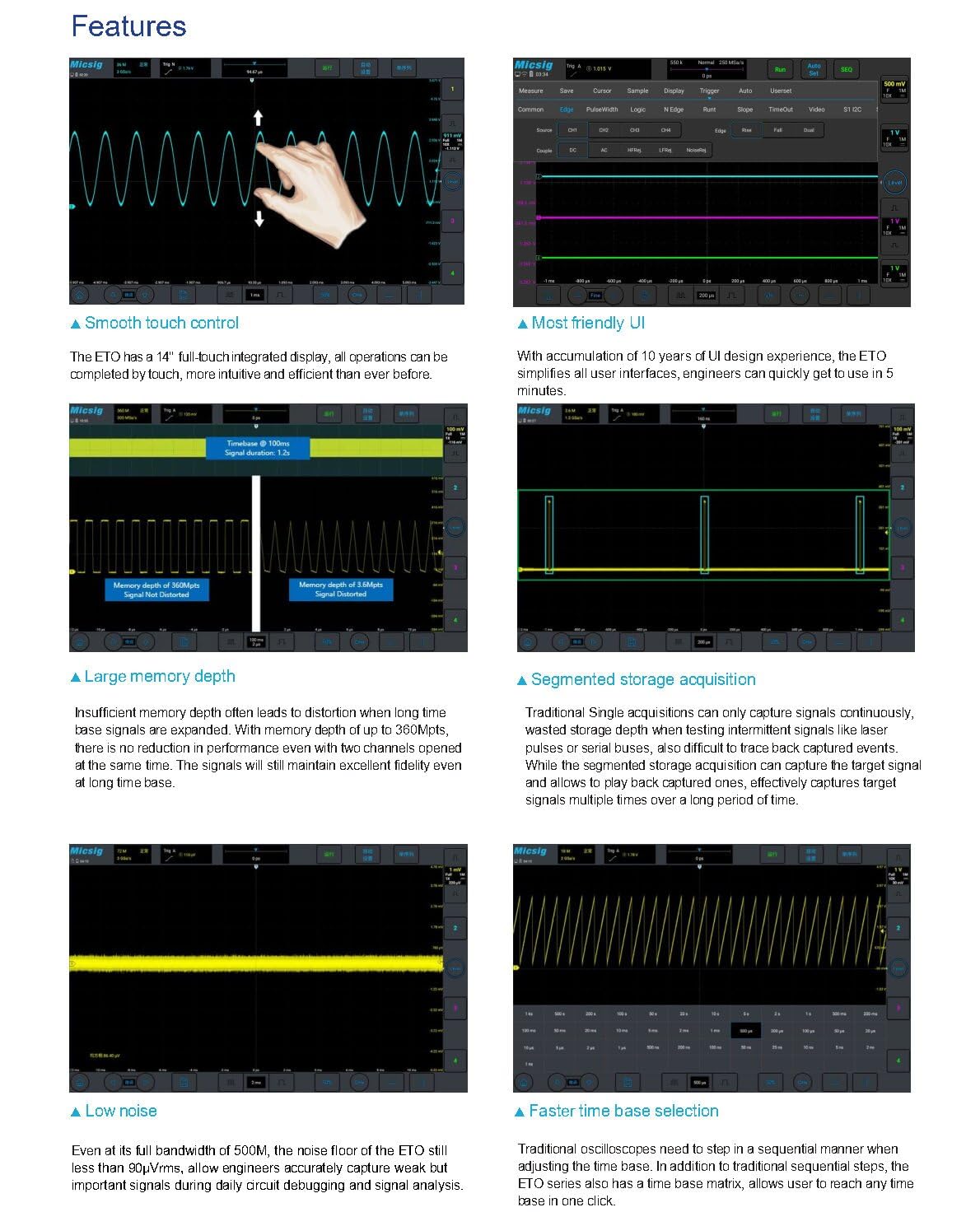
Figure 3.1: Demonstrates smooth touch control for waveform manipulation, intuitive user interface, large memory depth, segmented storage, low noise, and faster time base selection.
3.2 Pagrindiniai matavimai
After connecting your probes and powering on the device, you can begin taking measurements. Adjust the vertical scale (Volts/Div) and horizontal time base (Sec/Div) using the on-screen controls or physical knobs (if available on your model). The oscilloscope automatically displays key waveform parameters.
3.3 Išplėstinės funkcijos
- Hardware Digital Filtering: Apply high-pass or low-pass filters to isolate specific frequency components of a signal.
- Serial Bus Decoding and Analysis: Supports various serial bus protocols including RS-232/422/485, UART, CAN, CAN FD, LIN, SPI, I2C, and ARINC-429, MIL-STD-1553B. Decoded data can be exported to CSV format.
- Multiple Trigger Functions: Offers various trigger types such as edge, pulse width, logic, Nth edge, runt, slope, bus, window, and interval to capture specific events.
- Statistics Measurement: Automatically calculates average, maximum, minimum, and root mean square (RMS) values for up to 50,000 waveform events.
- Išplėstinės matematikos funkcijos: Includes addition, subtraction, multiplication, division, integration, differentiation, and FFT (Fast Fourier Transform) for detailed signal analysis.
- Įvairus File Išsaugoma: Save waveforms and measurement results in binary (.BIN) or CSV format. Images can also be saved.
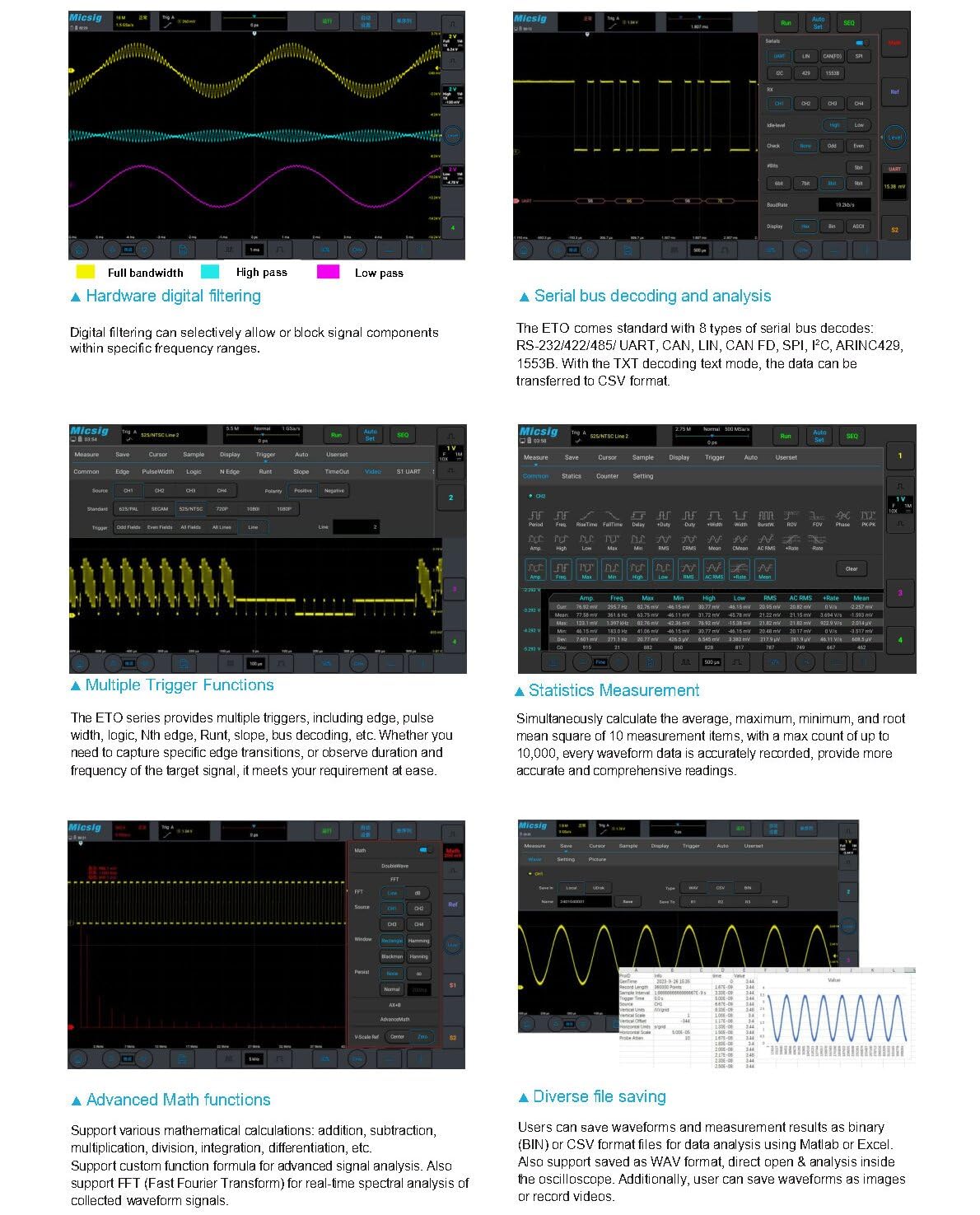
Figure 3.2: Illustrates hardware digital filtering, serial bus decoding, multiple trigger functions, statistics measurement, advanced math functions, and diverse file saving options.
3.4 Nuotolinis valdymas
The ETO series supports remote control via PC software, mobile applications, and HDMI screen projection. This allows for flexible operation and data analysis from a distance, enhancing efficiency in various testing scenarios.
4. Techninės specifikacijos
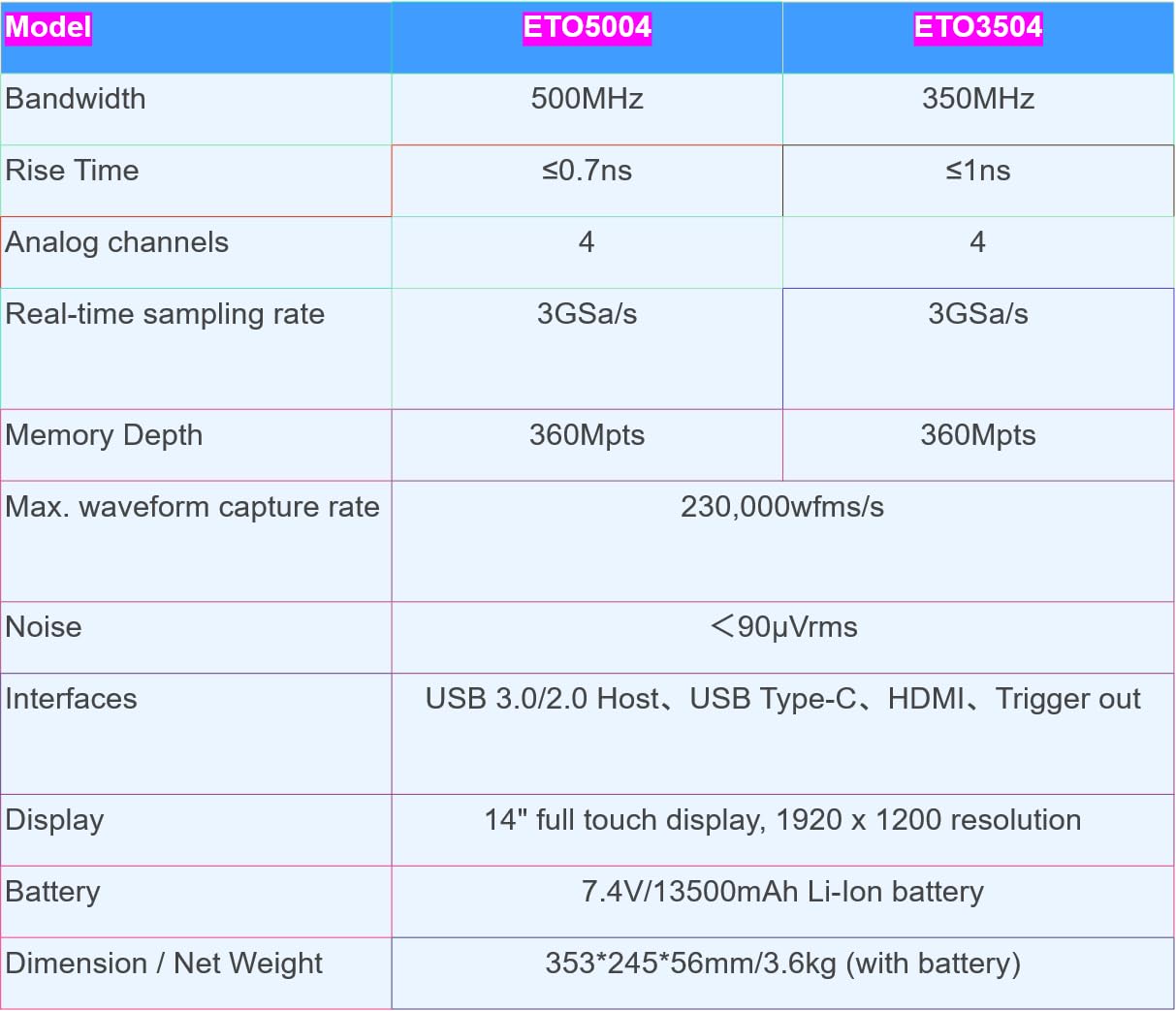
Figure 4.1: Detailed specifications for ETO5004 and ETO3504 models.
| Funkcija | ETO5004 | ETO3504 |
|---|---|---|
| Pralaidumas | 500 MHz | 350 MHz |
| Pakilimo laikas | ≤0.7ns | ≤1ns |
| Analoginiai kanalai | 4 | 4 |
| Realiu laiku Samplingo norma | 3GSa/s | 3GSa/s |
| Atminties gylis | 360 Mpts | 360 Mpts |
| Max. Waveform Capture Rate | 230,000wfms/s | |
| Triukšmo grindys | <90µVrms | |
| Sąsajos | USB 3.0/2.0 Host, USB Type-C, HDMI, Trigger out | |
| Ekranas | 14 inches, 1920 x 1200 resolution, full touch | |
| Baterija | 7.4V/13,500mAh Li-ion battery (included) | |
| Matmenys / Grynasis svoris | 353 * 245 * 56 mm / 3.6 kg (su baterija) | |
| Prekės modelio numeris | SM-ETO5004 | SM-ETO3504 |
5. Priežiūra
5.1 Valymas
Prietaisui valyti naudokite minkštą, damp cloth. Avoid abrasive cleaners, solvents, or strong chemicals that could damage the screen or casing. Prieš valydami, įsitikinkite, kad įrenginys yra išjungtas ir atjungtas nuo visų maitinimo šaltinių.
5.2 Akumuliatoriaus priežiūra
For optimal battery life, avoid fully discharging the battery frequently. Store the device in a cool, dry place when not in use for extended periods. If storing for a long time, ensure the battery is charged to approximately 50% to prevent deep discharge.
5.3 Aplinkos sąlygos
Operate and store the oscilloscope within the specified environmental ranges (temperature, humidity) to ensure proper function and longevity. Avoid exposure to extreme temperatures, direct sunlight, dust, and moisture.
6. Problemų sprendimas
If you encounter issues with your Micsig ETO series oscilloscope, consider the following basic troubleshooting steps:
- Nėra galios: Ensure the power adapter is securely connected and the battery is charged. Check the power switch.
- Nėra signalo ekrano: Verify that probes are correctly connected to the input channels and the signal source. Check probe attenuation settings. Adjust vertical and horizontal scales.
- Nestabili bangos forma: Adjust the trigger level and trigger source. Ensure the trigger mode is appropriate for the signal.
- Jutiklinis ekranas nereaguoja: Paleiskite įrenginį iš naujo. Jei problema išlieka, susisiekite su klientų aptarnavimo tarnyba.
- Ryšio problemos: For USB or HDMI connections, ensure cables are properly seated and drivers (if applicable for PC software) are installed.
For more complex issues, refer to the detailed troubleshooting guide available on the Micsig official websvetainėje arba susisiekite su klientų aptarnavimo tarnyba.
7. Garantija ir palaikymas
This product is manufactured by Shenzhen Micsig Technology Co., Ltd. For specific warranty information, please refer to the warranty card included with your product or visit the official Micsig websvetainė. Garantijos sąlygos paprastai apima gamybos defektus tam tikrą laikotarpį nuo įsigijimo datos.
For technical support, service, or inquiries, please contact the Micsig Official Store or the manufacturer directly. Contact information can usually be found on the product packaging or the official Micsig websvetainę.
Gamintojas: Shenzhen Micsig Technology Co., Ltd.
Pardavėjas: Micsig Official Store
Ask a question about this manual
Ask about setup, troubleshooting, compatibility, parts, safety, or missing instructions. Manuals+ will review the question and use this page’s manual context to help answer it.