
1. Įvadas
The MUSE M-179 P Alarm Clock Radio is designed to provide reliable timekeeping and audio entertainment. This device features an FM PLL radio with the capacity to store 20 preset stations. It includes a time projection function, allowing you to adjust both the angle and rotation of the projected image for optimal viewing. As an alarm clock, it offers a dual alarm system, enabling you to wake up to either your preferred radio station or a standard buzzer. Additional functions include a snooze feature for extra sleep and a sleep timer for falling asleep to music.
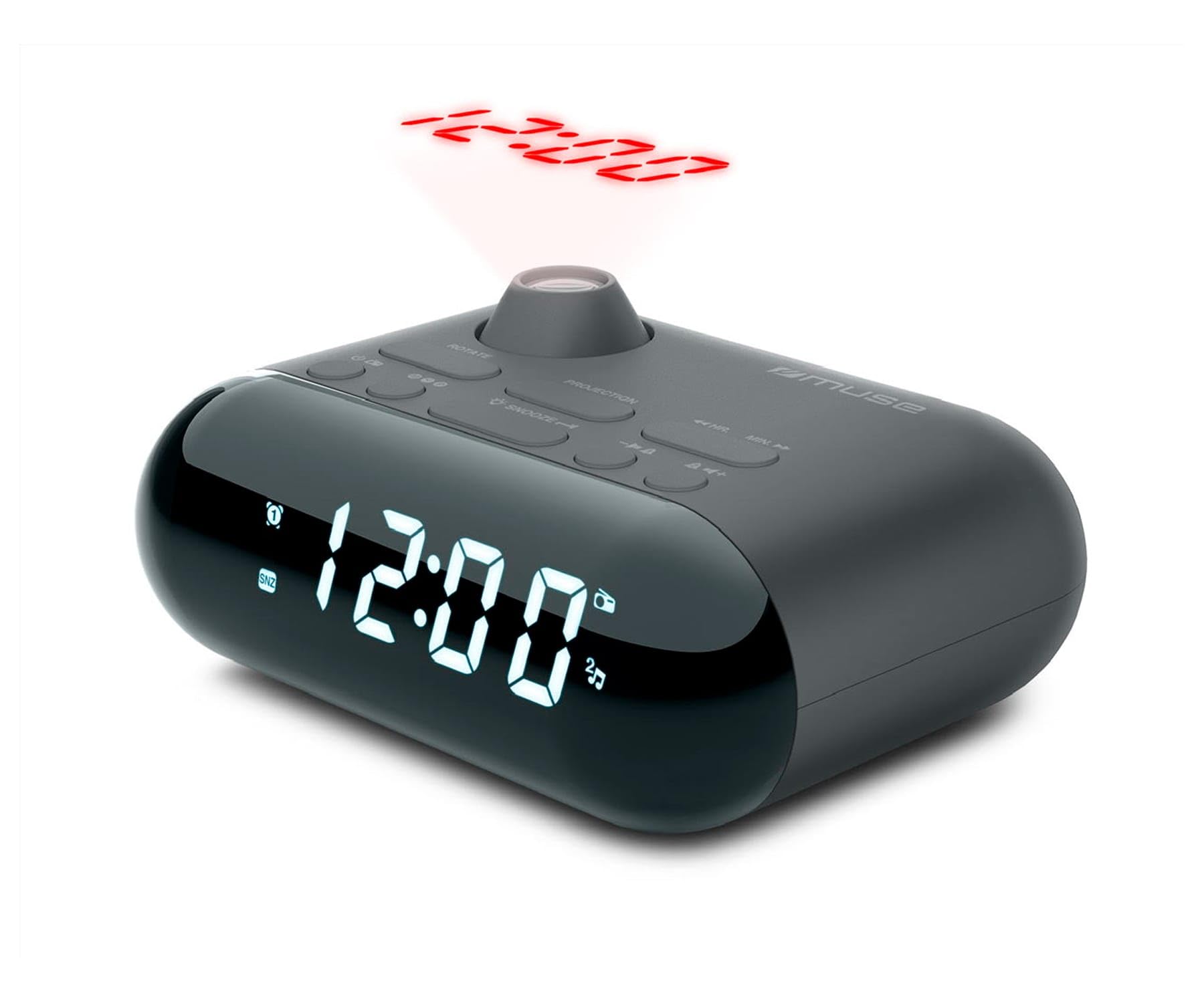
Image showing the front of the MUSE M-179 P Alarm Clock Radio, featuring the LED display and control buttons.
2. Saugos instrukcijos
- Prieš naudodami įrenginį, atidžiai perskaitykite visas instrukcijas.
- Išsaugokite šį vadovą ateityje.
- Saugokite įrenginį nuo lašančio ar purslančio vandens.
- Užtikrinkite tinkamą vėdinimą; neužblokuokite jokių ventiliacijos angų.
- Nestatykite įrenginio šalia šilumos šaltinių, tokių kaip radiatoriai, šildytuvai, viryklės ar kiti prietaisai (įskaitant ampkeltuvai), kurie gamina šilumą.
- Naudokite tik gamintojo nurodytus priedus/priedus.
- Naudotas baterijas išmeskite atsakingai pagal vietines taisykles.
- Nebandykite ardyti ar modifikuoti įrenginio. Visus techninės priežiūros darbus patikėkite kvalifikuotiems techninės priežiūros darbuotojams.
3. Pakuotės turinys
Patikrinkite, ar jūsų pakuotėje yra šie daiktai:
- MUSE M-179 P Alarm Clock Radio Unit
- 1 x AA Battery (for backup or primary power, depending on model)
- Vartotojo vadovas (šis dokumentas)
4. Produkto ypatybės
- Alarm Clock Radio: Integrated alarm and radio functions.
- Laiko projekcija: Projects the current time onto a wall or ceiling.
- Dvigubas aliarmas: Nustatykite du nepriklausomus signalus.
- Žadinimo parinktys: Choose to wake up to FM radio or a buzzer sound.
- PLL FM Radio: Digital tuning for stable radio reception.
- 20 FM Presets: Store up to 20 of your favorite FM radio stations.
- Snaudimo funkcija: Temporarily pause the alarm.
- Miego laikmatis: Fall asleep to radio with automatic shut-off.
- Integruotas laikrodis: Accurate timekeeping.
- Nešiojamas dizainas: Compact and easy to move.
5. Valdikliai ir ekranas
The MUSE M-179 P features an intuitive layout for easy operation. While specific button labels may vary, common controls include:
- Skystųjų kristalų ekranas: Shows current time, alarm status, and radio frequency.
- Laiko nustatymo mygtukas: For adjusting hours and minutes.
- Alarm 1/Alarm 2 Buttons: To set and activate individual alarms.
- Snooze/Sleep Button: Activates snooze or sets the sleep timer.
- Radio/Tuning Buttons: For scanning and selecting radio stations.
- Garsumo valdymas: Reguliuoja garso išvestį.
- Projector On/Off & Adjustment: Controls the time projection feature.
6. Sąranka
6.1. Maitinimo prijungimas
- Open the battery compartment, usually located on the bottom or back of the unit.
- Insert 1 AA battery, ensuring correct polarity (+/-). This battery powers the unit.
- Saugiai uždarykite akumuliatoriaus skyrių.
6.2. Pradinis laiko nustatymas
- When the unit is first powered on, the display may flash or show a default time.
- Paspauskite ir palaikykite LAIKO NUSTATYMAS button (or similar) until the hour digits begin to flash.
- Naudokite VALANDA ir MINUTĖ buttons (or tuning buttons) to adjust the hour. Pay attention to AM/PM indicators if present.
- Paspauskite LAIKO NUSTATYMAS dar kartą, kad patvirtintumėte valandas ir pereitumėte prie minučių reguliavimo.
- Adjust the minutes using the appropriate buttons.
- Paspauskite LAIKO NUSTATYMAS one last time to save the current time.
7. Naudojimo instrukcijos
7.1. Signalų nustatymas
The M-179 P features two independent alarms (Alarm 1 and Alarm 2).
- Paspauskite ir palaikykite 1 pavojaus signalas mygtuką, kol pradės mirksėti žadintuvo valandų skaitmenys.
- Naudokite VALANDA ir MINUTĖ mygtukus, kad nustatytumėte norimą žadintuvo laiką.
- Paspauskite 1 pavojaus signalas again to confirm the time and select the wake-up source (radio or buzzer). Use the tuning buttons to toggle between options.
- Paspauskite 1 pavojaus signalas once more to save the settings. The alarm indicator will light up on the display.
- Pakartokite procesą, 2 pavojaus signalas naudojant 2 pavojaus signalas mygtuką.
7.2. FM radijo naudojimas
- Paspauskite RADIJO ĮJUNGTAS/IŠJUNGTAS mygtuką, kad įjungtumėte radiją.
- Naudokite TUNE +/- mygtukais, kad rankiniu būdu reguliuotumėte dažnį.
- Norėdami automatiškai ieškoti stočių, paspauskite ir palaikykite TUNE +/- button. The radio will stop at the next strong signal.
- To save a preset station: Tune to the desired station, then press and hold the NUSTATYMAS mygtuką (arba MEM). The preset number will flash. Use TUNE +/- , kad pasirinktumėte iš anksto nustatytos stoties numerį (1–20), tada paspauskite NUSTATYMAS vėl išsaugoti.
- To recall a preset station: Press the NUSTATYMAS mygtuką pakartotinai, kad peržiūrėtumėte išsaugotas stotis.
- Reguliuokite garsumą naudodami TŪRIS +/- mygtukai.
7.3. Laiko projekcija
- Raskite PROJEKTORIUS ĮJUNGTAS/IŠJUNGTAS switch or button. Turn it on to activate the time projection.
- Adjust the projection angle by physically rotating the projector lens housing.
- Jei įmanoma, naudokite VAIZDO SUKIMAS button or dial to flip the projected time display 180 degrees for optimal viewant lubų ar sienos.
- Adjust the focus of the projected image by rotating the focus ring around the projector lens.
7.4. Snaudimo funkcija
Kai suskamba žadintuvas, paspauskite SNAIGĖ button. The alarm will temporarily stop and sound again after a few minutes (typically 5-9 minutes, depending on the model's default setting).
7.5. Miego laikmatis
- Kol groja radijas, paspauskite MIEGAS mygtuką.
- Pakartotinai paspauskite MIEGAS button to cycle through available sleep timer durations (e.g., 90, 60, 30, 15 minutes, or OFF).
- Radijas automatiškai išsijungs po pasirinkto laiko.
8. Priežiūra
8.1. Valymas
- Nuvalykite įrenginį minkštu, sausu skudurėliu.
- Nenaudokite abrazyvinių valiklių, vaško ar tirpiklių.
8.2. Baterijos keitimas
- When the display dims or the unit malfunctions, it may be time to replace the battery.
- Open the battery compartment and replace the old AA battery with a new one, observing correct polarity.
- Dispose of the old battery according to local environmental regulations.
9. Problemų sprendimas
| Problema | Galima priežastis | Sprendimas |
|---|---|---|
| Įrenginys neįsijungia. | Baterija išsikrovusi arba neteisingai įdėta. | Replace battery or check polarity. |
| Prastas radijo priėmimas. | Antena nėra ištiesta arba silpnas signalo lygis. | Visiškai ištieskite FM anteną. Pakeiskite įrenginio padėtį, kad signalas būtų geresnis. |
| Signalizacija neskamba. | Signalizacija neįjungta arba nustatyta neteisingai. | Ensure alarm is set and activated (alarm indicator visible). Check alarm volume. |
| Time projection is blurry. | Fokusas nepakoreguotas. | Rotate the focus ring on the projector lens until the image is clear. |
| Projected time is upside down. | Image rotation needs adjustment. | Press the IMAGE ROTATION button or adjust the dial to flip the display. |
10. Specifikacijos
- Prekinis ženklas: MŪZA
- Modelio numeris: M-179 P
- Maitinimo šaltinis: Battery powered (1 AA battery required)
- Ekrano tipas: LED
- Ryšio technologija: Auxiliary (3.5 mm Audio Interface)
- Tuner tipas: FM
- Palaikomos radijo juostos: FM
- Ypatingos savybės: Built-in clock, Portable
- Gaminio matmenys (I x P x A): 15 cm x 12.4 cm x 6.8 cm
- Atsparumo vandeniui lygis: Waterproof (Note: This specification should be interpreted with caution for electronic devices. Avoid direct exposure to water.)
- Vidinė medžiaga: Plastikiniai
- Rekomenduojami naudojimo būdai: Naudoti patalpose
- Compatible Devices (Auxiliary): Headphones, Speaker, MP3 player, Laptop
11. Garantija ir palaikymas
This product is covered by a standard manufacturer's warranty. For detailed warranty information, please refer to the warranty card included in your product packaging or visit the official MUSE website. For technical support, troubleshooting assistance, or to inquire about spare parts, please contact MUSE customer service through their official channels.
Prašome išsaugoti pirkimo įrodymą bet kokiems garantiniams reikalavimams.