
Įvadas
This manual provides comprehensive instructions for the ZWP RM-SRG660 Replacement Remote Control. This remote is specifically designed to be compatible with Sony Audio Systems MHC-RG440S and MHC-RG330, offering a direct replacement for your original remote control.
The RM-SRG660 remote control is engineered for ease of use, featuring a durable ABS construction and soft plastic buttons for comfortable operation. It utilizes infrared technology for reliable communication with your audio system.
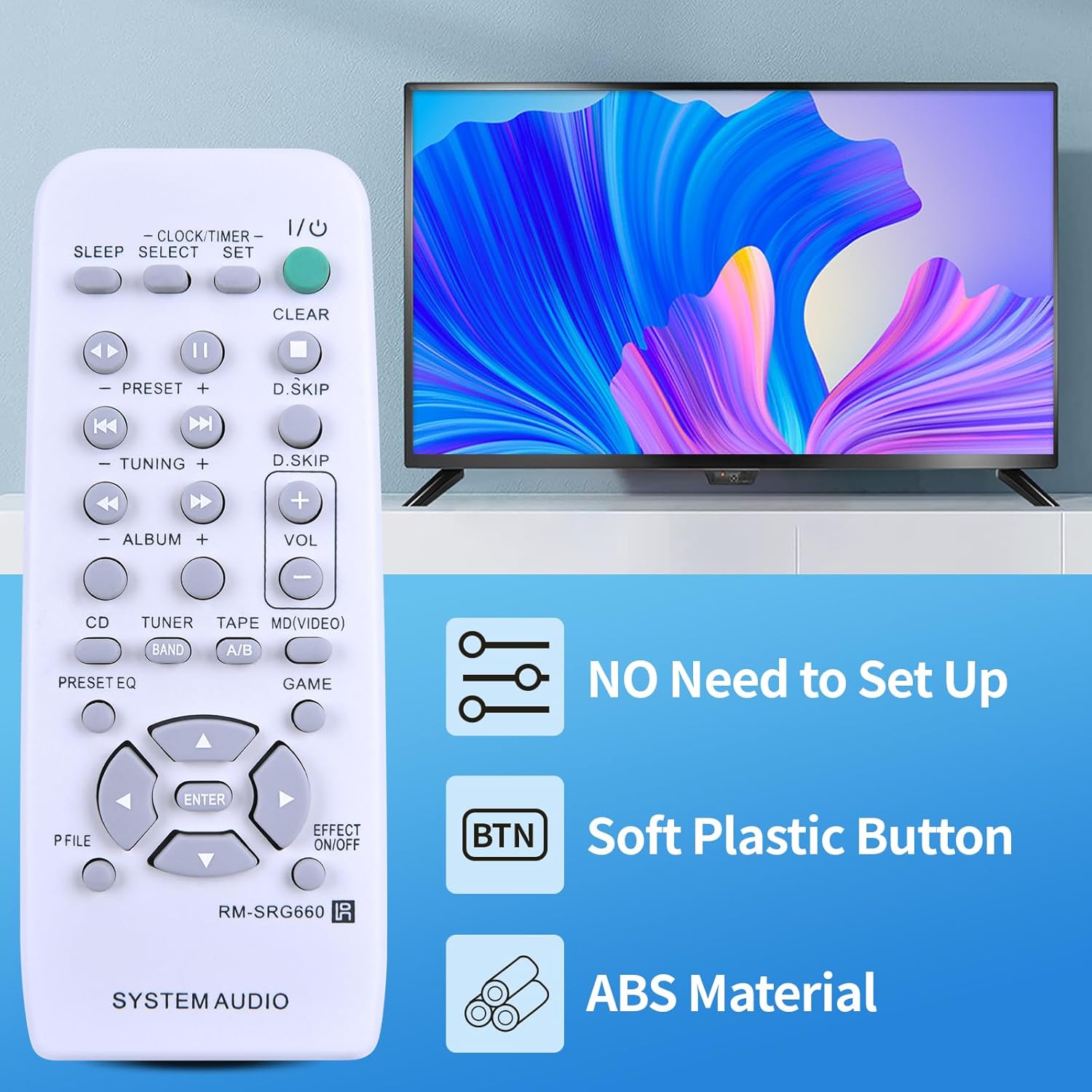
Image: The ZWP RM-SRG660 remote control, highlighting its key features: no setup required, soft plastic buttons, and durable ABS material construction.
Sąranka
The ZWP RM-SRG660 Replacement Remote Control is designed for immediate use without any complex programming or pairing. Simply install the batteries, and it will be ready to operate your compatible Sony Audio System.
Akumuliatoriaus montavimas
- Nuotolinio valdymo pulto gale raskite baterijų skyrių.
- Slide the battery compartment cover downwards or in the direction indicated by the arrow to open it.
- Įdėkite dvi (2) AAA 1.5 V baterijas, užtikrindami, kad teigiamas (+) ir neigiamas (-) poliai teisingai sutaptų su žymėjimais skyriaus viduje.
- Uždėkite baterijų skyriaus dangtelį, stumdami jį atgal į vietą, kol jis tvirtai spragtelės.
Important: Batteries are not included with the remote control. Do not mix old and new batteries, or different types of batteries.

Vaizdas: Išsamus view of the battery compartment, illustrating the correct orientation for inserting two AAA 1.5V batteries.
Nereikalingas programavimas
This remote control is pre-programmed for the specified Sony Audio Systems. Once batteries are installed, it will function immediately without any additional setup steps.

Image: The remote control displayed with a clear message indicating that no programming or pairing is required; it works directly after battery insertion.
Naudojimo instrukcijos
The RM-SRG660 remote control provides full functionality for your Sony Audio System. Ensure there is a clear line of sight between the remote control and the audio system's infrared receiver for optimal performance.
Pagrindinės funkcijos baigtosview
- Maitinimas (įvestis/išvestis): Turns the audio system on or off.
- Garsas (+/-): Increases or decreases the audio volume.
- Preset (+/-): Navigates through radio station presets or track presets.
- Tuning (+/-): Adjusts radio frequency manually.
- Album (+/-): Navigates between albums or folders.
- CD, Tuner, Tape, MD/Video (Band): Selects the input source (e.g., CD player, radio tuner, tape deck, MiniDisc/Video input).
- Play/Pause (►/⏸): Controls playback for media.
- Praleisti (◀◀ / ►►): Skips to the previous or next track/chapter.
- Aišku: Clears current settings or selections.
- Clock/Timer/Set: Accesses clock and timer settings.
- Miegoti: Activates the sleep timer function.
- Iš anksto nustatytas EQ: Cycles through equalizer presets.
- Poveikis įjungtas/išjungtas: Toggles sound effects.
- Directional Arrows (▲ ◀ ▼ ►) and Enter: Naudojamas meniu naršymui ir pasirinkimui.

Image: The remote control in action, demonstrating its capability for long-distance and precise control, effective up to 10 meters (33 feet).
Priežiūra
Proper care and maintenance will ensure the longevity and reliable performance of your remote control.
Valymas
- Nuotolinio valdymo pultą nuvalykite minkšta, sausa šluoste.
- Įsisenėjusiam purvui šiek tiek pamirkykiteampNuvalykite šluostę vandeniu arba švelniu, neabrazyviniu valikliu. Nenaudokite stiprių cheminių medžiagų ar tirpiklių.
- Avoid getting moisture into the battery compartment or around the buttons.
Baterijos keitimas
- Pakeiskite baterijas, kai nuotolinio valdymo pultas sulėtėja arba nustoja veikti.
- Always replace both batteries at the same time with new AAA 1.5V batteries.
- Išmeskite panaudotas baterijas laikydamiesi vietinių taisyklių.
Sandėliavimas
- Laikykite nuotolinio valdymo pultą vėsioje, sausoje vietoje, apsaugotoje nuo tiesioginių saulės spindulių ir ekstremalių temperatūrų.
- Jei nuotolinio valdymo pultas nebus naudojamas ilgesnį laiką, išimkite baterijas, kad išvengtumėte ištekėjimo ir galimos žalos.
Trikčių šalinimas
Jei kyla problemų dėl nuotolinio valdymo pulto, žr. šiuos dažniausiai pasitaikančius sprendimus:
- Nuotolinio valdymo pultas nereaguoja:
- Patikrinkite, ar baterijos įdėtos teisingai, laikantis teisingo poliškumo (+/-).
- Pakeiskite baterijas naujomis AAA 1.5 V baterijomis.
- Ensure there is a clear line of sight between the remote control and the audio system's infrared receiver. Obstructions can block the signal.
- Make sure the remote control is pointed directly at the audio system.
- Ribotas diapazonas arba pertraukiamasis veikimas:
- The batteries may be low. Replace them.
- Įsitikinkite, kad infraraudonųjų spindulių signalui netrukdo jokie stiprūs šviesos šaltiniai (pvz., tiesioginiai saulės spinduliai ar ryškios fluorescencinės lempos).
- Reduce the distance between the remote control and the audio system.
- Neveikia tam tikri mygtukai:
- Check for any debris or stickiness around the button. Gently clean the area.
- If only one or a few buttons are unresponsive after checking batteries and line of sight, the remote control may be faulty.
Jei šie veiksmai neišsprendžia problemos, daugiau pagalbos ieškokite skyriuje „Palaikymas“.
Specifikacijos
| Modelio numeris | RM-SRG660 |
| Prekės ženklas | ZWP |
| Suderinamumas | Sony Audio Systems MHC-RG440S, MHC-RG330 |
| Ryšio technologija | Infraraudonųjų spindulių (IR) |
| Maitinimo šaltinis | 2 x AAA 1.5 V baterijos (nepridedamos) |
| Medžiaga | Aukštos kokybės ABS |
| Veikimo diapazonas | Iki 10 metrų (33 pėdų) |
| Spalva | Juoda |
| Prekės svoris | 2.4 uncijos |

Image: Physical dimensions of the remote control, including length, width, and thickness, along with a view akumuliatoriaus skyriaus.
Palaikymas
For any questions, concerns, or issues regarding your ZWP RM-SRG660 Replacement Remote Control, please do not hesitate to contact us. We are committed to assisting you and resolving any problems you may encounter.
Please reach out to the seller or manufacturer directly through the platform where you purchased the product for prompt support.