
Įvadas
Thank you for choosing the Calypso K5855 X-Trem Analog-Digital Watch. This watch combines the classic appeal of analog timekeeping with the versatility of digital functions, making it suitable for daily wear, sports, and various activities. This manual provides detailed instructions to help you set up, operate, and maintain your watch for optimal performance.
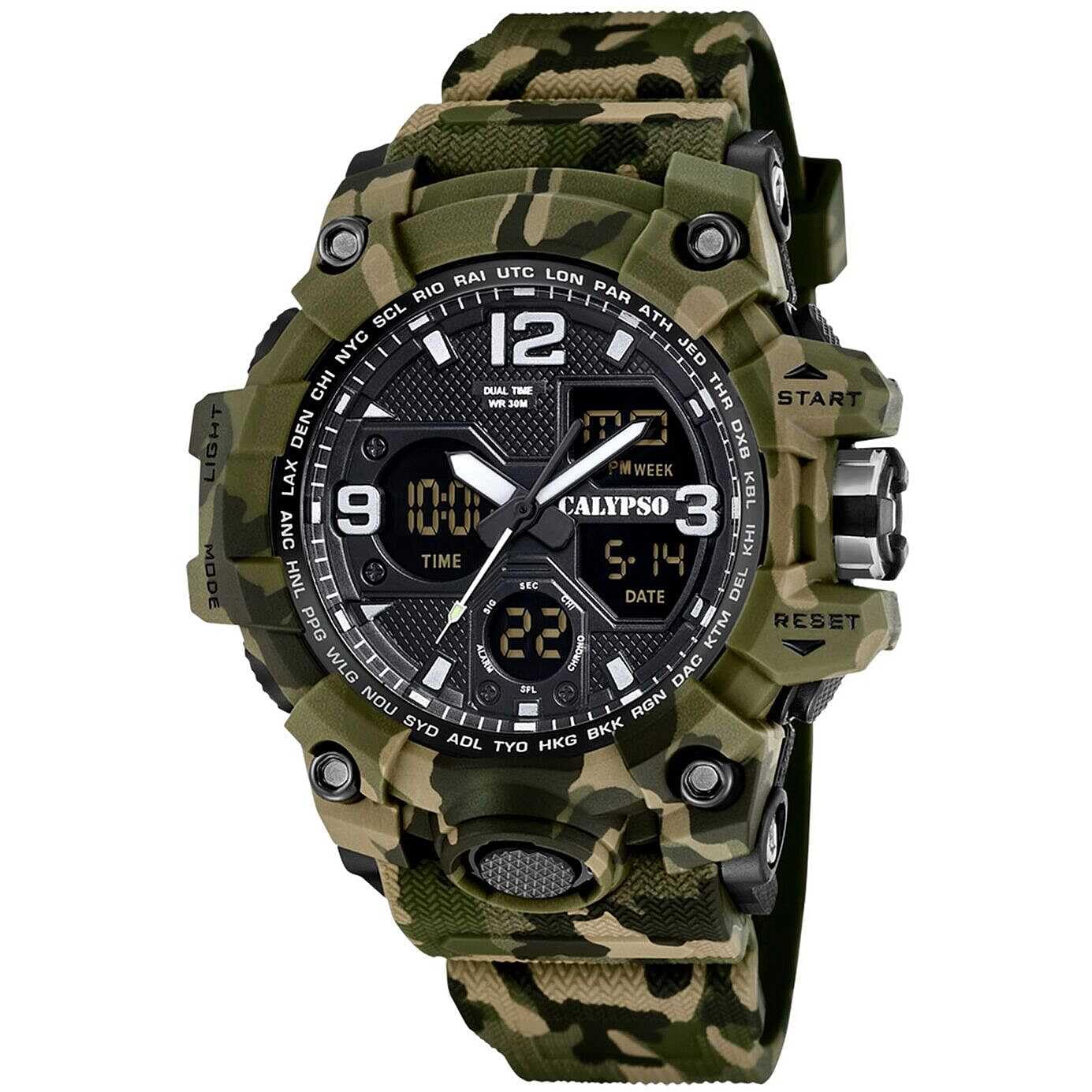
Image: Calypso K5855 X-Trem Analog-Digital Watch (Green Variant).
Sąranka
Pirminė apžiūra
Upon unboxing, inspect your watch for any visible damage. Ensure all buttons are functional and the display is clear.

Image: Calypso watch packaging box.
Skaitmeninio laiko ir datos nustatymas
- Režimo mygtukas: Press the MODE button repeatedly until you reach the Time Setting mode (usually indicated by flashing digits).
- Koregavimo mygtukas: Use the ADJUST button to select the digit you wish to change (e.g., seconds, hours, minutes, year, month, day).
- Nustatyti mygtukas: Use the SET button to increase the selected value. Hold it down for faster adjustment.
- Patvirtinti: Once all settings are correct, press the MODE button again to exit the setting mode.
Analoginio laiko nustatymas
The analog hands are typically set independently.
- Patraukite karūną: Gently pull the crown (the knob on the side of the watch) out to the first or second click position (refer to specific model instructions if available, as some watches have multiple crown positions).
- Pasukti karūną: Turn the crown to move the analog hands to the correct time.
- Paspauskite karūnėlę: Nustatę, grąžinkite karūnėlę į pradinę padėtį, kad paleistumėte analoginį mechanizmą.
Naudojimo instrukcijos
Režimo funkcijos
Your Calypso K5855 X-Trem watch features multiple digital modes. Press the REŽIMAS mygtuką, kad galėtumėte juos peržiūrėti:
- Laiko rodymas: Rodo dabartinį laiką, datą ir savaitės dieną.
- Chronografas (chronometras): Skirta praėjusio laiko matavimui.
- Signalizacija: To set daily alarms.
- Dvigubas laikas: To display a second time zone.
Chronografas (chronometras)
- Įjunkite chronografo režimą: Press the MODE button until "CHRONO" or "STW" appears.
- Pradėti/sustabdyti: Press the START/STOP button (often labeled "ST/SP" or "ADJ") to begin timing. Press again to stop.
- Ratų/tarpo laikas: While timing, press the LAP/RESET button (often labeled "RESET" or "LIGHT") to record a lap time without stopping the main timer.
- Atstatyti: With the stopwatch stopped, press the LAP/RESET button to reset the time to zero.
Signalizavimo funkcija
- Įjunkite aliarmo režimą: Press the MODE button until "ALARM" or "AL" appears.
- Nustatyti zadintuva: Use the ADJUST button to select hours or minutes, and the SET button to change the values.
- Suaktyvinti / išjungti: In Alarm Mode, press the START/STOP button to toggle the alarm ON/OFF. An alarm icon will typically appear when active.
- Stabdymo signalas: Kai suskamba žadintuvas, paspauskite bet kurį mygtuką, kad jį sustabdytumėte.
Dvigubas laikas
- Enter Dual Time Mode: Press the MODE button until "DUAL TIME" or "DT" appears.
- Set Second Time: Use the ADJUST button to select hours or minutes, and the SET button to change the values for the second time zone.
Backlight (Light Function)
Paspauskite ŠVIESA button (usually located on the top left or bottom right) to illuminate the digital display for a few seconds, allowing visibility in low-light conditions.
12/24 valandų formatas
In the Time Setting mode, you can usually toggle between 12-hour (with AM/PM indicator) and 24-hour formats using the SET or ADJUST button when the hour digits are flashing.

Image: Calypso K5855 X-Trem watch (Orange Variant) displaying digital time.

Image: Calypso K5855 X-Trem watch (Green-Yellow Variant) displaying digital time, day, and date.
Priežiūra
Atsparumas vandeniui (5 atm)
Your watch is water-resistant up to 5 ATM (50 meters). This means it is suitable for everyday use and can withstand splashes, rain, and brief immersion in water, such as showering. It is ne suitable for swimming, diving, or prolonged water activities. Do not operate buttons while the watch is wet or submerged.
Valymas
Reguliariai valykite laikrodžio korpusą ir dirželį minkštu, sausu skudurėliu. Įsisenėjusius nešvarumus galima lengvai nuvalyti.amp Galima naudoti šluostę, po to nusausinkite. Venkite cheminių valiklių, nes jie gali pažeisti laikrodžio medžiagas.
Baterijos keitimas
The watch is powered by a quartz movement and requires a battery (1 C battery is listed in specifications). When the display dims or the watch stops functioning, it's time for a battery replacement. It is recommended to have the battery replaced by a qualified watch technician to ensure proper sealing and maintain water resistance.
Trikčių šalinimas
- Watch Not Running / Display Blank:
Check if the battery needs replacement. Ensure the crown is pushed in completely for analog movement.
- Neteisingas laikas / data:
Refer to the "Setting the Digital Time and Date" and "Setting the Analog Time" sections to re-adjust the time and date.
- Mygtukai nereaguoja:
Ensure the watch is not in a locked mode (if applicable, though this model typically does not have one). If the watch is wet, dry it thoroughly before attempting to press buttons. If issues persist, a battery replacement might be necessary, or contact support.
Specifikacijos
| Prekės ženklas | Calypso |
| Modelio numeris | K5855/3 |
| Ekrano tipas | Analog-Digital |
| Judėjimo tipas | Kvarcas |
| Atsparumo vandeniui įvertinimas | 5 bankomatai (50 metrų) |
| Bylos medžiaga | Polikarbonatas |
| Dirželio medžiaga | Polycarbonate (Rubber band) |
| Krištolo medžiaga | Plastikiniai |
| Korpuso skersmuo | 56 milimetrų |
| Korpuso storis | 18.3 milimetrų |
| Juostos plotis | 28 milimetrų |
| Juostos ilgis | 21 centimetras |
| Prekės svoris | 65 gramų |
| Ypatingos savybės | 24-hour Display, Chronograph, Dual Time, Light, Alarm, Date, 12/24h format |
| Maitinimo šaltinis | Battery (1 C battery included) |
Informacija apie garantiją
Your Calypso K5855 X-Trem watch comes with a 2 metų gamintojo garantija. This warranty covers manufacturing defects under normal use. It does not cover damage resulting from improper use, accidents, unauthorized repairs, or normal wear and tear.
For specific details regarding returns or warranty claims, please refer to the retailer's return policy or contact Calypso customer service.
Palaikymas
Should you encounter any issues not covered in this manual or require further assistance, please contact Calypso customer support or the authorized retailer where you purchased the watch.
You can also visit the official Calypso websvetainėje, kur rasite papildomų išteklių ir kontaktinės informacijos.