
Įvadas
This manual provides essential instructions for the safe and efficient use of your Aiwa AW-KF4 Portable Bluetooth Speaker. Please read this manual thoroughly before using the product and retain it for future reference.
The Aiwa AW-KF4 is a portable Bluetooth speaker designed for robust audio performance with dynamic LED lighting, a rechargeable battery, and resistance to water and dust (IPX6). It offers versatile connectivity options including Bluetooth, USB, and AUX input.
Pakuotės turinys
Carefully unpack your speaker and ensure all items are present and in good condition. If any items are missing or damaged, please contact your retailer.
- Aiwa AW-KF4 Portable Bluetooth Speaker
- USB-C įkrovimo laidas
- Instrukcijų vadovas

Image: The Aiwa AW-KF4 speaker in its retail packaging, showing the speaker and branding.
Produktas baigtasview
The Aiwa AW-KF4 speaker features a compact, cylindrical design with integrated controls and dynamic LED lighting. It is built for portability and durability.
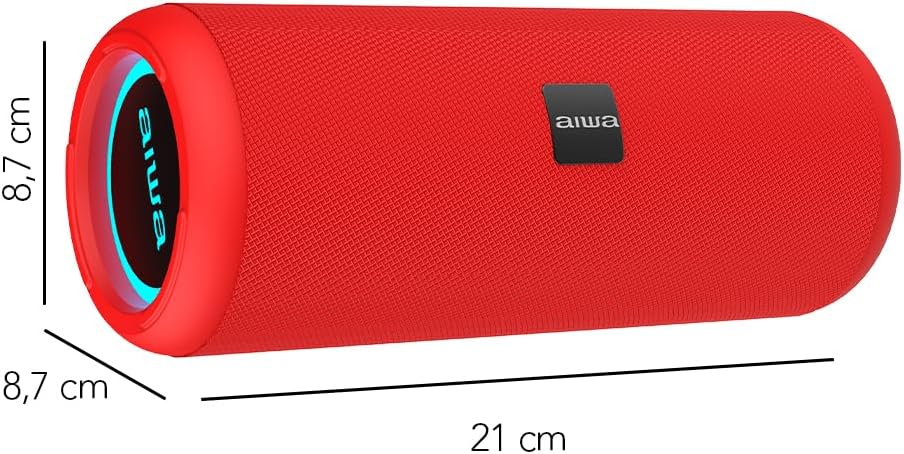
Image: A red Aiwa AW-KF4 speaker showing its approximate dimensions: 21 cm in length and 8.7 cm in diameter.

Image: Two Aiwa AW-KF4 speakers (red and black) illustrating key features: 20W output, LED lighting, TWS function, IPX6 water resistance, Bluetooth, USB, and SD card compatibility.

Image: A collage showing the Aiwa AW-KF4 speaker in various outdoor settings, emphasizing its IPX6 water resistance, up to 10 hours of battery life, and hands-free calling capability with an integrated microphone.
Sąranka
1. Įkraukite garsiakalbį
Before first use, fully charge the speaker. Use the provided USB-C cable to connect the speaker to a compatible USB power adapter (not included) or a computer's USB port.
- Įkrovimo metu užsidegs įkrovimo indikatoriaus lemputė.
- Pilnas įkrovimas trunka maždaug 3 valandų.
- Kai akumuliatorius visiškai įkrautas, indikatoriaus lemputė gali pasikeisti arba užgesti.
A fully charged battery provides up to 10 hours of playback, depending on volume level and usage.
2. Maitinimo įjungimas/išjungimas
- To power on: Press and hold the Power button for a few seconds until you hear an audible prompt and the LED lights activate.
- To power off: Press and hold the Power button for a few seconds until you hear an audible prompt and the LED lights turn off.
Naudojimo instrukcijos
1. „Bluetooth“ poravimas
The speaker will automatically enter Bluetooth pairing mode when powered on for the first time or if no device is connected. The LED indicator will flash, indicating it's ready to pair.
- Įsitikinkite, kad garsiakalbis įjungtas ir veikia susiejimo režimu.
- Įjunkite „Bluetooth“ savo išmaniajame telefone, planšetiniame kompiuteryje ar kitame garso įrenginyje.
- Ieškokite "AW-KF4" in the list of available Bluetooth devices.
- Select "AW-KF4" to connect. You will hear a confirmation sound once paired.
- The LED indicator will stop flashing and remain solid.
Garsiakalbio „Bluetooth“ veikimo atstumas yra iki 10 metrų (33 pėdų).
2. Tikrojo belaidžio stereo (TWS) funkcija
The TWS function allows you to pair two Aiwa AW-KF4 speakers together for a stereo sound experience.

Image: A visual representation of the TWS (True Wireless Stereo) function, showing two Aiwa AW-KF4 speakers being used together for synchronized sound.
- Ensure both AW-KF4 speakers are powered on and not connected to any Bluetooth device.
- On one speaker (this will be the primary speaker), press and hold the TWS button (if available, or a designated button as per specific model instructions) until you hear a pairing tone.
- Du garsiakalbiai automatiškai susijungs. Prisijungus pasigirs patvirtinimo tonas.
- Dabar prijunkite „Bluetooth“ įrenginį prie pagrindinio garsiakalbio, kaip aprašyta skyriuje „„Bluetooth“ susiejimas“.
Note: Refer to the specific button layout on your speaker for the exact TWS pairing button.
3. USB ir AUX atkūrimas
- USB atkūrimas: Įdėkite USB atmintinę su garso įrašu files into the USB port. The speaker will automatically detect and begin playing music from the drive.
- AUX atkūrimas: Connect an audio device using a 3.5mm AUX cable (not included) to the AUX input port. The speaker will switch to AUX mode.
4. LED lemputės
The speaker features dynamic LED lights. These lights typically activate automatically when the speaker is powered on. Specific controls for changing light modes or turning them off may be available via a dedicated button on the speaker (refer to your speaker's button layout).
5. Valdikliai
The speaker features tactile controls for various functions:
- Maitinimo mygtukas: Paspauskite ir palaikykite, kad įjungtumėte/išjungtumėte.
- Atkūrimo / pristabdymo mygtukas: Spauskite norėdami paleisti arba pristabdyti muziką.
- Garsumo didinimas/kitas takelis: Paspauskite, jei norite padidinti garsumą. Paspauskite ir palaikykite, jei norite pereiti į kitą takelį.
- Garsumo mažinimas/ankstesnis takelis: Paspauskite, jei norite sumažinti garsumą. Paspauskite ir palaikykite, jei norite pereiti į ankstesnį takelį.
- Režimo mygtukas: Press to switch between Bluetooth, USB, and AUX modes.
- Call Button (if applicable): Paspauskite, kad atsilieptumėte / baigtumėte skambučius. Paspauskite ir palaikykite, kad atmestumėte skambučius.
Note: Button functions may vary slightly. Consult the diagrams in your physical manual for precise button identification.
Priežiūra
To ensure the longevity and optimal performance of your Aiwa AW-KF4 speaker, follow these maintenance guidelines:
- Valymas: Garsiakalbio išorę valykite minkšta, sausa šluoste. Nenaudokite abrazyvinių valiklių, tirpiklių ar stiprių cheminių medžiagų.
- Atsparumas vandeniui (IPX6): The speaker is resistant to strong water jets. It is not designed for submersion. Ensure all port covers are securely closed before exposing the speaker to water or dust. After exposure to water, wipe the speaker dry before charging.
- Saugykla: Garsiakalbį laikykite vėsioje, sausoje vietoje, toliau nuo tiesioginių saulės spindulių ir ekstremalių temperatūrų.
- Akumuliatoriaus priežiūra: Norėdami išsaugoti baterijos veikimo laiką, reguliariai įkraukite garsiakalbį, net jei juo nesinaudojate dažnai. Venkite ilgo visiško baterijos iškrovimo.

Image: The Aiwa AW-KF4 speaker positioned near a pool, illustrating its IPX6 water resistance feature, suitable for outdoor and poolside use.
Trikčių šalinimas
Jei kyla problemų dėl garsiakalbio, žr. šias dažniausiai pasitaikančias problemas ir sprendimus:
| Problema | Galima priežastis / sprendimas |
|---|---|
| Garsiakalbis neįsijungia. |
|
| Nepavyksta susieti per „Bluetooth“. |
|
| Nėra garso. |
|
| Garso iškraipymas. |
|
| TWS susiejimas nepavyko. |
|
Specifikacijos
| Modelio pavadinimas | AW-KF4 (AWKF4B) |
| Prekės ženklas | Aiwa |
| Garsiakalbio išėjimo galia | 20 vatų efektinė vertė |
| Dažnio atsakas | 80 Hz (minimum specified) |
| Ryšio technologija | „Bluetooth 5.0“, USB, AUX |
| Garso išvesties režimas | Stereo |
| Būsto medžiaga | Plastikiniai |
| Garsiakalbio tipas | Žemų dažnių garsiakalbis |
| Atsparumo vandeniui lygis | IPX6 (Resistant to strong water jets) |
| Bluetooth diapazonas | Iki 10 metrų (33 pėdų) |
| Mikrofonai | 1 (for hands-free calling) |
| Baterijos talpa | 2000 mAh ličio jonų |
| Baterijos veikimo laikas | Iki 10 valandų (priklauso nuo garsumo ir naudojimo) |
| Įkrovimo laikas | Maždaug 3 val |
| Įvesties tomastage | 5 voltų |
| Varža | 4 omai |
| Kontrolės metodas | Lytėjimo mygtukai |
| Matmenys (I x D) | Maždaug 21 cm x 8.7 cm |
| Suderinami įrenginiai | Išmanieji telefonai, planšetiniai kompiuteriai |
| Kilmė | Kinija |
Garantija ir palaikymas
Your Aiwa AW-KF4 Portable Bluetooth Speaker comes with a 1 metų gamintojo garantija nuo įsigijimo datos. Ši garantija taikoma gamybos defektams, atsiradusiems įprasto naudojimo sąlygomis.
Garantija netaikoma:
- Damage caused by misuse, abuse, negligence, or accident.
- Žala dėl neleistino remonto ar modifikacijų.
- Normalus nusidėvėjimas.
For warranty claims or technical support, please contact your retailer or the official Aiwa customer service in your region. Please have your proof of purchase and product model number (AW-KF4) ready when contacting support.