
DVT-C9F24992D65E215A7DD6011D34514A46
Instrukcijų vadovas
Tucus Remote Control for JVC RM-SUXQ30UW RM-SUXQ30US UX-Q30S UX-Q30B UX-Q30P UX-Q30B UX-Q30W Micro COMPACT COMPONENT Stereo SYSTEM
Model: DVT-C9F24992D65E215A7DD6011D34514A46 | Brand: Generic
Įvadas
This manual provides essential information for the setup, operation, and maintenance of your new Tucus replacement remote control. This remote is designed to be compatible with various JVC Micro COMPACT COMPONENT Stereo Systems, including models RM-SUXQ30UW, RM-SUXQ30US, UX-Q30S, UX-Q30B, UX-Q30P, and UX-Q30W. While it is a replacement remote and not the original device's remote, common functions are expected to operate normally. Please review this guide thoroughly to ensure proper use and longevity of your remote control.
Sąranka
1. Akumuliatoriaus įdėjimas
The remote control requires two (2) AA batteries (not included) for operation. Follow these steps to install them:
- Nuotolinio valdymo pulto gale raskite baterijų skyrių.
- Baterijų skyriaus dangtelį stumkite žemyn arba į išorę, kad jį atidarytumėte.
- Įdėkite dvi AA baterijas, užtikrindami, kad teigiamas (+) ir neigiamas (-) poliai teisingai sutaptų su žymėjimais skyriaus viduje.
- Stumkite baterijų skyriaus dangtelį atgal į vietą, kol jis tvirtai spragtelės.

Figure 1: Back of the remote control showing the battery compartment cover.
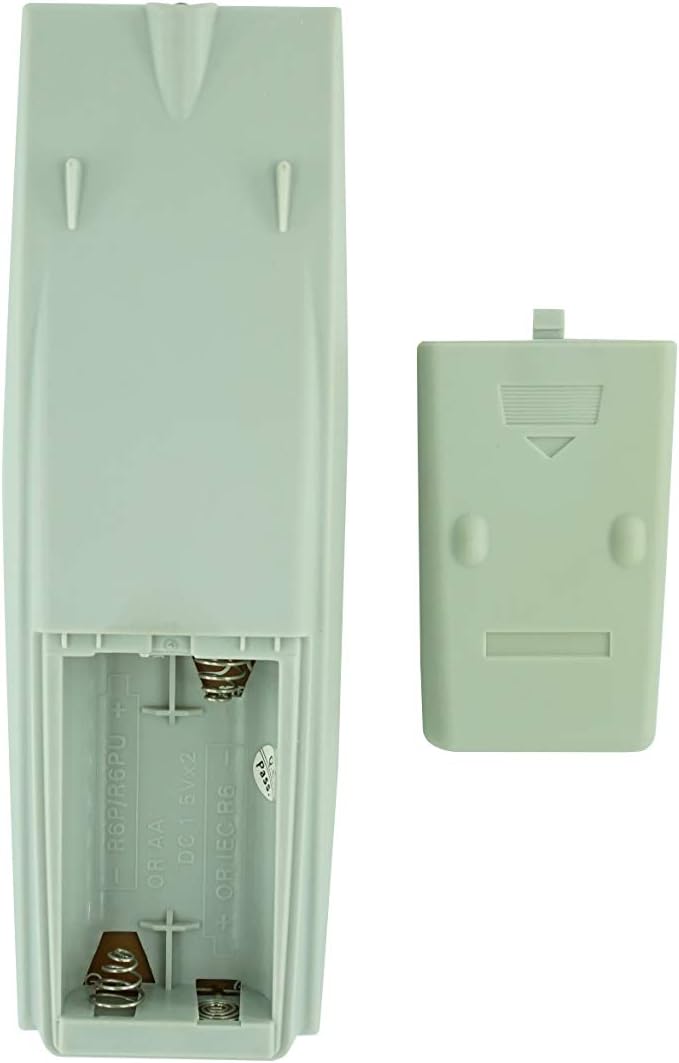
2 pav.: Baterijų skyrius su nuimtu dangteliu, paruoštas baterijoms įdėti.
2. Pradinis naudojimas
Once batteries are installed, the remote control is ready for use. Point the remote directly at your JVC Micro COMPACT COMPONENT Stereo System. No additional programming is typically required for this replacement remote for the listed compatible models.
Naudojimo instrukcijos
This remote control provides access to the primary functions of your JVC stereo system. Below is a general overview of common button functions. Please note that while the functionality is guaranteed, the exact button layout may differ slightly from your original remote.

3 pav.: priekis view nuotolinio valdymo pulto su mygtukų išdėstymu.
Pagrindinės funkcijos:
- BUDĖJIMO REŽIMAS / ĮJUNGTAS: Powers the stereo system on or off.
- DISPLAY: Changes or shows display information.
- LAIKRODIS / LAIKMATIS: Pasiekia laikrodžio ir laikmačio nustatymus.
- MIEGAS: Sets a sleep timer for automatic power off.
- Skaičių mygtukai (0–9, +10): Direct input for track numbers, radio frequencies, etc.
- ŽEMI / AUKŠTI DAŽNIAI: Reguliuoja žemų ir aukštų dažnių lygius.
- Navigation (UP, DOWN, LEFT, RIGHT, SET): Naudojamas meniu naršymui ir pasirinkimui.
- Playback Controls (PLAY/PAUSE, STOP, FAST FORWARD, REWIND, SKIP): Valdo medijos atkūrimą.
- Source Selection (CD, TAPE, FM/AM, AUX/MD): Pasirenka garso įvesties šaltinį.
- FM MODE / REV.MODE: Toggles FM stereo/mono or tape reverse mode.
- AUTOMATINIS IŠANKSTINIS NUSTATYMAS: Automatically scans and saves radio stations.
- PRGM / RANDOM / REPEAT: Controls program, random, and repeat playback modes.
- PTY SEARCH / PTY SELECT: For Program Type search and selection on radio.
- DISPLAY / TA/News / Info: Provides additional display information or traffic/news announcements.
- AHB PRO: Įjungia arba išjungia „Active Hyper-Bass PRO“.
- TŪRIS (+/-): Reguliuoja pagrindinį garsumo lygį.
For specific advanced functions, please refer to the original instruction manual of your JVC Micro COMPACT COMPONENT Stereo System.
Priežiūra
Nuotolinio valdymo pulto valymas
Norėdami išlaikyti nuotolinio valdymo pulto išvaizdą ir funkcionalumą, reguliariai jį valykite:
- Nuvalykite paviršių minkšta, sausa šluoste.
- Įsisenėjusiam purvui šiek tiek pamirkykiteampNuvalykite šluostę vandeniu arba švelniu, neabrazyviniu valikliu. Nepurkškite valiklio tiesiai ant nuotolinio valdymo pulto.
- Venkite naudoti stiprias chemines medžiagas, tirpiklius ar abrazyvines valymo kempines, nes jos gali pažeisti nuotolinio valdymo pulto apdailą ar vidinius komponentus.
Baterijos keitimas
Replace batteries when the remote's response becomes sluggish or it stops functioning. Always replace both batteries at the same time with new ones of the same type (AA). Do not mix old and new batteries, or different types of batteries.
Sandėliavimas
Jei nuotolinio valdymo pultas nebus naudojamas ilgesnį laiką, išimkite baterijas, kad išvengtumėte elektrolito ištekėjimo ir galimo jo pažeidimo.
Trikčių šalinimas
- Nuotolinis nereaguoja:
- Patikrinkite, ar baterijos įdėtos teisingai, laikantis teisingo poliškumo (+/-).
- Pakeiskite senas baterijas naujomis.
- Ensure there are no obstructions between the remote control and the stereo system's infrared receiver.
- Įsitikinkite, kad esate nuotolinio valdymo pulto veikimo diapazone.
- Some buttons not working or unexpected behavior:
- This remote is a replacement and while common functions are supported, the button layout or specific advanced functions might not perfectly match your original remote. Refer to the button layout image in the Operating Instructions section.
- Ensure the stereo system is powered on and set to the correct input source.
- Remote appears damaged:
- If the remote has been dropped or exposed to liquids, internal damage may have occurred. In such cases, replacement may be necessary.
Specifikacijos
| Prekės ženklas | Bendras |
| Gamintojas | TUCUS |
| Modelio numeris | DVT-C9F24992D65E215A7DD6011D34514A46 |
| Suderinami modeliai | JVC RM-SUXQ30UW, RM-SUXQ30US, UX-Q30S, UX-Q30B, UX-Q30P, UX-Q30W Micro COMPACT COMPONENT Stereo SYSTEM |
| Medžiagos tipas | Kita |
| Maitinimo šaltinis | 2 x AA baterijos (į komplektą neįeina) |
| ASIN | B0D79958PW |
| Pasiekiama pirmoji data | 17 m. birželio 2024 d |
Informacija apie garantiją
This product comes with a 3-month warranty from the date of purchase. This warranty covers manufacturing defects and ensures the remote control functions as intended for compatible models. Please retain your proof of purchase for any warranty claims.
Pagalba klientams
If you have any questions regarding the compatibility or functionality of this remote control, or if your specific device model is not listed, please contact the seller directly for assistance. The seller stocks a wide range of remote controls and parts and can confirm suitability for your needs.
For general inquiries or to provide feedback, please refer to the contact information provided by your retailer or the seller.
Ask a question about this manual
Ask about setup, troubleshooting, compatibility, parts, safety, or missing instructions. Manuals+ will review the question and use this page’s manual context to help answer it.