
1. Įvadas
Thank you for choosing the BOTSLAB G980H 4K Dash Cam with Hardwire Kit. This manual provides detailed instructions for the installation, operation, and maintenance of your new dash camera system. Please read this manual thoroughly before using the product to ensure proper functionality and safety.
2. Produktas baigtasview
The BOTSLAB G980H is a high-performance dash camera system designed to capture clear video footage of your journeys. The front camera records in true 4K resolution, while the rear camera records in 1080P (optimized to approximately 2K via BOTSLAB algorithm). Both cameras utilize the Sony IMX 415 sensor, providing clear video capture, including in low-light conditions. The system includes advanced features such as 24/7 parking mode, ADAS (Advanced Driver-Assistance Systems), and built-in GPS for reliable recording and enhanced driving safety.
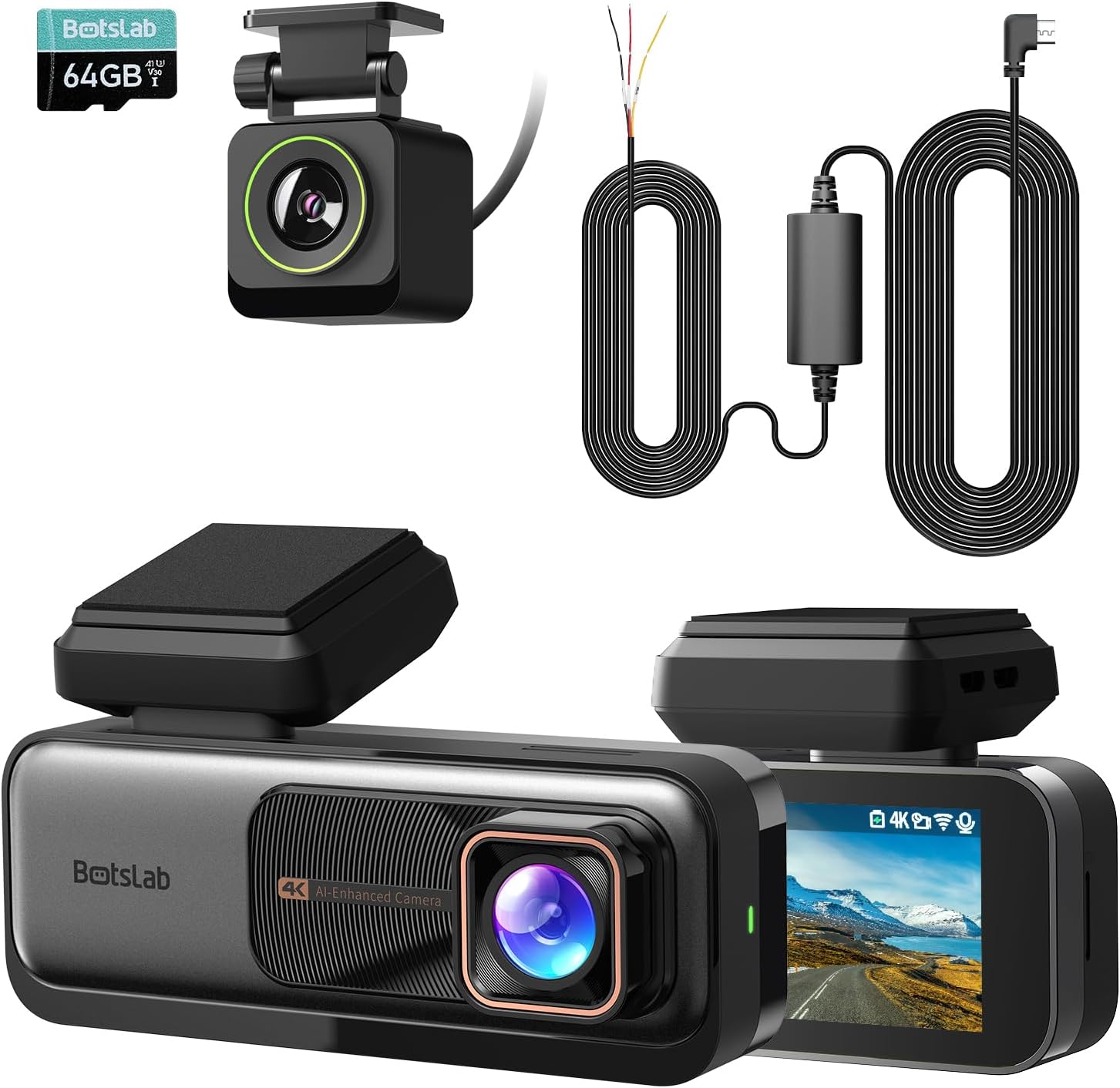
Image: The main components of the BOTSLAB G980H Dash Cam system, including the front camera, rear camera, and hardwire kit.
3. Kas yra dėžutėje
Išpakuodami patikrinkite, ar yra visi šie daiktai:
- BOTSLAB G980H Dash Cam (Front Unit)
- Galinė kamera
- „Hardwire“ rinkinys
- ADAS (Advanced Driver-Assistance Systems) functionality
- Micro USB cable (integrated with hardwire kit)
- Vartotojo vadovas
Paveikslėlis: Vizualinis produkto pakuotėje esančių elementų vaizdas.
4. Sąranka ir diegimas
Proper installation is crucial for optimal performance. The G980H dash cam is designed for windshield mounting.
4.1 Laidinio sujungimo rinkinio montavimas
The included hardwire kit enables 24/7 parking mode functionality. It requires connection to your vehicle's fuse box.
- Step 1: Test Power Sources
Use a multimeter to check for a 12V constant power source and an ACC (Accessory) power source in your car's fuse box. - Step 2: Set Up the Wires
Connect the Yellow Wire (ACC) to the accessory power, the Red Wire (VCC+) to the constant power, and the Black Wire (GND-) to a grounding point on the vehicle chassis. - Step 3: Connect the Dash Cam
Attach the micro USB port of the hardwire kit to your BOTSLAB G980H dash cam. Ensure the cable is routed neatly and securely.

Image: A multimeter being used to test fuse box connections for constant and ACC power.

Vaizdas: Stambus planas view of the hardwire kit's yellow, red, and black wires connected to the car's fuse box and ground.
Image: The micro USB connector of the hardwire kit ready to be plugged into the dash cam.

Image: A diagram showing the micro USB port, power conversion box, and the three wires (ACC, VCC+, GND-) of the hardwire kit.

Image: The 9ft long hardwire cable, designed for compatibility with various car models.
4.2 Vaizdo registratoriaus tvirtinimas
Mount the front dash cam on your windshield, ideally behind the rearview veidrodį, kad jis neužstotų jūsų view. Position the rear camera on the rear window for optimal coverage.
4.3 Atminties kortelės įdėjimas
Insert a high-quality U3 or V30 rated microSD card (not included) into the designated slot on the dash cam. Ensure it is inserted correctly until it clicks into place. The dash cam requires a memory card for recording footage.
5. Naudojimo instrukcijos
5.1 Pagrindinės operacijos
- Maitinimo įjungimas/išjungimas: The dash cam will automatically power on and begin recording when your vehicle starts, and power off when the engine is turned off (if connected via ACC power).
- Ciklo įrašymas: The G980H features seamless loop recording, continuously overwriting the oldest footage kai atminties kortelė pilna.
- G jutiklis: In the event of a sudden impact or collision, the built-in G-Sensor will automatically lock the current video segment to prevent it from being overwritten.
- Vaizdo įrašo kokybė: The front camera records in 4K resolution, providing a wide 170-degree view kelio priekyje.

Image: Illustration of the dash cam's 4K resolution and 170-degree wide-angle recording capability.
5.2 ADAS Features (Advanced Driver-Assistance Systems)
The G980H is equipped with a 1.5TOPS AI NPU chip and BOTSLAB's AI algorithm to provide real-time driving alerts:
- Įspėjimas apie pėsčiųjų susidūrimą: Alerts you to potential collisions with pedestrians.
- Front Vehicle Starts Moving: Notifies you when the vehicle ahead begins to move, useful in traffic.
- Įspėjimas apie nukrypimą nuo eismo juostos: Alerts if you unintentionally drift out of your lane.
- Headway Monitoring Warning: Helps maintain a safe distance from the vehicle in front.
- Driver Fatigue Alerts: Provides alerts every 2 hours to encourage breaks and prevent fatigue.

Image: Visual representation of the various ADAS warnings provided by the dash cam, along with illustrations of the AI NPU chip and built-in GPS.
5.3 24/7 Parking Mode
With the hardwire kit installed, the G980H can monitor your vehicle even when it's turned off, providing protection against theft and vandalism.
- The dash cam will automatically switch to parking mode when the vehicle is parked.
- It will record emergencies and suspicious activities around your car.

Image: The dash cam display showing options for Time-Lapse Recording (Parking Mode) and Normal Recording (Driving Mode), illustrating its 24-hour monitoring capability.
5.4 GPS Integration
The built-in GPS module integrates with Google Maps, allowing you to track your driving path. The dash cam's display will show your real-time speed, and recorded videos will include speed records.

Image: The dash cam screen showing real-time speed and GPS data, with a map overlay indicating the driving path.
6. Priežiūra
- Valymas: Kameros objektyvą ir ekraną valykite minkštu, sausu skudurėliu. Venkite naudoti abrazyvinius valiklius ar tirpiklius.
- Atminties kortelė: Regularly format the memory card (at least once a month) to ensure optimal performance and prevent data corruption. Use a high-quality U3 or V30 rated microSD card.
- Firmware atnaujinimai: Check the BOTSLAB official website periodically for firmware updates to ensure your dash cam has the latest features and bug fixes.
7. Problemų sprendimas
| Problema | Galima priežastis / sprendimas |
|---|---|
| Vaizdo registratorius neįsijungia. |
|
| Vaizdo įrašo kokybė prasta arba vaizdas neryškus. |
|
| Parking mode is not working. |
|
| GPS signalas silpnas arba nerandamas. |
|
8. Specifikacijos
| Funkcija | Detalė |
|---|---|
| Modelio pavadinimas | G980H |
| Prekės ženklas | BOTSLAB |
| Priekinės kameros skiriamoji geba | True 4K (Sony IMX 415 sensor) |
| Galinės kameros skiriamoji geba | 1080P (optimized to near 2K) |
| Ypatingos savybės | Hardwire Kit, ADAS, 24/7 Parking Mode, Built-in GPS, Loop Recording, G-Sensor |
| Ryšio technologija | USB, belaidis (ekrano funkcijoms) |
| Montavimo tipas | Priekinio stiklo kalnas |
| Spalva | Juoda |
| AI lustas | 1.5TOPS AI NPU chip |
9. Garantija ir palaikymas
For warranty information and technical support, please refer to the official BOTSLAB websvetainėje arba susisiekite tiesiogiai su jų klientų aptarnavimo tarnyba. Išsaugokite pirkimo kvitą kaip pirkimo įrodymą garantijos pretenzijoms.
Gamintojas: BOTSLAB
Pirmą kartą pasiekiama data: 25 m. spalio 2024 d