
Elcometer A415CFBI
„Elcometer 415“ dažų ir miltelinių dangų storio matuoklio naudotojo vadovas
Model B Ferrous (A415CFBI)
1. Įvadas
The Elcometer 415 Industrial Paint & Powder Thickness Gauge is designed to provide simple, fast, and accurate coating thickness measurements on smooth and thin industrial paint and powder coatings. This manual provides essential information for the safe and effective operation, maintenance, and troubleshooting of your device.
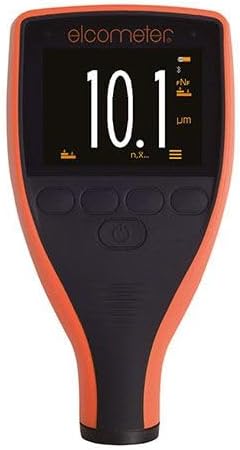
Figure 1: The Elcometer 415 Paint & Powder Coating Thickness Gauge, showing its display and control buttons.
2. Saugos informacija
Please read and understand all safety instructions before operating the gauge. Failure to do so may result in injury or damage to the instrument.
- Do not expose the gauge to extreme temperatures, direct sunlight, or high humidity.
- Avoid dropping the instrument or subjecting it to severe impacts.
- Keep the gauge away from strong magnetic fields.
- Nebandykite patys ardyti ar taisyti matuoklio. Visus techninės priežiūros darbus patikėkite kvalifikuotiems specialistams.
- Ensure the measurement surface is clean and free from debris to prevent damage to the probe and ensure accurate readings.
- The gauge has an IP64 rating, indicating protection against dust ingress and splashing water from any direction. However, it is not waterproof and should not be submerged.
3. Kas yra dėžutėje
Išpakuodami patikrinkite, ar yra visi komponentai:
- Elcometer 415 Gauge
- Check Piece
- Folijos rinkinys
Jei trūksta kokių nors prekių arba jos pažeistos, nedelsdami susisiekite su tiekėju.
4. Sąranka
4.1. Pradinis įjungimas
The Elcometer 415 Gauge is typically supplied with batteries pre-installed. To power on the device, press and hold the power button located on the front panel until the display illuminates.
4.2. Kalibravimas
For accurate measurements, the gauge requires calibration. The Elcometer 415 supports both 1-point and 2-point calibration methods to ensure precision on smooth and thin coated substrates.
- 1-Point Calibration: This method is suitable for most applications. Place the gauge on a known uncoated substrate (e.g., the supplied check piece) and follow the on-screen prompts to set the zero point.
- 2-Point Calibration: For enhanced accuracy, especially on specific materials or thickness ranges, use the supplied foil set. First, perform a 1-point calibration. Then, place a foil of known thickness on the uncoated substrate and calibrate the second point according to the gauge's instructions.
Refer to the on-screen menu for detailed calibration procedures.
5. Operating the Gauge
5.1. Matavimas
Once calibrated, place the probe of the gauge firmly and perpendicularly onto the coated surface. The measurement will be displayed instantly on the screen. The gauge is capable of taking over 60 readings per minute, significantly reducing inspection times.

Figure 2: The Elcometer 415 Gauge being used to measure the thickness of a coating on a flat surface.
5.2. Rodyti interpretaciją
The large, clear display shows the measurement in micrometers (µm) or mils (mils). Additional icons indicate battery status, measurement mode, and connectivity status (e.g., Bluetooth if applicable).
5.3. Duomenų registravimas ir perdavimas
The Elcometer 415 features data logging capabilities. Measurements can be stored internally and transferred to a computer via USB. Use the ElcoMaster software for instant report generation and further analysis of your data.

Figure 3: The Elcometer 415 Gauge displaying a measurement, with a smartphone showing detailed data analysis via the ElcoMaster app.
6. Priežiūra
6.1. Valymas
To clean the gauge, wipe the exterior with a soft, damp cloth. Do not use abrasive cleaners or solvents, as these can damage the scratch, solvent, and powder resistant display. Ensure the probe tip is kept clean and free of debris for accurate readings.
6.2. Sandėliavimas
When not in use, store the Elcometer 415 in its protective case in a dry, cool environment, away from direct sunlight and extreme temperatures. Remove batteries if the gauge will not be used for an extended period to prevent leakage.
7. Problemų sprendimas
This section addresses common issues you might encounter with your Elcometer 415 Gauge.
| Problema | Galima priežastis | Sprendimas |
|---|---|---|
| Matuoklis neįsijungia. | Išsikrovusios arba išsikrovusios baterijos. | Pakeiskite baterijas naujomis. Įsitikinkite, kad jos tinkamai įstatytos. |
| Netikslūs rodmenys. | Improper calibration; dirty probe tip; unstable surface. | Recalibrate the gauge; clean the probe tip; ensure the surface is stable and flat. |
| Ekranas blankus arba mirga. | Maža akumuliatoriaus energija. | Pakeiskite baterijas. |
| Cannot transfer data via USB. | Incorrect cable; driver issue; ElcoMaster software not running. | Ensure correct USB cable is used; install necessary drivers; open ElcoMaster software. |
If the problem persists after attempting these solutions, please contact Elcometer customer support.
8. Specifikacijos
| Funkcija | Detalė |
|---|---|
| Modelis | Elcometer 415 (Model B Ferrous) |
| Dalies numeris | A415CFBI |
| Matavimo diapazonas | Up to 1000µm (40mils) for cured paint & powder coatings |
| Matavimo greitis | 60+ readings per minute |
| Aplinkos apsauga | IP64 (Scratch, solvent, and powder resistant display) |
| Duomenų perdavimas | USB to ElcoMaster software |
| Kalibravimas | 1-point and 2-point calibration |
9. Garantija
The Elcometer 415 Gauge is manufactured to high quality standards. For specific warranty terms and conditions, please refer to the documentation provided with your purchase or visit the official Elcometer websvetainė. Išplėstinės apsaugos planus taip pat galima įsigyti atskirai.
10. Parama
For technical assistance, product inquiries, or service requests, please contact Elcometer customer support. You can find contact information and additional resources on the official Elcometer websvetainė:
Please have your model number (A415CFBI) and serial number ready when contacting support.
Ask a question about this manual
Ask about setup, troubleshooting, compatibility, parts, safety, or missing instructions. Manuals+ will review the question and use this page’s manual context to help answer it.