
Mytrix G901
„Mytrix Tac Master“ belaidžių žaidimų ausinių naudotojo vadovas
Modelis: G901
Įvadas
The Mytrix Tac Master Wireless Gaming Headset is designed to provide a high-quality audio experience for gaming across multiple platforms. Featuring 2.4GHz lossless wireless technology, Bluetooth 5.3, and a 3.5mm wired connection, this headset offers versatile connectivity, low latency, and immersive surround sound. The detachable noise-canceling microphone ensures clear communication, while the ergonomic design and long battery life provide comfort for extended use.
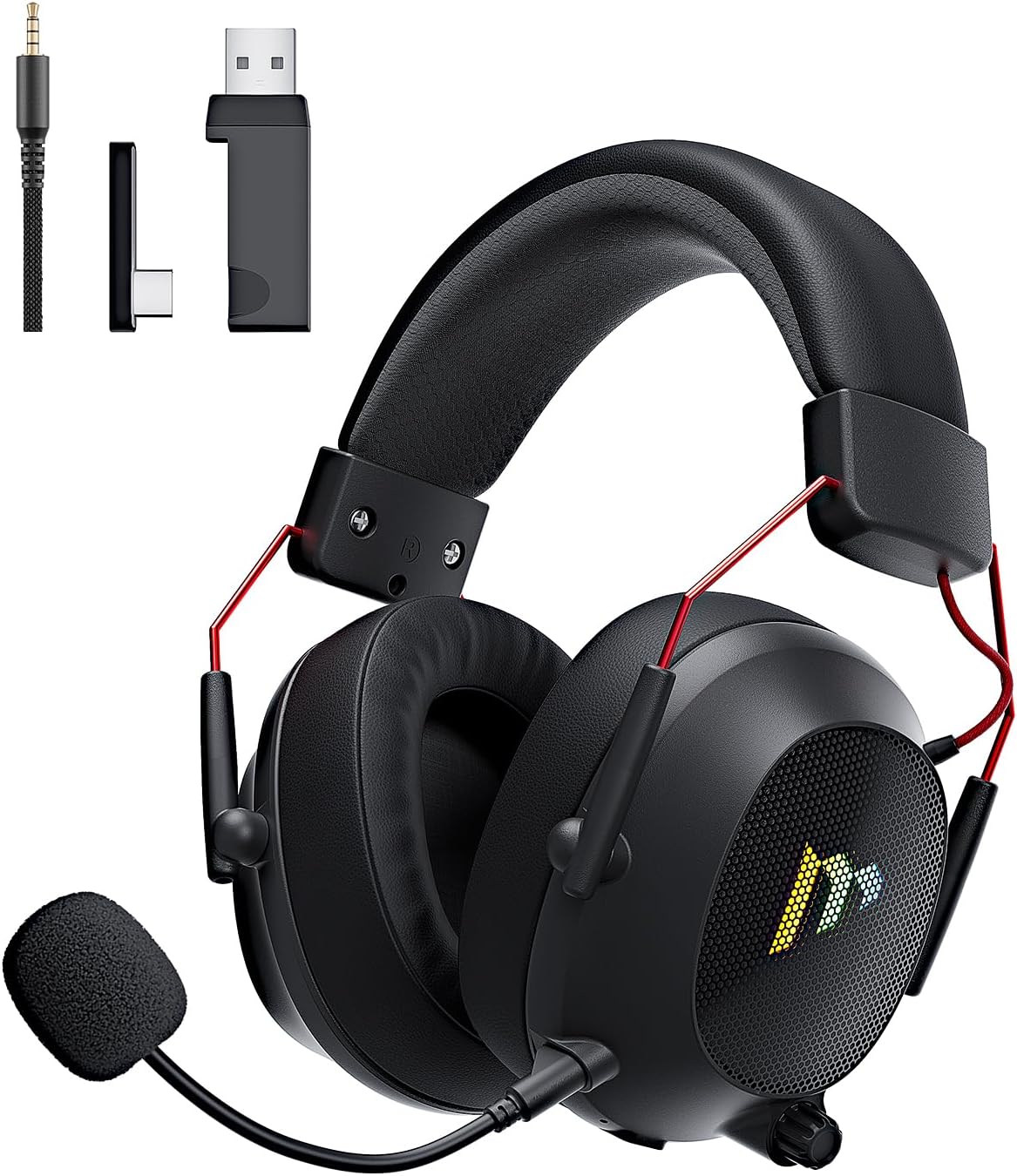
Image: The Mytrix Tac Master Wireless Gaming Headset, showcasing its sleek black design with red accents, detachable microphone, and included USB dongle and Type-C adapter.
Pakuotės turinys
Patikrinkite, ar jūsų siuntinyje yra visi toliau išvardyti daiktai:
- Mytrix Tac Master Wireless Gaming Headset
- Nuimamas triukšmą slopinantis mikrofonas
- 2.4GHz USB-A Wireless Dongle
- USB Type-C Transmitter
- 3.5 mm garso laidas
- USB įkrovimo kabelis (USB-A į USB-C)
- Vartotojo vadovas (šis dokumentas)
Headset Controls and Components
Familiarize yourself with the various controls and components of your Mytrix Tac Master headset:

Image: Diagram illustrating the location and function of controls on the Mytrix Tac Master headset, including power button, volume wheel, microphone mute button, and mode switch.
- Maitinimo mygtukas: Press and hold for 3 seconds to turn on/off. Single press to pause/play audio.
- Režimo mygtukas (M): Single press to toggle microphone on/off. Double press to switch between Bluetooth and 2.4G wireless modes. Press and hold for 3 seconds to turn RGB lights on/off.
- Tūrio ratas: Rotate up to increase volume, rotate down to decrease volume.
- Mikrofono prievadas: Skirta nuimamam mikrofonui pritvirtinti.
- 3.5 mm garso lizdas: Laidiniam ryšiui.
- USB-C įkrovimo prievadas: Ausinių įkrovimui.
- RGB apšvietimas: Located on the earcups.
Sąranka
1. Ausinių įkrovimas
Before first use, fully charge the headset. Connect the USB charging cable to the headset's USB-C port and the other end to a USB power source (e.g., computer USB port, USB wall adapter). The LED indicator will show charging status and turn off when fully charged. A full charge takes approximately 3 hours and provides up to 48 hours of battery life.

Image: Visual representation of the headset's long-lasting battery life, indicating approximately 50 hours of use and a 3-hour charging time.
2. Mikrofono pritvirtinimas
Insert the detachable microphone into the microphone port on the left earcup. Ensure it is securely seated. The microphone is flexible and omni-directional, allowing for angle adjustment.
3. Ryšio parinktys
The Mytrix Tac Master headset offers multiple connection methods for broad compatibility:

Image: Diagram illustrating the four connection modes: 2.4GHz Dongle (USB-A and USB-C), Bluetooth 5.3, and 3.5mm Wired, along with compatible devices for each mode.
3.1. 2.4GHz Wireless Connection (Recommended for PC, PS4, PS5, Switch Docked Mode)
- Identify the appropriate dongle for your device:
- For devices with a USB-A port (PC, PS4, PS5, Switch Docked): Use the 2.4GHz USB-A dongle.
- For devices with a USB-C port (Switch Handheld, Laptops, Tablets): Use the USB Type-C transmitter.
- Plug the selected 2.4GHz dongle/transmitter into an available USB port on your device.
- Power on the headset by pressing and holding the Power button for 3 seconds.
- Ensure the headset is in 2.4GHz mode. If not, double-press the 'M' button to switch modes until the headset connects to the dongle. The headset will automatically pair with the dongle.
- On your device, select the headset as the audio output and input device.
3.2. Bluetooth 5.3 Connection (Recommended for Mobile Phones, Tablets, Laptops)
- Power on the headset by pressing and holding the Power button for 3 seconds.
- Double-press the 'M' button to switch the headset to Bluetooth pairing mode. The LED indicator will flash, indicating it's ready to pair.
- On your device, enable Bluetooth and search for "Mytrix Tac Master" in the list of available devices.
- Select "Mytrix Tac Master" to connect. Once connected, the LED indicator will stop flashing.
3.3. 3.5mm Wired Connection (Recommended for Xbox, Game Console Controllers, Devices without USB/Bluetooth)
- Prijunkite vieną 3.5 mm garso kabelio galą prie ausinių 3.5 mm lizdo.
- Connect the other end of the 3.5mm audio cable to the audio jack on your device (e.g., Xbox controller, phone).
- In wired mode, the headset's microphone and RGB lighting functions are not active.
Naudojimo instrukcijos
Maitinimo įjungimas/išjungimas
- Norėdami įjungti: Press and hold the Power button for approximately 3 seconds until the headset powers on.
- Norėdami išjungti: Press and hold the Power button for approximately 3 seconds until the headset powers off.
Garsumo valdymas
- Padidinti garsumą: Rotate the Volume wheel upwards.
- Sumažinti garsumą: Rotate the Volume wheel downwards.
Mikrofono valdymas
- Nutildyti / įjungti mikrofoną: Single press the 'M' button.
- The detachable microphone features noise cancellation for clear voice chat.
RGB apšvietimo valdymas
- Turn RGB Lights On/Off: Press and hold the 'M' button for approximately 3 seconds.
Garso atkūrimo valdymas
- Leisti / pristabdyti garsą: Single press the Power button.
Erdvinis garsas
The headset features 7.1 stereo surround sound for an immersive audio experience, allowing for precise positioning of sound details in games.

Paveikslėlis: sprogęs view of the headset's 50mm drivers, illustrating the components that contribute to its 7.1 stereo surround sound capability.
Priežiūra
- Valymas: Use a soft, dry cloth to clean the headset. Do not use abrasive cleaners or solvents. For earcups, gently wipe with a damp šluoste ir prieš naudojimą leiskite visiškai išdžiūti ore.
- Saugykla: Laikykite ausines vėsioje, sausoje vietoje, toliau nuo tiesioginių saulės spindulių ir ekstremalių temperatūrų. Jei laikysite ilgesnį laiką, įsitikinkite, kad baterija yra iš dalies įkrauta (apie 50 %), kad išsaugotumėte baterijos veikimo laiką.
- Akumuliatoriaus priežiūra: Avoid fully discharging the battery frequently. Charge the headset regularly, even if not in constant use, to maintain battery longevity.
- Mikrofono priežiūra: Handle the detachable microphone gently. Avoid excessive bending or twisting.
Trikčių šalinimas
| Problema | Galima priežastis | Sprendimas |
|---|---|---|
| Nėra garso iš ausinių. | Headset not powered on, low battery, incorrect audio output selected, connection issue. | Ensure headset is powered on and charged. Check device's audio settings to confirm "Mytrix Tac Master" is selected as output. Re-establish 2.4GHz or Bluetooth connection. For wired mode, ensure cable is fully inserted. |
| Mikrofonas neveikia. | Microphone muted, not properly attached, incorrect audio input selected, wired mode limitation. | Single press the 'M' button to unmute. Ensure microphone is securely attached. Check device's audio settings to confirm "Mytrix Tac Master" is selected as input. Note: Microphone does not function in 3.5mm wired mode. |
| Cannot connect via 2.4GHz wireless. | Dongle not recognized, headset not in 2.4GHz mode, interference. | Ensure dongle is fully inserted into a working USB port. Double-press 'M' button to switch headset to 2.4GHz mode. Try a different USB port. Move closer to the dongle to reduce interference. |
| Nepavyksta prisijungti per „Bluetooth“. | Headset not in pairing mode, Bluetooth disabled on device, already connected to another device. | Double-press 'M' button to enter Bluetooth pairing mode (LED flashes). Ensure Bluetooth is enabled on your device. Disconnect from other Bluetooth devices if necessary. |
| RGB lemputės neveikia. | Lights turned off, low battery, wired mode limitation. | Press and hold the 'M' button for 3 seconds to toggle RGB lights. Ensure headset has sufficient battery. Note: RGB lights do not function in 3.5mm wired mode. |
Specifikacijos
| Funkcija | Detalė |
|---|---|
| Modelio pavadinimas | Gaming Headset (G901) |
| Ryšio technologija | 2.4 GHz belaidis ryšys, „Bluetooth 5.3“, 3.5 mm laidinis ryšys |
| Ausinės Jack | 3.5 mm lizdas |
| belaidis diapazonas | Up to 50 feet (in open spaces) |
| Latencija | ≤20ms (2.4GHz) |
| Garso tvarkyklės tipas | 50 mm dinaminės tvarkyklės |
| Garso ypatybės | 7.1 Stereo Surround Sound |
| Mikrofonas | Detachable, Omni-directional, Noise-Canceling |
| Baterijos veikimo laikas | Iki 48 valandų |
| Įkrovimo laikas | apytiksliai 3 valandas |
| Baterijos tipas | 1 ličio jonų baterija (pridedama) |
| Ausinės forma | Virš ausies |
| Ypatingos savybės | Ergonomic Design, RGB Lighting, Foldable & Portable |
| Gaminio matmenys | 5.91 x 3.94 x 5.91 colio |
| Prekės svoris | 13.4 uncijos |
| Gamintojas | Mytrix |
Garantija ir palaikymas
Mytrix products are manufactured to high quality standards. For information regarding warranty coverage, technical support, or service inquiries, please refer to the warranty card included with your product or visit the official Mytrix website. You may also contact Mytrix customer support directly for assistance with your Tac Master Gaming Headset.
Dėl papildomos pagalbos apsilankykite „Mytrix“ parduotuvė „Amazon“ platformoje.
Svarbi saugos informacija
- Saugokite ausines nuo ekstremalių temperatūrų, drėgmės ar skysčių.
- Venkite ausinių numetimo ir stiprių smūgių.
- Do not attempt to disassemble or repair the headset yourself. This will void the warranty.
- Klausykitės vidutiniu garsumu, kad nepažeistumėte klausos. Ilgalaikis garsių garsų poveikis gali sukelti negrįžtamą klausos praradimą.
- Laikyti vaikams nepasiekiamoje vietoje.
Ask a question about this manual
Ask about setup, troubleshooting, compatibility, parts, safety, or missing instructions. Manuals+ will review the question and use this page’s manual context to help answer it.